
1. Inleiding
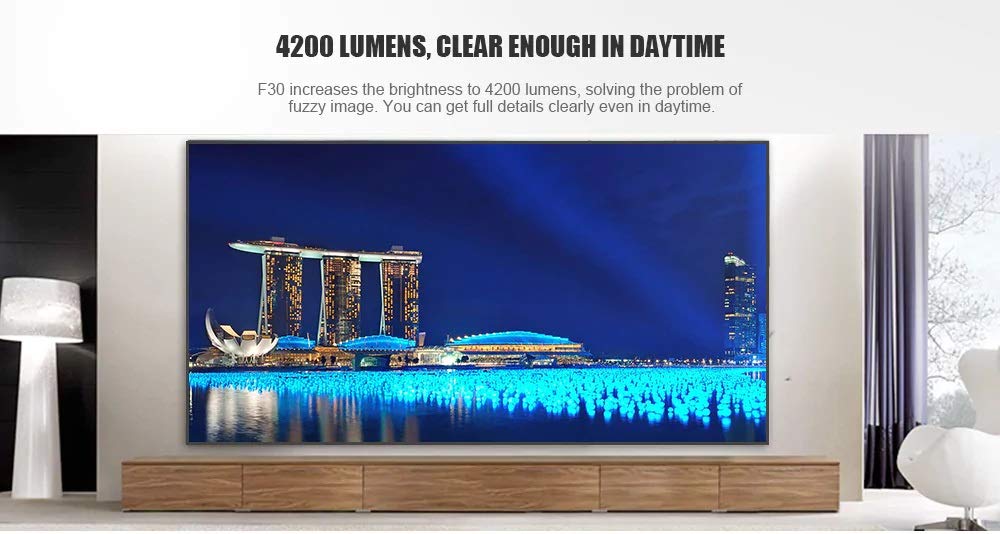
This manual provides essential instructions for the safe and efficient use of your Vivibright F30 Projector. Please read this manual thoroughly before operating the device and retain it for future reference. The Vivibright F30 is a Full HD 1080p LED projector designed for home theater, education, and business presentations, offering 4200 lumens brightness and multiple connectivity options.
2. Veiligheidsinligting
- Kragtoevoer: Gebruik slegs die gespesifiseerde kragadapter. Maak seker dat die volumetage voldoen aan die projektor se vereistes.
- Ventilasie: Moenie ventilasie-openinge blokkeer nie. Maak seker dat daar voldoende spasie rondom die projektor is vir behoorlike lugvloei om oorverhitting te voorkom.
- Hitte: Die projektor lamp generates heat. Avoid touching the lens or vents immediately after use.
- Oogbeskerming: Moenie direk in die projektorlens kyk wanneer die lamp is on. The bright light can cause eye strain or damage.
- Plasing: Place the projector on a stable, level surface. Avoid placing it in direct sunlight, near heat sources, or in environments with high humidity or dust.
- Skoonmaak: Ontkoppel die krag voor skoonmaak. Gebruik 'n sagte, droë lap. Moenie vloeibare of aërosol skoonmaakmiddels gebruik nie.
- Diens: Do not attempt to service the projector yourself. Refer all servicing to qualified personnel.
3. Pakketinhoud
Verifieer dat alle items in die pakket teenwoordig is:
- Vivibright F30 Projector
- Kragkabel
- Afstandbeheer
- Gebruikershandleiding (hierdie dokument)
- HDMI-kabel (kan per streek/pakket verskil)
4. Produk verbyview
Maak jouself vertroud met die projektor se komponente en koppelvlakke.
Figuur 4.1: Voorkant view of the Vivibright F30 Projector, showing the lens and ventilation.

Figuur 4.2: Kant view of the Vivibright F30 Projector, highlighting the various input ports.
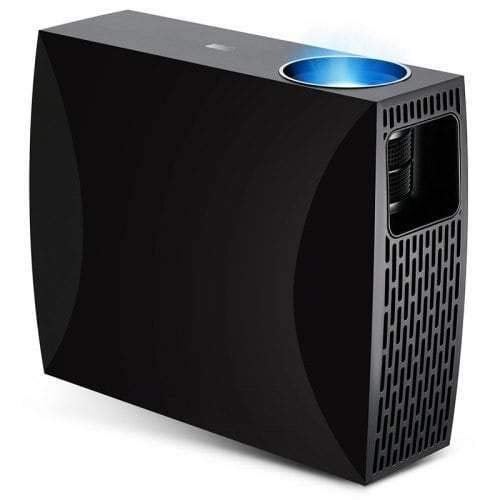
Figuur 4.3: Top or rear view of the Vivibright F30 Projector, showing control buttons or additional vents.
4.1. Koppelvlakke
- HDMI-poorte: For connecting devices like laptops, gaming consoles, Blu-ray players, and media players.
- VGA-poort: For connecting older computers or other VGA-compatible devices.
- USB-poorte: For connecting USB storage devices to play media directly.
- Klankuitgang: Vir die koppeling van eksterne luidsprekers of oorfone.
- Kragtoevoer: Om die kragkabel aan te sluit.
5. Opstelling
5.1. plasing
Position the projector on a stable surface or mount it appropriately. Ensure the projector is perpendicular to the projection screen for optimal image geometry. The projection distance can range from 1.2 to 6.8 meters, depending on the desired screen size.
5.2. Kragverbinding
- Koppel die kragkabel aan die projektor se kragtoevoerpoort.
- Steek die ander kant van die kragkabel in 'n geaarde elektriese aansluiting.
5.3. Koppeling van invoertoestelle
Connect your desired source device (e.g., laptop, media player) to the projector using an appropriate cable (HDMI, VGA, USB). Ensure the cable is securely connected to both the projector and the source device.
5.4. Fokus- en Keystone-aanpassing
- Fokus: Draai die fokusring op die projektorlens totdat die beeld skerp en duidelik op die skerm verskyn.
- Sleutelsteen: If the projected image is trapezoidal (wider at the top or bottom), use the keystone correction feature (manual or digital, depending on model) to adjust the image to a rectangular shape.
6. Bedryfsinstruksies
6.1. Skakel aan/af
- Krag aan: Press the power button on the projector or the remote control. The indicator light will change, and the lamp sal verlig.
- Skakel af: Press the power button again. Confirm shutdown if prompted. Allow the projector to cool down before unplugging it.
6.2. Invoerbronkeuse
Press the "Source" button on the remote control or the projector's control panel to cycle through available input sources (HDMI1, HDMI2, VGA, USB). Select the input corresponding to your connected device.
6.3. Kieslysnavigasie
Use the arrow buttons on the remote control or projector to navigate through the on-screen display (OSD) menu. Press "OK" or "Enter" to select an option and "Exit" or "Menu" to go back or close the menu.
6.4. Beeld- en klankinstellings
Adjust picture settings such as brightness, contrast, color, and aspect ratio via the OSD menu to optimize image quality. Adjust volume levels for the built-in speaker or connected external audio devices.
7. Onderhoud
7.1. Skoonmaak van die lens
Vee die projektorlens liggies af met 'n sagte, pluisvrye lap wat spesifiek vir optiese oppervlaktes ontwerp is. Moenie skuurmiddels of harde chemikalieë gebruik nie.
7.2. Skoonmaak van die projektorbehuising
Gebruik 'n sagte, droë lap om die buitekant van die projektor skoon te maak. Vir hardnekkige merke, gebruik 'n effens droë lap.amp 'n Lap kan gebruik word, gevolg deur 'n droë lap. Maak seker dat geen vloeistof in die ventilasie-openinge binnedring nie.
7.3. Lamp Lewe
The Vivibright F30 Projector utilizes an LED lamp with an estimated lifespan of up to 50,000 hours, requiring no regular replacement under normal usage conditions.
8. Probleemoplossing
| Probleem | Moontlike oorsaak | Oplossing |
|---|---|---|
| Geen prent word vertoon nie |
|
|
| Beeld is vaag |
|
|
| Image is trapezoidal (keystone effect) |
|
|
| Geen klank nie |
|
|
| Projektor oorverhit of skakel af |
|
|
9. Spesifikasies
| Kenmerk | Detail |
|---|---|
| Handelsmerk | Vivibright |
| Model | F30 |
| Inheemse resolusie | 1920 x 1080 (Vol HD) |
| Ondersteunde resolusie | Tot 4K |
| Helderheid | 4200 Lumens (LED Luminous) |
| Kontrasverhouding | 2200:1 |
| Vertoon tegnologie | LCD |
| Lamp Tik | LED |
| Lamp Lewe | Tot 50,000 uur |
| Projeksie afstand | 1.2 tot 6.8 XNUMX meter |
| Geraasvlak | 29 Desibel |
| Konnektiwiteit | HDMI, VGA, USB |
| Spesiale kenmerke | Portable, Built-in Speaker |
| Item gewig | 3 kg |
| Montage tipe | Tafelblad Mount |
10. Waarborg en Ondersteuning
10.1. Waarborginligting
The Vivibright F30 Projector comes with a 1 jaar waarborg vanaf die aankoopdatum. Hierdie waarborg dek vervaardigingsdefekte en wanfunksies onder normale gebruik. Bewaar asseblief u bewys van aankoop vir waarborgeise.
The warranty does not cover damage caused by misuse, accidents, unauthorized repairs, or normal wear and tear.
10.2. Kliëntediens
For technical assistance, warranty claims, or further inquiries, please contact Vivibright customer support through their official website or the contact information provided with your purchase documentation. When contacting support, please have your product model (F30) and purchase details ready.