
Filius 0543-14
Filius 0543-14 Radio Controlled Solar Alarm Clock User Manual
Model: 0543-14 | Brand: Filius
Inleiding
Thank you for choosing the Filius 0543-14 Radio Controlled Solar Alarm Clock. This manual provides essential information for the safe and efficient operation of your new alarm clock. Please read it thoroughly before use and retain it for future reference.
The Filius 0543-14 features a silver plastic casing, a clear white analog dial, illumination, a loud alarm, and a snooze function. It is designed for indoor use and incorporates radio-controlled time synchronization and solar power capabilities.
Veiligheidsinligting
- Do not expose the clock to extreme temperatures, direct sunlight for prolonged periods (beyond normal operation), or high humidity.
- Vermy om die horlosie te laat val of dit aan harde impakte bloot te stel.
- Moenie probeer om die horlosie self uitmekaar te haal of te herstel nie. Verwys alle diens na gekwalifiseerde personeel.
- Hou batterye buite bereik van kinders. Indien ingesluk, soek onmiddellike mediese hulp.
- Gooi gebruikte batterye weg volgens plaaslike regulasies.
Pakketinhoud
Verifieer dat alle items in die pakket teenwoordig is:
- Filius 0543-14 Alarm Clock
- 1 x AA-battery
- Gebruikershandleiding (hierdie dokument)
Opstelling
1. Battery Installasie
The Filius 0543-14 alarm clock requires one AA battery for operation. A battery is included in the package.
- Vind die batteryklepdeksel aan die agterkant van die horlosie.
- Verwyder die deksel deur dit te skuif of op te lig.
- Insert the AA battery, ensuring the correct polarity (+ and -) as indicated inside the compartment.
- Plaas die batterykompartement se deksel veilig terug.

Beeld: Agter view of the Filius 0543-14 alarm clock, showing the battery compartment and controls.
2. Initial Time Synchronization (Radio Controlled)
This clock is radio-controlled and will automatically set itself to the correct time once the battery is installed and it receives a signal. This process may take a few minutes to several hours depending on your location and signal strength.
- Place the clock near a window or in an open area to facilitate signal reception.
- Avoid placing it near electronic devices that may cause interference (e.g., TVs, computers, microwaves).
- The clock will automatically search for the time signal. The hands will move to 12:00 and then adjust to the correct time.
- If the clock does not set itself after 24 hours, try moving it to a different location or manually setting the time (refer to the "Manual Time Setting" section if available on the device, otherwise rely on radio control).
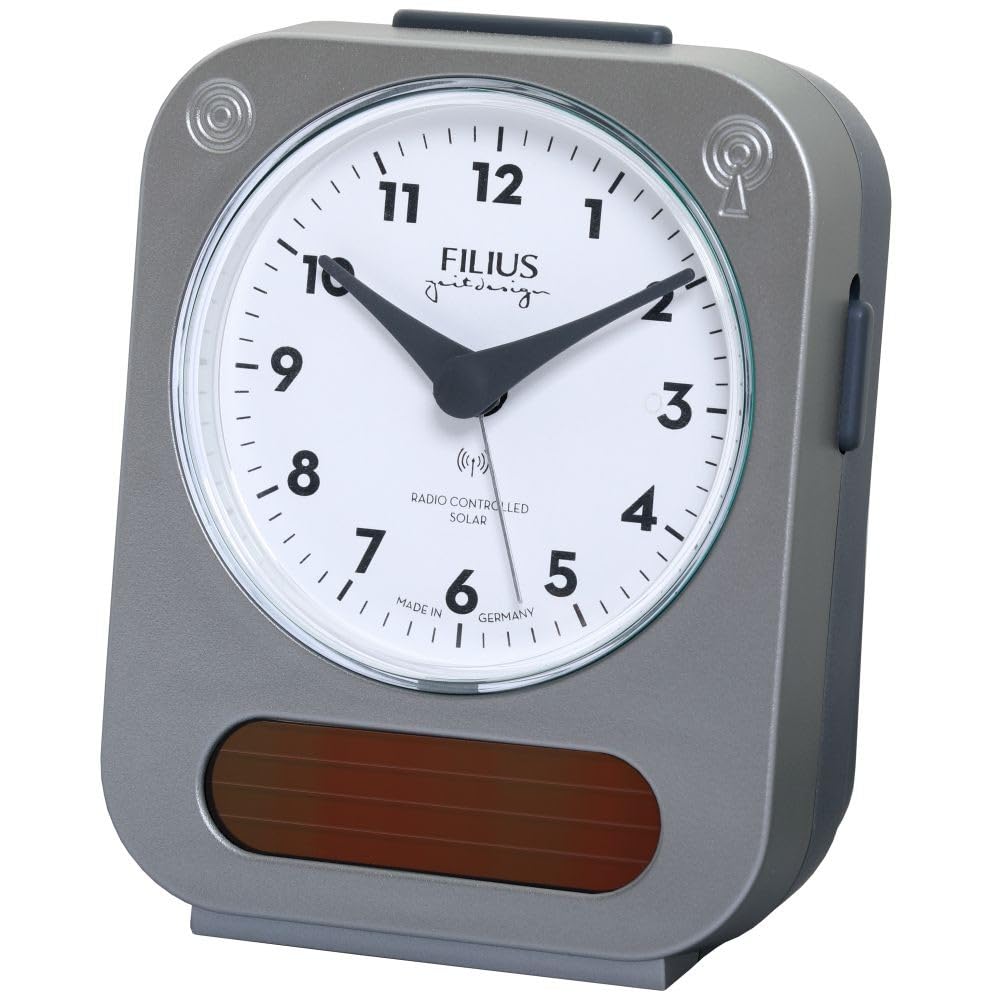
Image: Detail of the clock face, highlighting the "RADIO CONTROLLED SOLAR" indicator.
Bedryfsinstruksies
1. Stel die alarm in
Om die alarmtyd te stel:
- Locate the alarm setting knob, usually on the back or side of the clock.
- Rotate the knob to move the alarm hand to your desired alarm time.
- Activate the alarm by sliding the alarm ON/OFF switch (typically on the side or back) to the "ON" position.
2. Sluimerfunksie
When the alarm sounds, press the large button on top of the clock to activate the snooze function. The alarm will temporarily stop and sound again after approximately 5-10 minutes.
3. Verligting
To illuminate the clock face in low light conditions, press the large button on top of the clock. The backlight will activate for a few seconds, allowing you to read the time.

Image: The Filius 0543-14 alarm clock displaying its blue illumination feature in the dark.
4. Solar Power Feature
The clock is equipped with a solar panel to supplement power. Ensure the clock is exposed to ambient light (not necessarily direct sunlight) to utilize this feature and extend battery life. The solar panel is visible on the front bottom of the clock.
Onderhoud
1. Skoonmaak
Wipe the clock with a soft, dry cloth. Do not use abrasive cleaners, solvents, or chemical sprays, as these may damage the casing or dial.
2. Battery vervanging
When the clock's display dims or the alarm weakens, it is time to replace the AA battery. Follow the "Battery Installation" steps in the Setup section.
Probleemoplossing
| Probleem | Moontlike oorsaak | Oplossing |
|---|---|---|
| Clock does not display correct time or hands do not move. | Battery is dead or incorrectly installed. No radio signal received. | Check and replace the battery. Move the clock to a location with better signal reception (e.g., near a window). Allow up to 24 hours for synchronization. |
| Die alarm lui nie. | Alarm is not activated. Alarm time is incorrectly set. Battery is low. | Ensure the alarm ON/OFF switch is in the "ON" position. Verify the alarm hand is set to the desired time. Replace the battery. |
| Illumination is dim or not working. | Battery is laag. | Vervang die battery. |
Spesifikasies
- Modelnommer: 0543-14
- Handelsmerk: Filius
- Materiaal: Plastiek (silwer)
- Vertoon tipe: Analoog
- Spesiale kenmerke: Illuminated, Loud Alarm, Snooze, Radio Controlled, Solar Powered
- Kragbron: 1 x AA Battery (included), Solar
- Produkafmetings (L x B x H): Ongeveer 9.5 cm (L) x 5 cm (B) x 12.5 cm (H)
- Item gewig: 195 gram
- Beoogde gebruik: Binneshuise
- Land van oorsprong: Duitsland
Waarborg inligting
Specific warranty details are not provided in the product information. Please refer to the retailer's return policy or contact Filius customer support for warranty information. Typically, electronic devices come with a standard manufacturer's warranty against defects in materials and workmanship.
Ondersteuning
For further assistance, technical support, or inquiries regarding your Filius 0543-14 alarm clock, please contact your retailer or visit the official Filius webwebwerf vir kontakinligting.
Let asseblief daarop: Inligting rakende die beskikbaarheid van onderdele word nie verskaf nie.
Ask a question about this manual
Ask about setup, troubleshooting, compatibility, parts, safety, or missing instructions. Manuals+ will review the question and use this page’s manual context to help answer it.