
1. Produk verbyview
The Alpine HCE-RCAM-WRA is a rear-view camera system specifically designed for 2007-2018 Jeep Wrangler JK models. This system enhances rear visibility, aiding in parking and maneuvering. It features High Dynamic Range (HDR) technology for improved image quality across various lighting conditions, preventing washed-out or overly dark images. The camera is mounted on a versatile bracket that positions between the spare tire and the vehicle's 5x5 wheel pattern, ensuring a clear line of sight.
Sleutel kenmerke sluit in:
- Easy, Add-On Camera System
- Versatile Installation with adjustable bracket
- High Dynamic Range (HDR) Technology for superior image quality
2. Wat is in die boks
Verifieer dat alle komponente teenwoordig is voordat u met die installasie begin:
- Camera Bracket with HCE-C1100 pre-assembled
- Camera Extension Cable (7M/23FT)
- Spaarwielbeugel
- Kabelbinders x5
- Waterproofing Pad x1
- Power & Video Unit
- Retaining Clips x3
- Waterproofing Pad Adhesive x1
- Vinnige installasiegids x1
- Torx Screw & Lock Washer M6x8
- Torx Screw, Lock Washer, & Nut M6x12 x1
- Nut for M6x12 Screw x1 (Spare only, not used)
- Heat Shrink Tubing x1
- Inbussleutel x1

Figure 2.1: All included components of the HCE-RCAM-WRA system.
3. Opstelling en installering
The HCE-RCAM-WRA system is designed for integration with Alpine in-dash screen systems, factory Jeep screens, or other aftermarket displays. For factory screens, the Alpine SGS-CH01 Camera Interface (sold separately) may be required for active guide lines without factory screen re-programming.
3.1. Kameramontering
The camera and its bracket are designed to mount between the spare tire and the Wrangler’s 5x5 wheel pattern. The upper portion of the bracket can be adjusted to the left or right of the wheel’s spokes to ensure an unobstructed view agter die voertuig.

Figure 3.1: The camera mounted on its spare tire bracket.
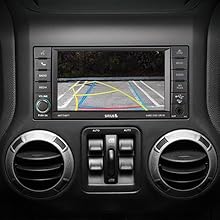
Figure 3.2: Camera positioned within the spokes of a spare wheel.
3.2. Bedradingsverbindings
The system requires connections for power, ground, and video signal. The power wire for the camera should be connected to the vehicle's reverse light circuit so the camera activates automatically when the vehicle is shifted into reverse. The video signal cable runs from the camera to your compatible in-dash display unit.
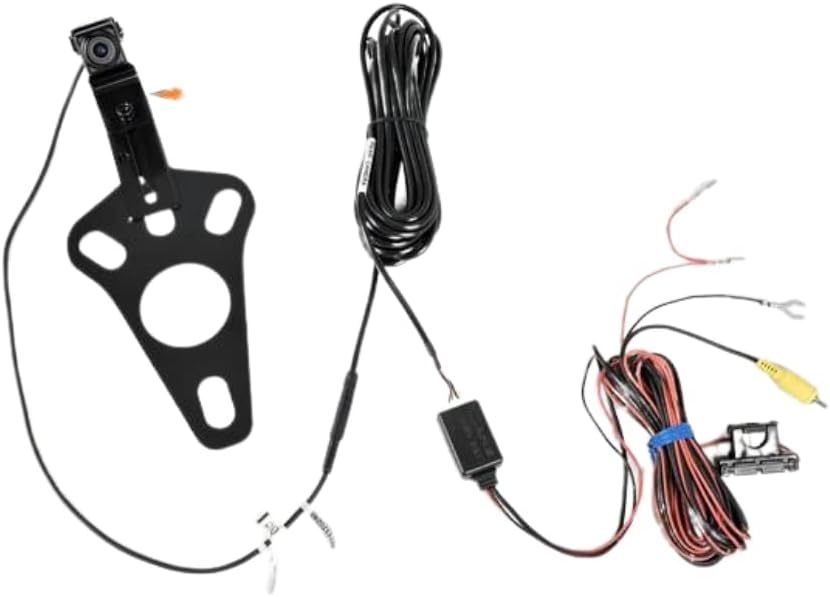
Figuur 3.3: oorview of the wiring connections for the camera system.
3.2.1. General Wiring Example (Not specific to Jeep JK or Alpine)
The following video demonstrates a general approach to wiring a backup camera, including tapping into reverse lights and routing cables. While the vehicle and camera shown are different, the principles of connecting power, ground, and video signal remain similar.
Video 3.1: General backup camera wiring demonstration (Note: This video features a different vehicle and camera system and is for illustrative purposes of wiring principles only).
3.3. Adjustable Mounting and Features
The camera's bracket allows for versatile positioning to achieve the best viewing angle, accommodating various spare tire and wheel designs. The camera itself is designed to be robust and waterproof.
Video 3.2: Demonstration of camera features and adjustable bracket (Note: This video features a similar product from a different brand, but illustrates common features and adjustability relevant to spare tire mounted cameras).
Video 3.3: Oorview of adjustable spare tire mount and optional guidelines (Note: This video features a similar product from a different brand, but illustrates common features and adjustability relevant to spare tire mounted cameras).
4. Bedryfsinstruksies
Once properly installed and connected, the Alpine HCE-RCAM-WRA camera system operates automatically. When the vehicle is shifted into reverse, the camera will activate, and the rear-view image will be displayed on your compatible in-dash screen.
The camera utilizes High Dynamic Range (HDR) technology to provide a clear image even in challenging lighting conditions, such as transitioning from bright sunlight to dark garages or during nighttime operation. This technology helps to balance bright and dark areas for optimal visibility.
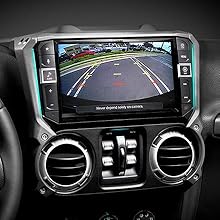
Figuur 4.1: Example of the rear-view image displayed on a compatible screen.
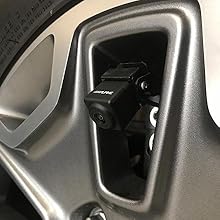
Figure 4.2: HDR technology improves image clarity in varied lighting conditions.
5. Onderhoud
To ensure optimal performance and longevity of your Alpine HCE-RCAM-WRA camera system, follow these simple maintenance guidelines:
- Maak die kameralens skoon: Regularly inspect and gently clean the camera lens using a soft, damp lap. Vermy skuurmiddels of materiale wat die lens kan krap.
- Gaan verbindings na: Periodically inspect all wiring connections, especially those exposed to the elements, to ensure they are secure and free from corrosion.
- Inspekteer Montering: Verify that the camera bracket and mounting hardware remain securely fastened to the spare tire. Tighten any loose screws as needed.
- Vermy hoëdrukwas: While the camera is designed to be durable, avoid directing high-pressure water jets directly at the camera or its connections during vehicle washing.
6. Probleemoplossing
If you encounter issues with your Alpine HCE-RCAM-WRA camera system, refer to the following common problems and solutions:
- Geen beeld op skerm nie:
- Ensure the vehicle is in reverse.
- Check all power and video connections for proper seating and integrity.
- Verify that the reverse light trigger wire is correctly connected and receiving power when in reverse.
- Confirm your in-dash display is set to the correct camera input.
- Poor Image Quality (Blurry, Distorted, or Flickering):
- Maak die kameralens deeglik skoon.
- Check video cable connections for any damage or loose contacts.
- Maak seker dat die kamera stewig gemonteer is en nie vibreer nie.
- Verify that the power supply to the camera is stable (12 Volts).
- Image Appears Washed Out or Too Dark:
- The camera's HDR technology is designed to mitigate this, but extreme lighting conditions can still affect image perception.
- Adjust brightness/contrast settings on your in-dash display, if available.
If these steps do not resolve the issue, contact Alpine customer support or a certified installer.
7. Spesifikasies
| Kenmerk | Spesifikasie |
|---|---|
| Handelsmerk | Alpiene |
| Modelnommer | HCE-RCAM-WRA |
| Versoenbare voertuie | Jeep Wrangler JK (2007-2018) |
| Item gewig | 1.5 pond |
| Produk afmetings | 9 x 8 x 4 duim |
| Voltage | 12 Volt |
| Optiese sensortegnologie | CMOS |
| Lens tipe | Wye hoek |
| Regte hoek van View | 120 grade |
| Installasie tipe | Beugelhouer |
8. Waarborg en Ondersteuning
For warranty information, product registration, or technical assistance, please refer to the official Alpine website or contact Alpine customer support directly. Keep your purchase receipt as proof of purchase for warranty claims.