
Fanimation MAD7912BBN
Fanimation Levon Custom DC Motor Ceiling Fan
Gebruikershandleiding
Model: MAD7912BBN
Inleiding
This manual provides detailed instructions for the safe installation, operation, and maintenance of your Fanimation Levon Custom DC Motor Ceiling Fan, model MAD7912BBN. The Levon Custom series offers a versatile design with various optional blade and finish combinations, allowing for a personalized aesthetic. This fan is designed for indoor use and features a DC motor for efficient performance, along with Wi-Fi compatibility and fanSync Bluetooth for modern control options.
Veiligheidsinligting
Lees en verstaan asseblief alle instruksies voordat u met die installasie begin. Versuim om hierdie instruksies te volg, kan lei tot elektriese skok, brand of persoonlike besering.
- Ensure the installation site is structurally sound and can support the fan's weight (approximately 19 pounds).
- All electrical connections must be made in accordance with local codes, ordinances, and the National Electric Code (NEC). If you are unfamiliar with electrical wiring, consult a qualified electrician.
- Disconnect power at the main circuit breaker before attempting any installation or maintenance.
- Moenie die waaier met 'n beskadigde kragkabel of prop gebruik nie.
- Hou hande, hare en klere weg van bewegende waaierlemme.
- Hierdie waaier is slegs vir binnenshuise gebruik ontwerp.
Pakketinhoud
Carefully unpack all components and ensure you have received all items listed below. If any parts are missing or damaged, contact Fanimation customer support immediately.
- DC Motor Assembly (Fanimation Levon Custom)
- Montagebeugel
- Downrod
- Afdak
- Hardewarepak (skroewe, wassers, draadmoere)
- fanSync Bluetooth Receiver
- Instruksie Handleiding
- Note: Fan blades and optional LED Light Kit are sold separately.
Opstelling en installasie
Installation of the Fanimation Levon Custom ceiling fan requires basic electrical knowledge. If you are unsure about any steps, please consult a qualified electrician.
1. Berei die installasiewerf voor
Ensure the electrical box is securely mounted to the building structure and is rated for fan support. The fan requires a 120V AC power supply.
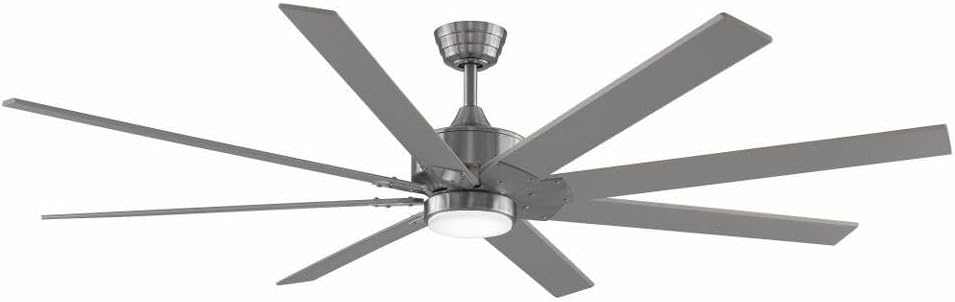
Figure 1: Assembled Fanimation Levon Custom DC Motor Ceiling Fan. This image shows the complete fan unit, including the motor housing, downrod, and a set of eight fan blades (sold separately), all in a brushed nickel finish.
2. Mount the Bracket and Downrod
Attach the mounting bracket to the electrical box. Secure the downrod to the fan motor assembly, ensuring all pins and screws are tightened.
3. Elektriese verbindings
Connect the fan's electrical wires to the household wiring according to the wiring diagram provided in the separate detailed installation guide. Ensure proper grounding. The fanSync Bluetooth receiver should be wired in line as per instructions for remote and smart control functionality.

Figuur 2: Kant view of the Fanimation Levon Custom DC Motor Ceiling Fan. This perspective highlights the sleek profile of the motor housing and the angle of the fan blades, demonstrating its modern design.
4. Attach Fan Blades and Light Kit (Optional)
Securely attach the fan blades (sold separately) to the motor housing. If installing the optional LED light kit (sold separately), follow its specific installation instructions.

Figuur 3: Close-up view of the Fanimation Levon Custom DC Motor Ceiling Fan's central housing. This image focuses on the brushed nickel finish of the motor unit and the integrated light fixture, which is part of the optional LED light kit.
Bedryfsinstruksies
Your Fanimation Levon Custom fan can be controlled via the included fanSync Bluetooth remote or through a compatible Wi-Fi enabled smart device (with required controls sold separately).
- Krag aan/af: Use the designated button on your remote or smart device interface to turn the fan on or off.
- Spoedbeheer: The fan offers 3 distinct power levels. Adjust the fan speed using the speed control buttons on your remote or the slider/buttons in your smart application.
- Light Control (if applicable): If an optional LED light kit is installed, use the light control buttons on your remote or smart device to turn the light on/off and adjust brightness (if dimmable).
- Wi-Fi konneksie: For Wi-Fi control, ensure you have the necessary Wi-Fi compatible controls and follow their specific pairing instructions to connect your fan to your home network.
Onderhoud
Gereelde onderhoud sal die lang lewensduur en optimale werkverrigting van jou plafonwaaier verseker.
- Skoonmaak: Om die waaier skoon te maak, vee dit af met 'n sagte, damp cloth. Do not use abrasive cleaners or solvents, as these may damage the finish or blades.
- Bladinspeksie: Kontroleer die lem-aanhegsels gereeld vir styfheid. Los lemme kan wiebel en geraas veroorsaak.
- Motor smering: Die GS-motor is permanent gesmeer en benodig geen addisionele olie nie.
- Elektriese verbindings: Annually inspect all electrical connections for any signs of wear or loosening. Ensure power is disconnected before inspection.
Probleemoplossing
If you experience issues with your Fanimation Levon Custom ceiling fan, refer to the following common problems and solutions:
| Probleem | Moontlike oorsaak | Oplossing |
|---|---|---|
| Waaier begin nie | Geen krag na die waaier nie; Los draadverbindings; Afstandbeheerder se battery is laag. | Check circuit breaker and wall switch. Ensure all wire connections are secure. Replace remote control batteries. |
| Fan wiebel | Los lemskroewe; Ongebalanseerde lemme; Los monteringsbeugel. | Tighten all blade screws. Use a balancing kit (not included) to balance blades. Ensure mounting bracket is securely fastened. |
| Lawaaierige operasie | Los skroewe; Motor brom; Lemme wat teen 'n obstruksie tref. | Check and tighten all screws. A slight motor hum is normal for DC motors. Ensure nothing is obstructing the blade path. |
| Afstandbeheer werk nie | Low battery; Not paired correctly; Obstruction between remote and receiver. | Replace batteries. Refer to fanSync pairing instructions. Ensure clear line of sight. |
Spesifikasies
Detailed technical specifications for the Fanimation Levon Custom DC Motor Ceiling Fan (Model MAD7912BBN).
| Handelsmerk | Fanimasie |
| Model Naam | Levon Custom DC Motor - BN |
| Modelnommer | MAD7912BBN |
| Kleur | Geborselde nikkel |
| Elektriese waaierontwerp | Plafonventilator |
| Kragbron | Elektries met koord |
| Spesiale kenmerk | Wi-Fi Enabled (with separate controls) |
| Voltooi Tipe | Klaar |
| Lugvloeikapasiteit | 8244 KFPH |
| Voltage | 120.0 V |
| Item gewig | 18.96 pond (ongeveer 8.6 kg) |
| Produk afmetings | 52 x 52 x 15.58 duim (ongeveer 132 x 132 x 39.6 cm) |
| Binne/buiteluggebruik | Binneshuise |
| Bladmateriaal | Plastic (if purchased separately) |
| Aantal kragvlakke | 3 |
| UPC | 840506087224 |
Waarborg inligting
The Fanimation Levon Custom DC Motor Ceiling Fan is backed by a Beperkte lewenslange waarborg. This warranty covers defects in materials and workmanship under normal use. For specific terms, conditions, and limitations, please refer to the warranty documentation included with your purchase or visit the official Fanimation webwebwerf.
Kliënte ondersteuning
If you have any questions, require technical assistance, or need to report a missing or damaged part, please contact Fanimation customer support. Have your model number (MAD7912BBN) and purchase information ready when contacting support.
For the most up-to-date contact information and additional resources, please visit the official Fanimation webwebwerf: www.fanimation.com