
1. Inleiding
This manual provides instructions for the safe and effective operation of the SMART SENSOR AS8906 Handheld NO2 Gas Leak Detector. This device is designed for detecting Nitrogen Dioxide (NO2) gas concentrations in various environments. Please read this manual thoroughly before using the product.
1.1 Veiligheidsinligting
- Always operate the device in accordance with the instructions provided.
- Do not attempt to modify or repair the device yourself. Refer to qualified personnel for service.
- Ensure the device is charged using the provided charging adapter and USB cable.
- Avoid exposing the device to extreme temperatures or humidity outside the specified operating conditions.
- This device is intended for professional use and should be handled with care.
2. Produk verbyview
2.1 Pakketinhoud
Die standaardpakket sluit die volgende items in:
- 1 x Nitrogen Dioxide Gas Monitor (AS8906)
- 1 x Gebruikershandleiding
- 1 x Laaiadapter
- 1 x USB-kabel
- 1 x Hand Carry Case
- 1 x Kalibrasie Sertifikaat
- 1 x CNEX Certificate
- 1 x Gift Paper Box

Figuur 2.1: Standaard pakketinhoud.
2.2 Toestelkomponente
Familiarize yourself with the main components of the AS8906 detector:

Figuur 2.2: Voorkant view and labeled components of the AS8906 detector.
- High Sensitive Sensor: Detects NO2 gas concentration.
- Sampling Pump Connecting Port: For attaching the optional sampling pomp.
- LCD skerm: Displays gas concentration, battery status, and other information.
- Af-knoppie: Used for navigation and decreasing-waardes.
- Op-knoppie: Used for navigation and increasing-waardes.
- Klankalarm: Emits an audible alert when gas concentration exceeds set limits.
- Laaipoort: Vir die koppeling van die USB-laaikabel.
- Lig alarm: Visual alert (LED) when gas concentration exceeds set limits.
- Aan / uit-knoppie: Beheer toestelkrag.
- Enter-knoppie: Bevestig keuses en instellings.
2.3 Afmetings
The AS8906 detector features a compact design for portability.
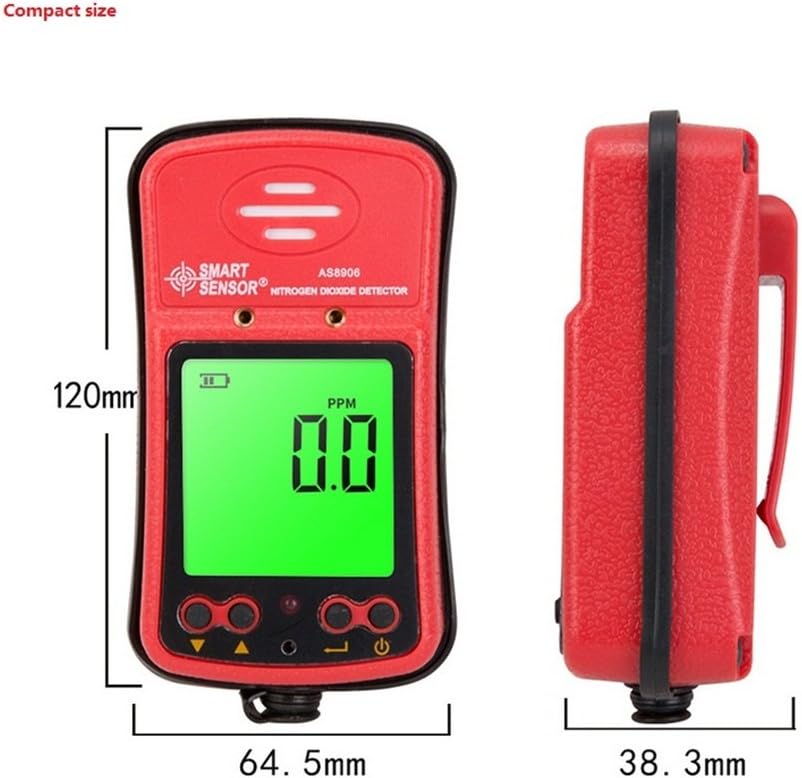
Figuur 2.3: Toestelafmetings.
Dimensions: 120.2mm (Height) x 64.5mm (Width) x 38.3mm (Depth).

Figure 2.4: The compact size allows for easy portability.
3. Opstelling
3.1 Laai die toestel
The AS8906 detector is powered by a built-in 3.7V Li-battery. Before first use, ensure the device is fully charged.
- Locate the charging port at the bottom of the device.
- Koppel die meegeleverde USB-kabel aan die laaipoort.
- Connect the other end of the USB cable to the charging adapter.
- Plug the charging adapter into a standard power outlet.
- The battery indicator on the LCD screen will show charging status. A full charge typically provides up to 12 hours of continuous operation.
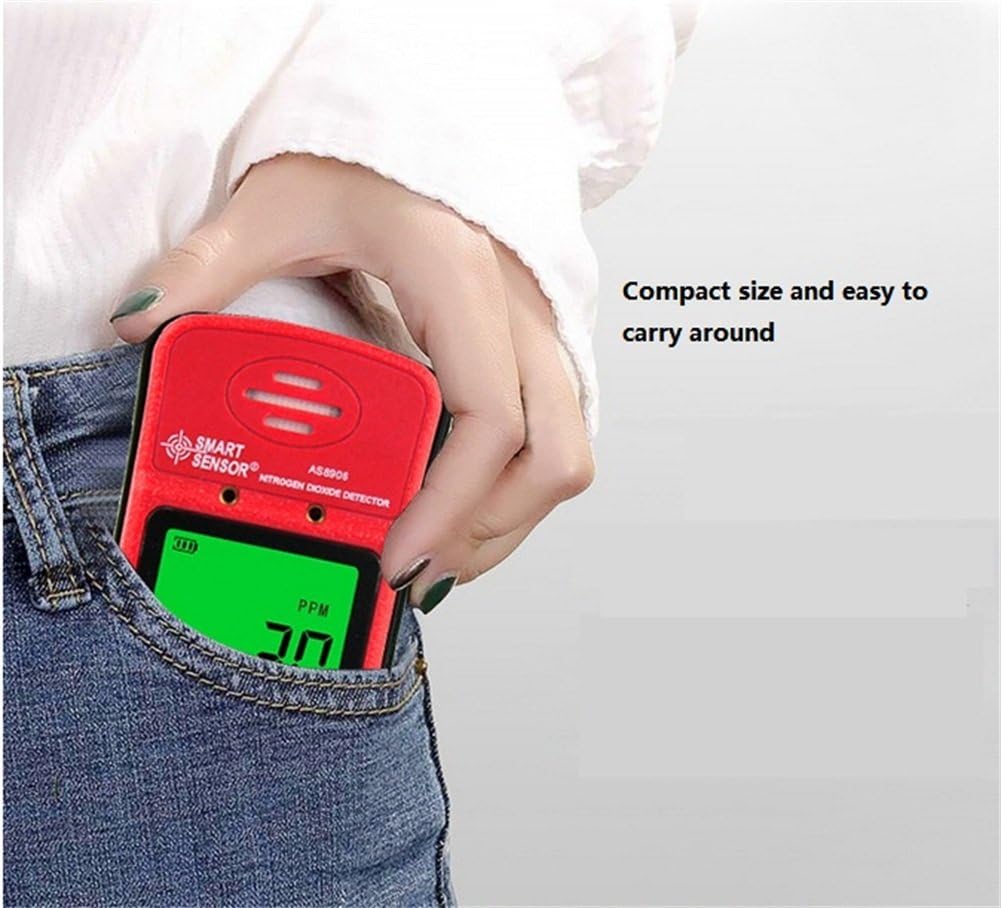
Figure 3.1: Charging port location.

Figure 3.2: Gas detector with recharge adapter.
3.2 Koppel die SampLingpomp (Opsioneel)
The optional sampling pump (AS8930) is designed to assist the gas detector in environments with limited access or poor air circulation. It does not operate independently and requires power from the gas detector.
- Belyn die sampling pump with the gas detector's sampling pump connecting port.
- Securely attach the sampling pump to the gas detector using the two closed-type screws. Ensure a tight connection to avoid poor contact.
- Connect the soft rubber tube (500mm long) to the nozzle of the sampling pomp.
- Belangrik: Do not connect any other voltage power supply to the sampling pump to prevent damage.
Figuur 3.3: Sampling pump and accessories.
4. Operasie
4.1 Aan-/afskakel
- Om aan te skakel: Druk en hou die Krag aan/af-knoppie until the LCD screen illuminates. The device will perform a self-test.
- Om af te skakel: Druk en hou die Krag aan/af-knoppie totdat die skerm afskakel.
4.2 Verstaan die skerm
The high-density digital LCD screen displays real-time gas concentration values, battery status, and other operational indicators. The backlight function allows for use in dark areas.
- PPM: Indicates parts per million, the unit for gas concentration.
- Battery-ikoon: Toon die huidige batterylaaivlak.
- Alarm aanwysers: Visual cues for alarm status.
4.3 Alarmfunksies
The device features high and low alarm functions with three alert methods: sound, light, and vibration. Alarm values are adjustable.
- When the gas concentration reaches a preset high or low alarm value, the device will activate its sound, light, and vibration alarms.
- The alarm sound can reach up to 80dB.
4.4 Adjusting Alarm Values
Refer to the on-screen menu for adjusting high and low alarm thresholds. Use the Up en Af buttons to navigate and change values, and the Voer in knoppie om te bevestig.
4.5 Using the Sampling Pomp
Wanneer die sampling pump is connected, it will draw air into the detector, allowing for gas concentration measurement in remote or confined spaces. The air flow velocity is approximately 0.5 cubic inches per hour, with a maximum gas sample collecting distance of about 50 feet.
5. Onderhoud
5.1 Batterysorg
- Recharge the device when the battery indicator shows low power to ensure continuous operation.
- Vermy om die battery gereeld heeltemal te leeg te maak om sy lewensduur te verleng.
- Indien die toestel vir 'n lang tydperk gestoor word, laai dit tot ongeveer 50% en herlaai dit elke paar maande.
5.2 Skoonmaak
- Vee die buitekant van die toestel af met 'n sagte, damp lap.
- Do not use abrasive cleaners or solvents, as these can damage the casing of skerm.
- Ensure no liquids enter the sensor area or charging port.
5.3 Kalibrasie
The device comes with a calibration certificate. For optimal accuracy and compliance, periodic professional calibration is recommended. Refer to the manufacturer or authorized service centers for calibration services.
6. Probleemoplossing
If you encounter issues with your AS8906 detector, refer to the following common problems and solutions:
| Probleem | Moontlike oorsaak | Oplossing |
|---|---|---|
| Toestel skakel nie aan nie. | Lae of uitgeputte battery. | Charge the device using the provided adapter and USB cable. |
| Onakkurate lesings. | Sensorkontaminasie of behoefte aan kalibrasie. | Ensure the sensor area is clean. Consider professional calibration if readings remain inconsistent. |
| Alarm not sounding/lighting/vibrating. | Alarm settings configured incorrectly or disabled. | Check alarm settings in the device menu. Ensure volume and vibration are enabled. |
| Sampling pump not working. | Poor connection to the detector or pump malfunction. | Verseker die sampling pump is securely attached with screws. Verify the detector is powered on. |
If the problem persists after attempting these solutions, contact customer support for further assistance.
7. Spesifikasies
7.1 Detektorspesifikasies
| Kenmerk | Detail |
|---|---|
| Handelsmerk | SLIM SENSOR |
| Model | AS8906 |
| Gas tipe | Stikstofdioksied (NO2) |
| Meetreeks | 0~20 dpm |
| Resolusie | 0.1 dpm |
| Werksbeginsel | Elektrochemiese sensor |
| Alarmtipe | Sound, Light, Vibration (adjustable values) |
| Alarmklankvlak | Tot 80dB |
| Bedryfstemperatuur | -10~50°C |
| Bedryfshumiditeit | 15~95% RH (standard) |
| Kragbron | 3.7V Li-battery (Built-in) |
| Werkstroom | 16mA |
| Deurlopende werking | Approx. 12 hours (full charge) |
| Materiaal | ABS plastiek |
| Netto gewig | 200 g (7.1 onse) |
| Afmetings | 120.2 x 64.5 x 38.3 mm |
| Sertifiserings | JJG693; JJG695: JJG915 and GB3836 series anti-explosion standard, CNEX |
7.2 Sampling Pump Specifications (Optional Accessory)
| Kenmerk | Detail |
|---|---|
| Bedryfsvoltage Reeks | DC 2.2V-3.2V |
| Werkstroom | <280mA |
| Spuitkop deursnee | 2.5 mm |
| Geraas | <75 dB |
| Afmetings | 100.8 x 62.3 x 50 mm |
| Max Sample Distance | Ongeveer. 50 voet |
| Air Flow Velocity | Approx. 0.5 cubic inches per hour |
8. Waarborg en Ondersteuning
8.1 Waarborginligting
Your SMART SENSOR AS8906 Handheld NO2 Gas Leak Detector comes with a warranty. Please refer to the included Warranty Card in your package for specific terms and conditions, including warranty period and coverage details.
8.2 Kliëntediens
For technical assistance, troubleshooting beyond this manual, or warranty claims, please contact SMART SENSOR customer support. Contact information can typically be found on the product packaging, the warranty card, or the official SMART SENSOR webwebwerf.