
Inleiding
This manual provides essential instructions for the setup, operation, and maintenance of your KOAMTAC KDC470Ci-BLE 2D Imager Barcode Sled Scanner combined with the Apple iPhone 7/8Plus SmartSled Charging Case. Please read this manual thoroughly before using the device to ensure proper functionality and to prevent damage.
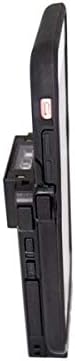
Image: The KOAMTAC KDC470Ci-BLE 2D Imager Barcode Sled Scanner integrated with an Apple iPhone 7/8Plus via the SmartSled Charging Case. This side view highlights the compact design and the connection points between the scanner and the smartphone case.
Produk verbyview
The KOAMTAC KDC470Ci-BLE is a robust 2D CMOS Imager Barcode Sled Scanner designed for mobile data collection. When paired with the Apple iPhone 7/8Plus SmartSled Charging Case, it transforms your smartphone into a comprehensive barcode scanning solution. Key features include:
- 2D CMOS Imager: Capable of reading various 2D barcodes.
- SmartSled Design: Allows for easy integration and removal of the iPhone 7/8Plus.
- Gelyktydige laai: The SmartSled case enables simultaneous charging of both the KDC470Ci-BLE scanner and the iPhone 7/8Plus via a Micro USB cable or charging cradle.
- Duursame konstruksie: IP65-rated for dust and water resistance, with a 5-foot drop specification.
- Verlengde batterylewe: Advanced power management features, including a hibernation mode, extend battery life beyond an average work shift. The built-in rechargeable battery can also serve as an external power source for the iPhone.
- Sagteware-verenigbaarheid: Includes KT Sync keyboard wedging software and an SDK for Android, Blackberry, iOS, and Windows platforms.
Opstel instruksies
- Uitpak: Carefully remove all components from the packaging. Verify that you have the KDC470Ci-BLE scanner, the Apple iPhone 7/8Plus SmartSled Charging Case, and any included cables or accessories.
- Insert iPhone: Gently slide your Apple iPhone 7/8Plus into the SmartSled Charging Case until it is securely seated. Ensure all connectors align properly.
- Attach Scanner: Connect the KDC470Ci-BLE scanner to the SmartSled Charging Case. The scanner is designed to seamlessly attach to the back of the case, forming a single integrated unit.
- Aanvanklike heffing: Before first use, fully charge the integrated unit. Connect the Micro USB cable to the SmartSled Charging Case and then to a power source. The scanner and iPhone will charge simultaneously.
- Sagteware installasie:
- For basic keyboard wedging functionality, install the KT Sync software on your host device (e.g., iPhone).
- For custom application development, utilize the provided SDK for your specific operating system (iOS in this case).
- Bluetooth Pairing (if not using direct connection):
- Power on the KDC470Ci-BLE scanner.
- On your iPhone, navigate to Bluetooth settings and search for available devices.
- Select the KDC470Ci-BLE from the list to pair. Follow any on-screen prompts.
Bedryfsinstruksies
Skandeer strepieskodes
- Krag aan: Ensure the KDC470Ci-BLE scanner is powered on.
- Target Barcode: Point the scanner's imager window at the barcode you wish to scan.
- Activate Scan: Press the scan button located on the side of the KDC470Ci-BLE. A red aiming beam will appear.
- Confirm Scan: Once the barcode is successfully read, the scanner will typically emit an audible beep and/or vibrate, and the data will be transmitted to your connected iPhone application.
Laai die toestel
The SmartSled Charging Case allows for convenient charging of both the KDC470Ci-BLE scanner and the iPhone 7/8Plus simultaneously.
- Connect a Micro USB cable to the charging port on the SmartSled case.
- Koppel die ander kant van die USB-kabel aan 'n versoenbare USB-kragadapter of 'n rekenaar se USB-poort.
- Alternatively, place the SmartSled unit into a compatible KOAMTAC charging cradle (sold separately) for simultaneous charging.
Kragbestuur
The KDC470Ci-BLE features advanced power management to conserve battery life. When not actively in use, the scanner enters a "hibernation mode" to extend operational time. To reactivate, simply press the scan button or interact with the device via your iPhone application.
Onderhoud
- Skoonmaak: Gebruik 'n sagte, pluisvrye lap effens dampened with water or a mild cleaning solution to clean the exterior of the scanner and case. Avoid harsh chemicals or abrasive materials. Do not spray liquids directly onto the device.
- Berging: Bêre die toestel op 'n koel, droë plek weg van direkte sonlig en uiterste temperature.
- Batterysorg: To prolong battery life, avoid fully discharging the battery frequently. If storing for an extended period, ensure the battery is charged to approximately 50%.
- Firmware -opdaterings: Periodically check the KOAMTAC website for firmware updates for your KDC470Ci-BLE scanner. Keeping the firmware updated ensures optimal performance and access to new features.
Probleemoplossing
| Probleem | Moontlike oorsaak | Oplossing |
|---|---|---|
| Skandeerder skakel nie aan nie. | Lae of uitgeputte battery. | Charge the device using the Micro USB cable or charging cradle. |
| Unable to scan barcodes. | Barcode damaged or unreadable; scanner not aimed correctly; incorrect symbology settings. | Ensure the barcode is clear. Aim the red beam directly across the barcode. Check scanner settings for supported symbologies. |
| No data transmitted to iPhone. | Bluetooth connection lost; application not configured correctly; iPhone not securely seated in SmartSled. | Verify Bluetooth connection. Restart the scanning application. Re-seat the iPhone in the SmartSled case. |
| Toestel laai nie. | Faulty cable or power adapter; charging port obstruction; iPhone not properly connected. | Try a different Micro USB cable and power adapter. Inspect the charging port for debris. Ensure the iPhone is fully seated in the SmartSled. |
Spesifikasies
- Modelnommer: 381150 (KDC470Ci-BLE)
- Skandeerder tipe: 2D CMOS-beelder
- Verenigbaarheid: Apple iPhone 7/8Plus (with SmartSled Case), Desktop, Laptop, Smartphone
- Verbinding: Bluetooth Low Energy (BLE), USB Cable
- Kragbron: Battery Powered, USB Cable
- Omgewingsgradering: IP65
- Drop Spesifikasie: 5 voet (1.5 meter)
- Item gewig: 8.8 onse (ongeveer 249 gram)
- Pakket afmetings: 6.1 x 4.2 x 1.5 duim (ongeveer 15.5 x 10.7 x 3.8 cm)
- Vervaardiger: KOAMTAC
- Eerste beskikbaar: 13 November 2018
Waarborg en Ondersteuning
For warranty information and technical support, please refer to the official KOAMTAC website or contact KOAMTAC customer service directly. Keep your purchase receipt as proof of purchase for warranty claims.
- Vervaardiger: KOAMTAC
- Webwebwerf: www.koamtac.com
- Kontak: Refer to the KOAMTAC webwebwerf vir kontakbesonderhede en ondersteuningsbronne.