
1. Inleiding
This manual provides essential information for the safe and effective operation of your Retevis RT55 Marine Radio. Please read this manual thoroughly before using the device to ensure proper functionality and to prevent damage. The Retevis RT55 is a portable VHF marine transceiver designed for maritime communication, featuring IP67 waterproofing, floating capability, and vibration drainage.

Image 1.1: Retevis RT55 Marine Radio demonstrating its floating capability.
2. Pakketinhoud
Verifieer dat al die items wat hieronder gelys word in u pakket ingesluit is. Indien enige items ontbreek of beskadig is, kontak asseblief u kleinhandelaar.
- 1 x Retevis RT55 Marine Radio
- 1 x Antenna
- 1 x 1200mAh litiumioonbattery
- 1 x kragadapter
- 1 x laaibak
- 1 x gordelklem
- 1 x Lanyard
- 4 x skroewe
- 1 x Gebruikershandleiding (hierdie dokument)

Image 2.1: All components included in the Retevis RT55 package.
3. Produk verbyview
Maak jouself vertroud met die radio se komponente en kontroles.
3.1. Radiokomponente

Image 3.1: Front panel of the Retevis RT55 Marine Radio with key controls labeled.
- Antenna: Vir die oordrag en ontvangs van seine.
- LCD-skerm: Shows channel number, battery status, and other operational indicators.
- CH 16 Button: Quickly switches to Channel 16 (emergency channel).
- CH-knoppie: Gebruik vir kanaalkeuse.
- TAG/FAV Button: Wissel tussen tagged/favorite channels.
- MUTE/VOL Button: Adjusts volume or mutes audio.
- MONI/SQL Button: Activates monitor function or adjusts squelch level.
- DUAL/SCAN Button: Activates dual watch or scan function.
- LOCK/H/L Button: Locks the keypad or switches between high/low power output.
- Op/af pyle: Navigate menus and change channels.
- PTT (druk-om-te-praat)-knoppie: Geleë aan die kant, gebruik om te oordra.
4. Opstelling
4.1. Battery Installasie
- Maak seker dat die radio afgeskakel is.
- Belyn die batterypak met die batterykompartement aan die agterkant van die radio.
- Druk die battery liggies in plek totdat dit stewig klik.

Image 4.1: The 1200mAh Lithium-ion battery pack for the RT55.
4.2. Antenna-aanhegting
- Skroef die antenna kloksgewys op die konnektor bo-op die radio totdat dit vingervas is. Moenie te styf vasdraai nie.
4.3. Laai die battery
Laai die battery volledig voor die eerste gebruik. 'n Volle lading neem gewoonlik 'n paar uur.
- Koppel die kragadapter aan die laai wieg.
- Steek die kragadapter in 'n standaard wisselstroomaansluiting.
- Place the radio (with battery installed) into the charging cradle. Ensure proper contact between the radio and the cradle's charging terminals.
- The charging indicator on the cradle will illuminate (e.g., red for charging, green for fully charged).
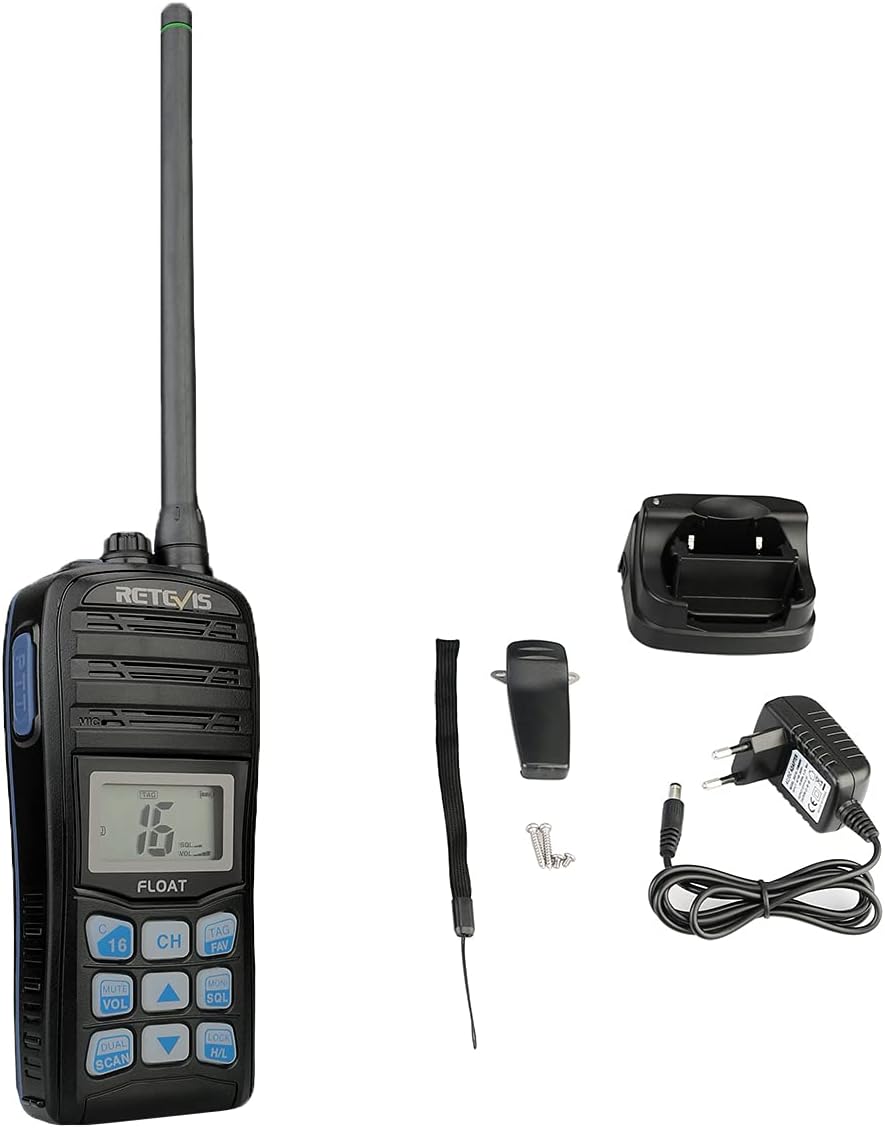
Image 4.2: The Retevis RT55 radio placed in its charging cradle.
5. Bedryfsinstruksies
5.1. Skakel aan/af
- Om aan te skakel, hou die KRAG button (often integrated with the LOCK/H/L button or a dedicated button) until the display illuminates.
- Druk en hou die. In om uit te skakel KRAG knoppie weer totdat die skerm afskakel.
5.2. Volume aanpassing
- Druk die STEM/VOL knoppie.
- Gebruik die Up / Down Arrow knoppies om die volume te verhoog of te verlaag.
- Druk STEM/VOL again to confirm or wait for the setting to auto-save.
5.3. Kanaalkeuse
The RT55 supports 88 international marine channels.
- Druk die CH knoppie.
- Gebruik die Up / Down Arrow knoppies om die verlangde kanaal te kies.
- Druk CH again to confirm or wait for the setting to auto-save.
- To quickly access the emergency channel, press the dedicated CH16 knoppie.
5.4. Squelch-funksie
Squelch eliminates background noise when no signal is being received.
- Druk die MONI/SQL knoppie.
- Gebruik die Up / Down Arrow buttons to adjust the squelch level (typically 0-9, where 0 is open squelch and 9 is maximum squelch).
- Druk MONI/SQL weer om te bevestig.
5.5. Dual Watch / Tri-Watch
This feature allows monitoring multiple channels simultaneously.
- Dubbele horlosie: Monitors the current working channel and Channel 16.
- Drie-horlosie: Monitors the current working channel, Channel 16, and a designated call channel (e.g., Channel 9).
- Druk die DUAL/SCAN button to activate or cycle through these modes.

Image 5.1: Visual representation of Dual-Watch and Tri-Watch channel monitoring.
5.6. Weather Channels
The RT55 can receive weather alerts on dedicated weather channels.
- Consult your local regulations for available weather channels.
- Access weather channels via the TAG/FAV button or a dedicated menu option.

Image 5.2: The radio displaying weather alert functionality.
5.7. Floating and Vibration Drainage
The RT55 is designed to float if dropped in water and features a vibration drainage function to clear water from the speaker.
- If the radio falls into water, it will float to the surface.
- To activate vibration drainage, typically press and hold a specific button (e.g., MONI/SQL or a dedicated drainage button) for a few seconds. The radio will emit a vibrating sound to expel water.

Image 5.3: The RT55 radio floating in water, highlighting its IP67 waterproof rating.

Image 5.4: The radio demonstrating its vibration drainage feature.
Video 5.1: Demonstration of the Retevis RT55's waterproofing, floating, and vibration drainage functions.
6. Onderhoud
- Skoonmaak: Maak die buitekant van die radio skoon met 'n sagte, damp lap. Moenie harde chemikalieë of skuur skoonmaakmiddels gebruik nie.
- Berging: Bêre die radio op 'n koel, droë plek wanneer dit nie gebruik word nie. Verwyder die battery as dit vir lang tye gebêre word.
- Batterysorg: Avoid fully discharging the battery frequently. Recharge before the battery is completely depleted to prolong its lifespan.
7. Probleemoplossing
| Probleem | Moontlike oorsaak | Oplossing |
|---|---|---|
| Radio skakel nie aan nie | Battery is laag of nie korrek geïnstalleer nie. | Laai die battery of installeer dit korrek weer. |
| Geen ontvangs of swak klankgehalte | Antenna loose or damaged; Squelch level too high; Out of range. | Check antenna connection; Adjust squelch level; Move closer to other radios or a repeater. |
| Kan nie oordra nie | Battery low; Incorrect channel selected; Keypad locked. | Charge battery; Select appropriate channel; Unlock keypad. |
| Water in speaker after submersion | Normal after water exposure. | Activate the vibration drainage function. |
8. Spesifikasies
| Kenmerk | Detail |
|---|---|
| Handelsmerk | Retevis |
| Modelnommer | RT55 |
| Kleur | Noir (Swart) |
| Aantal kanale | 88 |
| Frekwensiereeks | VHF |
| Maksimum reeks | 4 kilometer |
| Waterweerstandvlak | IP67 (waterdig) |
| Spesiale kenmerke | Float, Monitor Function, IP67 Waterproof, Call Channel Programming, Automatic Backlight, Vibration Drainage |
| Battery Tipe | 1 x 1200mAh Litium-ioon (ingesluit) |
| Voltage | 7.4 Volt |
| Produk Afmetings (D x B x H) | 4.1P x 6.5L x 14H sentimeter |
| Item gewig | 288 gram |
| Geraasvlak | 40 Desibel |
| Versoenbare toestelle | Other two-way radios with the same band or channel, compatible accessories (headsets, earphones, external antennas) |
| Temperatuurreeks | -20℃ ~ +55℃ |
| Land van oorsprong | China |
9. Waarborg en Ondersteuning
Retevis offers the following warranty and support for the RT55 Marine Radio:
- Waarborgtydperk: 2 jaar vir die radio se behuising, 1 jaar vir bykomstighede.
- Retourbeleid: 30 days for no-reason returns.
- Nawaarborgdiens: Maintenance service is available beyond the warranty period. Buyers are responsible for associated costs.
For further assistance or technical support, please refer to the official Retevis webwebwerf of kontak jou plaaslike handelaar.