
1. Inleiding
This manual provides instructions for the Macally BTDYNAMOUSE Wireless Bluetooth Mouse. This device is designed for comfortable and quiet operation across various platforms.
The Macally BTDYNAMOUSE is a slim, ambidextrous Bluetooth mouse featuring silent click buttons and adjustable DPI settings. It connects wirelessly to compatible devices, offering a clutter-free workspace.
2. Wat is in die boks
- Macally BTDYNAMOUSE Wireless Bluetooth Mouse
- 2 x AAA-batterye
3. Produkkenmerke
- Verstelbare DPI: Switch between 800, 1200, and 1600 DPI for precise cursor control.
- Stilklikknoppies: Designed for quiet operation, reducing click noise by 90% compared to traditional mice.
- Slim and Ambidextrous Design: Comfortable for both left and right-handed users, with a low-profile vormfaktor.
- Bluetooth draadlose konneksie: Connects wirelessly up to 10 meters (30 feet).
- Lang batterylewe: Two AAA batteries provide up to 3 months of use (based on 8 hours daily use). Battery life may vary.
- Verenigbaarheid: Works with Windows and macOS operating systems.
4. Opstelinstruksies
4.1. Installeer batterye
1. Locate the battery compartment on the underside of the mouse.
2. Maak die batterykompartement se deksel oop.
3. Insert two AAA batteries, ensuring correct polarity (+/-).
4. Maak die batteryklep se deksel toe.

Figuur 1: Battery-installasie
4.2. Bluetooth-koppeling
1. Turn on the mouse using the ON/OFF switch located on the underside.
2. Press and hold the Bluetooth pairing button (usually a small button near the ON/OFF switch or sensor) for 2-3 seconds until the LED indicator starts blinking, indicating it's in pairing mode.
3. On your computer or device (Mac, Windows, iPad, Tablet):
- Gaan na Bluetooth-instellings.
- Soek vir nuwe toestelle.
- Select "Macally BTDYNAMOUSE" from the list of available devices.
- Volg enige instruksies op die skerm om die saambindproses te voltooi.
Once successfully paired, the LED indicator on the mouse will stop blinking and remain solid or turn off, depending on the mouse model.

Figure 2: Mouse with Laptop, indicating multi-device compatibility
5. Bedryfsinstruksies
The Macally BTDYNAMOUSE features a standard 3-button layout with a scroll wheel for intuitive navigation.
- Links klik: Primêre aksie, tipies gebruik vir die seleksie van items of die oopmaak van skakels.
- Regs klik: Secondary action, typically used to open context menus.
- Rolwiel: Gebruik vir vertikale blaai deur dokumente en web pages. The scroll wheel can also be pressed for a middle-click action, depending on software configuration.

Figure 3: Ergonomic Design for Comfortable Use

Figure 4: Quiet Click Buttons in Action
6. DPI-aanpassing
The mouse features a DPI switch button to adjust cursor sensitivity. This allows you to fine-tune the mouse's responsiveness to your preference.
To change the DPI setting, press the small button located behind the scroll wheel. Each press cycles through the available DPI levels: 800, 1200, and 1600.
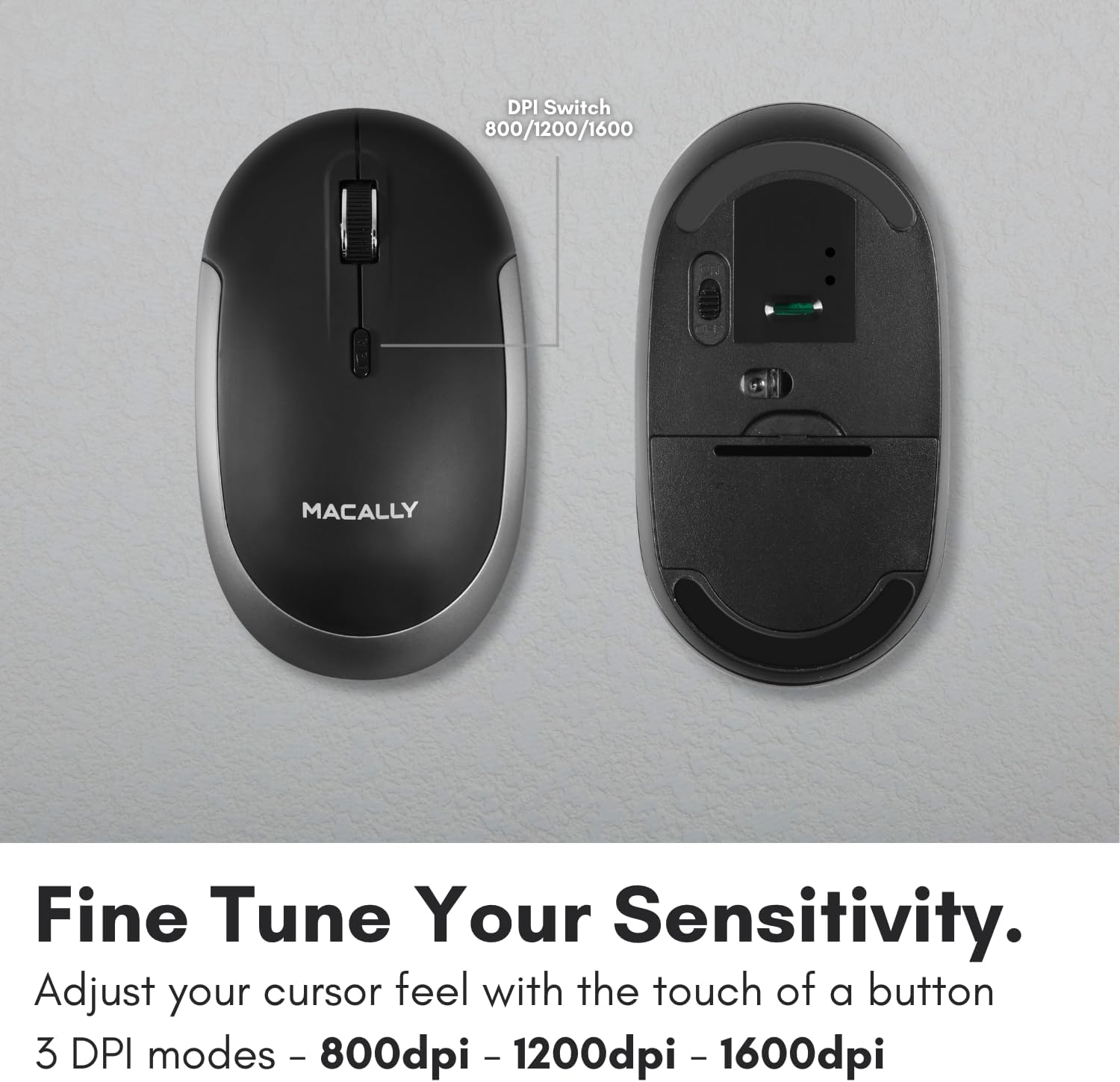
Figure 5: DPI Switch Location
7. Battery-inligting
The Macally BTDYNAMOUSE uses two AAA batteries. For optimal performance and battery life, it is recommended to use high-quality alkaline batteries.
- Battery tipe: 2 x AAA
- Geskatte batterylewe: Up to 3 months (based on 8 hours of daily use). Actual battery life may vary based on usage patterns and computing conditions.
When the battery level is low, the mouse's LED indicator may flash or change color to alert you. Replace batteries promptly to ensure uninterrupted use.
8. Onderhoud
To ensure the longevity and optimal performance of your Macally BTDYNAMOUSE, follow these maintenance guidelines:
- Skoonmaak: Gebruik 'n sagte, droë lap om die muis skoon te maak. Vir hardnekkige vuiligheid, gebruik 'n effens droë lap.amp ’n Lap kan gebruik word, maar maak seker dat geen vog die toestel binnedring nie.
- Vermy vloeistowwe: Do not expose the mouse to liquids or excessive moisture.
- Berging: Bêre die muis op 'n koel, droë plek wanneer dit nie vir lang tye gebruik word nie.
- Battery vervanging: Replace batteries as needed. Dispose of old batteries according to local regulations.
9. Probleemoplossing
| Probleem | Moontlike oorsaak | Oplossing |
|---|---|---|
| Mouse not connecting via Bluetooth | Mouse is off or batteries are low. Not in pairing mode. Device's Bluetooth is off. | Ensure mouse is on and batteries are fresh. Put mouse in pairing mode. Check device's Bluetooth settings. Try re-pairing. |
| Cursor is erratic or unresponsive | Dirty optical sensor. Mouse used on unsuitable surface. Low battery. | Clean the optical sensor. Use a mouse pad or a smooth, non-reflective surface. Replace batteries. |
| Mouse clicks are not silent | This mouse is designed for 90% noise reduction, not complete silence. | The mouse provides a significantly quieter click than standard mice, but a faint sound may still be audible. |
| Kort batterylewe | Frequent usage. Low-quality batteries. | Use high-quality alkaline batteries. Turn off the mouse when not in use for extended periods. |
10. Spesifikasies
| Kenmerk | Detail |
|---|---|
| Handelsmerk | Macally |
| Model Naam | BTDYNAMOUSE |
| Verbindingstegnologie | Bluetooth, Draadloos |
| Bewegingsopsporingstegnologie | Opties |
| DPI-instellings | 800 / 1200 / 1600 |
| Knoppies | 4 (Links, Regs, Blaai-klik, DPI-skakelaar) |
| Hand Oriëntasie | Ambidekstrous |
| Versoenbare toestelle | Laptop, Personal Computer (Windows, macOS) |
| Wireless Range | Tot 10 m (30 voet) |
| Battery Tipe | 2 x AAA (ingesluit) |
| Batterylewe | Tot 3 maande (geskat) |
| Item gewig | 73 gram |
| Materiaal | Silicone (Enclosure) |
| Kleur | Swart |
11. Amptelike produkvideo's
11.1. Bluetooth Optical Silent Click Mouse - White
Hierdie video bied 'n oorview of the Macally BTDYNAMOUSE, highlighting its slim design, ambidextrous body, simple 3-button layout, 90% noise reduction, and easy DPI adjustability (800/1200/1600).
11.2. Macally Wireless Bluetooth Mouse for Windows PC and Mac
This video demonstrates the Macally BTDYNAMOUSE's features, including its Bluetooth wireless technology, comfortable ambidextrous design, simple 3-button/scroll wheel layout, silent click buttons, and easy DPI adjustability.
12. Waarborg en Ondersteuning
For warranty information and technical support, please refer to the official Macally webwebwerf of kontak hul kliëntediens. Bewaar u aankoopbewys vir waarborgeise.