
Inleiding
The Forge Doosl DSER102 is a versatile device designed to enhance your audio experience. It functions as both a Bluetooth receiver, allowing you to stream audio wirelessly to non-Bluetooth devices, and an FM transmitter, enabling you to broadcast audio to your car radio. This manual provides detailed instructions for setup, operation, and maintenance to ensure optimal performance.
Veiligheidsinligting
- Hou die toestel weg van water, vog en uiterste temperature.
- Moenie probeer om die toestel self uitmekaar te haal of te herstel nie. Raadpleeg gekwalifiseerde dienspersoneel.
- Gebruik slegs die meegeleverde laaikabel of 'n gesertifiseerde ekwivalent.
- Vermy langdurige blootstelling aan direkte sonlig.
- Gooi die toestel en sy battery verantwoordelik weg volgens plaaslike regulasies.
Pakketinhoud
Kontroleer asseblief die pakket vir die volgende items:
- Forge Doosl DSER102 Bluetooth Receiver & FM Transmitter
- Mikro USB-laaikabel
- 3.5 mm oudio kabel
- Gebruikershandleiding (hierdie dokument)
Produk verbyview
Maak jouself vertroud met die toestel se komponente:
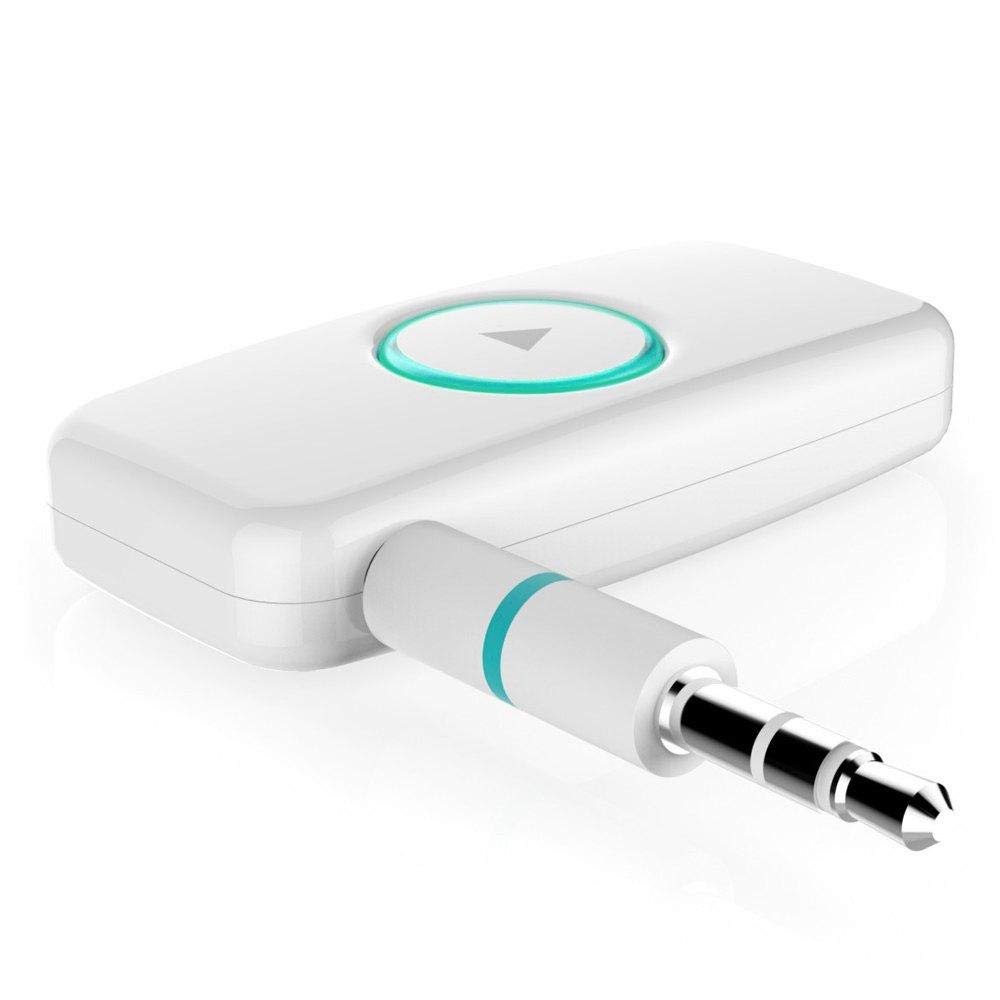
Figuur 1: Voorkant view of the DSER102 device.
- Multifunksie-knoppie: Power on/off, Play/Pause, Answer/End Call, Mode Switch.
- LED-aanwyser: Shows power, charging, and connection status.
- 3.5mm Audio Output/Input Port: Connects to audio devices.
- Micro USB -laaipoort: Vir die laai van die interne battery.
Opstelling
1. Laai die toestel
Before first use, fully charge the DSER102.
- Connect the Micro USB charging cable to the device's charging port.
- Koppel die ander kant van die kabel aan 'n USB-kragadapter (nie ingesluit nie) of 'n rekenaar se USB-poort.
- The LED indicator will show red during charging and turn off when fully charged. A full charge takes approximately 2 hours and provides up to 16 hours of music playback.
2. Bluetooth Receiver Mode Setup
Use this mode to stream audio from your Bluetooth-enabled phone to a non-Bluetooth speaker or car stereo.
- Krag aan: Press and hold the Multi-function Button for 3 seconds until the LED indicator flashes blue rapidly, indicating pairing mode.
- Koppel aan oudiotoestel: Plug the DSER102 into the 3.5mm AUX input of your car stereo, home stereo, or speaker using the 3.5mm audio cable.
- Pair with Phone: On your mobile phone, enable Bluetooth and search for "DSER102" in the list of available devices. Select it to pair.
- Connection Confirmed: Once paired, the LED indicator will flash blue slowly. You can now play music from your phone through the connected audio device.
3. FM Transmitter Mode Setup
Use this mode to broadcast audio from the DSER102 to your car's FM radio.
- Krag aan: Druk die multifunksieknoppie 3 sekondes lank in.
- Switch to FM Transmitter Mode: Double-press the Multi-function Button to switch modes. The LED indicator will change color or pattern (refer to device for specific indication).
- Stem FM-radio in: On your car's FM radio, tune to an unused FM frequency (e.g., 87.5 MHz or 108.0 MHz).
- Set DSER102 Frequency: The DSER102 will transmit on a specific FM frequency. If adjustable, match the DSER102's frequency to your car radio's frequency. If not adjustable, find the frequency the DSER102 is broadcasting on and tune your car radio to it.
- Koppel klankbron: Connect your audio source (e.g., phone via Bluetooth) to the DSER102. The audio will now be transmitted to your car's FM radio.
Bedryfsinstruksies
Krag aan/af
- Krag aan: Press and hold the Multi-function Button for approximately 3 seconds until the LED indicator lights up.
- Skakel af: Press and hold the Multi-function Button for approximately 3 seconds until the LED indicator turns off.
Music Playback (Bluetooth Receiver Mode)
- Speel/pouse: Druk kort op die multifunksionele knoppie.
Call Management (Bluetooth Receiver Mode)
- Beantwoord/beëindig oproep: Druk kort op die multifunksionele knoppie.
- Verwerp oproep: Druk die multifunksieknoppie 2 sekondes lank in.
- Herbel laaste nommer: Double-press the Multi-function Button.
Onderhoud
- Maak die toestel skoon met 'n sagte, droë lap. Moenie vloeibare skoonmaakmiddels of aërosols gebruik nie.
- Berg die toestel op 'n koel, droë plek wanneer dit nie gebruik word nie.
- Vermy om die toestel te laat val of aan sterk impakte te onderwerp.
Probleemoplossing
| Probleem | Oplossing |
|---|---|
| Toestel skakel nie aan nie. | Maak seker dat die toestel volledig gelaai is. Koppel dit aan 'n kragbron met die mikro-USB-kabel. |
| Kan nie met Bluetooth-toestel saambind nie. | Make sure the DSER102 is in pairing mode (rapidly flashing blue LED). Ensure your phone's Bluetooth is enabled and within range. Try restarting both devices. |
| No audio in Bluetooth Receiver mode. | Check if the 3.5mm audio cable is securely connected to both the DSER102 and your audio system's AUX input. Ensure your audio system is set to the correct AUX input. Adjust volume on both devices. |
| Poor audio quality in FM Transmitter mode. | Find a clear, unused FM frequency on your car radio and match the DSER102's frequency to it. Avoid frequencies used by local radio stations. Reduce interference by moving the device away from other electronics. |
Spesifikasies
- Model: DSER102
- Bluetooth weergawe: V4.0
- Battery kapasiteit: 250mAh Li-battery
- Musiekspeeltyd: Tot 16 uur
- Laaipoort: Mikro USB
- Oudio-uitvoer: 3.5 mm AUX
- Afmetings: 1.4 x 4.6 x 3.7 cm
- Gewig: 200 g
- Versoenbare toestelle: Koptelefoon, slimfoon, luidspreker
Waarborg en Ondersteuning
For warranty information or technical support, please refer to the retailer where the product was purchased or visit the official Forge webwebwerf. Bewaar u aankoopbewys as bewys van aankoop.