
1. Inleiding
Thank you for choosing the XTUGA EW240 UHF 4-Channel Wireless Microphone System. This professional wireless microphone system is designed to deliver clear and powerful audio performance for various applications, including family parties, stages, churches, and karaoke. This manual provides detailed instructions for setup, operation, maintenance, and troubleshooting to ensure optimal performance and longevity of your system.
2. Belangrike veiligheidsinligting
- Lees alle instruksies noukeurig deur voordat die produk gebruik word.
- Bewaar hierdie handleiding vir toekomstige verwysing.
- Moenie die eenheid aan reën of vog blootstel om brand of elektriese skok te voorkom nie.
- Verseker behoorlike ventilasie en moenie enige ventilasie-openinge blokkeer nie.
- Gebruik slegs die kragadapter wat by die eenheid voorsien is.
- Moenie probeer om die eenheid uitmekaar te haal of te wysig nie. Verwys alle diens na gekwalifiseerde personeel.
- Gooi batterye weg volgens plaaslike regulasies.
3. Pakketinhoud
Kontroleer asseblief die pakket om seker te maak dat alle items teenwoordig is:
- 1 x 4-Channel Receiver
- 1 x Gebruikershandleiding
- 4 x Bodypack-senders
- 4 x Lavalier-mikrofone
- 4 x Koptelefoonmikrofone
- 1 x 110V/220V kragadapter
4. Produk verbyview
4.1 Ontvanger Eenheid
The receiver is the central unit of the wireless microphone system, featuring a durable metal design and individual volume controls for each of its four channels. It includes four receiving antennas for stable signal reception and an LCD display for monitoring operating status.


4.2 Bodypack-senders
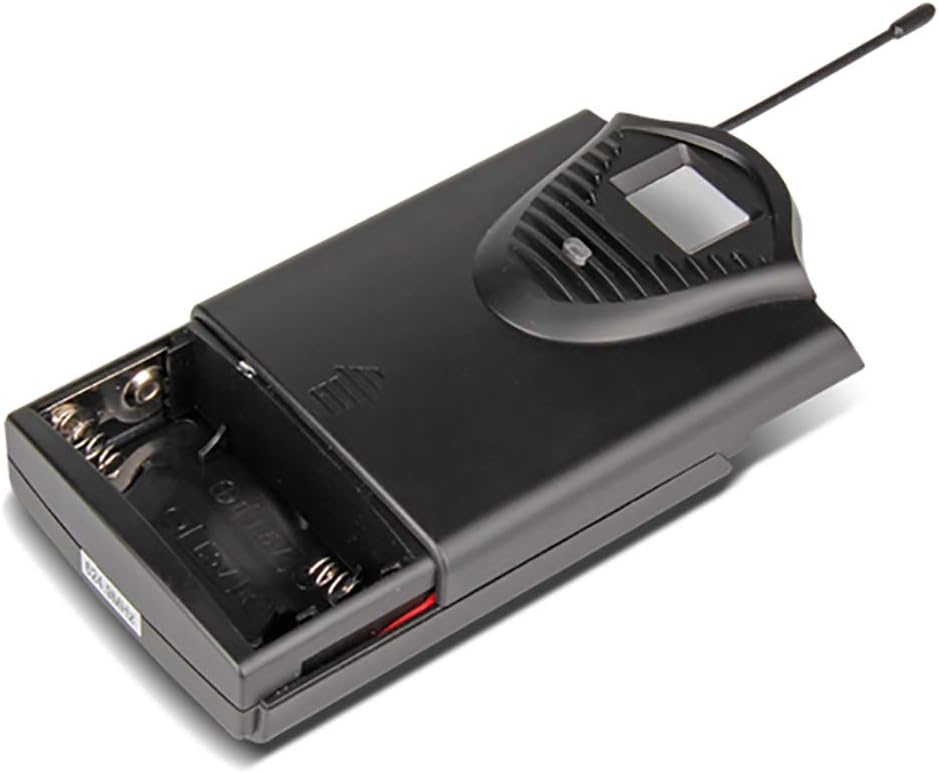
The system includes four bodypack transmitters, each designed for use with either a lavalier or headset microphone. These transmitters are compact, feature an LCD display for battery and operating status, and are powered by two 1.5V batteries, offering up to 8 hours of continuous use.



5. Opstelinstruksies
5.1 Ontvanger Opstelling
- Plasing: Place the receiver on a stable, flat surface, away from potential sources of interference (e.g., computers, Wi-Fi routers). Ensure adequate ventilation around the unit.
- Antenna verbinding: Screw the four included antennas onto the ANT A, ANT B, ANT C, and ANT D connectors on the rear panel of the receiver. Position them vertically for optimal signal reception.
- Kragverbinding: Connect the supplied power adapter to the DC 16V, 400mA input on the rear of the receiver, then plug it into a suitable power outlet.
- Oudio-uitvoer: Koppel die ontvanger aan jou menger, amplifier, or sound system using either the 6.3cm (1/4 inch) mixed output or the individual 6.3cm (1/4 inch) outputs for each channel (OUT A, OUT B, OUT C, OUT D).


5.2 Senderopstelling
- Battery installasie: Open the battery compartment of each bodypack transmitter. Insert two 1.5V AA batteries, ensuring correct polarity. Close the compartment securely.
- Mikrofoonverbinding: Plug the lavalier or headset microphone into the input jack on the bodypack transmitter.
- Krag aan: Turn on the power switch on the bodypack transmitter. The LCD display will illuminate, showing the channel and battery status.
6. Bedryfsinstruksies
- Skakel die stelsel aan: First, power on the receiver. Then, power on each bodypack transmitter.
- Volume aanpassing: Use the individual volume control knobs on the receiver for each channel (CH 01, CH 02, CH 03, CH 04) to adjust the microphone levels. Start with the volume low and gradually increase it to avoid feedback.
- Sein aanwysers: The receiver's LCD display will show the active channel frequencies. The RF (Radio Frequency) and AF (Audio Frequency) indicators will light up when a signal is being received and audio is present, respectively.
- Gebruik: Position the lavalier microphone approximately 6-8 inches from your mouth, or wear the headset microphone comfortably. Speak clearly into the microphone.
- Skakel af: When finished, first turn off the bodypack transmitters, then power off the receiver. This helps prevent pops or thumps through your sound system.
7. Onderhoud
- Skoonmaak: Use a soft, dry cloth to clean the receiver and transmitters. Do not use liquid cleaners or solvents.
- Battery vervanging: Replace batteries in the bodypack transmitters when the low battery indicator appears on the LCD display. Always use fresh, high-quality 1.5V AA batteries.
- Berging: Store the system in a cool, dry place when not in use. Remove batteries from transmitters if storing for extended periods to prevent leakage.
- Antenna sorg: Handle antennas carefully. Avoid bending them excessively.
8. Probleemoplossing
| Probleem | Moontlike oorsaak | Oplossing |
|---|---|---|
| Geen klank vanaf mikrofoon nie | Transmitter or receiver not powered on; low batteries; microphone not connected; receiver output not connected to sound system; volume too low. | Ensure all units are powered on. Replace batteries. Check microphone connection to transmitter. Verify receiver output is connected and sound system is on. Increase receiver and sound system volume. |
| Swak klankgehalte/Interferensie | Interference from other wireless devices; transmitter too far from receiver; antennas not positioned correctly; low batteries. | Move away from other wireless devices. Ensure line of sight between transmitter and receiver. Position antennas vertically. Replace batteries. |
| Kort bedryfsafstand | Obstructions between transmitter and receiver; antennas not positioned correctly; environmental interference. | Ensure clear line of sight. Position antennas vertically. Avoid using in areas with high RF interference. |
| Receiver LCD not displaying | Receiver not powered on; power adapter faulty. | Check power connection and ensure receiver is switched on. Try a different power outlet. |
9. Spesifikasies
9.1 General System
- Aantal kanale: 4 kanale
- Stabiliteit: ± 0.006%
- Normal Deviation: ± 22 kHz
- S/N-verhouding: <120 dB
- THD: <0.6 %
- Frekwensie reaksie: 50 Hz - 15 kHz
- Reeks: 65 XNUMX meter
9.2 Ontvanger
- Sensitiwiteit: > 80 dB
- Oudio-uitvoer: Balanced and Unbalanced (6.3cm mixed output, four 6.3cm individual outputs)
- Kragvereistes: AC 16 V, 400 mA
- Afmetings: 440 x 210 x 40 mm
- Gewig: Ongeveer 1.3 kg
- Materiaal: Metaal
9.3 Wireless Microphone (Transmitter)
- Patroon tipe: Dinamies
- RF -uitset: <10 mW
- Normal Deviation: ± 22 kHz
- Maksimum afwyking: ± 80 kHz
- Battery: 2 x 1.5 V AA-batterye
- Batterylewe: 8 uur
10. Waarborg en Ondersteuning
XTUGA products are designed for reliability and performance. For warranty information and technical support, please refer to the contact details provided with your purchase or visit the official XTUGA webwebwerf. Bewaar u aankoopbewys as bewys van aankoop vir enige waarborgeise.