
HANWHA HCV-6070R
Hanwha Techwin HCV-6070R 2MP Outdoor Vandal-Resistant Dome Camera User Manual
Model: HCV-6070R
Inleiding
This manual provides detailed instructions for the installation, operation, and maintenance of the Hanwha Techwin HCV-6070R 2MP Outdoor Vandal-Resistant Dome Camera. This camera is designed for outdoor security surveillance, offering 2-megapixel resolution, a 2.8-12mm manual varifocal lens, and night vision capabilities with a BNC connection.
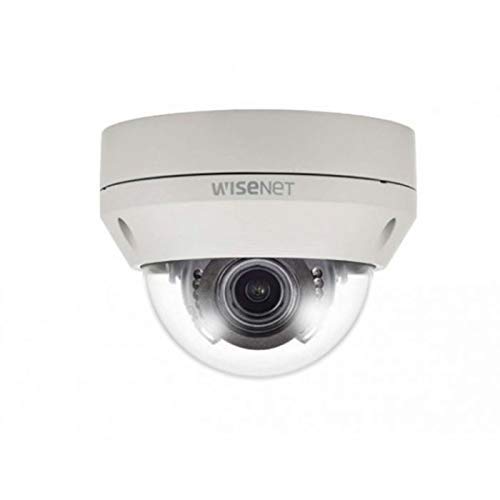
Figure 1: Hanwha Techwin HCV-6070R 2MP Outdoor Vandal-Resistant Dome Camera.
Veiligheidsinligting
Please read all safety instructions carefully before installing or operating the camera. Keep this manual for future reference.
- Ensure the power supply matches the camera's requirements to prevent electrical shock or fire.
- Moenie die kamera blootstel aan uiterste temperature, humiditeit of korrosiewe omgewings nie.
- Installasie moet deur gekwalifiseerde personeel uitgevoer word in ooreenstemming met plaaslike elektriese kodes.
- Avoid direct exposure of the lens to strong light sources for extended periods.
- Moenie probeer om die kamera uitmekaar te haal of te wysig nie. Dit sal die waarborg ongeldig maak.
Pakketinhoud
Verifieer dat alle items in die pakket teenwoordig is:
- Hanwha Techwin HCV-6070R Dome Camera (1 unit)
- Monteer skroewe en ankers
- Installasie sjabloon
- Vinnige Begingids
- Waterproof Cap (if applicable)
Opstelling
1. Monteer die kamera
The HCV-6070R is designed for wall mounting. Choose a suitable outdoor location that provides the desired surveillance coverage and is protected from direct impact.
- Use the provided installation template to mark the drilling holes on the wall.
- Drill holes according to the template and insert the wall anchors.
- Secure the camera base to the wall using the mounting screws.
- Pas die kamera se viewing angle as needed before tightening all screws.
2. Bedrading en verbindings
The camera utilizes a BNC connection for video output and requires a separate power supply. Ensure all connections are secure and weatherproof for outdoor use.
- Videoverbinding: Connect a BNC cable from the camera's BNC port to the video input of your DVR (Digital Video Recorder).
- Kragverbinding: Connect a 12V DC power adapter (not included) to the camera's power input. The camera operates at 8 watts.
- Draadlose konneksie: The camera supports Wi-Fi for remote control and monitoring. Refer to the operating section for initial Wi-Fi setup.

Figuur 2: Example of a BNC coaxial cable for video connection. Ensure a secure connection to the camera and DVR.
3. Aanvanklike konfigurasie
After physical installation and power-up, access the camera settings via your connected DVR or a compatible mobile application (Android controller type specified).
- Stel die datum en tyd in.
- Configure network settings for Wi-Fi connectivity.
- Adjust video quality and recording preferences.
Bedien die kamera
1. Videomonitering en -opname
The camera provides 2MP effective video resolution, capturing video at 1080p and a frame rate of 30 fps. Video is typically recorded in MPEG-4 format.
- Toegang regstreeks view and recorded footage through your connected DVR or the remote control application.
- Ensure your DVR is configured to record from the correct channel.
2. Adjusting Focus and Zoom
The HCV-6070R features a 2.8-12mm manual varifocal lens with optical zoom. Adjustments are made manually on the camera body.
- Loosen the focus and zoom locking screws on the camera lens assembly.
- Adjust the zoom ring to achieve the desired field of view.
- Adjust the focus ring until the image is clear and sharp.
- Tighten the locking screws to secure the settings.
3. Night Vision and Low Light Performance
Equipped with night vision and "Night Color" low light technology, the camera automatically switches to infrared mode in low light conditions to provide clear surveillance footage. The light source type is LED.
- Ensure no obstructions block the infrared LEDs on the camera.
- The camera will automatically activate its infrared illuminators when ambient light levels drop.
4. Bewegingsopsporing
The camera supports motion-only alerts. Configure motion detection zones and sensitivity settings through your DVR or the remote control application.
- Definieer spesifieke areas binne die kamera se view vir bewegingsopsporing.
- Set the sensitivity level to minimize false alarms.
- Configure alert notifications (e.g., email, push notifications) via your DVR or application.
5. Afstandbeheer
The camera can be controlled remotely using a compatible Android application. Ensure the camera is connected to your Wi-Fi network.
- Download and install the Hanwha Techwin mobile application on your Android device.
- Follow the in-app instructions to add and connect to your HCV-6070R camera.
- Deur die toepassing kan jy view leef footage, access recordings, and adjust certain camera settings.
Onderhoud
Gereelde onderhoud verseker optimale werkverrigting en lang lewensduur van jou kamera.
- Maak die lens skoon: Gently wipe the camera lens with a soft, clean, lint-free cloth. For stubborn dirt, use a lens cleaning solution specifically designed for optical surfaces.
- Skoonmaak van die behuising: Clean the camera's exterior housing with a damp lap. Moenie harde chemikalieë of skuur skoonmaakmiddels gebruik nie.
- Kabel inspeksie: Periodically check all cables and connections for signs of wear, damage, or corrosion, especially for outdoor installations.
- Firmware -opdaterings: Check the Hanwha Techwin website for any available firmware updates to ensure your camera has the latest features and security patches.
Probleemoplossing
| Probleem | Moontlike oorsaak | Oplossing |
|---|---|---|
| Geen video-uitvoer nie | No power; Loose BNC connection; Incorrect DVR input selected. | Check power supply; Secure BNC cable; Select correct channel on DVR. |
| Vaag of vaag beeld | Lens out of focus; Dirty lens. | Manually adjust focus (refer to Operating section); Clean the lens. |
| Nagvisie werk nie | IR LEDs blocked; Insufficient power; Camera stuck in day mode. | Clear obstructions; Verify power supply; Restart camera. |
| Bewegingsopsporing aktiveer nie | Incorrect sensitivity settings; Motion detection zone not configured. | Adjust sensitivity; Configure motion detection zones in DVR/app. |
| Cannot connect via Wi-Fi | Incorrect Wi-Fi password; Camera out of range; Network issues. | Verify Wi-Fi credentials; Move camera closer to router; Check network status. |
Spesifikasies
| Model | HCV-6070R |
| Handelsmerk | HANWHA Techwin |
| Effektiewe video-resolusie | 2 MP (1080p) |
| Raamtempo | 30 fps |
| Lens tipe | 2.8-12mm Manual Varifocal Lens |
| Fokus Tipe | Handmatige fokus |
| Zoem tipe | Optiese zoom |
| Verbindingstegnologie | Wireless (Wi-Fi), BNC Connection |
| Kragbron | Manual (requires external 12V DC power adapter) |
| Wattage | 8 watt |
| Binne/buiteluggebruik | Buitelug |
| Spesiale kenmerk | Night Vision (Night Color low light technology) |
| Vormfaktor | Koepel |
| Montage tipe | Muurmontering |
| Versoenbare toestelle | DVR |
| Beheer metode | Remote (Android Controller Type) |
| Internasionale Beskermingsgraad | IP54 |
| Fotosensortegnologie | CMOS |
| Video-opname-formaat | MPEG-4 |
| Alerttipe | Slegs beweging |
Waarborg en Ondersteuning
For warranty information and technical support, please refer to the official Hanwha Techwin webwebwerf of kontak hul kliëntediens direk. Bewaar u aankoopbewys as bewys van aankoop vir waarborgeise.
Vervaardiger: Hanwha
Eerste datum beskikbaar: 19 Februarie 2019
Ask a question about this manual
Ask about setup, troubleshooting, compatibility, parts, safety, or missing instructions. Manuals+ will review the question and use this page’s manual context to help answer it.