
Slim 425
Smart Kingfisher Rechargeable Lithium Battery and USB Charger User Manual
Inleiding
This manual provides essential instructions for the safe and efficient use of your Smart Kingfisher Rechargeable Lithium Battery and USB Charger. Please read this manual thoroughly before use and retain it for future reference.
Veiligheidsinligting
- Waarskuwing: Moenie probeer om nie-herlaaibare batterye te laai nie.
- Waarskuwing: Do not charge batteries from other suppliers unless explicitly stated as compatible.
- Keep the charger and batteries away from water and moisture.
- Do not disassemble, crush, or puncture the batteries or charger.
- Avoid exposing batteries to extreme temperatures or direct sunlight.
- Gooi batterye verantwoordelik weg volgens plaaslike regulasies.
Pakketinhoud
Verifieer dat alle items in jou pakket teenwoordig is:
- 2 x 425 Rechargeable Lithium Batteries
- 1 x Dual-Port USB Charger
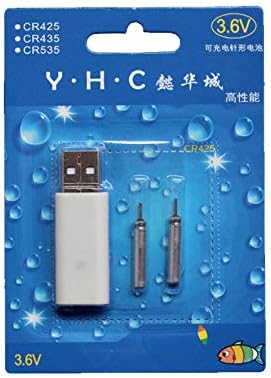
Image: Retail packaging showing the USB charger and two 425 rechargeable batteries.

Image: A pair of Smart Kingfisher 425 rechargeable lithium batteries.
Opstelling
The Smart Kingfisher USB charger is designed for ease of use. No complex setup is required.
- Identify the USB charger and the 425 rechargeable batteries.
- Connect the USB charger to a compatible power source (see "Operating Instructions" for options).

Image: The USB charger unit with its two charging pins visible.
Bedryfsinstruksies
Laai die batterye
The charger features two ports, allowing for simultaneous charging of two batteries.
- Insert the 425 rechargeable batteries into the charging ports of the USB charger. Ensure a secure connection.
- Connect the USB charger to a power source. Compatible power sources include:
- USB power adapter (wall charger)
- Kragbank
- Motorlaaier
- Laptop or PC USB port
- Observe the LED indicator on the charger:
- A groen LED indicates that the batteries are currently charging.
- A rooi LED indicates that the batteries are fully charged.
- Laai neem gewoonlik ongeveer 3 uur vir 'n volle lading.
- Once fully charged, disconnect the charger from the power source and remove the batteries.
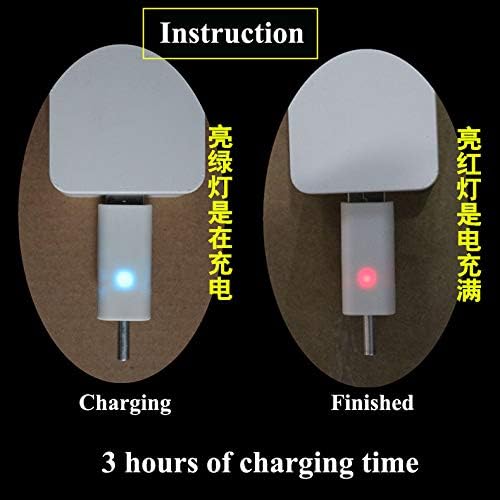
Image: Visual guide for charging status: green light for charging, red light for fully charged. Indicates a 3-hour charging time.

Image: Diagram illustrating multiple methods for charging the device, including car chargers, wall adapters, power banks, and laptops.
Onderhoud
- Clean the charger and batteries with a dry, soft cloth. Do not use liquids or abrasive cleaners.
- Store the batteries and charger in a cool, dry place when not in use.
- Avoid storing fully discharged batteries for extended periods to prolong their lifespan.
Probleemoplossing
| Probleem | Moontlike oorsaak | Oplossing |
|---|---|---|
| Batteries not charging (no LED indication) |
|
|
| Charging takes longer than 3 hours |
|
|
| Red LED does not turn on after extended charging |
|
|
Spesifikasies
- Materiaal: Plastiek
- Produk gewig: 20 g (total for charger and batteries)
- Battery tipe: 425 Rechargeable Lithium Battery (compatible with CR425, CR435, CR535)
- tipe laaier: USB-laaier met dubbele poort
- Invoer: USB (compatible with various USB power sources)
- Laai aanwyser: Green LED (charging), Red LED (fully charged)
- Benaderde laaityd: 3 uur
Waarborg en Ondersteuning
Vir waarborginligting of tegniese ondersteuning, verwys asseblief na die kleinhandelaar se terugkeerbeleid of kontak die vervaardiger direk. Bewaar u aankoopbewys as bewys van aankoop.
Vir verdere hulp kan u die product page on Amazon.com.mx.