
1. Inleiding
This manual provides essential information for the setup, operation, and maintenance of your Blackweb BWC18SB001 2.0 Channel Google Assistant Smart Soundbar. Please read these instructions carefully before using the product to ensure proper functionality and to maximize your audio experience. This smart soundbar integrates speaker functionality with Google Assistant capabilities, enhancing your home entertainment system.
2. Wat is in die boks
Verifieer dat alle komponente teenwoordig is tydens uitpak:
- Swartweb BWC18SB001 2.0 Channel Google Assistant Smart Soundbar
- Afstandbeheer
- Kragadapter
- Relevant Audio Cables (e.g., Optical, Aux)
- Gebruikershandleiding (hierdie dokument)
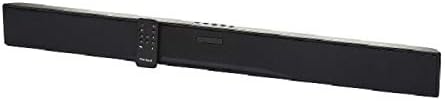
Image: The Blackweb BWC18SB001 Smart Soundbar, shown with its included remote control. The soundbar is black and rectangular, designed to sit beneath a television.
3. Produkkenmerke
- 2.0-kanaal klank: Delivers clear stereo sound for an enhanced listening experience.
- Geïntegreerde Google Assistent: Control your soundbar and smart home devices using voice commands.
- Veelvuldige verbindingsopsies: Supports HDMI, Optical, AUX, and Bluetooth for versatile audio input.
- Beheermetodes: Features on-device buttons and a dedicated remote control for easy operation.
- Kompakte ontwerp: Designed to fit seamlessly into your home theater setup.
4. Opstelling
4.1 Plasing
Place the soundbar on a stable, flat surface directly in front of your television or mount it on a wall (mounting hardware not included). Ensure there is adequate ventilation around the unit.
4.2 Kragverbinding
- Koppel die kragadapter aan die DC IN-poort aan die agterkant van die klankbalk.
- Steek die ander kant van die kragadapter in 'n muuraansluiting.
4.3 Oudioverbinding
Kies een van die volgende metodes om jou klankbalk aan jou TV of ander klankbron te koppel:
- HDMI (Aanbeveel): Connect an HDMI cable (not included) from the HDMI ARC port on your TV to the HDMI ARC port on the soundbar. This allows for high-quality audio and control via your TV remote.
- Opties: Connect an Optical cable (included) from the OPTICAL OUT port on your TV to the OPTICAL IN port on the soundbar.
- AUX: Connect a 3.5mm audio cable (included) from the AUX OUT port on your TV or audio device to the AUX IN port on the soundbar.
5. Bedryfsinstruksies
5.1 Krag aan/af
- Druk die aan / af-knoppie (U) on the soundbar or the remote control to turn the unit on or off.
- A green indicator light on the soundbar signifies that it is powered on.
5.2 Volumebeheer
- Gebruik die Volume Op (VOL+) en Volume Verlaag (VOL-) buttons on the soundbar or remote control to adjust the volume.
- Druk die Mute-knoppie (X) on the remote to mute or unmute the sound.
5.3 Invoerkeuse
Druk die Invoer-knoppie (M) on the soundbar or the corresponding input buttons (AUX, OPTICAL, HDMI, Bluetooth) on the remote control to switch between audio sources.
6. Google Assistent-integrasie
Jou Swartweb soundbar features integrated Google Assistant. To activate, ensure the soundbar is connected to your home Wi-Fi network (refer to the separate Google Home app setup guide for detailed instructions). Once connected, you can use voice commands:
- Say "Hey Google" or "Ok Google" followed by your command.
- Examples: "Hey Google, play music," "Ok Google, what's the weather?" "Hey Google, turn up the volume."
You can also mute the Google Assistant microphone using the dedicated button on the soundbar or remote control if you prefer privacy.
7. Bluetooth-verbinding
Om 'n Bluetooth-toestel te koppel:
- Druk die Bluetooth-knoppie (BT) on the remote control or cycle through inputs on the soundbar until "BT" is displayed or indicated. The soundbar will enter pairing mode.
- Aktiveer Bluetooth op jou mobiele toestel (slimfoon, tablet, skootrekenaar) en soek vir beskikbare toestelle.
- Select "Blackweb BWC18SB001" from the list of devices.
- Sodra dit gekoppel is, sal die klankbalk 'n suksesvolle verbinding aandui, en jy kan klank vanaf jou toestel speel.
Die Bluetooth-reikwydte is ongeveer 10 meter (33 voet).
8. Onderhoud
To ensure the longevity and optimal performance of your soundbar:
- Skoonmaak: Use a soft, dry cloth to wipe the exterior of the soundbar. Do not use liquid cleaners or abrasive materials.
- Ventilasie: Ensure that the ventilation openings are not blocked.
- Omgewing: Avoid exposing the soundbar to extreme temperatures, humidity, or direct sunlight.
9. Probleemoplossing
- Geen krag: Ensure the power adapter is securely connected to both the soundbar and a working wall outlet.
- Geen klank:
- Check that the soundbar is powered on and not muted.
- Verifieer dat die korrekte invoerbron op die klankbalk gekies is.
- Ensure audio cables (HDMI, Optical, AUX) are securely connected to both the soundbar and your TV/audio source.
- Adjust the volume on both the soundbar and your TV/audio source.
- Bluetooth verbind nie:
- Maak seker dat die klankbalk in Bluetooth-paringsmodus is.
- Maak seker dat jou toestel se Bluetooth geaktiveer en binne bereik is.
- Probeer om die toestel te ontkoppel en weer te koppel.
- Google Assistent reageer nie:
- Gaan jou Wi-Fi-verbinding na.
- Ensure the Google Assistant microphone is not muted.
- Verify the soundbar is properly set up in the Google Home app.
10. Spesifikasies
| Kenmerk | Spesifikasie |
|---|---|
| Model Naam | BWC18SB001 |
| Tipe luidspreker | Klankbalk |
| Surround Sound Channel-konfigurasie | 2.0 |
| Beheer metode | Voice, Remote, On-device Buttons |
| Verbindingstegnologie | HDMI, Optical, AUX, Bluetooth |
| Bluetooth-reeks | 10 meter |
| Luidspreker Maksimum uitsetkrag | 150 Watt |
| Klankuitvoermodus | Stereo, Omring |
| Kragbron | Elektries met koord |
| Produk afmetings | 32 x 2.77 x 3.26 duim |
| Item gewig | 3.97 pond |
| UPC | 681131237703 |
11. Waarborg en Ondersteuning
For warranty information and technical support, please refer to the documentation provided at the time of purchase or visit the official Blackweb webwebwerf. Bewaar u bewys van aankoop vir waarborgeise.