
1. Inleiding
This user manual provides comprehensive instructions for the setup, operation, and maintenance of your SHARP LC-32HI5012E HD Ready Smart LED TV. Please read this manual thoroughly before using your television to ensure proper functionality and safety.
The SHARP LC-32HI5012E is an 81 cm (32-inch) HD Ready Smart LED TV featuring Active Motion 200 technology for enhanced picture quality and a Triple Tuner for versatile reception options. It includes integrated Wi-Fi and a Harman/Kardon sound system for a complete entertainment experience.
2. Pakketinhoud
Nadat u die pakkie oopgemaak het, maak asseblief seker dat al die volgende items ingesluit is:
- SHARP LC-32HI5012E Main Unit
- Afstandsbediening (met batterye)
- Gebruikershandleiding (hierdie dokument)

Beeld: Voorkant view of the SHARP LC-32HI5012E television, displaying a vibrant city skyline on its screen. This image shows the slim bezel design and the central SHARP logo.
3. Opstelling
3.1 Montering van die Staanplek
Carefully place the TV screen-down on a soft, flat surface to prevent damage. Attach the two stand feet to the designated slots at the bottom of the TV, securing them with the provided screws. Ensure the stand is firmly attached before proceeding.
3.2 Aansluiting van randapparatuur
Your TV offers various connection options for external devices:
- HDMI-poorte (x3): Koppel Blu-ray-spelers, speletjiekonsoles of dekodeerders.
- USB-poorte (x2): Vir mediaweergawe vanaf USB-skywe.
- Antenna In (RF): Connect your terrestrial antenna for DVB-T/T2HD reception.
- Sat In: Connect your satellite dish for DVB-S/S2 reception.
- RJ45 (LAN): Vir bedrade internetverbinding.
- CI+ Poort: For conditional access modules (CAM) to view geënkripteerde kanale.
- Mini Component/YPbPr, Mini AV Composite: Vir ouer analoog toestelle.
- Digitale optiese oudio-uitset: Vir die koppeling aan eksterne klankstelsels.
- Audio out / Headphone: Vir oorfone of eksterne luidsprekers.

Beeld: Agter view of the SHARP LC-32HI5012E television, highlighting the arrangement of various input and output ports for connecting external devices.
3.3 Aanvanklike Aanskakeling en Eerste Opstelling
After connecting all necessary cables, plug the power cord into an electrical outlet. Press the power button on the remote control or the TV. The first-time setup wizard will guide you through:
- Taalkeuse.
- Netwerkverbinding (Wi-Fi of bedrade LAN).
- Channel scanning for DVB-C, DVB-S/S2, or DVB-T/T2HD.
- Tydsone en ander basiese instellings.
4. Bedryfsinstruksies
4.1 Basiese TV-funksies
- Krag aan/af: Gebruik die aan/af-knoppie op die afstandbeheerder of TV.
- Volumebeheer: Gebruik die VOL +/- knoppies.
- Kanaalkeuse: Use CH +/- or number buttons.
- Invoerbron: Press the SOURCE button to switch between HDMI, AV, TV, etc.
- Kieslysnavigasie: Use arrow keys and OK button to navigate menus.
4.2 Slim-TV-funksies
Your SHARP LC-32HI5012E is equipped with integrated Wi-Fi and offers access to various smart features:
- Vooraf geïnstalleerde toepassings: Access popular streaming services like Netflix and YouTube directly.
- Web Blaaier: Blaai direk deur die internet vanaf jou TV.
- Aquos Net+: Access additional online content and services provided by Sharp.
Maak seker dat jou TV aan die internet gekoppel is vir volle Smart TV-funksionaliteit.
4.3 Oudiostelsel
The integrated Harman/Kardon sound system provides a high-quality audio experience with excellent dynamics and clarity. Adjust audio settings in the TV menu to customize your sound preferences.
5. Onderhoud
5.1 Skoonmaak van die skerm
Om die skerm skoon te maak, vee dit liggies af met 'n sagte, pluisvrye lap. Vir hardnekkige merke, vee dit effens af.ampMaak die lap skoon met water of 'n gespesialiseerde skermreiniger. Moenie spuit vloeistof direk op die skerm.
5.2 Algemene sorg
- Hou die TV weg van direkte sonlig en hittebronne.
- Verseker voldoende ventilasie rondom die TV.
- Ontkoppel die TV van die kragtoevoer tydens weerligstorms of wanneer dit vir lang tye sonder toesig gelaat word.
6. Probleemoplossing
If you encounter any issues with your TV, please refer to the following common problems and solutions before contacting support.
| Probleem | Moontlike oorsaak | Oplossing |
|---|---|---|
| Geen krag | Power cord unplugged, power outlet issue. | Kontroleer die kragkabelverbinding. Probeer 'n ander aansluiting. |
| Geen Beeld, maar Klank Is Teenwoordig | Verkeerde invoerbron, foutiewe kabel. | Verify correct input source. Check HDMI/AV cable connections. |
| Geen klank nie | Volume gedemp of te laag, probleem met eksterne oudiostelsel. | Unmute volume, increase volume. Check external audio connections. |
| Kan nie aan Wi-Fi koppel nie | Incorrect password, router issue, TV too far from router. | Re-enter password. Restart router. Move TV closer or use wired connection. |
7. Spesifikasies
| Kenmerk | Detail |
|---|---|
| Handelsmerk | SKERP |
| Modelnommer | LC-32HI5012E |
| Skermtegnologie | LED |
| Resolusie | HD-gereed (1366 x 768 piksels) |
| Skerm diagonaal | 81.3 cm (32 duim) |
| Herlaaitempo | 60 Hz |
| Spesiale kenmerk | Internet (Smart TV) |
| Ondersteunde internetdienste | Netflix, YouTube, Browser |
| Verbindingstegnologie | USB, HDMI, LAN, Wi-Fi |
| Tuners | DVB-C, DVB-S/S2, DVB-T/T2HD |
| Oudiostelsel | Harman/Kardon |
| Produkafmetings (B x H x D) | 74 x 49.1 x 18 cm (met staander) |
| Gewig | 4.8 kilogram |
| Montage tipe | Tafelberg |
7.1 Energie-doeltreffendheid
The SHARP LC-32HI5012E has an energy efficiency rating of F. For detailed energy consumption information, please refer to the energy label and product information sheet.

Image: Energy efficiency label for the SHARP LC-32HI5012E television, showing its energy class F and power consumption details.
Vir meer besonderhede, besoek die amptelike EPREL-databasis: https://eprel.ec.europa.eu/qr/402565
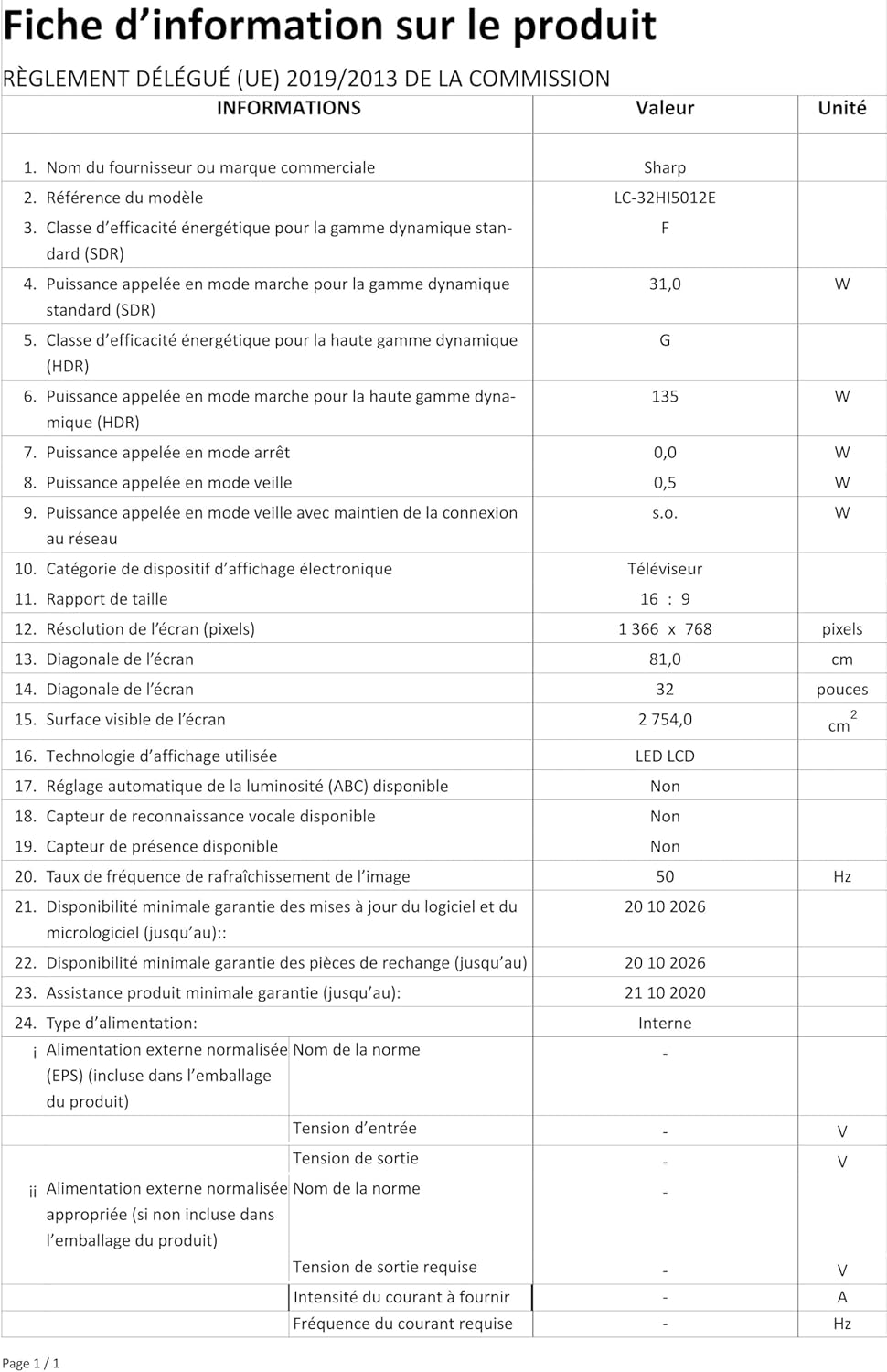
Image: Product information sheet detailing technical specifications and compliance information for the SHARP LC-32HI5012E television.
8. Waarborg en Ondersteuning
For warranty information, please refer to the warranty card included with your product or visit the official SHARP webwebwerf. Bewaar u aankoopbewys as bewys van aankoop vir enige waarborgeise.
For technical support or service inquiries, please contact SHARP customer service. Contact details can typically be found on the SHARP official webwebwerf of in die produkverpakking.