
1. Inleiding
The Zerone Sport Action DV Camera is a compact and portable device designed for capturing high-definition video during various outdoor activities. Featuring 1080P and 720P recording options, a 120-degree wide-angle lens, and an IPX-4 waterproof aluminum alloy shell, this camera is built for durability and ease of use. It includes a built-in microphone for audio recording and provides vibration feedback for operational status.
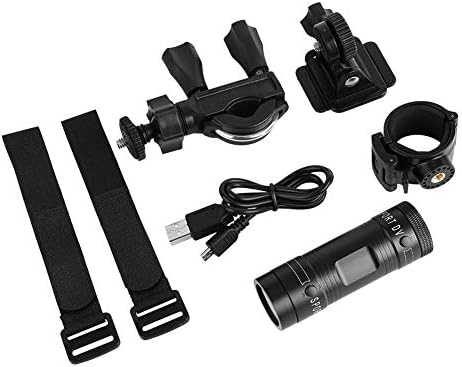
Image 1.1: The Zerone Sport Action DV Camera unit.
2. Veiligheidsinligting
- Moenie die kamera vir lang tye aan uiterste temperature of direkte sonlig blootstel nie.
- While the camera features an IPX-4 waterproof rating, it is designed to withstand splashes and light rain. Do not submerge or soak the camera in water.
- Hou die toestel weg van sterk magnetiese velde.
- Use only the specified charging cable and power adapter to prevent damage.
- Moenie probeer om die kamera uitmekaar te haal of te wysig nie, aangesien dit die waarborg ongeldig sal maak en skade kan veroorsaak.
- Bêre die kamera op 'n droë, koel plek wanneer dit nie gebruik word nie.
3. Pakketinhoud
Kontroleer asseblief die pakket om seker te maak dat alle items teenwoordig is:
- Zerone Sport Action DV Camera Unit
- USB-laaikabel
- Mounting Accessories (e.g., bike mount, helmet mount, strap mounts)
- Rechargeable Battery (may be pre-installed)
- Gebruikershandleiding (hierdie dokument)
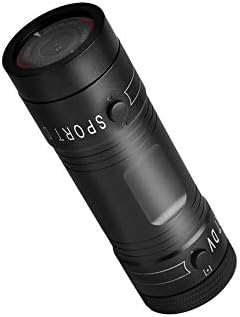
Image 3.1: Contents of the Zerone Sport Action DV Camera package, showing the camera, USB cable, and various mounting options.
4. Kamera oorview
Maak jouself vertroud met die kamera se komponente en kontroles.
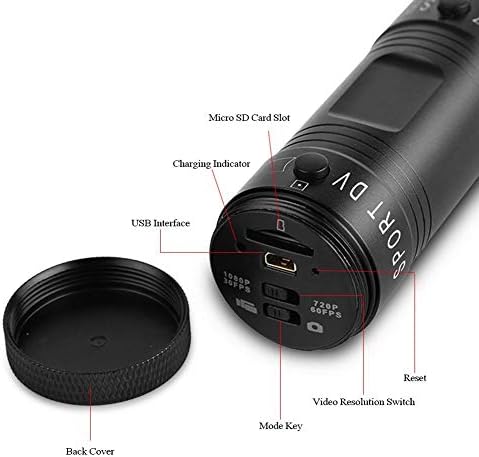
Beeld 4.1: Gedetailleerd view of the camera's rear end, highlighting the Micro SD card slot, USB interface, charging indicator, mode key, video resolution switch (1080P 30fps / 720P 60fps), and reset button.
- Micro SD -kaartgleuf: Insert your Micro SD card here. A card is required for operation.
- Laai aanwyser: Displays charging status. A red light indicates charging; it turns off when fully charged.
- USB-koppelvlak: Vir laai en koppeling aan 'n rekenaar.
- Modussleutel: Used to switch between recording modes (e.g., video, photo).
- Video Resolution Switch: Selects between 1080P 30fps and 720P 60fps recording resolutions.
- Herstel-knoppie: Word gebruik om die toestel terug te stel as dit nie meer reageer nie.
- Power Button (Front): Located on the front side of the camera.
- Record/Stop Button (Back): Located on the back side of the camera.
5. Opstelling
5.1 Laai die battery
- Connect the camera to a USB power source (e.g., computer, wall adapter) using the provided USB cable.
- Die rooi lig on the back of the camera will illuminate, indicating that it is charging.
- Sodra dit ten volle gelaai is, sal die rooi lig afskakel.
- Note: If the camera blinks red and blue when plugged in, it indicates that an SD card is not inserted. This is not a charging indicator.
5.2 Invoeging van 'n Micro SD-kaart
A Micro SD card (not included) is required for recording video and photos. The camera supports Micro SD cards up to a certain capacity (check product packaging for maximum supported size, typically 32GB or 64GB for similar devices).
- Skroef die agterblad van die kamera af.
- Locate the Micro SD card slot (refer to Image 4.1).
- Steek die Micro SD-kaart versigtig in die gleuf totdat dit in plek klik. Maak seker dat die kaart korrek georiënteer is.
- Replace the back cover, ensuring it is securely tightened to maintain water resistance.
5.3 Montering van die kamera
The camera comes with various mounting accessories for different applications.
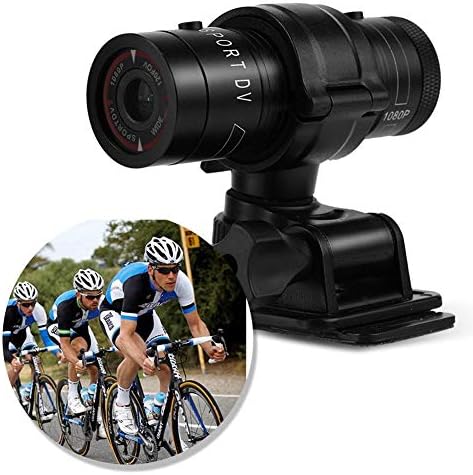
Image 5.1: The camera attached to a bicycle handlebar, demonstrating one of its mounting options.
- Bike Mount: Gebruik die clamp mount to attach the camera securely to bicycle handlebars or other tubular structures.
- Helmet Mount: Utilize the adhesive or strap mounts to fix the camera to a helmet.
- Strap Mounts: For attaching to various gear or body parts.
Ensure all mounts are securely fastened before engaging in activities to prevent the camera from falling.
6. Bedien die kamera
6.1 Krag aan/af
- Om aan te skakel, hou die Kragknoppie (front switch) until the camera vibrates.
- Druk en hou die. In om uit te skakel Kragknoppie again until the camera vibrates once.
6.2 Selecting Video Resolution
Before recording, select your desired video resolution using the switch on the back of the camera (refer to Image 4.1).
- Skuif die skakelaar na "1080P 30fps" for Full HD video at 30 frames per second.
- Skuif die skakelaar na "720P 60fps" for HD video at 60 frames per second.
6.3 Opname van video
- Maak seker dat die kamera aangeskakel is.
- Druk die Rekord/Stop-knoppie (back switch) to start recording. The camera will vibrate three times to indicate recording has started.
- Druk op die om die opname te stop Rekord/Stop-knoppie again. The camera will vibrate once to indicate recording has stopped.
6.4 Koppel aan 'n rekenaar
Om oor te dra files or access recorded content:
- Maak seker dat die kamera afgeskakel is.
- Koppel die kamera aan jou rekenaar met die meegeleverde USB-kabel.
- The camera will be recognized as a removable storage device.
- You can then access and transfer your video files.
7. Onderhoud
- Skoonmaak: Gebruik 'n sagte, droë lap om die kamera se behuising skoon te maak. Vir die lens, gebruik 'n gespesialiseerde lensskoonmaaklap en -oplossing. Vermy skuurmiddels.
- Berging: When not in use for extended periods, store the camera in a cool, dry place. Ensure the battery is partially charged (around 50%) to prolong its lifespan.
- Waterweerstand: Regularly check that the back cover is securely tightened to maintain the IPX-4 water resistance. Avoid exposing the USB port or SD card slot to moisture when the cover is open.
- Batterysorg: Avoid fully discharging the battery frequently. Recharge it when the low battery indicator appears.
8. Probleemoplossing
| Probleem | Moontlike oorsaak | Oplossing |
|---|---|---|
| Kamera skakel nie aan nie. | Battery is leeg. | Laai die kamera volledig. |
| Camera blinks red and blue, then turns off. | No Micro SD card inserted or card is faulty. | Insert a functional Micro SD card. Ensure it is properly seated. |
| Kan nie video opneem nie. | Geen Mikro SD-kaart, kaart vol of kaartfout nie. | Insert a Micro SD card, delete old files, or format the card (this will erase all data). |
| Swak video kwaliteit. | Lens is dirty; low light conditions; incorrect resolution setting. | Clean the lens. Ensure adequate lighting. Select 1080P resolution for higher detail. |
| Kamera reageer nie. | Sagtewarefout. | Use a thin object (like a paperclip) to press the Herstel-knoppie (refer to Image 4.1). |
9. Spesifikasies
| Kenmerk | Detail |
|---|---|
| Handelsmerk | Nul |
| Modelnommer | Zeronefg3h149y2s |
| Video-opname-resolusie | 1080p (30fps), 720p (60fps) |
| Lenshoek | 120-degree A+ grade wide-angle |
| Waterdigte gradering | IPX-4 (splash-proof) |
| Skulpmateriaal | Aluminiumlegering |
| Fotosensortegnologie | CMOS |
| Maksimum diafragma | 1.8 millimeter |
| Tipe flitsgeheue | Micro SD (card not included) |
| Video-opname-formaat | AVI |
| Ondersteunde oudioformaat | AAC, MP3, PCM, FLAC, or Dolby Digital/AC-3 |
| Verbindingstegnologie | USB |
| Item gewig | 10.8 onse (ongeveer 306 gram) |
| Produk afmetings | 11.81 x 6.3 x 5.91 duim (ongeveer 30 x 16 x 15 cm) |
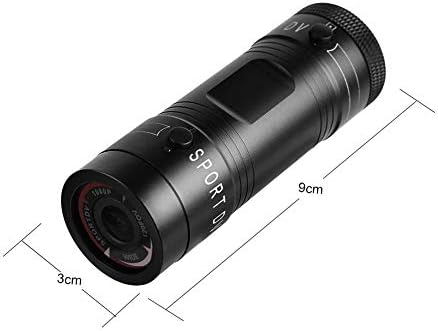
Image 9.1: Physical dimensions of the camera, showing a length of 9cm and a diameter of 3cm.
10. Waarborg en Ondersteuning
Vir waarborginligting en tegniese ondersteuning, verwys asseblief na die dokumentasie wat saam met u aankoop verskaf is of kontak die kleinhandelaar/vervaardiger direk. Bewaar u bewys van aankoop vir waarborgeise.
Manufacturer: Zerone
For further assistance, you may visit the Zerone Store on Amazon: Zerone Store