
Inleiding
This manual provides instructions for the ALLIMITY AA59-00741A and AA59-00742A replacement remote control. This remote is designed to function as a direct replacement for various Samsung TV models, offering immediate usability without complex setup procedures. Please read this manual thoroughly to understand the remote's features and operation.
Produk verbyview
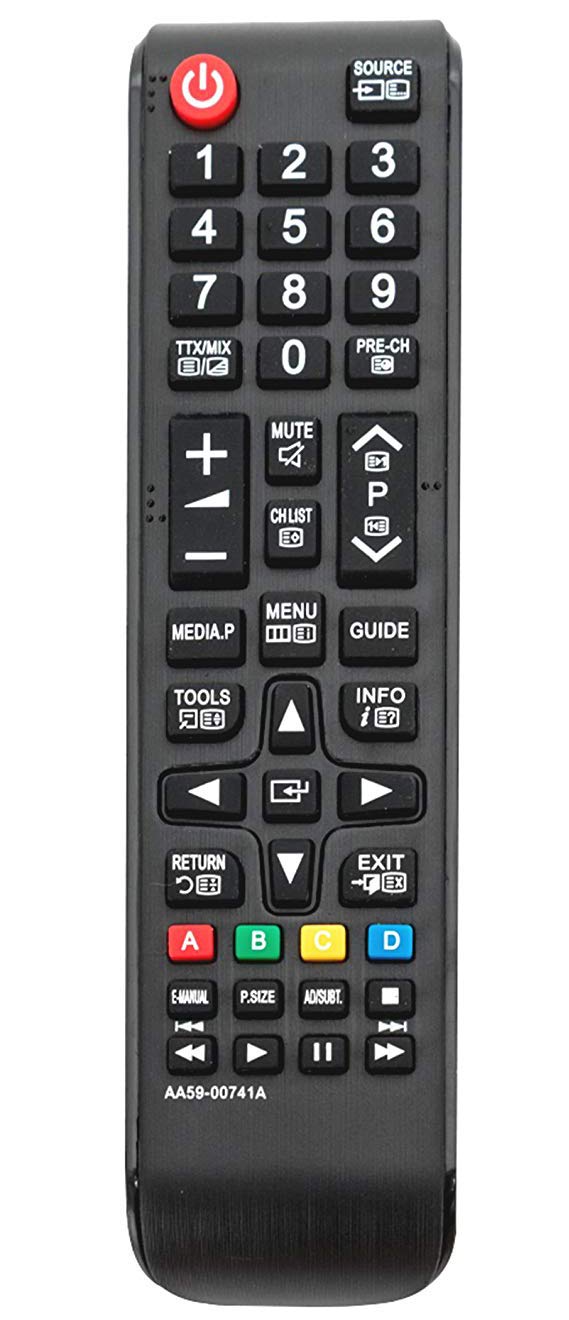
Prent 1: Voorkant view of the ALLIMITY AA59-00741A / AA59-00742A replacement remote control. The remote is black with clearly labeled buttons for power, source, numerical input, volume, channel, menu, navigation, and media playback functions.
The ALLIMITY AA59-00741A / AA59-00742A remote control features a standard layout for ease of use. Key functional areas include:
- Power Button (Red, Top Left): Skakel die TV aan of af.
- Source Button (Top Right): Kies invoerbronne (HDMI, AV, ens.).
- Numeriese sleutelbord (0-9): Vir direkte kanaalinvoer.
- Volume op/af (+/-): Verstel klankvolume.
- Channel Up/Down (P^/P˅): Verander TV-kanale.
- Demp-knoppie: Maak die TV-klank stil.
- Kieslys-knoppie: Kry toegang tot die TV se hoofkieslys.
- Directional Pad (Up, Down, Left, Right, Enter): For navigating menus and selections.
- Terugkeer-knoppie: Gaan terug na die vorige skerm of kieslys.
- Uitgangsknoppie: Verlaat die huidige kieslys of funksie.
- Mediaterugspeelkontroles: Speel, Pouseer, Stop, Spoel vorentoe, Spoel terug.
- Gekleurde knoppies (A, B, C, D): For specific functions within certain TV applications or menus.
Opstelling
- Battery installasie:
Locate the battery compartment on the back of the remote control. Slide the battery cover downwards or outwards to open it.
Insert two (2) AAA alkaline batteries, ensuring the positive (+) and negative (-) terminals align correctly with the markings inside the compartment.
Maak die batteryklep toe deur dit terug te skuif totdat dit stewig klik.
- Aanvanklike gebruik:
This remote control is designed to work with compatible Samsung TV models without any programming or pairing. Once batteries are installed, it is ready for immediate use.
Bedryfsinstruksies
Point the remote control directly at your Samsung TV's infrared receiver for optimal performance. Ensure there are no obstructions between the remote and the TV.
- Krag aan/af: Druk die Krag knoppie een keer.
- Veranderende kanale: Gebruik die P^ (Channel Up) or P˅ (Channel Down) buttons. Alternatively, use the numeric keypad to enter a channel number directly.
- Verstel volume: Druk die + (Volume Up) or - (Volume Down) buttons.
- Demp oudio: Druk die Demp button to temporarily silence the TV. Press again to restore audio.
- Kies invoerbron: Druk die Bron knoppie om deur beskikbare invoerbronne te blaai (bv. HDMI1, HDMI2, AV).
- Toegang tot Menu's: Druk die Spyskaart button to open the TV's main menu. Use the directional pad and Voer in button to navigate and select options.
- Mediaspeel: Use the dedicated media control buttons (Play, Pause, Stop, Rewind, Fast Forward) when watching content from a connected media device or USB.
Onderhoud
- Battery vervanging: Replace batteries when the remote's response becomes sluggish or stops working. Always replace both batteries with new AAA alkaline batteries.
- Skoonmaak: Wipe the remote control with a soft, dry cloth. Do not use liquid cleaners or abrasive materials, as they may damage the remote.
- Berging: Store the remote in a cool, dry place away from direct sunlight and extreme temperatures. If not used for an extended period, remove the batteries to prevent leakage.
Probleemoplossing
- Afstandsbediening reageer nie:
Kontroleer of die batterye korrek met die korrekte polariteit geplaas is.
Vervang ou batterye met nuwe AAA alkaliese batterye.
Ensure there is a clear line of sight between the remote control and the TV's infrared sensor.
Verify that the remote control model (AA59-00741A / AA59-00742A) is compatible with your specific Samsung TV model.
- Intermitterende werking: Dit dui dikwels op lae batterykrag. Vervang die batterye.
- Spesifieke knoppies werk nie: Check for any physical obstructions or debris under the button. If the issue persists after cleaning and battery replacement, the remote may require replacement.
Spesifikasies
| Kenmerk | Detail |
|---|---|
| Handelsmerk | ALLIMITEIT |
| Modelnommers | AA59-00741A, AA59-00742A |
| Verbindingstegnologie | Infrarooi (IR) |
| Versoenbare toestelle | Various Samsung TV models (refer to product description for full list) |
| Spesiale kenmerk | Geen programmering benodig nie |
| Battery Tipe | 2 x AAA alkaliese batterye (nie ingesluit nie) |
| Maksimum reeks | Approximately 10 Meters (33 feet) |
| Knoppie Hoeveelheid | 20 |
Waarborg en Ondersteuning
For warranty information or technical support, please refer to the seller's policy on the purchase platform or contact the manufacturer directly. Keep your purchase receipt as proof of purchase.