
1. Inleiding
Thank you for choosing the Generic Tronsmart Element Pixie Wireless Bluetooth Speaker. This manual provides essential information for setting up, operating, and maintaining your speaker. Please read it carefully before use to ensure optimal performance and longevity of your device.
2. Veiligheidsinligting
- Moenie die luidspreker blootstel aan uiterste temperature, humiditeit of direkte sonlig nie.
- Vermy om die luidspreker te laat val of aan sterk impakte te onderwerp.
- Do not disassemble, repair, or modify the speaker yourself. Contact qualified service personnel if needed.
- Hou die luidspreker weg van water en ander vloeistowwe. Hierdie produk is nie waterdig nie.
- Gebruik slegs die gespesifiseerde laaikabel en adapter.
- Gooi die produk en sy battery verantwoordelik weg volgens plaaslike regulasies.
3. Pakketinhoud
Kontroleer asseblief die pakket vir die volgende items:
- Generic Tronsmart Element Pixie Wireless Bluetooth Speaker
- USB-laaikabel
- Gebruikershandleiding (hierdie dokument)
Note: Contents may vary slightly depending on region.
4. Produk verbyview
Familiarize yourself with the components of your speaker.
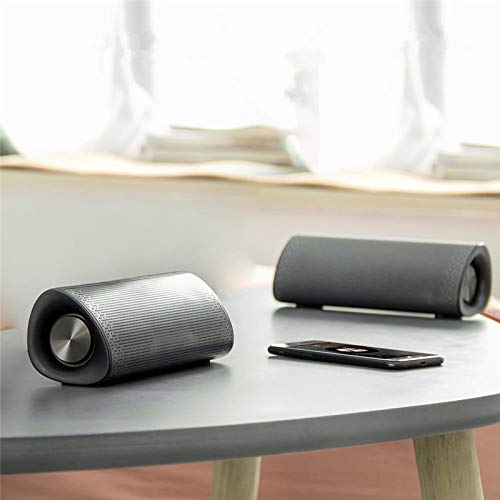
Figuur 4.1: Voorkant view of the Tronsmart Element Pixie speaker, showing the speaker grille and control panel.
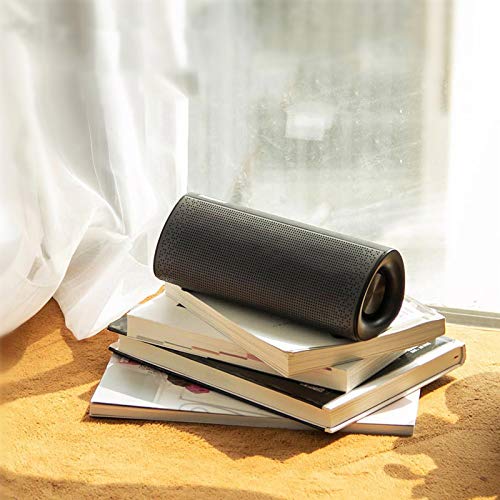
Figuur 4.2: Kant view of the Tronsmart Element Pixie speaker, highlighting its compact design and portability.
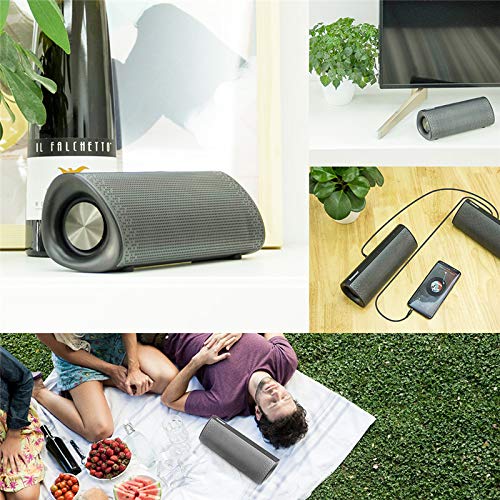
Figuur 4.3: oorview of the speaker's versatility, including a demonstration of two speakers connected for True Wireless Stereo (TWS) audio.
The speaker features a compact design with intuitive controls, typically located on the top or side panel. These controls usually include power, volume, and playback buttons.
5. Opstelling
5.1. Laai die luidspreker op
- Connect the small end of the USB charging cable to the charging port on your speaker.
- Koppel die groot punt van die USB-laaikabel aan 'n USB-kragadapter (nie ingesluit nie) of 'n rekenaar se USB-poort.
- Die laai-aanwyserliggie sal brand, gewoonlik rooi, om aan te dui dat die luidspreker laai.
- Once fully charged, the indicator light will change color (e.g., turn off or turn blue/green). Disconnect the speaker from the power source.
Note: For best results, fully charge the speaker before its first use.
5.2. Bluetooth-koppeling
- Maak seker dat die luidspreker ten volle gelaai is.
- Druk en hou die Power-knoppie (Ⓘ) for a few seconds to turn on the speaker. A sound prompt or LED indicator will confirm it's on and in pairing mode (often a blinking blue light).
- Gaan na die Bluetooth-instellings op jou slimfoon, tablet of ander Bluetooth-geaktiveerde toestel.
- Aktiveer Bluetooth en soek vir beskikbare toestelle.
- Select "Tronsmart Element Pixie" (or similar name) from the list of devices.
- Once paired, the speaker will emit a confirmation sound, and the LED indicator will typically stop blinking and remain solid blue.
Note: If prompted for a password, enter "0000". The speaker will automatically reconnect to the last paired device when turned on, if it's within range.
5.3. Ware Draadlose Stereo (TWS) Paring (Opsioneel)
To enjoy enhanced stereo sound, you can pair two Tronsmart Element Pixie speakers together:
- Ensure both speakers are turned off and fully charged.
- Turn on both speakers. Do not connect them to any Bluetooth device yet.
- On one of the speakers (this will be the primary speaker), press and hold the TWS pairing button (if available, otherwise refer to specific product instructions for TWS pairing, often a dedicated button or a combination of volume buttons).
- The speakers will attempt to connect to each other. A confirmation sound will indicate successful TWS pairing.
- Once paired, the primary speaker's LED will blink, indicating it's ready to connect to your device. The secondary speaker's LED will remain solid.
- Now, connect your Bluetooth device to the primary speaker as described in Section 5.2.
Note: TWS functionality may vary. Refer to specific product details for exact button combinations if a dedicated TWS button is not present.
6. Bedryfsinstruksies
6.1. Skakel aan/af
- Krag aan: Druk en hou die Power-knoppie (Ⓘ) vir ongeveer 3 sekondes.
- Skakel af: Druk en hou die Power-knoppie (Ⓘ) vir ongeveer 3 sekondes.
6.2. Musiekweergawe
- Speel/pouse: Druk die Play / Pause-knoppie (⏸ / ⏵) een keer.
- Volgende snit: Druk en hou die Volume Op-knoppie (+) or a dedicated Next Track button.
- Vorige snit: Druk en hou die Volume Verlaag-knoppie (-) or a dedicated Previous Track button.
6.3. Volumebeheer
- Volume op: Druk kort op die Volume Op-knoppie (+).
- Volume af: Druk kort op die Volume Af-knoppie (-).
6.4. Handvrye oproepe
- Beantwoord oproep: Druk die Play / Pause-knoppie (⏸ / ⏵) once when a call comes in.
- Beëindig oproep: Druk die Play / Pause-knoppie (⏸ / ⏵) een keer tydens 'n oproep.
- Verwerp oproep: Druk en hou die Speel/Pause-knoppie (⏸ / ⏵) vir 2 sekondes.
7. Onderhoud
- Skoonmaak: Gebruik 'n sagte, droë lap om die luidspreker skoon te maak. Moenie skuurmiddels of oplosmiddels gebruik nie.
- Berging: Wanneer dit nie vir lang tye gebruik word nie, bêre die luidspreker op 'n koel, droë plek, weg van direkte sonlig en uiterste temperature.
- Batterysorg: Om die batterylewe te verleng, vermy om die luidspreker gereeld heeltemal te ontlaai. Laai dit gereeld, selfs al word dit nie gebruik nie.
8. Probleemoplossing
| Probleem | Moontlike oorsaak | Oplossing |
|---|---|---|
| Luidspreker skakel nie aan nie. | Lae battery. | Laai die luidspreker volledig. |
| Kan nie met Bluetooth-toestel saambind nie. | Bluetooth is off on your device; speaker is not in pairing mode; too far from device. | Ensure Bluetooth is enabled on your device. Put the speaker in pairing mode. Move the speaker closer to your device (within 10 meters). Forget previous pairings on your device and try again. |
| Geen geluid of lae volume nie. | Volume te laag op luidspreker of toestel; luidspreker nie gekoppel nie; oudiobronprobleem. | Increase volume on both the speaker and your connected device. Ensure the speaker is properly paired. Check the audio source on your device. |
| TWS-paring misluk. | Speakers not in TWS pairing mode; one speaker already connected to a device. | Ensure both speakers are disconnected from any Bluetooth devices. Follow TWS pairing instructions carefully. |
9. Spesifikasies
| Handelsmerk | Generies |
| Model | Tronsmart Element Pixie |
| Verbindingstegnologie | Bluetooth, Draadloos |
| Tipe luidspreker | Subwoofer |
| Spesiale kenmerk | Subwoofer |
| Subwoofer Speaker Diameter | 5 duim |
| Tweeter Driver Diameter | 1 duim |
| Beheer metode | Raak |
| Kragbron | Battery aangedrewe |
| Versoenbare toestelle | Slimfoon, tablet |
| Is waterdig | Onwaar |
10. Waarborg en Ondersteuning
This product comes with a standard manufacturer's warranty. Please refer to the warranty card included in your package for specific terms and conditions. For technical support or warranty claims, please contact your retailer or the manufacturer's customer service.
Bewaar u aankoopbewys as bewys van aankoop vir waarborgdoeleindes.