
AWEI T5
AWEI T5 True Wireless Earbuds User Manual
Inleiding
This manual provides detailed instructions for the AWEI T5 True Wireless Earbuds. Please read this guide carefully before using the product to ensure proper operation and to maximize your listening experience.
Pakketinhoud
Verifieer dat al die items wat hieronder gelys word, in u pakket teenwoordig is:
- AWEI T5 True Wireless Earbuds (Left and Right)
- Laaikas
- USB-laaikabel
- Gebruikershandleiding
- Verskeie groottes oordoppe

Image: AWEI T5 True Wireless Earbuds retail packaging, showing the brand logo and product model.
Produk verbyview
Familiarize yourself with the components of your AWEI T5 True Wireless Earbuds and charging case.

Image: The AWEI T5 True Wireless Earbuds inside their charging case, with an additional image showing an earbud being worn by a user.

Beeld: 'n Nabyskoot view of the AWEI T5 True Wireless Earbuds and their charging case resting on a laptop keyboard.
The earbuds are designed for a secure and comfortable fit, and the charging case provides both protection and power on the go.
Opstelling
1. Aanvanklike laai
Laai die oordopjes en die laaikassie volledig voor die eerste gebruik.
- Plaas albei oordopjes in die laaikas.
- Koppel die USB-laaikabel aan die laaikas en 'n kragbron.
- The indicator lights on the case and earbuds will show charging status.
- Sodra dit ten volle gelaai is, ontkoppel die kabel.
2. Koppel met 'n Toestel
To connect your AWEI T5 earbuds to a Bluetooth-enabled device:
- Maak seker dat die oordopjes gelaai is.
- Maak die laaikas oop en verwyder albei oorfone. Hulle sal outomaties in paringsmodus gaan.
- Gaan na Bluetooth-instellings op jou toestel (slimfoon, tablet, ens.) en aktiveer Bluetooth.
- Soek vir available devices and select "AWEI T5" from the list.
- Sodra dit gekoppel is, sal jy 'n bevestigingstoon hoor, en die aanwyserliggies op die oorfone sal verander.
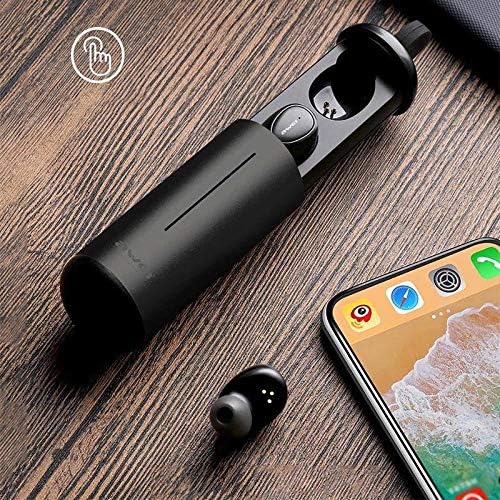
Image: AWEI T5 Earbuds in their charging case, positioned next to a smartphone, illustrating the pairing process.
Bedryfsinstruksies
Basiese kontroles
The AWEI T5 earbuds feature touch controls for various functions:
- Speel/pouse: Tik een keer op enige van die oordopjes.
- Volgende snit: Dubbeltik op die regteroorknoppie.
- Vorige snit: Tik twee keer op die linker oordop.
- Beantwoord/beëindig oproep: Tik een keer op enige oordopjes tydens 'n inkomende oproep.
- Verwerp oproep: Druk en hou enige oordopjes vir 2 sekondes in tydens 'n inkomende oproep.
- Aktiveer stemassistent: Tik drie keer op enige van die oordopjes.
Enkele oordopmodus
You can use either the left or right earbud independently:
- Remove one earbud from the charging case. It will automatically connect to the last paired device.
- The other earbud can remain in the case or be turned off.
Dubbele oordopjesmodus
For a stereo audio experience, use both earbuds:
- Remove both earbuds from the charging case. They will automatically connect to each other and then to the last paired device.
Onderhoud en versorging
To ensure the longevity and optimal performance of your AWEI T5 earbuds:
- Skoonmaak: Maak die oorfone en laaikas gereeld skoon met 'n sagte, droë, pluisvrye lap. Moenie harde chemikalieë of skuurmiddels gebruik nie.
- Berging: Wanneer dit nie gebruik word nie, bêre die oordopjes in hul laaikassie om hulle teen stof en skade te beskerm.
- Batterysorg: Avoid fully discharging the battery frequently. Charge the earbuds and case regularly, even if not used for extended periods.
- Waterweerstand: The earbuds are rated IPX4, meaning they are resistant to splashing water from any direction. Do not submerge them in water or expose them to heavy rain.

Image: AWEI T5 Earbuds with water droplets, indicating their IPX4 splash-resistant rating.
Probleemoplossing
If you encounter issues with your AWEI T5 earbuds, refer to the following common problems and solutions:
| Probleem | Oplossing |
|---|---|
| Oordopjes koppel nie met toestel nie. | Ensure earbuds are charged. Turn off and on Bluetooth on your device. Forget "AWEI T5" from your device's Bluetooth list and re-pair. |
| Slegs een oorknoppie werk. | Place both earbuds back into the charging case, close the lid, then open and remove them together. Ensure both are charged. |
| Geen geluid of lae volume nie. | Kontroleer die volumevlakke op beide jou toestel en die oorfone. Maak seker dat die oorfone behoorlik gekoppel is. |
| Laaikas laai nie. | Verify the USB cable is securely connected to both the case and the power source. Try a different cable or power adapter. |
Spesifikasies
Technical details for the AWEI T5 True Wireless Earbuds:
| Kenmerk | Detail |
|---|---|
| Modelnommer | T5 |
| Konnektiwiteit | Bluetooth |
| Vormfaktor | In-Oor |
| Materiaal | Plastiek |
| Kleur | Swart |
| Afmetings (produk) | 4 x 10 x 16.5 cm |
| Gewig (produk) | 4.54 g |
| Battery Tipe | 1 Lithium Ion (per earbud, typically) |
| Waterweerstandgradering | IPX4 (Spatbestand) |
Waarborg en Ondersteuning
Vir waarborginligting en kliëntediens, verwys asseblief na die dokumentasie wat saam met u aankoop verskaf is of kontak die kleinhandelaar. Bewaar u bewys van aankoop vir enige waarborgeise.
Ask a question about this manual
Ask about setup, troubleshooting, compatibility, parts, safety, or missing instructions. Manuals+ will review the question and use this page’s manual context to help answer it.