
1. Inleiding
Dankie vir die aankoopasing the auna V-20 Vertical Stereo System. This manual provides essential information for the safe and efficient operation of your device. Please read it thoroughly before use and keep it for future reference.
2. Veiligheidsinstruksies
- Lees alle instruksies noukeurig deur voordat u die toestel gebruik.
- Hou die toestel weg van water, vog en uiterste temperature.
- Moenie enige ventilasie-openinge blokkeer nie.
- Gebruik slegs aanhegsels/bykomstighede wat deur die vervaardiger gespesifiseer word.
- Ontkoppel die toestel tydens weerligstorms of wanneer dit vir lang tye ongebruik word.
- Verwys alle diens na gekwalifiseerde dienspersoneel.
- Moenie die c oopmaak nieasing; daar is geen gebruiker-onderhoudbare onderdele binne nie.
3. Pakketinhoud
Kontroleer asseblief dat alle items teenwoordig is:
- 1 x auna V-20 Vertical Stereo System
- 1 x Remote Control (including 2 x 1.5V AAA batteries)
- 1 x kragadapter
- 1 x Removable Stand Base
- 1 x Wire Antenna
- User Manual (English and German)
4. Produk verbyview
The auna V-20 is a versatile micro stereo system featuring a vertical design. It includes a CD player, DAB+ and FM radio, Bluetooth, NFC, USB, and AUX connectivity. The system can be used with its stand or mounted on a wall.

Figure 4.1: The auna V-20 Vertical Stereo System shown with its remote control in a modern living room environment.
Voorpaneelkontroles en skerm
The front panel features a sleek design with a motorized CD drive cover and an LED display that shows time and operational information. Control buttons are located on the top edge of the unit.
Agterpaneelverbindings
The rear panel provides various connection ports for external devices and power.
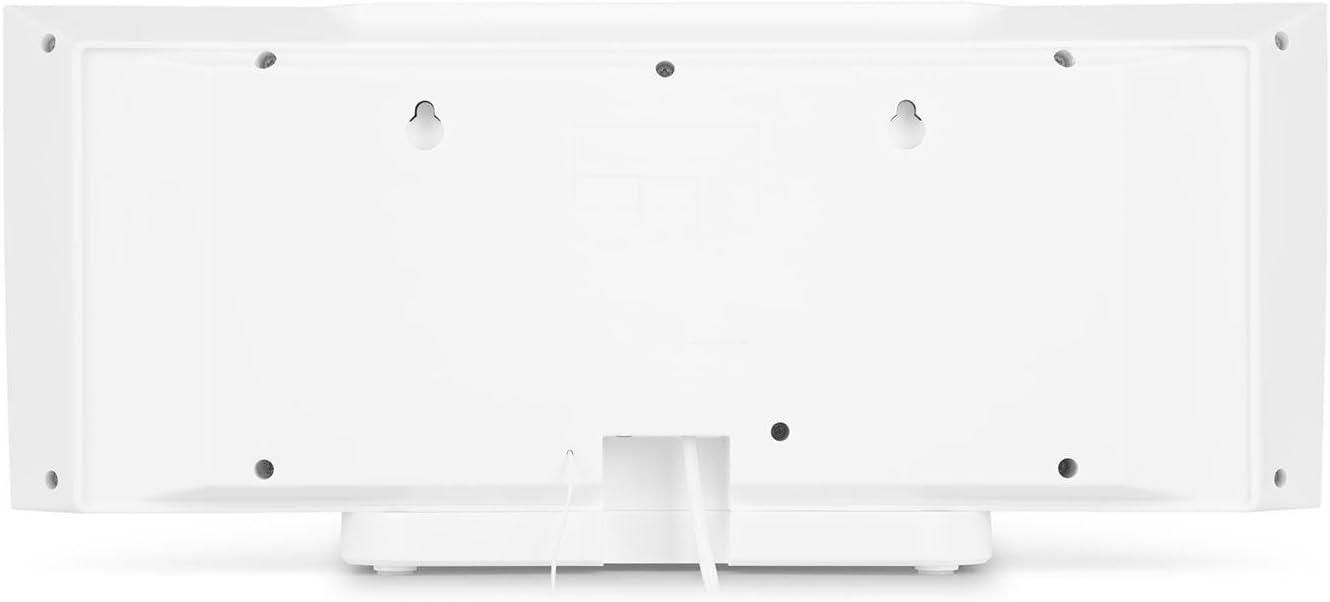
Figuur 4.2: Agter view of the auna V-20, highlighting the USB port and AUX input.
Afstandbeheer
The included remote control allows for convenient operation of all functions from a distance.

Figuur 4.3: Gedetailleerd view of the remote control for the auna V-20 stereo system.
5. Opstelling
5.1 Plasingsopsies
The auna V-20 offers flexible placement:
- Standmontering: Attach the removable stand base for desktop or shelf placement. Ensure the unit is stable on a flat surface.
- Muurmontering: The unit can be mounted on a wall to save space. Use appropriate wall mounting hardware (not included) and ensure the wall can support the unit's weight.

Figuur 5.1: Agter view illustrating the wall mounting points and the stand attachment area.
5.2 Kragverbinding
Connect the provided power adapter to the DC IN port on the rear of the unit, then plug it into a standard wall outlet (AC 230V, 50 Hz).
5.3 Antennaverbinding
Extend the wire antenna for optimal DAB+ and FM radio reception. Adjust its position for the best signal quality.
6. Bedryfsinstruksies
6.1 Aan/Af en Bystand
Druk die AAN/STANDBY button on the unit or remote control to switch the system on or put it into standby mode.
6.2 Moduskeuse
Druk die FUNKSIE button on the unit or the dedicated mode buttons (FM/DAB, USB, CD, AUDIO IN, BLUETOOTH) on the remote control to switch between different audio sources.
6.3 Volumebeheer
Stel die volume aan met die VOL+ en VOL- buttons on the unit or remote control. The LED display will show the current volume level.
6.4 Gelykmakerinstellings
The system features a 2-band equalizer and equalizer presets. Use the EQ button on the remote control to cycle through presets or adjust bass/treble. The X-BAS function can be activated for enhanced bass.
7. Bluetooth and NFC Connectivity
7.1 Bluetooth -koppeling
To stream music wirelessly from your smartphone, tablet, or laptop:
- Switch the stereo system to Bluetooth mode. The LED display will indicate pairing mode.
- Aktiveer Bluetooth op jou mobiele toestel en soek vir beskikbare toestelle.
- Select "auna V-20" from the list to pair. Once connected, you can play audio from your device.

Figure 7.1: A smartphone being used to connect to the auna V-20 via Bluetooth.
7.2 NFC-verbinding
For intuitive pairing with NFC-enabled devices:
- Maak seker dat NFC op jou mobiele toestel geaktiveer is.
- Gently swipe your NFC-enabled device over the NFC sensor on the auna V-20.
- The devices will automatically pair via Bluetooth.

Figuur 7.2: Close-up view of the NFC sensor for quick device pairing.
8. CD-speler werking
The auna V-20 features an MP3-compatible CD player with a motorized drive.

Figure 8.1: The motorized CD player mechanism with a disc inserted.
8.1 Loading a CD
- Druk die OOP/TOUS button to open the motorized CD cover.
- Carefully place a CD (CD, CD-R/RW, MP3-CD) onto the spindle with the label side facing you.
- Druk OOP/TOUS again to close the cover. The system will automatically switch to CD mode and begin playback.
8.2 Terugspeelkontroles
- Speel/pouse: Druk SPEEL/POUSEER om terugspeel te begin of te onderbreek.
- Slaan snitte oor: Gebruik die SLAAP VOORUIT or SKAP TERUG knoppies om tussen snitte te navigeer.
- stop: Druk die STOP knoppie om die terugspeel te beëindig.
- Repeat/Random: Gebruik die HERHAAL en EVALLEKLIK buttons on the remote for playback options.
- Programmable Playback: The system supports programmable title display for custom playlists.
9. Radio Operation (DAB+/FM)
The auna V-20 features both DAB+ digital radio and analog FM radio with RDS function.
9.1 Selecting Radio Mode
Druk die FM/DAB button on the remote control to switch between FM and DAB+ modes.
9.2 Automatic Station Scan
In either FM or DAB+ mode, press the SKANDEER button on the remote control to automatically scan and store available stations. The system can store up to 20 presets per reception type.
9.3 Manual Tuning and Presets
- Handmatige instelling: Gebruik die TUNE +/- buttons on the remote control for fine-tuning.
- Stoor voorafinstellings: Once a station is found, press the VOORINSTEL button, then use the number buttons (0-9, 10+) to assign a preset number. Press ENTER te bevestig.
- Herroeping van voorinstellings: Press the corresponding number button on the remote control to quickly access a saved station.
- Inligtingsknoppie: In DAB+-modus, druk die INLIGTING button to display additional information such as artist, title, album, or news.
10. USB-terugspeel
The auna V-20 allows playback of MP3 audio files direk vanaf 'n USB-stok.
10.1 Koppel 'n USB-toestel
- Insert your USB stick into the USB port on the rear of the unit.
- Switch the stereo system to USB mode using the USB knoppie op die afstandbeheer.
- Die stelsel sal outomaties MP3 opspoor en begin speel files.
10.2 USB Playback Controls
Playback controls (Play/Pause, Skip, Stop, Repeat, Random) are similar to CD player operation. Use the MAP button on the remote to navigate through folders on the USB device.
11. AUX -invoer
Connect external audio devices such as MP3 players, CD players, or computers using the AUX input.
11.1 Aansluiting van 'n eksterne toestel
- Connect a 3.5mm audio cable (not included) from the headphone jack or audio output of your external device to the AUX IN port on the rear of the auna V-20.
- Switch the stereo system to AUDIO IN mode using the LUISTER IN knoppie op die afstandbeheer.
- Play audio from your external device. The sound will be output through the auna V-20 speakers.
12. Onderhoud
12.1 Skoonmaak
- Ontkoppel altyd die toestel van die kragtoevoer voordat u dit skoonmaak.
- Gebruik 'n sagte, droë lap om die buitenste oppervlaktes skoon te maak.
- Moenie skuurmiddels, wasse of oplosmiddels gebruik nie, aangesien dit die afwerking kan beskadig.
- Vir die CD-lens, gebruik indien nodig 'n gespesialiseerde CD-lensreiniger.
12.2 Algemene sorg
- Vermy om swaar voorwerpe op die eenheid te plaas.
- Hou die eenheid weg van direkte sonlig en hittebronne.
- Verseker behoorlike ventilasie rondom die eenheid om oorverhitting te voorkom.
13. Probleemoplossing
| Probleem | Moontlike oorsaak | Oplossing |
|---|---|---|
| Geen krag nie | Power cable not connected; power outlet faulty | Check power cable connection; try a different outlet |
| Geen klank nie | Volume too low; incorrect source selected; mute activated | Increase volume; select correct source; deactivate mute |
| CD speel nie | CD inserted incorrectly; CD dirty/scratched; unsupported format | Reinsert CD correctly; clean or replace CD; ensure CD is compatible (CD, CD-R/RW, MP3-CD) |
| Swak radio-ontvangs | Antenna nie uitgestrek nie; swak sein | Extend and adjust antenna position; try moving the unit to a different location |
| Bluetooth-samestelling misluk | Toestel te ver; Bluetooth nie geaktiveer nie; verkeerde paringsprosedure | Ensure devices are close; enable Bluetooth on mobile device; follow pairing instructions (Section 7.1) |
14. Spesifikasies
| Kenmerk | Detail |
|---|---|
| Handelsmerk | auna |
| Model | V-20 |
| Deelnommer | AUVZ-1100-ghfr |
| Produk afmetings | 51 x 25 x 16 cm |
| Gewig | 2.6 kg |
| Kragbron | Elektries |
| Wattage | 27 watt |
| Klankuitvoermodus | Stereo |
| Luidsprekerkonfigurasie | 2.0 |
| Ondersteunde oudioformate | MP3 |
| Media tipe | CD, MP3 |
| Connector Tipes | Bluetooth, NFC, USB, AUX |
| Bluetooth-versoenbaar | Ja |
| Bluetooth weergawe | 2.1+EDR |
| Bluetooth Profile | A2DP |
| Versoenbare toestelle | Smartphone, tablet, MP3 player |
| Spesiale kenmerke | Maklik om te gebruik |
| Afstandbeheerbatterye | 2 x 1.5V AAA (ingesluit) |
| DAB+ frekwensiereeks | 174 - 240 MHz (Band III) |
15. Waarborg en Ondersteuning
This product is covered by a manufacturer's warranty. For detailed warranty information, please refer to the documentation provided at the time of purchase or contact auna customer support.
If you encounter any issues not covered in the troubleshooting section, or require further assistance, please contact auna customer service through their official webwebwerf of u kleinhandelaar.