
Yaheetech YA-00097936
Yaheetech Multistore 2002 Rekenaarlessenaar Gebruikershandleiding
Model: YA-00097936 | Handelsmerk: Yaheetech
Inleiding
Thank you for choosing the Yaheetech Multistore 2002 Computer Desk. This manual provides detailed instructions for assembly, operation, maintenance, and troubleshooting to ensure safe and efficient use of your new desk. Please read this manual thoroughly before beginning assembly or use, and retain it for future reference.
Veiligheidsinligting
- Hou alle onderdele en verpakkingsmateriaal buite bereik van kinders.
- Monteer die lessenaar op 'n sagte, skoon oppervlak om skrape te voorkom.
- Maak seker dat alle skroewe en bevestigingsmiddels stewig vasgedraai is voor gebruik. Kontroleer gereeld en draai weer vas soos nodig.
- Do not overload the desk. Refer to the "Specifications" section for weight capacities.
- Avoid placing hot items directly on the desk surface.
- Use caution when moving the desk, especially on uneven surfaces. Ensure casters are unlocked if moving.
Onderdele lys
Voor montering, verifieer dat alle komponente wat hieronder gelys word, teenwoordig en onbeskadig is. Indien enige onderdele ontbreek of beskadig is, kontak asseblief kliëntediens.

Figuur 1: Ontplof view of the desk showing main components and their names. This image highlights the heavy MDF boards, thickened frame, smooth steel ball drawer, open middle shelf, open bottom shelf, and lockable casters.
- A: Top Board (1 pc)
- B: Middle Shelf (1 pc)
- C: Bottom Shelf (1 pc)
- D: Side Frames (2 pcs)
- E: Drawer Front (1 pc)
- F: Drawer Sides (2 pcs)
- G: Drawer Back (1 pc)
- H: Drawer Bottom (1 pc)
- I: Drawer Slides (2 sets)
- J: Casters (4 pcs, 2 lockable)
- K: Hardware Pack (Screws, bolts, Allen wrench)
Monteer-instruksies
Volg hierdie stappe noukeurig vir behoorlike montering. Dit word aanbeveel om twee mense vir montering te hê.
- Step 1: Attach Casters to Side Frames.
Carefully attach the four casters (J) to the bottom of the two side frames (D). Ensure the two lockable casters are placed on the front side for easy access. Tighten securely with the provided wrench.

Figuur 2: Detail of a caster wheel attached to the desk's metal frame. This shows the sturdy connection point and the wheel's design.
- Stap 2: Monteer die hoofraam.
Connect the bottom shelf (C) and middle shelf (B) to the side frames (D) using the appropriate screws from the hardware pack (K). Do not fully tighten screws until all parts are aligned.
- Step 3: Assemble the Drawer.
Assemble the drawer components (E, F, G, H) using the provided screws. Ensure the drawer bottom (H) slides into the grooves correctly. Attach the drawer slides (I) to the sides of the assembled drawer.

Figuur 3: The desk's pull-out drawer, shown partially open, revealing its interior space. This image demonstrates the drawer's functionality and capacity.
- Step 4: Install Drawer Slides to Desk Frame.
Attach the other part of the drawer slides (I) to the designated points on the desk's main frame, just below where the top board will sit. Ensure they are level and aligned.

Figuur 4: 'n Gedetailleerde view of the smooth steel ball drawer slide mechanism. This highlights the quality of the sliding components for the drawer.
- Step 5: Attach the Top Board.
Place the top board (A) onto the assembled frame and secure it with screws. Ensure all pre-drilled holes align.
- Step 6: Insert the Drawer.
Carefully slide the assembled drawer into the installed drawer slides until it clicks into place.
- Stap 7: Finale Aandraaiing.
Once all components are in place and aligned, fully tighten all screws and fasteners. Do not overtighten.
Bedryfsinstruksies
The Yaheetech Multistore 2002 Computer Desk is designed for versatile use in various settings, including home offices, living rooms, or bedrooms.

Figuur 5: The computer desk positioned next to a sofa in a living room, demonstrating its compact size and suitability for small spaces. A laptop is placed on the top surface.
- Plasing: Position the desk on a flat, stable surface. If using on carpet, ensure the casters can move freely.
- Mobiliteit: To move the desk, unlock the two lockable casters by flipping their levers. Push or pull the desk gently to its desired location. Once in place, lock the casters to prevent accidental movement.
- Berging:
- The top surface is suitable for laptops, monitors, or writing.
- The pull-out drawer provides enclosed storage for small items like pens, notebooks, or external hard drives.
- The open middle shelf is ideal for books, documents, or small electronic devices.
- The open bottom shelf can accommodate larger items such as a CPU tower, printer, or storage boxes.
- Gewig kapasiteit: Adhere to the maximum weight capacities specified in the "Specifications" section to prevent damage.
Onderhoud
Regular maintenance will help prolong the life and appearance of your Yaheetech Multistore 2002 Computer Desk.
- Skoonmaak: Vee oppervlaktes af met 'n sagte, damp lap. Vermy die gebruik van harde chemikalieë, skuurmiddels of politoermiddels wat die afwerking kan beskadig.
- Gemors: Clean up spills immediately to prevent staining or damage to the MDF boards.
- Bevestigingsmiddels: Kontroleer gereeld alle skroewe en bevestigingsmiddels om te verseker dat hulle styf bly. Draai weer vas soos nodig om stabiliteit te handhaaf.
- toorkuns: Keep casters free of debris (hair, dust, etc.) to ensure smooth movement.
- Sunlight/Heat: Avoid prolonged exposure to direct sunlight or extreme heat, which can cause fading or warping.
Probleemoplossing
Indien u enige probleme met u lessenaar ondervind, raadpleeg die volgende algemene probleme en oplossings:
| Probleem | Moontlike oorsaak | Oplossing |
|---|---|---|
| Die lessenaar is wankelrig. | Los bevestigingsmiddels; ongelyke vloer. | Ensure all screws are fully tightened. Move desk to a level surface or use shims if necessary. |
| Laaie gly nie glad nie. | Laaiglyers verkeerd in lyn; puin in spore. | Maak seker dat die laaigleuwe korrek geïnstalleer en in lyn is. Maak die spore skoon van enige stof of puin. |
| Wiele rol nie vrylik nie. | Casters locked; debris in wheels. | Unlock casters if they are engaged. Remove any hair or debris from the wheels. |
| Ontbrekende dele na uitpak. | Verpakkingsfout. | Contact Yaheetech customer support with your purchase details and the specific missing parts. |
Spesifikasies
Detailed dimensions and material information for the Yaheetech Multistore 2002 Computer Desk.
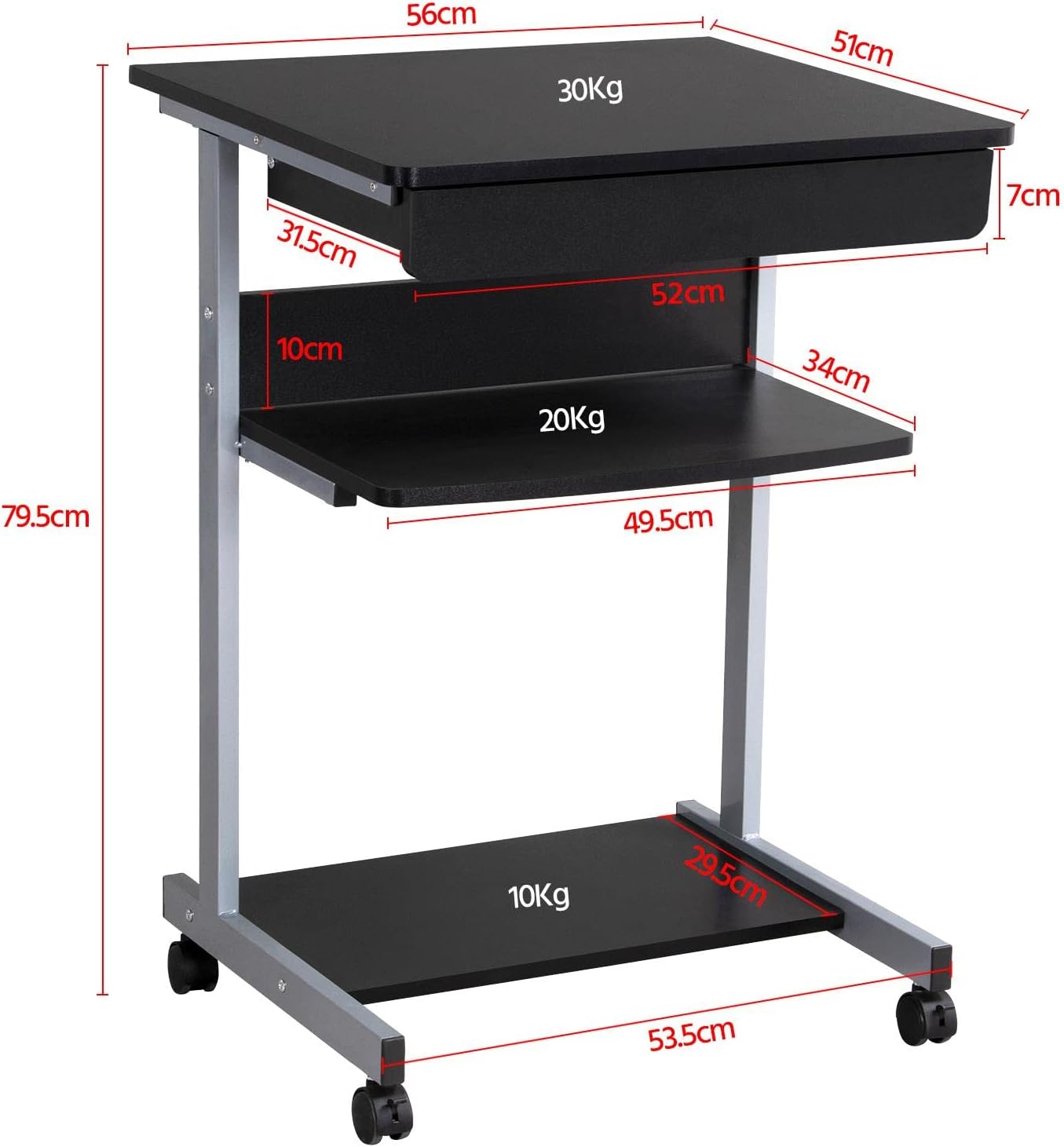
Figuur 6: Detailed dimensional drawing of the desk, including measurements for overall height, width, depth, and individual shelf and drawer dimensions. Also shows weight capacities for each surface.
| Kenmerk | Detail |
|---|---|
| Modelnommer | YA-00097936 |
| Algehele afmetings (L x B x H) | 56 x 51 x 79.5 cm (22 x 20.1 x 31.3 duim) |
| Top Board Dimensions | 56 x 51 cm (22 x 20.1 duim) |
| Drawer Dimensions (Inner) | 45 x 30 x 6 cm (17.7 x 11.8 x 2.4 duim) |
| Middelste rak afmetings | 50 x 34 cm (19.7 x 13.4 duim) |
| Bottom Shelf Dimensions | 50 x 30.5 cm (19.7 x 12 duim) |
| Materiaal | MDF (Medium Density Fiberboard) with Metal Frame |
| Kleur | Swart |
| Netto gewig | Ongeveer. 10.9 kg (24 lbs) |
| Max. Load Capacity (Top Board) | 30 kg (66 lbs) |
| Maks. Laaivermoë (Middelste Rak) | 20 kg (44 lbs) |
| Maks. Laaivermoë (Onderste Rak) | 10 kg (22 lbs) |
| Waaitjies | 4 (2 with locking mechanism) |
Waarborg en Ondersteuning
Yaheetech products are manufactured to high-quality standards. For specific warranty information, please refer to the warranty card included with your product or visit the official Yaheetech website. If you have any questions, require assistance with assembly, or need to report missing/damaged parts, please contact our customer support team:
- Webwebwerf: www.yaheetech.com (Kontroleer asseblief vir streeks webwerwe)
- E-pos: Verwys na u aankoopdokumentasie vir kliëntediens-e-pos.
- Telefoon: Verwys na u aankoopdokumentasie vir die kliëntediens se telefoonnommer.
When contacting support, please have your model number (YA-00097936) and purchase date ready.
Ask a question about this manual
Ask about setup, troubleshooting, compatibility, parts, safety, or missing instructions. Manuals+ will review the question and use this page’s manual context to help answer it.