
Road Angel Aura HD3
Road Angel Halo Pro Dashcam User Manual
Model: Aura HD3
1. Produk verbyview
The Road Angel Halo Pro is an advanced dual-channel dashcam system designed to provide comprehensive video surveillance for your vehicle. It records high-resolution footage from both the front and rear of your vehicle, offering peace of mind and crucial evidence in the event of an incident. Its compact design ensures minimal obstruction to your view.

Figure 1.1: Road Angel Halo Pro Dashcam Front and Rear Units.
Sleutel kenmerke:
- Dubbele kamera-opname: Captures 2K (1440p) footage from the front and 1080p from the rear simultaneously.
- Wyd Viewhoeke: 140-degree front and 120-degree rear viewing angles for extensive coverage.
- Ingeboude GPS: Records speed and location data for accurate incident reconstruction.
- G-sensor: Automatically detects impacts and sudden movements, locking the current footage om oorskryf te voorkom.
- Parkeermodus: Provides 24/7 surveillance when your vehicle is parked, protecting against bumps and vandalism.
- Wi-Fi konneksie: Seamlessly connect to the dashcam via a smartphone app for live view, kostage playback, and settings management.
- Loop opname: Continuously records, overwriting the oldest footage wanneer die geheuekaart vol is.
- Nagvisie: Enhanced low-light performance for clear recordings in challenging conditions.

Figuur 1.2: oorview of Halo Pro's main features including dual cameras, 2K quality, wide viewing angles, parking mode, and GPS/telematics.
2. Opstelling en installering
Proper installation is crucial for optimal performance of your Road Angel Halo Pro Dashcam. Please follow these steps carefully.
2.1 Pakketinhoud
Voordat u begin, maak seker dat alle komponente teenwoordig is:
- Road Angel Halo Pro Front Camera Unit
- Road Angel Halo Pro Rear Camera Unit
- Agterste kamera verbindingskabel
- Power Cable (12V USB-C)
- Mounting Bracket with Adhesive Pad
- Gebruikershandleiding (hierdie dokument)
2.2 Plaas die Micro SD-kaart
The Halo Pro supports Micro SD cards up to 128GB (sold separately). A high-speed Class 10 or U3 card is recommended for reliable recording.
- Locate the Micro SD card slot on the side of the front camera unit.
- Insert the Micro SD card with the gold contacts facing away from the screen until it clicks into place.
- Om te verwyder, druk die kaart versigtig in totdat dit klik, en laat dit dan los om uit te werp.
2.3 Montering van die Dashcam
Choose a location that does not obstruct the driver's view or interfere with airbags. The recommended position is behind the rearview spieël.
- Clean the windshield surface thoroughly where the dashcam will be mounted. Ensure it is dry and free of dust.
- Heg die kleefblokkie aan die monteerbeugel vas.
- Peel off the protective film from the adhesive pad and firmly press the bracket onto the chosen location on the windshield for at least 30 seconds.
- Slide the front camera unit onto the mounted bracket until it locks securely.
- For the rear camera, mount it on the rear windshield, ensuring a clear view. Connect it to the front unit using the provided rear camera cable. Route the cable neatly along the vehicle's interior trim.

Figure 2.1: Illustration of dual front and rear dashcam placement and their respective viewing angles (140° front, 120° rear).
2.4 Kragverbinding
Connect the power cable to the dashcam's USB-C port and route it to your vehicle's 12V power outlet (cigarette lighter socket) or a hardwire kit (sold separately) for parking mode functionality.
- Plug the small end of the power cable into the USB-C port on the dashcam.
- Plug the other end into your vehicle's 12V power outlet.
- Start your vehicle. The dashcam should power on automatically and begin recording.
3. Operating the Dashcam
The Road Angel Halo Pro is designed for simple operation, with most functions managed via the dedicated smartphone app.
3.1 Initial Power On and Recording
Once connected to power, the dashcam will automatically power on and begin loop recording when the vehicle's ignition is on. The front and rear cameras will record simultaneously.
3.2 Slimfoon-app-integrasie
The Road Angel app allows you to control settings, view leef footage, and download recordings.
- Download the "Road Angel Halo" app from your smartphone's app store (available on iOS and Android).
- Skakel die dashcam aan.
- On your smartphone, go to Wi-Fi settings and connect to the dashcam's Wi-Fi network (SSID and password can be found on the dashcam or in the manual).
- Open the Road Angel Halo app. You should now see the live view from the dashcam and be able to access its features.
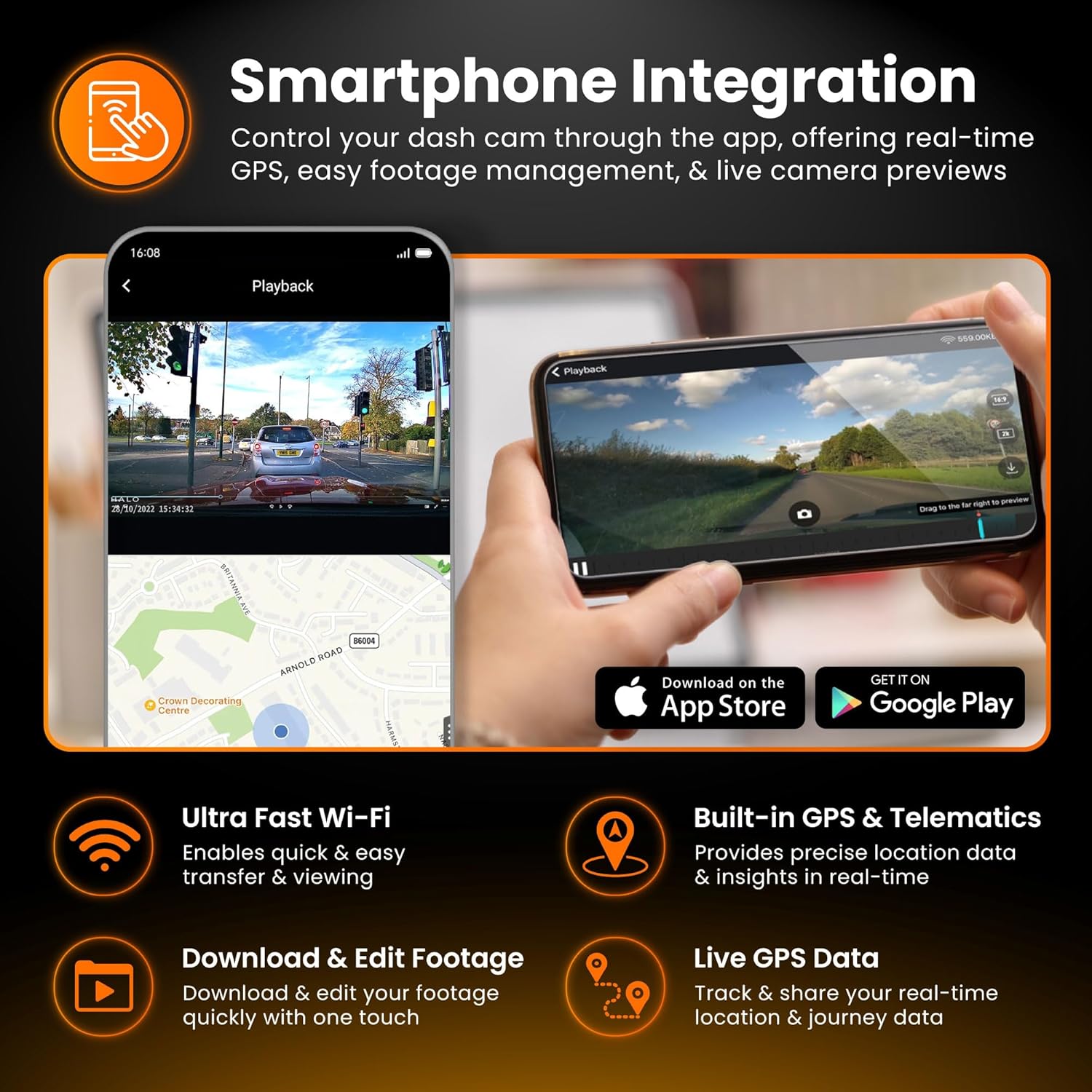
Figure 3.1: Smartphone integration showing live view, playback, and app download options for the Halo Pro.
3.3 G-Sensor and Emergency Recording
The built-in G-Sensor detects sudden impacts or rapid acceleration/deceleration. When triggered, it automatically locks the current video segment, preventing it from being overwritten by loop recording. These emergency files word in 'n aparte lêergids op die SD-kaart gestoor.
3.4 Parkeermodus
For 24/7 surveillance, the Parking Mode feature requires a continuous power supply (e.g., via a hardwire kit). In parking mode, the dashcam will monitor for impacts or motion and record accordingly, conserving power when idle.

Figure 3.2: Parking Mode feature, illustrating G-Sensor detection and continuous surveillance for your vehicle.
3.5 Accessing and Managing Footage
Footage can be accessed and managed in two primary ways:
- Via slimfoon-app: Connect to the dashcam's Wi-Fi, open the app, and navigate to the playback or gallery section. You can view, download, and share video clips directly from your phone.
- Via Mikro SD-kaart: Remove the Micro SD card from the dashcam and insert it into a computer's card reader. Video files are typically organized into folders (e.g., Normal, Event, Parking).

Figure 3.3: Accessing and managing footage instantly on your smartphone via Wi-Fi, showing 2K front and 1080p rear capture.
4. Onderhoud
Gereelde onderhoud verseker die lang lewensduur en optimale werkverrigting van jou dashcam.
4.1 Bestuur van Mikro SD-kaarte
It is recommended to format the Micro SD card regularly (e.g., once a month) using the dashcam's app or settings menu. This helps prevent data corruption and ensures smooth recording. Replace the SD card if you experience frequent errors or degraded performance.
4.2 Skoonmaak van die lense
Periodically clean the front and rear camera lenses with a soft, lint-free cloth. Avoid abrasive materials or harsh chemicals that could scratch the lens or damage the coating.
4.3 Firmware-opdaterings
Check the Road Angel website or app periodically for firmware updates. Keeping your dashcam's firmware up-to-date can improve performance, add new features, and resolve bugs.
5. Probleemoplossing
If you encounter issues with your Road Angel Halo Pro, refer to the following common problems and solutions.
5.1 Dashcam Not Powering On
- Gaan kragverbinding na: Ensure the power cable is securely plugged into both the dashcam and the vehicle's 12V outlet.
- Voertuigkrag: Verify that the vehicle's 12V outlet is receiving power (e.g., by testing with another device).
- lont: Check the fuse in your vehicle's fuse box that corresponds to the 12V outlet.
5.2 "SD Card Error" Message
- Formateer SD-kaart: Format the Micro SD card using the dashcam's app or by inserting it into a computer and formatting it to FAT32.
- Check SD Card Compatibility: Ensure you are using a Class 10 or U3 Micro SD card from a reputable brand.
- Replace SD Card: If errors persist, the SD card may be faulty and require replacement.
5.3 Wi-Fi-verbindingsprobleme
- Dashcam On: Ensure the dashcam is powered on and Wi-Fi is enabled.
- Vergeet Netwerk: On your phone, 'forget' the dashcam's Wi-Fi network and try reconnecting.
- Herbegin toestelle: Restart both your smartphone and the dashcam.
- Programtoestemmings: Ensure the Road Angel Halo app has necessary permissions (e.g., location, local network access) on your smartphone.
5.4 Swak videokwaliteit
- Skoon lense: Ensure both front and rear camera lenses are clean and free from smudges or dirt.
- Beskermende film: Check if any protective film is still on the lenses.
- Resolusie-instellings: Verify that the recording resolution is set to the highest available (2K front, 1080p rear) in the app settings.
6. Spesifikasies
Detailed technical specifications for the Road Angel Halo Pro Dashcam.
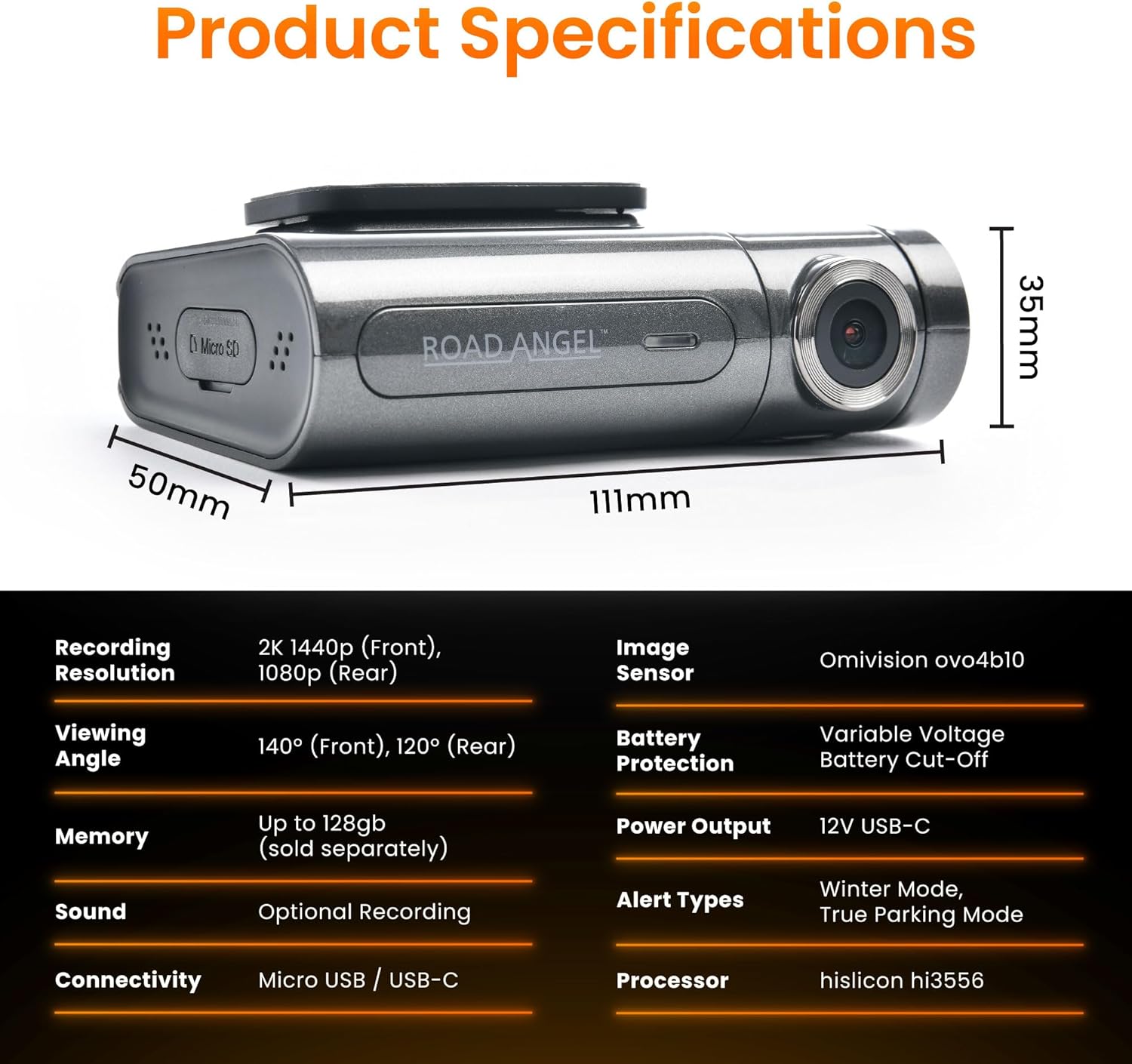
Figure 6.1: Detailed product specifications including dimensions and technical parameters.
| Kenmerk | Spesifikasie |
|---|---|
| Modelnommer | Aura HD3 |
| Opname-resolusie | Voor: 2K (1440p), Agter: 1080p |
| Viewing Hoek | Voor: 140°, Agter: 120° |
| Beeldsensor | Omnivision ovo4b10 |
| Verwerker | Hisilicon hi3556 |
| Geheue ondersteuning | Up to 128GB Micro SD (Class 10/U3 recommended) |
| Konnektiwiteit | Wi-Fi, Micro USB / USB-C |
| G-sensor | Ingeboude |
| GPS | Ingeboude |
| Tipe vertoon | LCD |
| Krag Invoer | 12V USB-C |
| Product Dimensions (Front Unit) | 6.2 x 9.3 x 2.8 cm |
| Produk Gewig | 0.13 kg (130 g) |
| Bedryfstemperatuur | Refer to manufacturer's guidelines |
7. Waarborg en Ondersteuning
For warranty information, technical support, and frequently asked questions, please visit the official Road Angel webwebwerf of kontak hul kliëntediens direk. Bewaar u bewys van aankoop vir waarborgeise.
Road Angel Official Webwebwerf: www.roadangelgroup.com