
1. Inleiding en oorview
The Xiaomi Mi Air Purifier 2S AC-M4-AA is designed to improve indoor air quality by efficiently filtering out pollutants. This intelligent air purifier is suitable for rooms up to 37m² and features a Clean Air Delivery Rate (CADR) of 310m³ per hour. It offers smart connectivity for app control and integrates with voice assistants for convenient operation, providing real-time air quality monitoring via its OLED display.
2. Produkkenmerke
- European Version for compliance with regional standards.
- Smart air purifier with Wi-Fi connectivity and mobile app control (Mi Home app).
- Effective for rooms up to 37m² (approximately 398 sq ft).
- High air purification capacity of 310m³/h CADR.
- Integrated OLED display for real-time air quality (PM2.5), temperature, humidity, and filter status.
- Equipped with a high-efficiency HEPA filter for comprehensive air purification.
- Low noise operation, especially in Night Mode (as low as 32 dB).
- Voice control compatibility with supported smart home platforms.
3. Pakketinhoud
Verifieer dat alle items in die pakket teenwoordig is:
- Xiaomi Mi Air Purifier 2S (AC-M4-AA)
- Kragkabel
- Gebruikershandleiding
- HEPA Filter (pre-installed or separately packaged)
4. Veiligheidsinstruksies
Om veilige werking te verseker en skade te voorkom, lees en volg asseblief hierdie veiligheidsriglyne:
- Always unplug the air purifier before cleaning, maintenance, or moving it.
- Do not block the air inlet or outlet vents. Maintain at least 20 cm (8 inches) clearance from walls and other objects.
- Use only the power adapter provided with the device. Ensure the voltage pas by jou plaaslike kragtoevoer.
- Do not operate the air purifier in wet or humid environments, such as bathrooms. Keep it away from water and other liquids.
- Hierdie toestel is nie bedoel vir gebruik deur persone (insluitend kinders) met verminderde fisiese, sensoriese of geestelike vermoëns, of 'n gebrek aan ervaring en kennis nie, tensy hulle toesig of instruksies oor die gebruik van die toestel gegee is deur 'n persoon wat verantwoordelik is vir hul veiligheid.
- Moenie vingers of vreemde voorwerpe in die luginlaat of -uitlaat steek nie.
- Do not use the air purifier near heat sources, flammable gases, or volatile substances.
- As die kragkoord beskadig is, moet dit deur die vervaardiger, sy diensagent of soortgelyke gekwalifiseerde persone vervang word om 'n gevaar te vermy.
5. Opstelling
Follow these steps to set up your Xiaomi Mi Air Purifier 2S:
- Pak die toestel uit: Carefully remove the air purifier from its packaging. Remove any protective films or tapes.
- Install/Check Filter: Open the filter compartment cover, usually located at the back or bottom of the unit. Ensure the HEPA filter is correctly seated and any plastic packaging around the filter is removed. Close the cover securely.
- Posisioneer die Suiweraar: Place the air purifier on a flat, stable surface. Ensure there is at least 20 cm (8 inches) of clear space around all sides and above the unit for optimal air circulation.
- Koppel krag: Plug the power cable into the power port on the back of the purifier, then plug the other end into a suitable electrical outlet.
- Laai die Mi Home-app af: Scan the QR code in the manual or search for "Mi Home" in your smartphone's app store (Google Play Store or Apple App Store). Download and install the app.
- Koppel aan toepassing: Open the Mi Home app, create an account or log in. Follow the in-app instructions to add your Xiaomi Mi Air Purifier 2S. This typically involves selecting the device, connecting to its temporary Wi-Fi hotspot, and then connecting it to your home Wi-Fi network (2.4GHz only).

Beeld: Voorkant view of the Xiaomi Mi Air Purifier 2S, showing the main body and the circular OLED display.

Beeld: Bo-onder view of the Xiaomi Mi Air Purifier 2S, highlighting the fan grille and control buttons on the top surface.
6. Bedryfsinstruksies
Your air purifier can be operated via the physical buttons on the unit or through the Mi Home app.
6.1. Using Physical Buttons
- Kragknoppie: Press the power button on the top of the unit to turn the air purifier on or off.
- Modusknoppie: Press the mode button (often integrated with the power button or a separate button) to cycle through operating modes: Automatic, Night, and Manual.
6.2. Using the Mi Home App
The Mi Home app provides comprehensive control and monitoring features:
- Afstandbeheer: Turn the purifier on/off, change modes, and adjust fan speed from anywhere.
- Intydse monitering: View current PM2.5 levels, temperature, and humidity in your room.
- Skeduleer: Set schedules for the purifier to turn on/off or change modes automatically.
- Filterstatus: Monitor the remaining lifespan of your filter and receive notifications when it's time for replacement.
- Instellings: Adjust display brightness, enable/disable sounds, and other device-specific settings.
6.3. Bedryfswyses
- Outomatiese modus: The purifier intelligently adjusts its fan speed based on the real-time air quality detected by its sensors.
- Nagmodus: Operates at the lowest fan speed with minimal noise and a dimmed OLED display to ensure undisturbed sleep.
- Handmatige modus: Allows you to manually select a desired fan speed or purification intensity.
6.4. OLED Display Information
The circular OLED display provides key information at a glance:
- PM2.5 konsentrasie: Shows the current particulate matter level in µg/m³.
- Temperatuur: Displays the ambient room temperature.
- Humiditeit: Shows the relative humidity level.
- Wi-Fi-status: Indicates connection status to your home network.
- Bedryfsmodus: Shows the currently active purification mode.
- Filterleeftyd: Displays the remaining percentage of the filter's life.

Image: The Xiaomi Mi Air Purifier 2S positioned in a modern living room, demonstrating its compact design and how it blends with home decor.
7. Onderhoud
Gereelde onderhoud verseker optimale werkverrigting en verleng die lewensduur van jou lugsuiweraar.
7.1. Filtervervanging
The HEPA filter has a limited lifespan, typically 6-12 months, depending on usage and air quality. The Mi Home app and the OLED display will indicate when the filter needs replacement.
- Unplug the Purifier: Always disconnect the power before replacing the filter.
- Open Filter Compartment: Locate and open the filter compartment cover (usually at the back or bottom).
- Verwyder ou filter: Carefully pull out the used filter. Dispose of it according to local regulations.
- Voeg nuwe filter in: Place a new, genuine Xiaomi HEPA filter into the compartment, ensuring it is correctly oriented and seated.
- Maak die omslag toe: Maak die deksel van die filterkompartement stewig toe.
- Reset Filter Lifespan: After replacement, open the Mi Home app and follow the prompts to reset the filter lifespan counter. This ensures accurate tracking of the new filter's usage.

Beeld: Agter view of the Xiaomi Mi Air Purifier 2S, illustrating the location of the filter compartment cover for maintenance.
7.2. Cleaning the Purifier
- Buitenste skoonmaak: Wipe the exterior surfaces of the air purifier with a soft, dry cloth. Do not use abrasive cleaners, solvents, or harsh chemicals, as these can damage the finish.
- Luginlaat-/uitlaatroosters: Use a soft brush or a vacuum cleaner with a brush attachment to gently clean dust and debris from the air inlet and outlet grilles.
- Laser Particle Sensor: Periodically clean the laser particle sensor, usually located on the back of the unit. Refer to the detailed manual or Mi Home app for specific instructions on how to access and clean this sensor, as it is crucial for accurate air quality readings.
8. Probleemoplossing
As jy probleme met jou lugsuiweraar ondervind, raadpleeg die volgende algemene probleme en oplossings:
| Probleem | Moontlike oorsaak | Oplossing |
|---|---|---|
| Toestel skakel nie aan nie | Power cable not connected; Filter compartment not closed properly; Power outlet issue. | Ensure power cable is securely plugged in. Close the filter compartment cover completely. Test the power outlet with another device. |
| No Wi-Fi connection / App control not working | Incorrect Wi-Fi password; Router too far; 5GHz Wi-Fi network; App pairing issue. | Ensure your Wi-Fi network is 2.4GHz. Move the purifier closer to the router. Restart the purifier and your router. Follow the Mi Home app's re-pairing instructions. |
| Swak suiweringsprestasie | Filter lifespan expired; Air inlets/outlets blocked; Dirty laser particle sensor. | Check filter lifespan in the app and replace if necessary. Ensure no obstructions around the air inlets/outlets. Clean the laser particle sensor as per maintenance instructions. |
| Ongewone geraas tydens operasie | Foreign object inside; Filter not seated correctly. | Unplug the device and check for any foreign objects. Ensure the filter is properly installed and secured. |
| OLED display not working or showing incorrect information | Temporary glitch; Sensor malfunction. | Try restarting the device by unplugging and plugging it back in. If the issue persists, contact customer support. |
9. Spesifikasies
Detailed technical specifications for the Xiaomi Mi Air Purifier 2S AC-M4-AA:
| Spesifikasie | Waarde |
|---|---|
| Modelnommer | AC-M4-AA |
| Afmetings (L x B x H) | 24 x 24 x 52 cm (9.4 x 9.4 x 20.5 duim) |
| Gewig | 4.5 kg (9.9 lbs) |
| Kragbron | Elektriese kabel |
| Gegradeerde krag | 29 Watt |
| Filter tipe | HEPA |
| Toepaslike area | Tot 37 m² (398 vk voet) |
| Geraasvlak | 32 Decibels (in Night Mode) |
| Tipe beheer | Application and Physical Buttons |
| Spesiale kenmerke | Wi-Fi Connectivity, OLED Display |
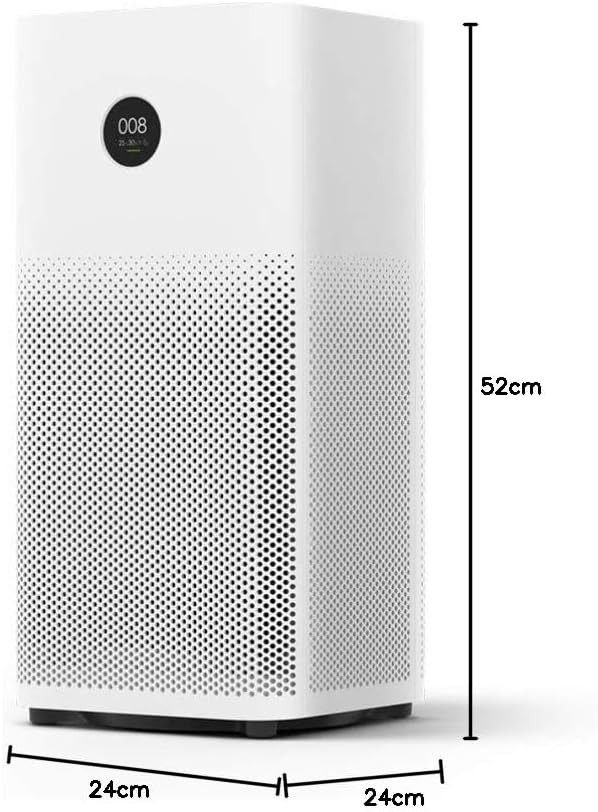
Image: Diagram illustrating the dimensions (height, width, depth) of the Xiaomi Mi Air Purifier 2S.
10. Waarborg en Ondersteuning
For detailed warranty information, terms, and conditions, please refer to the warranty card included with your product or visit the official XIAOMI webwebwerf. Bewaar u aankoopbewys as bewys van aankoop vir enige waarborgeise.
For technical support, service, or inquiries regarding your Xiaomi Mi Air Purifier 2S, please contact XIAOMI customer service or your local authorized retailer. Contact information can typically be found on the official XIAOMI webwebwerf of in jou produkdokumentasie.