
1. Inleiding
This manual provides essential information for the safe and efficient operation of your Zerone 10.8V-12V Lithium Battery Charger. This charger is designed for use with 10.8V to 12V Lithium-Ion batteries, offering quick and reliable charging. Please read this manual thoroughly before first use and retain it for future reference.

Image 1: The Zerone 10.8V-12V Lithium Battery Charger, showing its compact design and universal compatibility label.
2. Veiligheidsinstruksies
Always observe the following safety precautions to reduce the risk of electric shock, fire, or serious injury:
- Lees alle instruksies: Voordat u die laaier gebruik, lees alle instruksies en waarskuwingsmerke op die laaier, battery en produk wat die battery gebruik.
- Slegs binnenshuise gebruik: Moenie die laaier blootstel aan reën of nat toestande nie.
- Behoorlike voltage: Verseker die kragtoevoer voltage pas by die voltagsoos gespesifiseer op die laaier se graderingsplaatjie.
- Vermy skade: Moenie die laaier gebruik as dit 'n skerp hou gekry het, geval het of andersins beskadig is nie. Neem dit na 'n gekwalifiseerde dienspersoon.
- Ventilasie: Moenie enige ventilasie-openinge blokkeer nie. Verseker voldoende lugvloei rondom die laaier tydens werking.
- Ontkoppel wanneer dit nie gebruik word nie: Always unplug the charger from the power outlet before attempting any maintenance or cleaning, and when not in use.
- Gebruik gespesifiseerde batterye: Only charge batteries specifically designed for this charger. Charging other battery types may cause them to burst, leading to personal injury and damage.
- Moenie kortsluit nie: Moet nooit die batteryklemme kortsluit nie.
- Hou weg van kinders: Hierdie toestel is nie bedoel vir gebruik deur persone (insluitend kinders) met verminderde fisiese, sensoriese of geestelike vermoëns, of 'n gebrek aan ervaring en kennis nie, tensy hulle toesig of instruksies oor die gebruik van die toestel gegee is deur 'n persoon wat verantwoordelik is vir hul veiligheid.
3. Pakketinhoud
Verifieer dat alle items teenwoordig en in goeie toestand is:
- 1 x Zerone 10.8V-12V Lithium Battery Charger
- 1 x Gebruikershandleiding
4. Produkkenmerke
The Zerone 10.8V-12V Lithium Battery Charger offers the following key features:
- Universele verenigbaarheid: Specifically designed for 10.8V to 12V Lithium-Ion batteries.
- LED-aanwyser: Built-in LED display provides intuitive monitoring of battery status.
- Slim laaibestuur: Utilizes a 'first in, first charged' system and protects against overload.
- Vinnige laai: Capable of charging a 12V Lithium-Ion 1.5Ah battery in approximately 50 minutes.
- Wide Model Compatibility: Compatible with models such as DC10WD, DC10SB, DC10WC, BL1015, BL1016, BL1021B, and BL1041B.

Image 2: The charger displaying its compatibility with various battery models, including DC10WD, DC10SB, DC10WC, BL1015, BL1016, BL1021B, and BL1041B.
5. Opstelling
Volg hierdie stappe om jou batterylaaier op te stel:
- Pak die laaier uit: Carefully remove the charger and all components from the packaging.
- Koppel aan krag: Plug the charger's power cord into a standard 100V-260V AC electrical outlet. The charger's LED indicator will flash green once to confirm power connection.
- Berei battery voor: Ensure the battery to be charged is clean and free from debris.
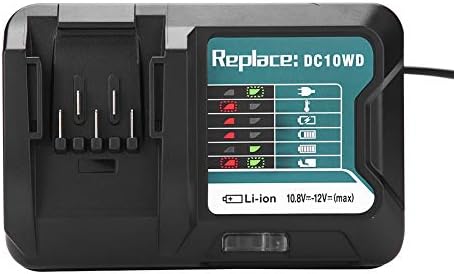
Image 3: The Zerone charger with its integrated power cord, ready for connection to an electrical outlet.
6. Bedryfsinstruksies
Om 'n battery te laai:
- Plaas battery in: Rig die battery met die laaier se gleuf en skuif dit in totdat dit stewig in plek klik.
- Monitor laai: The LED indicator will show the charging status. Refer to the "LED Indicator Guide" section for detailed explanations of the light patterns.
- Laai voltooi: Once the battery is fully charged, the LED indicator will show a solid green light.
- Verwyder battery: Press the release button on the battery (if applicable) and slide it out of the charger.
- Ontkoppel die laaier: Ontkoppel die laaier van die kragaansluiting wanneer dit nie gebruik word nie.

Image 4: The Zerone charger with a compatible lithium-ion battery inserted, ready for charging.
7. LED-aanwysergids
The charger features an LED display to communicate the battery's status:
| Aanwyser Lig | Status |
|---|---|
| Groen flikker | Charger is plugged in and ready. |
| Rooi flikker | Battery is in cooling mode. Charging will begin once the battery temperature is within the optimal range. |
| Red Sustained Light | Battery is currently charging (0-100%). |
| Green Sustained Light | Charging is completed. The battery is fully charged. |
| Red and Green Flashing | Indicates a defective battery pack or charger. |

Beeld 5: 'n Nabyskoot view of the charger's LED indicator panel, detailing the meaning of each light pattern for battery status.
8. Onderhoud
Behoorlike onderhoud verseker die lang lewensduur en werkverrigting van u laaier:
- Skoonmaak: Disconnect the charger from the power supply before cleaning. Use a dry, soft cloth to wipe the exterior of the charger. Do not use water or chemical cleaners.
- Berging: Store the charger in a dry, cool place, away from direct sunlight and moisture.
- Inspekteer gereeld: Periodically inspect the charger and its cord for any signs of damage. If damage is found, discontinue use and seek professional repair.
9. Probleemoplossing
Indien u probleme met u laaier ondervind, raadpleeg die volgende algemene probleme en oplossings:
- Laaier word nie aangeskakel nie:
- Ensure the power cord is securely plugged into both the charger and a working electrical outlet.
- Check the power outlet with another device to confirm it is functional.
- Battery not charging (Red Flashing LED):
- The battery may be too hot or too cold. Allow the battery to reach room temperature before attempting to charge again. Charging will automatically resume once the temperature is optimal.
- Battery not charging (Red and Green Flashing LED):
- This indicates a defective battery or charger. Try charging a different, known-good battery. If the issue persists, the charger may be faulty. If only the original battery causes this, the battery is likely defective.
- Stadige laai:
- Ensure the battery is fully seated in the charger.
- Verify that the battery is compatible with this charger.
Indien hierdie stappe nie die probleem oplos nie, kontak asseblief kliëntediens.
10. Spesifikasies
| Spesifikasie | Detail |
|---|---|
| Modelnommer | Zeronegfvetp6dn8-01 |
| Invoer Voltage | 100V-260V AC, 50-60Hz |
| Uitset Voltage | 10.8V-12V (GS) |
| Produk afmetings | 4.72 x 1.97 x 5.91 duim |
| Item gewig | 11.6 onse (0.33 kilogram) |
| Vervaardiger | Nul |
| Versoenbare batterytipes | 10.8V-12V Lithium-Ion (e.g., BL1015, BL1016, BL1021B, BL1041B) |
| Compatible Charger Models | DC10WD, DC10SB, DC10WC |

Image 6: The bottom view of the Zerone charger, showing its input/output specifications and model number.
11. Waarborg en Ondersteuning
For warranty information or technical support, please refer to the documentation provided with your purchase or contact Zerone customer service through the retailer where the product was purchased. Keep your purchase receipt as proof of purchase.