
1. Inleiding
This manual provides essential instructions for the safe and efficient operation of your SuperSonic IQ-6112DJBT Portable Bluetooth DJ Speaker. Please read this manual thoroughly before using the product and retain it for future reference.
2. Veiligheidsinligting
Om veilige werking te verseker en skade te voorkom, neem die volgende voorsorgmaatreëls:
- Moenie die luidspreker aan water, vog of uiterste temperature blootstel nie.
- Moenie die luidspreker oopmaak nie.asing. Verwys alle diens na gekwalifiseerde personeel.
- Hou die luidspreker weg van hittebronne en direkte sonlig.
- Gebruik slegs die kragadapter wat by die eenheid voorsien is.
- Verseker behoorlike ventilasie rondom die luidspreker tydens werking.
- Vermy langdurige luister op hoë volumevlakke om gehoorskade te voorkom.
3. Pakketinhoud
Verifieer dat alle items in die pakket teenwoordig is:
- SuperSonic IQ-6112DJBT Portable Bluetooth DJ Speaker
- Bedrade mikrofoon
- Afstandbeheer
- Kragadapter
- Gebruikershandleiding (hierdie dokument)
4. Produk verbyview
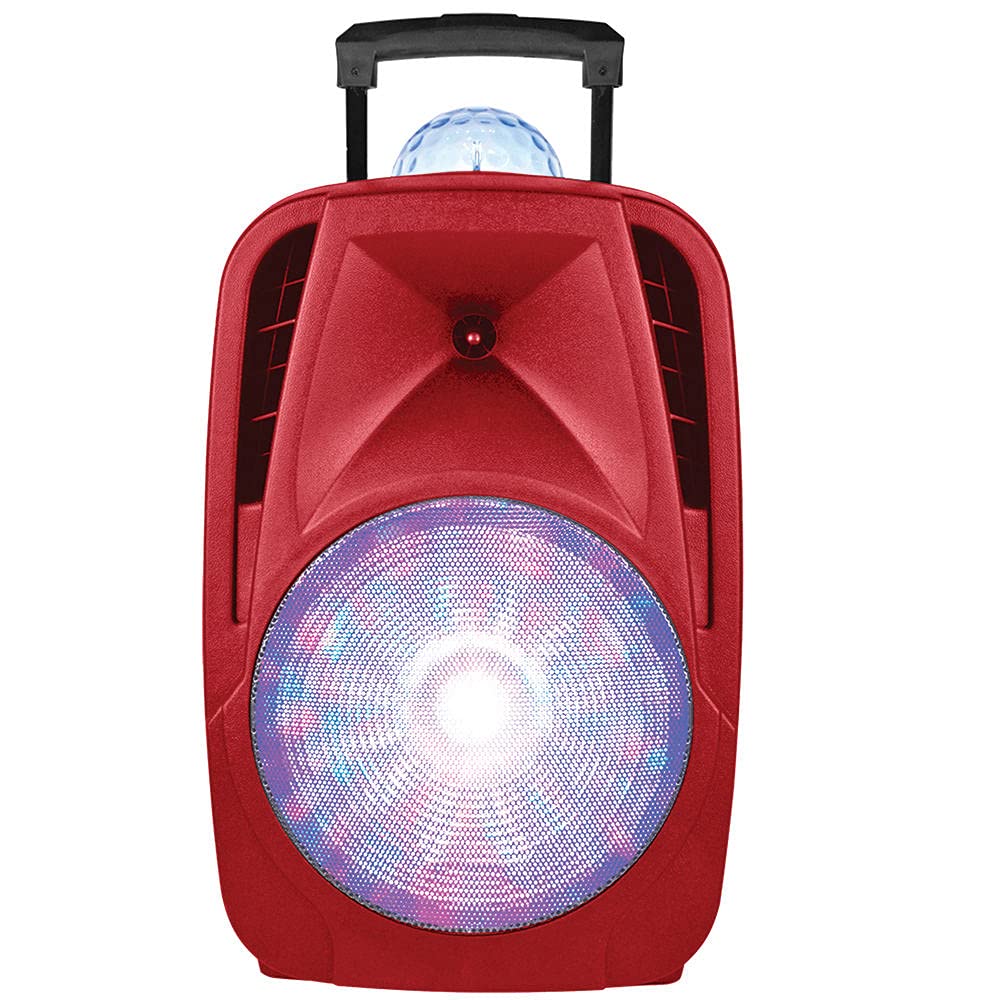
The SuperSonic IQ-6112DJBT is a versatile portable DJ speaker featuring a 12-inch high-efficiency woofer, built-in Bluetooth connectivity, USB/Micro SD card inputs, and an AUX input. It also includes a disco light feature for enhanced ambiance.
4.1 Included Accessories: Microphone and Remote Control
This image displays the included wired microphone and the multi-function remote control. The microphone features a standard 1/4 inch audio jack for connection to the speaker. The remote control includes buttons for mute, record, play, volume adjustment, track navigation, scan, and EQ settings, along with a numeric keypad for direct track selection.
4.2 Voorpaneelkontroles
The speaker features various controls for audio playback, input selection, and light effects. These typically include:
- Meester volume: Pas die algehele klankuitset aan.
- Mikrofoonvolume: Verstel die mikrofoon se invoervlak.
- Echo beheer: Pas die eggo-effek vir die mikrofoon aan.
- Invoermodus-knoppie: Switches between Bluetooth, USB, Micro SD, and AUX inputs.
- Ligmodus-knoppie: Controls the disco light effects.
- Terugspeelkontroles: Speel/Pouseer, Volgende/Vorige Snit.
4.3 Agterpaneelverbindings
The rear panel provides ports for power and external devices:
- Kragtoevoer: Koppel aan die kragadapter.
- AUX-invoer (3.5 mm): Connects external audio devices via an audio cable.
- USB-poort: Vir USB-flash drives.
- Micro SD -kaartgleuf: Vir Mikro SD geheuekaarte.
- Microphone Input (1/4 inch): Connects the wired microphone.
5. Opstelling
5.1 Kragverbinding
- Connect the supplied power adapter to the speaker's power input port.
- Steek die kragadapter in 'n standaard elektriese aansluiting.
- Turn on the speaker using the power switch, usually located on the rear or front panel.
5.2 Initial Charging (Battery Powered)
The speaker is battery-powered. For optimal performance, fully charge the speaker before its first use. The charging indicator light will typically change color or turn off when charging is complete.
6. Bedryfsinstruksies
6.1 Bluetooth -koppeling
- Skakel die luidspreker aan.
- Druk die Modus button on the speaker or remote control until "Bluetooth" mode is selected. The speaker will indicate it is in pairing mode (e.g., a flashing LED or an audible prompt).
- On your Bluetooth-enabled device (smartphone, tablet, etc.), go to the Bluetooth settings and search for available devices.
- Kies "IQ-6112DJBT" uit die lys toestelle.
- Once paired, the speaker will confirm the connection (e.g., a solid LED or an audible prompt). You can now play audio wirelessly from your device.
6.2 USB/Micro SD Playback
- Plaas 'n USB-geheuestokkie of mikro-SD-kaart (vooraf gelaai met MP3-klank) in files) into the respective port/slot on the speaker.
- Druk die Modus button to select "USB" or "SD" mode. The speaker will automatically begin playing audio from the inserted media.
- Gebruik die terugspeelkontroles (Speel/Pouseer, Volgende/Vorige Snit) op die luidspreker of afstandbeheerder om jou musiek te bestuur.
6.3 AUX-invoer
- Koppel die een kant van 'n 3.5 mm-klankkabel (nie ingesluit nie) aan die AUX-invoerpoort op die luidspreker.
- Connect the other end of the audio cable to the headphone jack or audio output of your external audio device (e.g., MP3 player, laptop).
- Druk die Modus knoppie om "AUX"-modus te kies.
- Play audio from your external device. Adjust volume on both the speaker and the external device.
6.4 Gebruik van mikrofoon
- Plug the wired microphone into the 1/4 inch microphone input jack on the speaker.
- Adjust the microphone volume knob on the speaker to your desired level.
- Adjust the echo control knob for an echo effect, if desired.
6.5 Ligeffekte
The speaker features built-in disco lights. Press the Ligte modus button on the speaker or remote control to cycle through different light patterns or to turn the lights off.
6.6 Afstandbeheerfunksies
The included remote control provides convenient access to various speaker functions:
- DEMPEL: Demp of demp die oudio-uitvoer.
- REK: Initiates recording (if supported by the speaker's firmware and connected media).
- REC SPEEL: Plays back recorded audio.
- VOL+/VOL-: Increases or decreases the main volume.
- CH+/CH- (Next/Previous): Spring na die volgende of vorige snit/stasie.
- SKANDEER: Scans for radio stations (if FM radio is supported).
- EQ: Blaai deur die voorinstellings van die gelykmaker.
- Numeriese sleutelbord (0-9): Direct selection of tracks on USB/SD media.
7. Onderhoud
7.1 Skoonmaak
Vee die buitekant van die luidspreker af met 'n sagte, droë lap. Moenie skuurmiddels, was of oplosmiddels gebruik nie. Maak seker dat geen vloeistowwe die luidspreker se openinge binnedring nie.
7.2 Berging
When not in use for extended periods, store the speaker in a cool, dry place, away from direct sunlight and extreme temperatures. If battery-powered, charge the battery periodically to maintain its lifespan.
8. Probleemoplossing
| Probleem | Moontlike oorsaak | Oplossing |
|---|---|---|
| Geen krag nie | Power adapter not connected; Battery depleted; Power switch off. | Ensure power adapter is securely connected and plugged into a working outlet. Charge the battery. Turn the power switch ON. |
| Geen klank nie | Volume te laag; Verkeerde invoermodus; Toestel nie gekoppel nie (Bluetooth); Kabel nie gekoppel nie (AUX). | Increase volume on speaker and source device. Select the correct input mode. Re-pair Bluetooth device. Check AUX cable connection. |
| Bluetooth verbind nie | Luidspreker nie in paringsmodus nie; Toestel te ver; Interferensie; Voorheen gekoppelde toestel gekoppel. | Ensure speaker is in Bluetooth pairing mode. Move device closer to speaker. Turn off other Bluetooth devices. Disconnect from previously paired devices. |
| Mikrofoon werk nie | Microphone not plugged in; Microphone volume too low; Faulty microphone. | Ensure microphone is securely plugged into the correct input. Increase microphone volume. Test with another microphone if available. |
9. Spesifikasies
- Handelsmerk: Supersonies
- Modelnommer: IQ-6112DJBT
- Woofer grootte: 12 duim
- Verbindingstegnologie: AUX, Bluetooth, USB
- Kragbron: Battery aangedrewe
- Impedansie: 4 ohm
- Aantal kanale: 2
- Oudio-invoer: Headphone jack (for AUX), 1/4 inch (for Microphone)
- Item gewig: 17.9 pond
- UPC: 639131861121
10. Waarborg en ondersteuning
10.1 Waarborginligting
This product is covered by a Manufacturer Warranty. For specific details regarding warranty coverage, duration, and terms, please refer to the warranty card included in your package or contact Supersonic customer support.
10.2 Kliëntediens
If you encounter any issues not covered in this manual or require further assistance, please contact Supersonic customer support. Contact information can typically be found on the product packaging, the official Supersonic webwebwerf, of die waarborgkaart.