
1. Inleiding
This manual provides detailed instructions for the assembly, operation, and maintenance of your FLEXISPOT Electric Sit Stand Desk Base. Designed for a DIY desktop workstation, this adjustable desk frame offers flexibility and ergonomic benefits for both home and office environments. It includes an integrated power strip and a cable management tray to enhance your workspace efficiency and organization.

This image displays the assembled FLEXISPOT standing desk frame within a modern office environment, showcasing its sleek design and how it fits into a professional workspace.
2. Belangrike veiligheidsinligting
Lees en verstaan asseblief alle veiligheidsinstruksies voor montering en gebruik om beserings of skade aan die produk te voorkom.
- Volg altyd die monteerinstruksies wat verskaf word.
- Keep the desk away from water and heat sources.
- Do not use the desk if the cord is damaged.
- Always use the desk within its weight limit.
- Keep the desk away from children and pets when in use.
3. Pakketinhoud
Verify that all components are present before beginning assembly. If any parts are missing or damaged, please contact FLEXISPOT customer support.

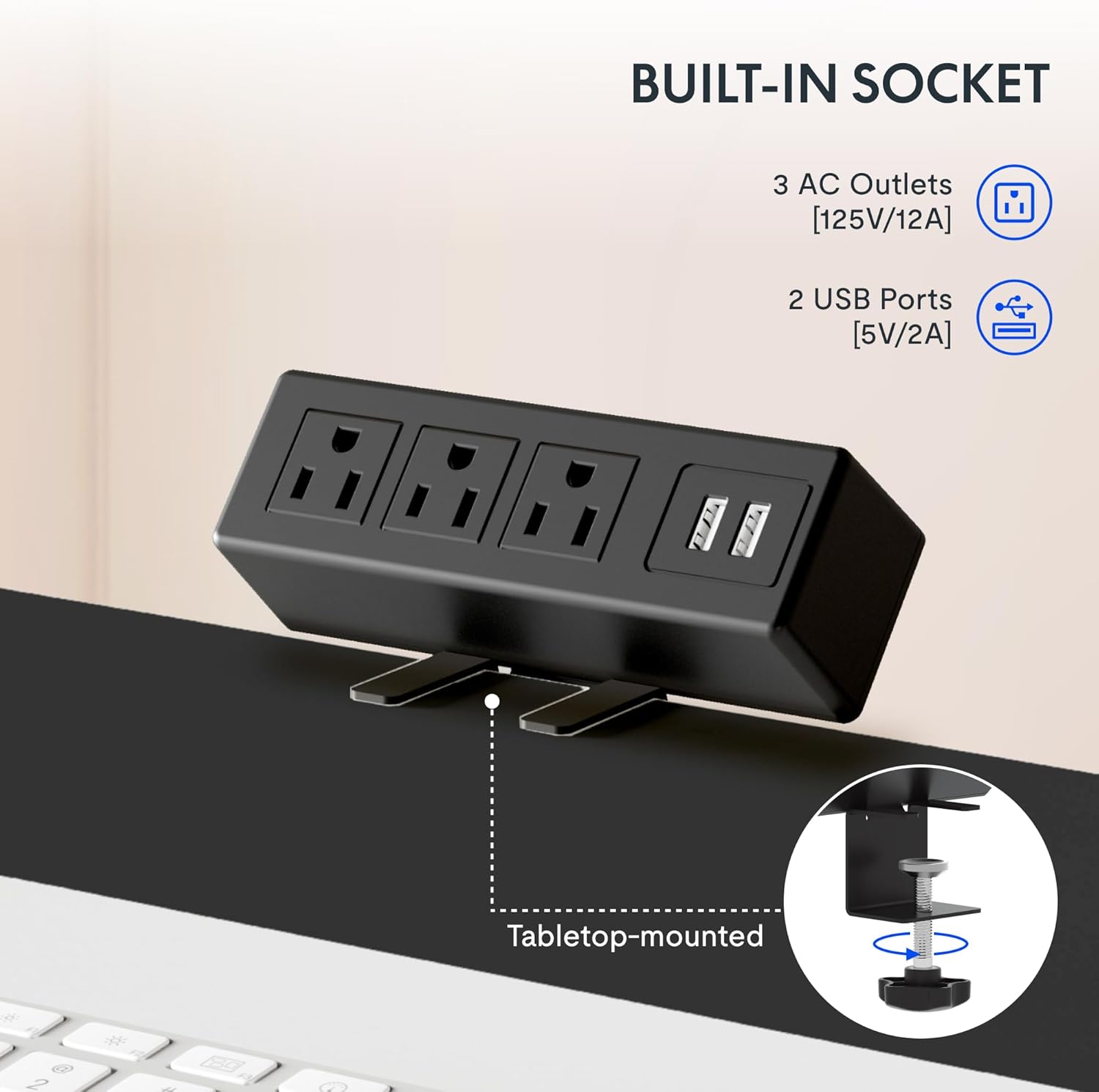
Hierdie beeld bied 'n nabyskoot view van die clamp-on power strip, highlighting its three AC outlets and two USB ports, designed for convenient tabletop mounting.
Lys van komponente:
- Adjustable Desk Legs (2)
- Crossbar/Frame Support
- Beheerpaneel met geheuefunksies
- Clamp Power Strip (3 AC outlets, 2 USB ports)
- Kabelbestuurbak
- Mounting Hardware and Tools (as provided)
- Cable Clips/Ties
4. Opstelling en samestelling
Assembly of the FLEXISPOT desk frame is designed to be straightforward and typically takes less than 30 minutes. Follow these steps carefully.
4.1 Prepare Your Workspace
Clear an area large enough to assemble the desk frame. Ensure you have all components and the provided tools readily available.
4.2 Stel die raam bymekaar
Attach the adjustable desk legs to the crossbar according to the detailed instructions in the included assembly guide. Ensure all screws are tightened securely.
4.3 Attach Your Desktop
The frame is compatible with various desktop sizes. Recommended desktop sizes are a width of 39.3" to 63" and a depth of 19.7" to 31.5". Secure your chosen desktop to the assembled frame using appropriate screws (may not be included with frame only purchase).

This diagram illustrates the recommended dimensions for a desktop panel to be used with the FLEXISPOT desk frame, ensuring proper fit and stability.
4.4 Install Power Strip and Cable Management
Heg die clamp power strip to the edge of your desktop for easy access to power outlets. Install the cable management tray and use the provided cable clips to organize and conceal your cords, maintaining a clean and clutter-free workspace.

Hierdie beeld bied 'n nabyskoot view van die clamp-on power strip, highlighting its three AC outlets and two USB ports, designed for convenient tabletop mounting.
This side-by-side comparison demonstrates the significant improvement in desk organization achieved by utilizing the integrated cable management tray, transforming a cluttered setup into a tidy workspace.
5. Bedryfsinstruksies
Your FLEXISPOT desk frame features an electric height adjustment system with a memory controller for personalized comfort.
5.1 Hoogte verstel
Use the up (▲) and down (▼) arrow buttons on the control panel to smoothly raise or lower the desk to your desired height. The adjustable height range is 28.1'' to 45.7''.

This visual demonstrates the extensive height adjustment capabilities of the desk, showing its minimum height of 28.1 inches and maximum height of 45.7 inches, allowing for versatile use.
5.2 Gebruik van geheuevoorinstellings
The control panel allows you to save up to four preferred height settings. To save a height, adjust the desk to the desired level, then press and hold one of the numbered memory buttons (1, 2, 3, or 4) until the display confirms the setting is saved. To recall a saved height, simply press the corresponding numbered button.
This detailed image highlights the desk's control panel, featuring a digital display, up/down adjustment buttons, and four memory preset buttons for convenient height recall.
5.3 Produk verbyview Video
Vir 'n visuele oorsigview of the FLEXISPOT desk and its features, please watch the official product video below.
Hierdie video bied 'n algemene oorsigview of FlexiSpot products, showcasing the ergonomic benefits and various uses of their adjustable desks in different settings. It demonstrates the smooth height adjustment and integrated features.
6. Onderhoud
To ensure the longevity and optimal performance of your FLEXISPOT Standing Desk Frame, follow these simple maintenance guidelines:
- Skoonmaak: Wipe down the frame and control panel with a soft, damp lap. Vermy die gebruik van harde chemikalieë of skuurmiddels wat die afwerking kan beskadig.
- Kabelbestuur: Periodically check and re-organize cables to prevent tangles and ensure smooth operation of the desk's height adjustment mechanism.
- Motorversorging: The motor is designed for maintenance-free operation. Avoid obstructing the movement of the legs during adjustment.
- Gereelde inspeksie: Occasionally check all screws and connections to ensure they remain tight. Re-tighten if necessary.
7. Probleemoplossing
If you encounter any issues with your FLEXISPOT Standing Desk Frame, refer to the following common troubleshooting tips:
| Probleem | Moontlike oorsaak | Oplossing |
|---|---|---|
| Die lessenaar beweeg nie of reageer nie op kontroles nie. | Power cable disconnected; overload protection activated; motor error. | Check power connections. Unplug and re-plug the desk. Reduce weight on the desk. Refer to the specific error codes in your detailed manual if available. |
| Die lessenaar beweeg oneweredig of maak ongewone geluide. | Los verbindings; ongelyke gewigsverspreiding; obstruksie. | Ensure all assembly screws are tight. Distribute weight evenly on the desktop. Check for any obstructions under or around the desk. |
| Geheue-voorinstellings werk nie. | Verkeerde stoorprosedure. | Ensure you press and hold the memory button until the setting is confirmed. Re-save your desired heights. |
If the problem persists after attempting these solutions, please contact FLEXISPOT customer support for further assistance.
8. Spesifikasies
Key technical specifications for the FLEXISPOT Standing Desk Frame (Model E1):
| Kenmerk | Detail |
|---|---|
| Handelsmerk | FLEXISPOT |
| Modelnommer | E1 |
| Produk Afmetings (D x B x H) | 19.7"D x 63"W x 45.7"H (frame only, max extension) |
| Verstelbare hoogtereeks | 28.1" (Min) - 45.7" (Max) |
| Recommended Desktop Width | 39.3" tot 63" |
| Aanbevole lessenaardiepte | 19.7" tot 31.5" |
| Basis materiaal | Allooi staal |
| Kleur | Grys |
| Maksimum gewig aanbeveling | 70 kilogram (ongeveer 154 pond) |
| Beheerpaneelkenmerke | Digital Display, Up/Down Adjustment, 4 Memory Presets |
| Kragstrook | 3 WS-aansluitingspunte (125V/12A), 2 USB-poorte (5V/2A) |
| Vereiste samestelling | Ja |
| UPC | 855427008913 |
9. Waarborg en Ondersteuning
FLEXISPOT stands behind the quality of its products. Your Standing Desk Frame is covered by the following warranty:
- 5-jaar waarborg: Covers the frame, motor, and other mechanisms.
- 2-jaar waarborg: Covers the controller, switch, and electronics.
For warranty claims, technical assistance, or any questions regarding your product, please visit the official FLEXISPOT website or contact their customer support directly. Please have your model number (E1) and proof of purchase ready when contacting support.


