
Inleiding
This manual provides instructions for the safe and efficient use of your LP LP-E8 Battery Charger. This charger is designed to provide reliable power for your compatible camera batteries.
Verenigbaarheid
The LP LP-E8 Battery Charger is compatible with Canon EOS Rebel cameras that use LP-E8 batteries. This includes models such as:
- Canon EOS Rebel T2i
- Canon EOS Rebel T3i
- Canon EOS Rebel T4i
- Canon EOS Rebel T5i
- Canon EOS 550D
- Canon EOS 600D
- Canon EOS 650D
- Canon EOS 700D
- Canon eos soen x4
- Canon eos soen x5
- Canon EOS Kiss X6i
- Canon EOS Kiss X7i
Note: This charger is not compatible with Canon EOS Rebel T2, T3, T4, or T5 models.

Image: LP LP-E8 Battery Charger showing compatibility with various Canon EOS Rebel camera models.
Veiligheidsinligting
Om veilige werking te verseker en skade te voorkom, neem asseblief die volgende veiligheidsmaatreëls in ag:
- Oorladingsbeskerming: The charger is equipped with circuitry to prevent overcharging of batteries.
- Kortsluitingbeskerming: Built-in protection against short circuits ensures safe operation.
- Hoë temperatuur beskerming: The charger includes features to prevent overheating during the charging process.
- Spanningsbeskerming: Designed to protect against power surges.
- Do not disassemble the charger. Refer to qualified service personnel for repairs.
- Use in dry locations only. Avoid exposure to moisture or water.
- Hou buite bereik van kinders.
Produk Kenmerke
- Standaardversoenbaarheid: Meets or exceeds OEM Canon LP-E8 Battery Charger specifications.
- Wêreldwye gebruik: Supports AC100-240V input, allowing use in various countries.
- Draagbare ontwerp: Constructed from durable ABS material, lightweight and compact for easy transport.
- LED-aanwyser: Provides clear charging status (Red for charging, Green for fully charged).
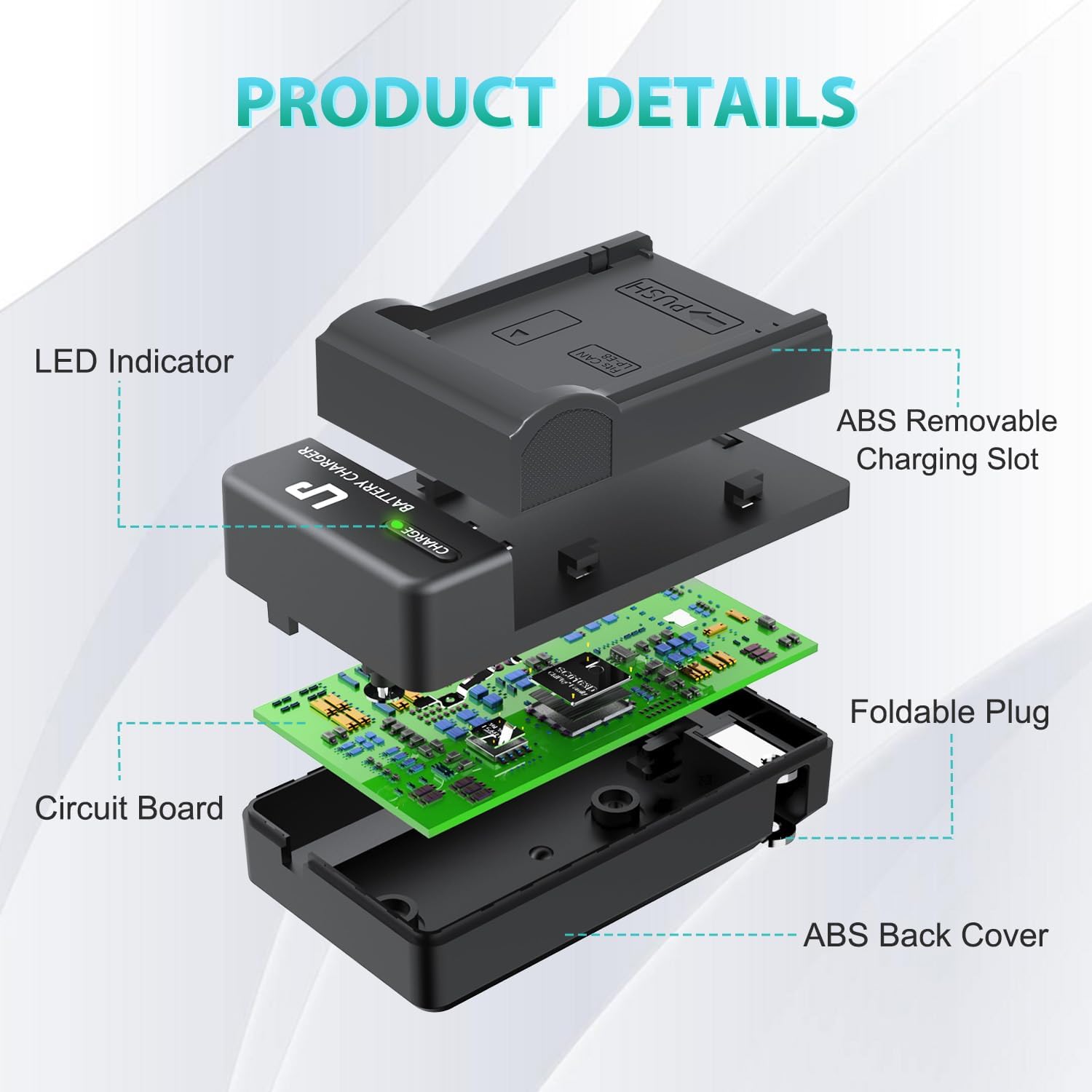
Beeld: Ontplof view illustrating the internal components and design of the LP LP-E8 Battery Charger.

Image: The compact LP LP-E8 Battery Charger shown being held, emphasizing its portability.
Opstelling en Bedryfsinstruksies
Plaas die battery in
- Ensure the charger is unplugged from the power outlet.
- Align the LP-E8 battery with the charging slot on the charger. The "PUSH" indicator on the charger shows the direction for insertion.
- Gently push the battery into the slot until it clicks securely into place.

Image: Demonstrating the correct way to insert an LP-E8 battery into the charger.
Laai proses
- Once the battery is securely inserted, unfold the integrated plug on the charger.
- Plug the charger directly into a standard AC wall outlet (AC100-240V).
- The LED indicator on the charger will illuminate Rooi to indicate that the battery is currently charging.
- When the battery is fully charged, the LED indicator will change to Groen.
- Once charging is complete, unplug the charger from the wall outlet and remove the battery by gently pressing the "PUSH" tab and sliding the battery out.

Image: Step-by-step guide on inserting the battery and plugging in the charger.

Image: LED indicator status: Red for charging, Green for fully charged.

Image: The LP LP-E8 Battery Charger in use, charging a battery while a Canon camera is nearby.
Video: Official LP LED AC Charger demonstration, showing the charging process and LED indicators.
Onderhoud en versorging
To ensure the longevity and optimal performance of your LP LP-E8 Battery Charger, follow these maintenance guidelines:
- Hou die laaier skoon en vry van stof en puin. Gebruik 'n sagte, droë lap vir skoonmaak.
- Berg die laaier op 'n koel, droë plek wanneer dit nie gebruik word nie.
- Vermy om die laaier te laat val of dit aan harde impakte bloot te stel.
- Moenie die laaier vir lang tye aan uiterste temperature of direkte sonlig blootstel nie.
Probleemoplossing
Charger Not Working / LED Not Lighting Up
- Maak seker dat die laaier stewig in 'n funksionele muuraansluiting ingeprop is.
- Verify that the battery is correctly inserted into the charging slot.
- Check if the battery itself is damaged or incompatible.
Battery Not Charging Fully
- Confirm that the LED indicator turns green when charging is complete.
- If the battery consistently fails to charge fully, it may be nearing the end of its lifespan and require replacement.
- Ensure the charger is not exposed to extreme temperatures during charging, which can affect performance.
Spesifikasies
| Model | LP-E8 (Model 996790) |
| Invoer | AC100-240V, 50/60Hz, MAX 150mA |
| Uitset | DC8.4V 600mA |
| Produk afmetings | 1.87 x 1.35 x 3.34 duim |
| Item gewig | 2.39 onse |
| Battery sel samestelling | Litiumioon |
| Vervaardiger | LP |

Image: Product dimensions of the LP LP-E8 Battery Charger.
Waarborg en Ondersteuning
LP provides the following support for this product:
- 30-Day Refund: Eligible for a refund within 30 days of purchase.
- 1-Year After-Sales Service: Comprehensive support for one year after purchase.
- Lewenslange diens: Deurlopende ondersteuning vir die produk se lewensduur.
- Customer Response: Expect a quick and friendly response within 24 hours on working days for any inquiries or issues.