
1. Inleiding
The Azpen Dockall D101 is a versatile device combining a Qi wireless charging dock station, a Bluetooth speaker, and a phone stand. It is designed to enhance your audio experience while conveniently charging your compatible smartphones and tablets.
2. Wat is in die boks
- 1 x DockAll Slim D101
- 1 x GS-kragadapter
- 1 x Gebruikershandleiding

Image: Box contents including the DockAll D101 unit, DC power adapter, and user manual.
3. Produk verbyview
The Dockall D101 features an innovative design that integrates multiple functionalities into one device for home and office use. Key components include:
- Qi draadlose laaibak: Vir versoenbare toestelle.
- Bluetooth-luidspreker: For audio streaming.
- Verstelbare telefoonstaander: Provides an upright viewing hoek.
- Beheerknoppies: For power, volume, and playback.
- MicroSD-gleuf: Supports cards up to 64 GB.

Beeld: Voorkant view of the Azpen Dockall D101 with a smartphone placed on the charging pad, illustrating wireless charging capability.
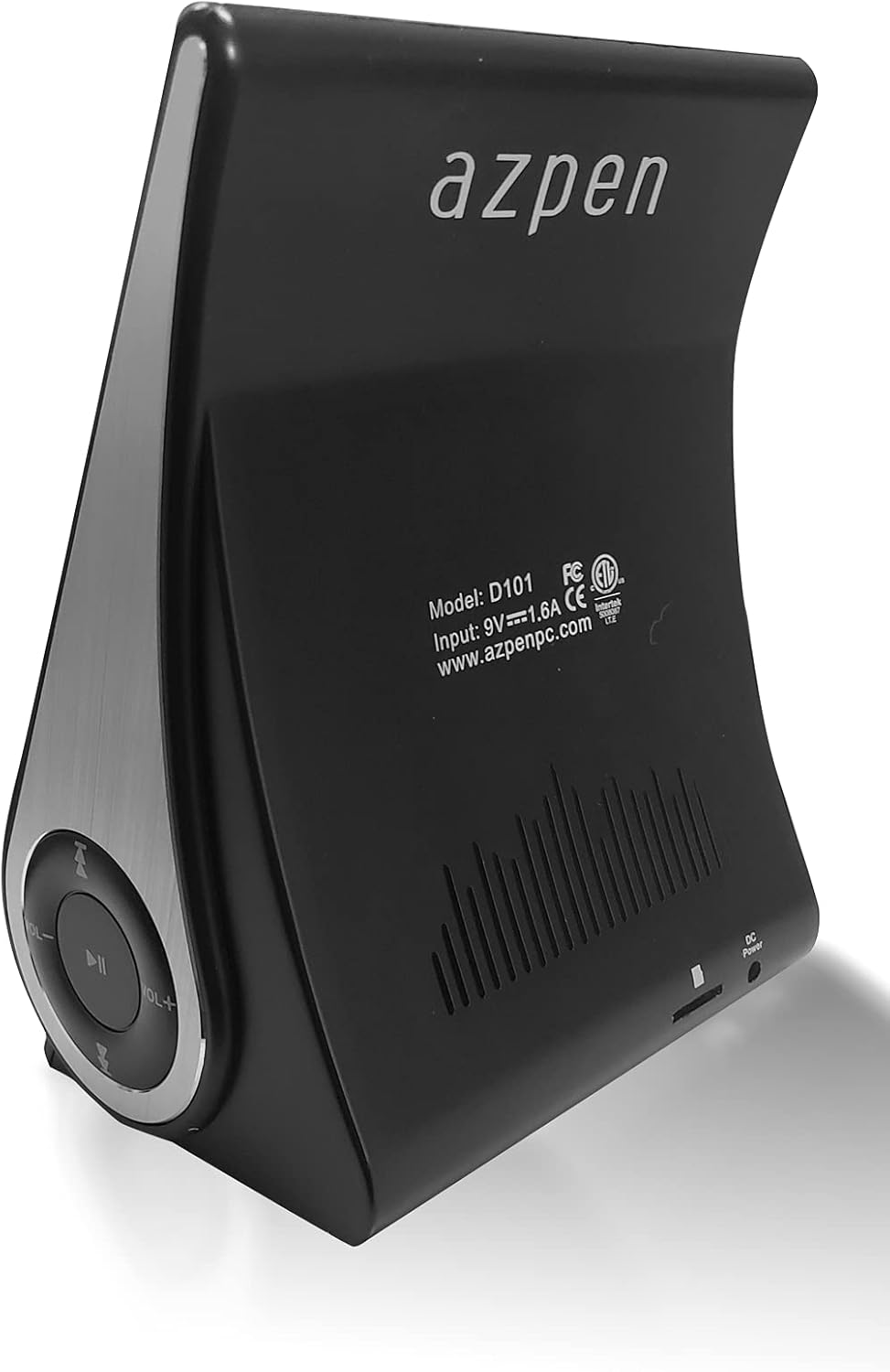
Beeld: Agter view of the Azpen Dockall D101, displaying the model number (D101), input specifications, and regulatory certifications.

Beeld: Syprofile of the Azpen Dockall D101, highlighting the circular control panel with volume, playback, and phone call buttons.
4. Opstelling
- Kragverbinding: Connect the provided DC Power Adapter to the "DC Power" port on the back of the Dockall D101. Plug the adapter into a standard wall outlet.
- Posisionering: Place the Dockall D101 on a stable, flat surface.
- Adjust Phone Stand: Gently pull up the phone stand to your desired viewing angle. Ensure the stand is securely locked in place.
5. Bedryfsinstruksies
5.1 Krag aan/af
- To power on, press and hold the Power button (usually indicated by a circle with a vertical line) on the control panel until the device activates.
- Om af te skakel, druk en hou die aan/af-knoppie weer in totdat die toestel afskakel.
5.2 Qi Wireless Charging
- Maak seker dat die Dockall D101 aangeskakel is.
- Place your Qi-compatible smartphone or tablet onto the charging pad on the adjustable stand.
- Adjust the position of your device until the solid blue light appears, indicating that wireless charging has begun.
- The Dockall D101 supports fast Qi wireless charging (10W).
- Note: Charging may not work through metal cases or excessively thick phone cases (e.g., OtterBox Defender).
5.3 Bluetooth-luidsprekerfunksionaliteit
- Saambinding:
- Power on the Dockall D101.
- Aktiveer Bluetooth op jou slimfoon of klanktoestel.
- Soek vir "Dockall D101" (or similar name) in your device's Bluetooth settings and select it to pair.
- 'n Bevestigingsklank sal suksesvolle paring aandui.
- Oudioterugspeel:
- Use the control buttons on the Dockall D101 to play/pause, skip tracks (forward/backward), and adjust volume.
- You can also control playback directly from your paired device.
- Handvrye oproepe:
- When a call comes in, press the Phone button (usually indicated by a phone icon) to answer.
- Speak into the built-in microphone on the Dockall D101.
- Press the Phone button again to end the call.

Image: A smartphone positioned on the Dockall D101 stand, displaying a music player interface, highlighting the device's audio capabilities.
Video: 'n Oorview of the Azpen DockAll Mini, demonstrating its features and functionality. While the video showcases a "Mini" model, the core operations for charging and Bluetooth are similar to the D101.
6. Onderhoud
- Skoonmaak: Use a soft, dry cloth to clean the surface of the Dockall D101. Do not use liquid cleaners or aerosols.
- Berging: Wanneer dit nie vir lang tye gebruik word nie, bêre die toestel op 'n koel, droë plek weg van direkte sonlig.
- Hantering: Vermy om die toestel te laat val of dit aan uiterste temperature of vog bloot te stel.
7. Probleemoplossing
| Probleem | Moontlike Oplossing |
|---|---|
| Toestel skakel nie aan nie. | Ensure the DC Power Adapter is securely connected to both the device and a working power outlet. |
| Draadlose laai werk nie. |
|
| Bluetooth koppel nie. |
|
| Swak klankgehalte. |
|
8. Spesifikasies
- Model Naam: D101
- Tipe luidspreker: Bluetooth-luidspreker
- Spesiale kenmerke: Wireless Charger, Upright View Angle, Bluetooth Speaker, 3-in-1 Hub
- Aanbevole gebruike: Vir slimfone of tablette
- Versoenbare toestelle: For iPhone 15/14/13/12/11, for Samsung Galaxy S24/S23/S22/S21/S20/S10
- Kleur: Swart
- Item gewig: 11.2 onse
- Is waterdig: ONWAAR
- Waarborg tipe: Beperk
- Aantal items: 1
- Beheer metode: Raak
- Draadlose kommunikasietegnologie: Bluetooth
- Luidsprekergrootte: 5 sentimeter
- Kragbron: Battery aangedrewe
- Oudiobestuurdertipe: Dinamiese bestuurder
- UPC: 859592006828
- Vervaardiger: Azpen
- Produk afmetings: 5.9 x 4.3 x 3.75 duim
- Luidspreker maksimum uitsetkrag: 5 Watt
- Verbindingstegnologie: Bluetooth
- Klankuitsetmodus: Mono
- Montage tipe: Dok

Image: Diagram showing the dimensions of the Azpen Dockall D101, with measurements in centimeters.
9. Waarborg en Ondersteuning
The Azpen Dockall D101 comes with a Limited Warranty. For specific details regarding warranty coverage and to access customer support, please refer to the warranty information provided in the original packaging or visit the official Azpen webwebwerf.
For further assistance, you may also contact Azpen customer service directly.