
1. Inleiding
Dankie vir die aankoopasing the sainlogic GBlife PT3378 Wireless Weather Forecast Station. This device provides accurate indoor and outdoor temperature and humidity readings, weather forecasts, moon phases, and atmospheric pressure. It features a clear display, a wireless outdoor sensor, and a convenient USB charging port. Please read this manual carefully to ensure proper setup and operation.
2. Package Contents and Product Overview
2.1 Pakketinhoud
- GBlife PT3378 Main Unit (Weather Station Display)
- Draadlose buitensensor
- Kragadapter vir hoofeenheid
- Gebruikershandleiding
2.2 Produk verbyview
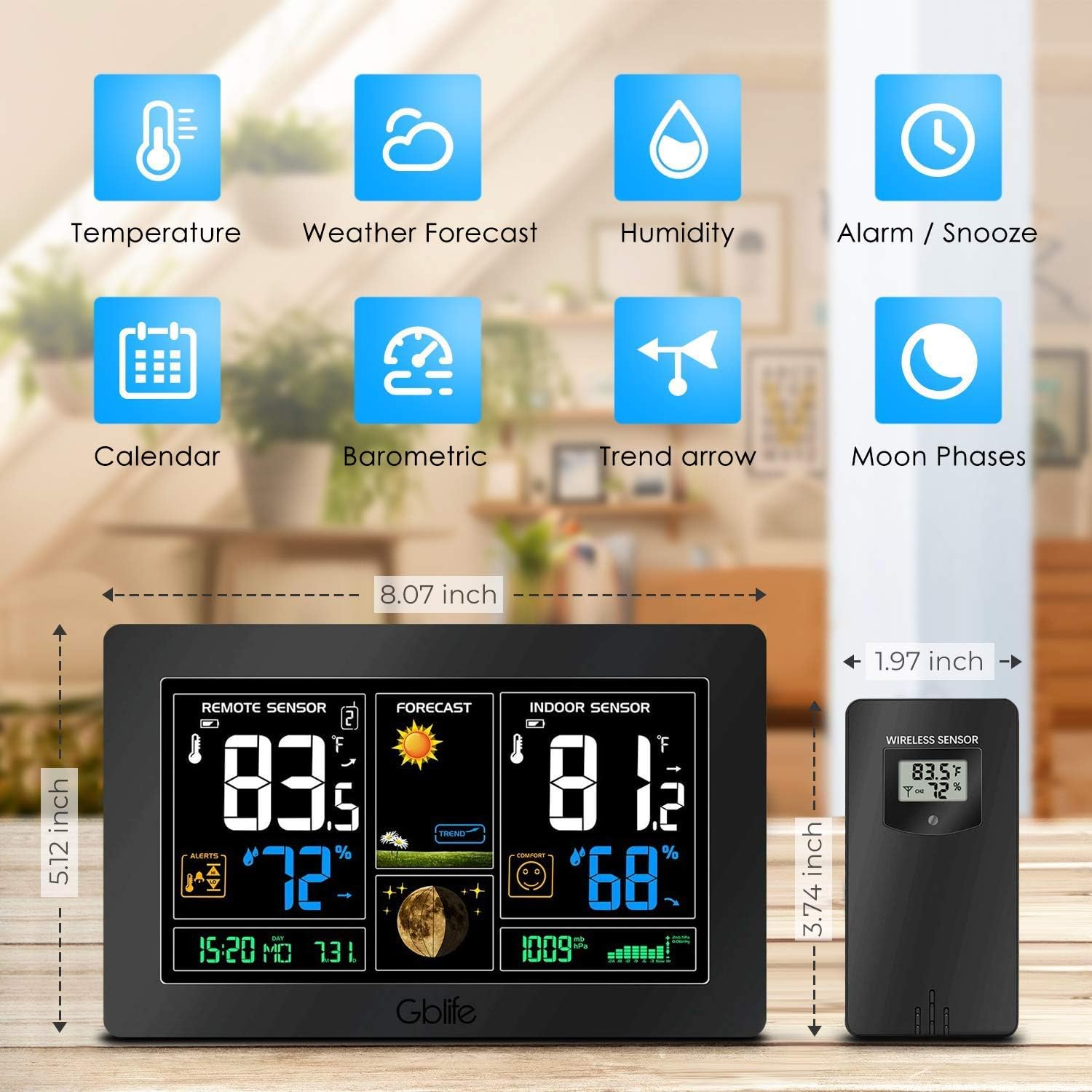
Prent 2.1: verbyview of the GBlife PT3378 Weather Station highlighting its main features including temperature, weather forecast, humidity, alarm/snooze, calendar, barometric pressure, trend arrow, and moon phases.

Prent 2.2: Gedetailleerd view of the GBlife PT3378 display showing remote temperature, remote humidity, time/date, weather forecast, weather trend, moon phase, indoor temperature, indoor humidity, comfort level, and atmospheric pressure. The image also labels the side buttons for time setting, alarm clock, up/down, alert setting, brightness adjustment, max/min value, and mute.
3. Opstelgids
3.1 Aanskakeling van die hoofeenheid
- Connect the provided power adapter to the DC 5V port on the back of the main unit.
- Steek die adapter in 'n standaard muuraansluiting. Die skerm sal aanskakel.
- Optionally, insert 3 x AAA batteries (not included) into the battery compartment for backup power in case of power outage.
3.2 Installing Batteries in the Wireless Outdoor Sensor
- Maak die batterykompartement aan die agterkant van die draadlose sensor oop.
- Insert 2 x AA batteries (not included), observing the correct polarity (+/-).
- Maak die batterykompartement stewig toe.
3.3 Koppel die sensor
The main unit and wireless sensor should automatically pair upon initial power-up. If pairing does not occur:
- Ensure both the main unit and sensor have power.
- Press and hold the 'CH' button on the main unit for 3 seconds to initiate a search for the outdoor sensor.
- The outdoor temperature and humidity should appear on the main unit's display.
3.4 Sensorplasing

Prent 3.1: Illustration of wireless data transmission between the indoor receiver (main unit) and the remote outdoor sensor. The sensor should be placed outdoors within range of the main unit.

Prent 3.2: The main unit can be placed on a table or mounted on a wall. The outdoor sensor is shown mounted on an exterior wall, indicating suitable placement for outdoor readings.
Place the wireless outdoor sensor in a dry, shaded location away from direct sunlight and precipitation to ensure accurate readings. The transmission range is up to 50 meters (150 feet) in an open area. The main unit can be placed on a tabletop using its integrated stand or mounted on a wall.
4. Bedryfsinstruksies
4.1 Vertoon inligting
Die hoofeenheid se skerm bied 'n omvattende oorsigview of weather conditions:
- Afstandsensor: Toon buitetemperatuur en humiditeit.
- Voorspelling: Shows weather forecast icons (sunny, cloudy, rainy, etc.) and weather trend.
- Indoor Sensor: Displays indoor temperature and humidity, along with a comfort level indicator.
- Tyd/Datum: Huidige tyd en datum.
- Maanfase: Current moon phase.
- Atmosferiese druk: Current atmospheric pressure reading.
Knip 4.1: A short demonstration of the GBlife PT3378 Weather Station's display features, including outdoor temperature/humidity, weather forecasts, moon phase, comfort level, and atmospheric pressure. This video provides a visual guide to the station's various readings.
4.2 Stel tyd en datum in
Refer to the 'Time Setting' button (labeled '1' in Image 2.2) on the side of the main unit. Press this button to enter time/date setting mode. Use the 'Up' and 'Down' buttons to adjust values and the 'Time Setting' button again to confirm and move to the next setting.
4.3 Wekkerfunksie
Use the 'Alarm Clock' button (labeled '2' in Image 2.2) to set and activate alarms. Follow similar steps as time setting to adjust alarm time.
4.4 Helderheidsaanpassing

Prent 4.1: The weather station display showing adjustable backlight brightness. High brightness is suitable for daytime viewing, while low brightness is ideal for night to avoid dazzling.
The display features adjustable backlight brightness. Use the 'Brightness Adjustment' button (labeled '6' in Image 2.2) to cycle through different brightness levels to suit your environment, from bright daytime viewing to a dimmer setting for night.
4.5 USB-laaipoort

Prent 4.2: The GBlife PT3378 weather station with a smartphone connected to its USB output port for charging. The station provides 5V, 1A output for charging compatible devices.
The main unit includes a USB output port (5V, 1A) for charging compatible devices such as smartphones. Connect your device's USB charging cable to this port.
5. Spesifikasies
| Kenmerk | Detail |
|---|---|
| Produk afmetings | 20.5 x 13 x 3 cm |
| Gewig | 600 gram |
| Kragbron (Hoofeenheid) | AC Adapter (included), 3x AAA batteries (backup, not included) |
| Kragbron (Buitesensor) | 2x AA-batterye (nie ingesluit nie) |
| Binnenshuise temperatuurreeks | 0°C – 60°C |
| Buitetemperatuurreeks | -40°C – 60°C |
| Temperatuur Akkuraatheid | ± 1°C |
| Draadlose oordragreeks | Tot 50 meter (150 voet) in oop area |
| Verbindingstegnologie | USB, draadloos |
| Spesiale kenmerke | Indoor/Outdoor Sensor, Waterproof (sensor), USB Charging Port |
6. Onderhoud
- Clean the display and unit with a soft, dry cloth. Do not use abrasive cleaners or solvents.
- Ensure the outdoor sensor is kept in a dry, shaded location to prolong its lifespan and maintain accuracy.
- Replace batteries in the outdoor sensor and main unit (if using backup) when the low battery indicator appears on the display.
7. Probleemoplossing
- Geen buitetemperatuur-/humiditeitslesing nie:
- Maak seker dat die buitesensor vars batterye het en binne die bereik van die hoofeenheid is.
- Press and hold the 'CH' button on the main unit to re-establish connection.
- Check for any obstructions between the sensor and the main unit.
- Onakkurate temperatuurlesings:
- Ensure the outdoor sensor is not in direct sunlight or exposed to extreme weather conditions.
- Verify that the main unit is not placed near heat sources or air conditioning vents.
- Skerm is dof of leeg:
- Check if the power adapter is securely connected.
- If using backup batteries, ensure they are fresh.
- Adjust the backlight brightness using the dedicated button.
8. Waarborg en Ondersteuning
The sainlogic GBlife PT3378 Wireless Weather Forecast Station includes a 45-day money-back guarantee and an 18-month customer service warranty. For any questions or support needs, please contact sainlogic customer service.