
Belangrike veiligheidsinligting
Read all instructions carefully before using this product. Keep this manual for future reference.
- Vermy om die headset aan uiterste temperature of humiditeit bloot te stel.
- Moenie die headset self uitmekaar haal of probeer herstel nie.
- Clean the headset with a soft, dry cloth. Do not use liquid cleaners.
- Langdurige luister op hoë volume vlakke kan gehoorskade veroorsaak.
Pakketinhoud
Verifieer dat alle items in die pakket teenwoordig is:
- NUBWO HW02 USB Computer Headset
- USB kabel
- Gebruikershandleiding (hierdie dokument)
Opstelling
Koppel aan 'n rekenaar (USB)
- Vind 'n beskikbare USB-poort op jou rekenaar.
- Plug the USB connector of the NUBWO HW02 headset into the USB port.
- The operating system will typically install the necessary drivers automatically. This may take a few moments.
- Once installed, the headset should be recognized as an audio input and output device.
- You may need to select the "NUBWO HW02" headset as your default audio device in your computer's sound settings.
Connecting to a Device (3.5mm Jack)
The NUBWO HW02 headset features a 3.5mm jack for broader compatibility.
- Locate the 3.5mm audio jack on your device (e.g., gaming console controller, smartphone, tablet).
- Insert the 3.5mm connector from the headset into the device's audio jack.
- Maak seker dat die verbinding veilig is.
- Adjust audio settings on your device as needed to select the headset for input and output.
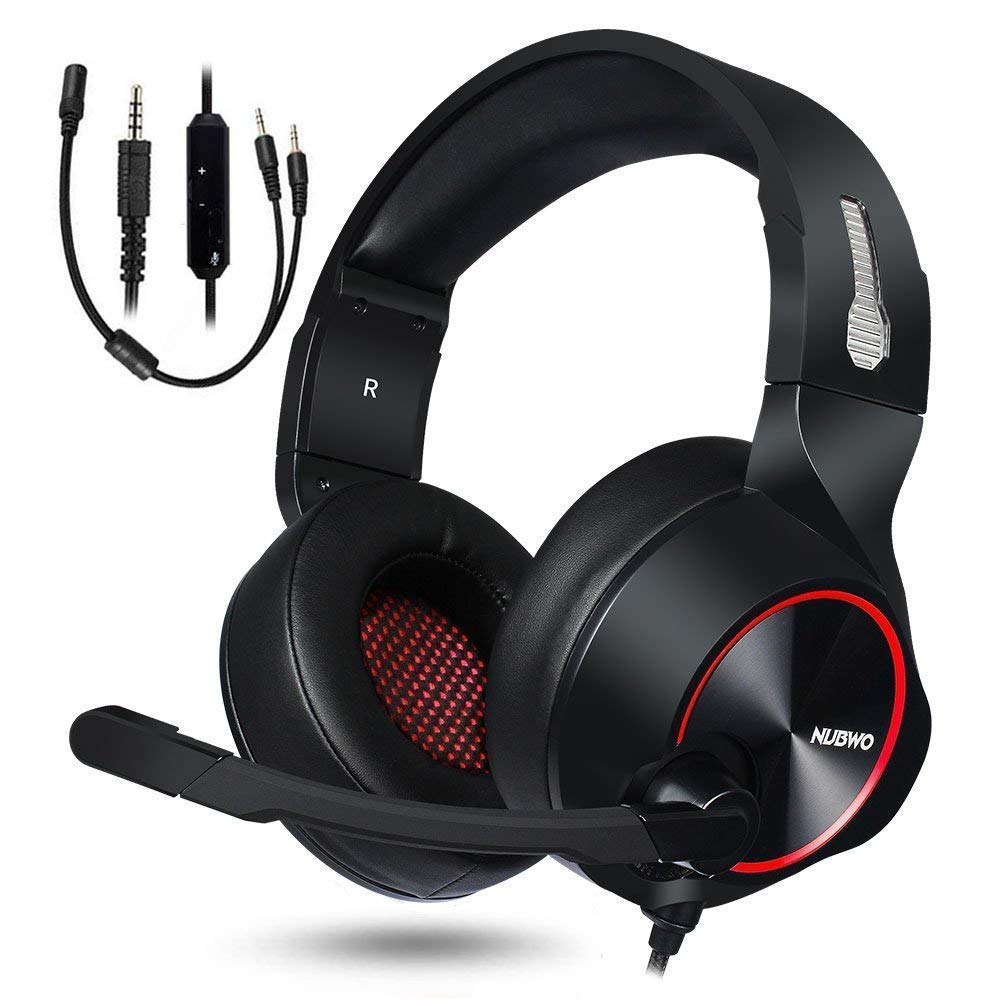
Image: NUBWO HW02 USB Computer Headset. This image displays the overall design of the headset, featuring orange accents on the earcups and headband, with a flexible microphone arm.
Bedryfsinstruksies
Verstel van die headset
- Kopbandverstelling: Gently slide the earcups up or down along the headband to achieve a comfortable fit over your ears.
- Mikrofoonposisionering: Bend the flexible microphone arm to position the microphone approximately 1-2 inches from your mouth for optimal voice clarity.
Volumebeheer
The NUBWO HW02 headset features an in-line volume control.
- Verhoog volume: Roll the volume wheel upwards.
- Verlaag volume: Roll the volume wheel downwards.
Microphone Mute Function
An in-line switch allows you to mute or unmute the microphone.
- Demp mikrofoon: Slide the switch to the "Mute" position.
- Mikrofoon demp: Slide the switch to the "Unmute" position.
Onderhoud
- Skoonmaak: Use a soft, dry, lint-free cloth to wipe down the earcups and headband. Do not use abrasive cleaners, alcohol, or solvents.
- Berging: When not in use, store the headset in a clean, dry place away from direct sunlight and extreme temperatures.
- Kabelversorging: Vermy skerp buigings of oormatige trek aan die kabel om skade te voorkom.
Probleemoplossing
| Probleem | Moontlike oorsaak | Oplossing |
|---|---|---|
| Geen klank van die oorfone nie | Oorfone nie behoorlik gekoppel nie. Volume te laag. Verkeerde oudio-uitvoertoestel gekies. | Ensure USB or 3.5mm jack is fully inserted. Increase volume using in-line control and computer/device settings. Select "NUBWO HW02" as the default playback device in your sound settings. |
| Mikrofoon werk nie | Mikrofoon gedemp. Verkeerde oudio-invoertoestel gekies. Mikrofoon verkeerd geposisioneer. | Check the in-line mute switch. Select "NUBWO HW02" as the default recording device in your sound settings. Adjust microphone position closer to your mouth. |
| Klankkwaliteit is swak of verwronge | Volume te hoog. Los verbinding. Inmenging. | Verlaag die volume. Re-seat the USB or 3.5mm connection. Probeer om aan 'n ander USB-poort of toestel te koppel. |
Spesifikasies
- Model: HW02
- Verbinding: Bedraad (USB, 3.5mm-aansluiting)
- Oorplasing: Oor Oor
- Geraasbeheer: Aktiewe geraaskansellasie
- Platformversoenbaarheid: Spelkonsole, rekenaar
- Materiaal: Silikoon
- Item gewig: 1.11 pond
- Produk afmetings: 9 x 7 x 4 duim
Waarborg en Ondersteuning
For warranty information or technical support, please refer to the NUBWO official webwebwerf of kontak hul kliëntediens. Bewaar u aankoopbewys as bewys van aankoop.
NUBWO Official Webwebwerf: Visit the NUBWO Store on Amazon