
1. Belangrike veiligheidsinstruksies
Please read and follow these instructions carefully for safe assembly and operation of your FLEXISPOT E5W-UK electric standing desk frame. Adhere to all weight restrictions and consider using additional anchors for enhanced stability, especially if the desk is frequently moved or heavily loaded.
- Maak seker dat alle komponente teenwoordig en onbeskadig is voor montering.
- Moenie die maksimum vragvermoë van 125 kg (275 lbs) oorskry nie.
- Hou kinders en troeteldiere weg van die lessenaar tydens werking.
- Avoid placing objects under the desk that could obstruct its movement.
- Ontkoppel krag voor skoonmaak of instandhouding.
- Gebruik slegs die meegeleverde kragadapter.
2. Produk verbyview
The FLEXISPOT E5W-UK is a robust electric standing desk frame designed for height adjustability and stability. It features a dual-motor lifting system and a memory control panel.

Beeld: Oorview of the FLEXISPOT EC5 height-adjustable desk frame, showcasing its robust and stable design in various color options (black, grey, white).
Sleutel kenmerke:
- Electric Lifting System: Powerful dual motors with a three-stage linear motion system ensure smooth and rapid height adjustment at 38 mm/second with low noise (under 50 dB).
- Solid and Robust Construction: The heavy-duty coated steel frame provides stability and supports a load capacity of up to 125 kg (275 lbs). Telescopic crossbars extend from 110 cm to 190 cm to accommodate tabletops from 120 cm to 200 cm in width.
- Humanized Lifting Function: Height adjustment range from 62 cm to 125 cm to suit various user heights and office needs.
- Anti-botsingsfunksie: Protects the desk from collisions with obstacles during height adjustment, enhancing safety.
- Gehalteversekering: Each Flexispot desk frame undergoes 10,000 fatigue tests, meeting international standards with CE/BIFMA/RoHS certification.

Image: Illustrates the dual motor system, highlighting specifications such as max load capacity (160kg), low energy consumption (<0.5W), speed (35mm/s), and noise level (under 50dB).

Image: Details the stability and durability features, including 3 lifting columns, height adjustment from 62-127cm, 20,000+ fatigue test validation, and removable foot caps for casters.
3. Opstelling en samestelling
The FLEXISPOT E5W-UK desk frame requires assembly. All necessary tools are included in the package. Assembly typically takes 20-25 minutes with clear, top-notch instructions.
Monteerstappe:
- Pak al die komponente uit en verifieer dit teen die onderdelelys in die ingeslote handleiding.
- Heg die hefkolomme aan die voetsteune vas.
- Connect the crossbars between the lifting columns.
- Install the control box and motor cables.
- Mount the control panel to the desired location on the desk frame.
- Secure your chosen tabletop to the assembled frame using appropriate screws (tabletop not included).
- Koppel die kragkabel aan en maak seker dat alle verbindings stewig is.

Image: Displays all components of the FLEXISPOT EC5 desk frame laid out for assembly, including legs, crossbars, control box, and tools, indicating an easy assembly process.
Adjusting Frame Width:
The frame's width is adjustable from 110 cm to 190 cm to accommodate various tabletop sizes (120-200 cm width x 60-80 cm depth). Adjust the telescopic crossbars to match your tabletop before securing it.
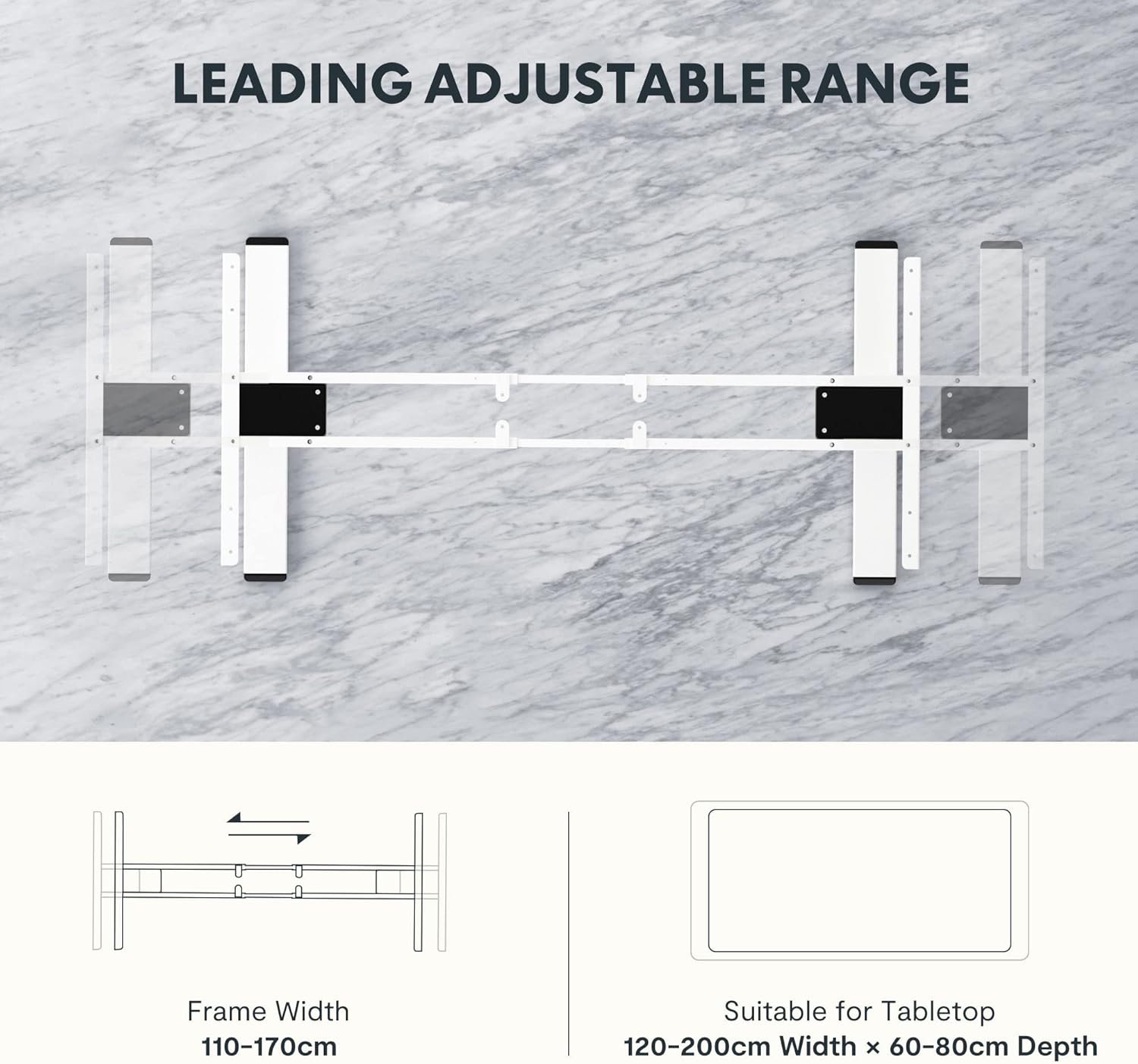
Image: Diagram illustrating the adjustable frame width from 110-170cm and suitable tabletop dimensions (120-200cm width x 60-80cm depth).
4. Bedryfsinstruksies
The FLEXISPOT E5W-UK desk frame is operated via an intuitive control panel with memory presets.
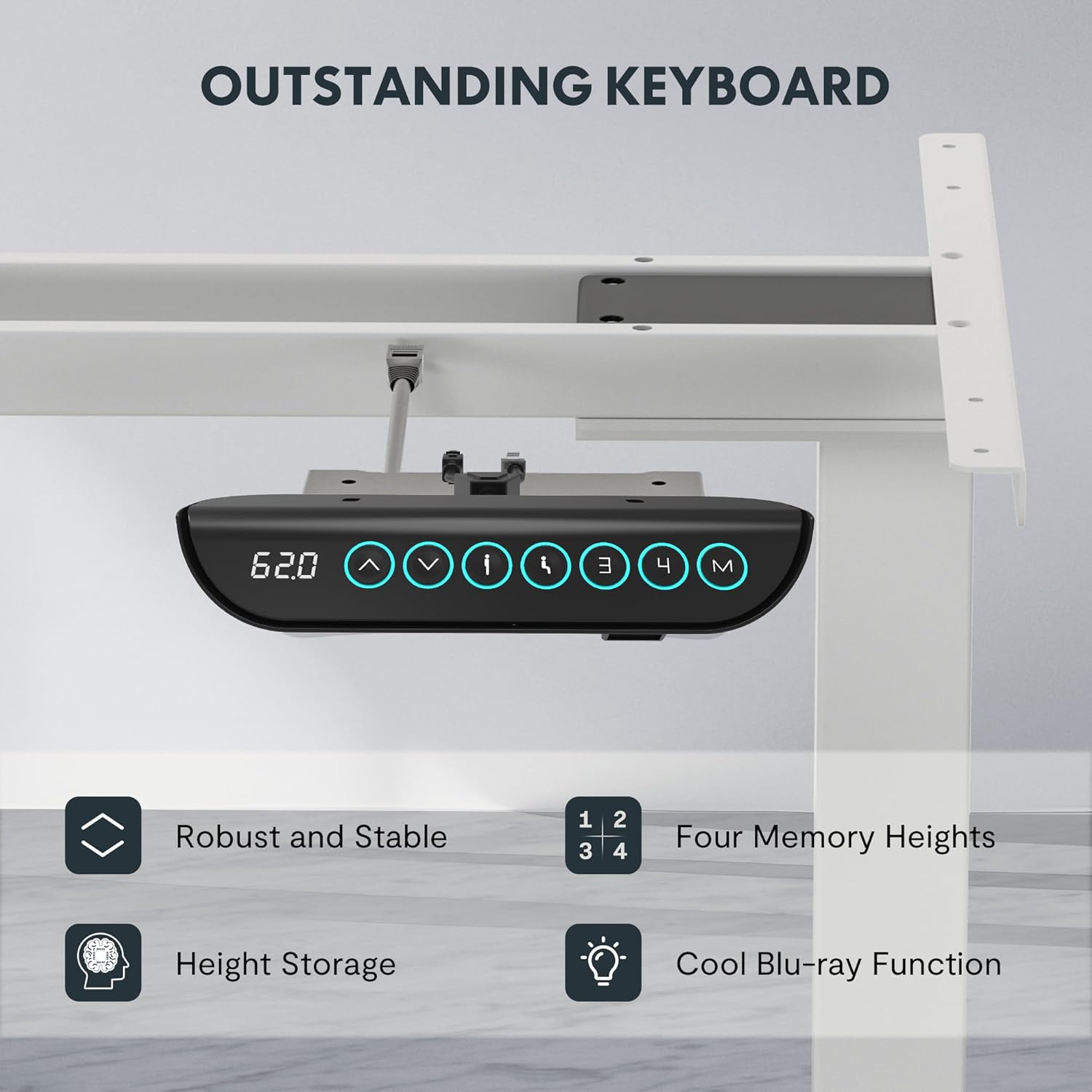
Image: Close-up of the FLEXISPOT EC5 control panel, featuring a digital height display, up/down buttons, and four memory preset buttons (1, 2, 3, 4), along with a memory set button (M).
Beheerpaneel funksies:
- Op/Af-knoppies (▲ / ▼): Druk en hou om die lessenaarhoogte handmatig aan te pas. Laat los om by die verlangde hoogte te stop.
- Digitale skerm: Toon die huidige hoogte van die lessenaar in sentimeter.
- Geheue-voorinstellings (1, 2, 3, 4):
- Verstel die lessenaar tot jou verlangde hoogte.
- Druk die "M"-knoppie. Die skerm sal "S-" wys.
- Press one of the number buttons (1, 2, 3, or 4) within 3 seconds to save the current height to that preset.
- To recall a saved height, simply press the corresponding number button. The desk will automatically move to the stored position.
- Antibotsingstelsel: The desk is equipped with an anti-collision feature. If the desk encounters an obstacle during movement, it will automatically stop and reverse slightly to prevent damage.
5. Onderhoud
Regular maintenance ensures the longevity and optimal performance of your FLEXISPOT E5W-UK desk frame.
- Skoonmaak: Vee die lessenaar se raam af met 'n sagte, damp cloth. Avoid abrasive cleaners or solvents. Ensure the power is disconnected before cleaning.
- Kabelbestuur: Periodically check all cables for wear or damage. Ensure they are neatly routed and not pinched.
- Bevestigingsmiddels: Kontroleer af en toe alle skroewe en boute om seker te maak dat hulle styf vas is. Draai weer vas indien nodig.
- Bewegingskontrole: Operate the desk through its full height range periodically to ensure smooth movement.
6. Probleemoplossing
If you encounter issues with your FLEXISPOT E5W-UK desk frame, refer to the common solutions below.
| Probleem | Moontlike oorsaak | Oplossing |
|---|---|---|
| Die lessenaar beweeg nie. | Power cable disconnected, control box loose, overload. | Check power connection. Ensure all cables are securely plugged in. Reduce weight on the desk. |
| Uneven movement or strange noises. | Los bevestigingsmiddels, obstruksie, ongelyke gewigsverspreiding. | Check and tighten all screws. Remove any obstructions. Redistribute weight evenly on the tabletop. |
| Anti-collision system frequently triggers. | Obstacles under or above the desk, sensitivity setting. | Clear the area around the desk. Consult the full manual for adjusting anti-collision sensitivity if available. |
| Geheue-voorinstellings werk nie. | Not saved correctly. | Stoor die geheuevoorinstellings weer volgens die gebruiksaanwysings. |
If the problem persists after attempting these solutions, please contact FLEXISPOT customer support.
7. Spesifikasies
- Modelnommer: E5W-UK
- Handelsmerk: FLEXISPOT
- Kleur: White (Frame 3 Levels - White)
- Materiaal: Alloy Steel (Frame), Metal (Raw Material)
- Afmetings (L x B x H): 45.87 x 110 x 7.87 cm (packaged); Product dimensions: 116.5P x 32l x 20H cm (assembled, without tabletop)
- Gewig: 29.72 kg (verpak)
- Laai kapasiteit: Tot 125 kg (275 pond)
- Hoogteaanpassingsreeks: 62 cm tot 125 cm
- Spoed: 38 mm/sekonde
- Geraasvlak: Minder as 50 dB
- Frame Width Adjustment: 110 cm tot 190 cm
- Suitable Tabletop Dimensions: 120-200 cm (width) x 60-80 cm (depth)
- Vergadering benodig: Ja
- Spesiale kenmerke: Sit-stand desk, Height-adjustable desk, Electric standing desk, Anti-collision function, Memory presets.
- Sertifiserings: CE/BIFMA/RoHS (as per product features)

Image: Displays certifications for the FLEXISPOT EC5, including an IGR Institute certificate for ergonomic product and a German Health Award for ergonomic brands.
8. Waarborg en Ondersteuning
FLEXISPOT stands by the quality of its products.
- Raamwaarborg: 5 jaar
- Motorwaarborg: 3 jaar
- Tegniese ondersteuning: Gratis leeftyd tegniese ondersteuning
For warranty claims, technical assistance, or any questions regarding your FLEXISPOT E5W-UK desk frame, please contact FLEXISPOT customer service through their official website or the retailer where the product was purchased. Please have your model number (E5W-UK) and proof of purchase ready when contacting support.