
Inleiding
This manual provides detailed instructions for the setup, operation, and maintenance of your Zerone BN59-01179A Replacement Remote Control. Please read this manual carefully before using the product to ensure proper functionality and longevity.
Produk verbyview
The Zerone BN59-01179A is a universal replacement remote control designed for compatible Smart TVs. It offers a compact design and a comprehensive set of buttons for various functions.
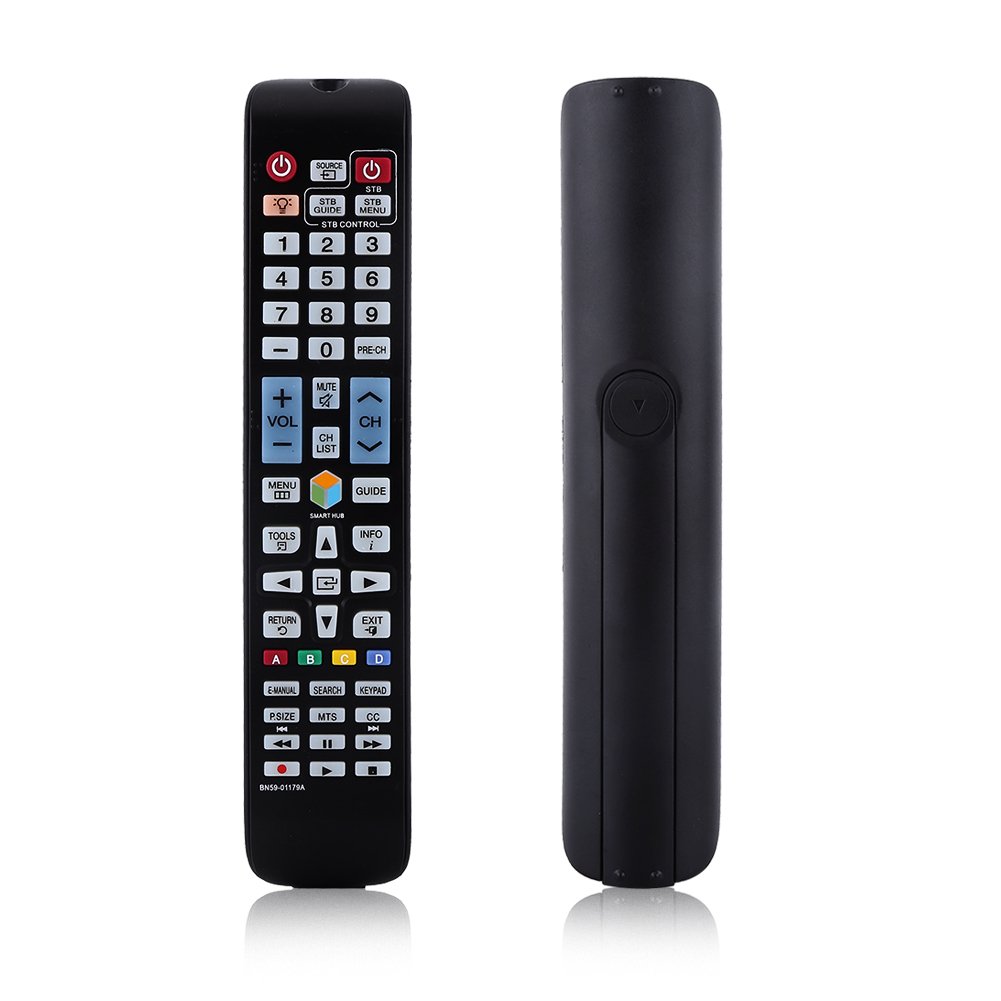
Beeld: Voorkant view of the Zerone BN59-01179A remote control, showing its full layout and approximate dimensions (23cm length, 4.7cm width, 2cm thickness).
Opstelling
Battery installasie
- Vind die batterykompartement aan die agterkant van die afstandbeheer.
- Skuif die batteryklep afwaarts of druk die grendel en lig op om oop te maak.
- Plaas twee (2) AAA-batterye in en maak seker dat die positiewe (+) en negatiewe (-) terminale korrek in lyn is met die merke binne-in die kompartement.
- Plaas die batteryklep terug deur dit terug in posisie te skuif totdat dit stewig klik.
Let wel: Batterye word nie saam met die afstandbeheerder ingesluit nie. Gebruik asseblief nuwe AAA-batterye vir optimale werkverrigting.

Image: The back of the remote control with the battery cover removed, showing the empty battery compartment ready for two AAA batteries.
Bedryfsinstruksies
This remote control is designed for immediate use with compatible TVs without requiring programming. Simply insert batteries and point the remote towards your television.
Sleutel funksies

Image: A hand holding the Zerone remote control, with inset close-ups highlighting the power/source buttons and the navigation/Smart Hub buttons.
- Aan/uit-knoppie (rooi knoppie): Skakel die TV aan of af.
- Bron: Kies invoerbronne (HDMI, AV, ens.).
- STB/DTV: Switches between Set-Top Box and Digital TV modes.
- Getalknoppies (0-9): Direkte kanaalkeuse.
- PRE-CH: Keer terug na die vorige kanaal.
- Volume (+/-): Pas die volumevlak aan.
- Demp: Demp of ontdemp die TV-klank.
- Channel (CH Up/Down): Verander TV-kanale opeenvolgend.
- CH LYS: Wys die kanaallys.
- SPYSKAART: Kry toegang tot die TV se hoofkieslys.
- Smart Hub: Maak die Smart Hub-koppelvlak vir toepassings en stromingsdienste oop.
- GIDS: Vertoon die elektroniese programgids.
- INLIGTING: Shows information about the current program.
- GEREEDSKAP: Accesses quick settings or contextual options.
- Navigasieknoppies (Op/Af/Links/Regs/Enter): Navigeer deur spyskaarte en kies opsies.
- TERUG: Gaan terug na die vorige skerm of kieslys.
- UITGANG: Verlaat die huidige kieslys of toepassing.
- Kleurknoppies (A, B, C, D): Funksionaliteit wissel volgens TV-model en toepassing.
- E-HANDLEIDING: Accesses the TV's electronic manual.
- SOEK: Opens the search function.
- SLEUTELBAS: Displays an on-screen keypad.
- P. GROOTTE: Adjusts picture size/aspect ratio.
- MTS: Multi-channel Television Sound (SAP).
- CC: Closed Captioning.
- Media Control Buttons (Play, Pause, Stop, Rewind, Fast Forward): Beheer die afspeel van media.
Onderhoud
- Skoonmaak: Gebruik 'n sagte, droë lap om die afstandbeheerder skoon te maak. Moenie vloeibare skoonmaakmiddels of skuurmiddels gebruik nie.
- Battery vervanging: Vervang batterye wanneer die afstandbeheerder se reaksie traag word of ophou werk. Vervang altyd albei batterye gelyktydig met nuwes.
- Berging: Indien die afstandbeheerder nie vir 'n lang tydperk gebruik gaan word nie, verwyder die batterye om lekkasie en skade te voorkom.
- Vermy blootstelling: Keep the remote away from direct sunlight, heat sources, and moisture.
Probleemoplossing
- Afstandsbediening reageer nie:
- Maak seker dat batterye korrek met die korrekte polariteit geplaas is.
- Vervang ou batterye met nuwe AAA-batterye.
- Check for any obstructions between the remote and the TV's infrared sensor.
- Maak seker dat die afstandbeheerder direk op die TV gerig is.
- Beperkte reeks:
- Vervang batterye.
- Ensure there are no strong light sources or electronic devices interfering with the signal.
- Spesifieke knoppies werk nie:
- Clean the remote control, especially around the unresponsive buttons, to remove any dirt or debris.
- If the issue persists after battery replacement and cleaning, the remote may be faulty.
Spesifikasies
| Kenmerk | Beskrywing |
|---|---|
| Handelsmerk | Nul |
| Model Naam | Zerone32687x9gqs (BN59-01179A compatible) |
| Verbindingstegnologie | Infrarooi |
| Versoenbare toestelle | Television (specifically for Samsung BN59-01179A compatible models) |
| Maksimum aantal ondersteunde toestelle | 8 (Universal functionality) |
| Knoppie Hoeveelheid | 12 (referring to main function groups, actual count is higher) |
| Tipe beheerder | Knoppie beheer |
| Maksimum reeks | 8 meter |
| Battery Tipe | AAA |
| Aantal batterye | 2 AAA-batterye benodig (nie ingesluit nie) |
| Spesiale kenmerk | Universele vervanging, geen programmering nodig nie |
Waarborg en Ondersteuning
Zerone provides a service guarantee for this product. If you encounter any questions or issues regarding your remote control, please contact the seller or manufacturer for assistance. They will provide follow-up services to address your concerns.
For specific warranty details and support contact information, please refer to your purchase documentation or the retailer's webwebwerf.