
Alvoxcon B07DZ44TF6
Alvoxcon UHF Wireless Dynamic Handheld Microphone System User Manual
Model: B07DZ44TF6
Inleiding
This manual provides detailed instructions for the setup, operation, and maintenance of your Alvoxcon UHF Wireless Dynamic Handheld Microphone System. Please read this manual thoroughly before using the product to ensure proper function and longevity.
Pakketinhoud
Upon unpacking, verify that all items listed below are present and in good condition:
- Alvoxcon UHF Wireless Handheld Microphone
- UHF Wireless Receiver (1/4 inch plug)
- AA Batteries (for microphone)
- USB Charging Cable (for receiver)
- 1/4-inch to 1/8-inch TRS Adapter
- 1/8-inch TRRS Splitter Cable (for smartphones/laptops)
- Gebruikershandleiding
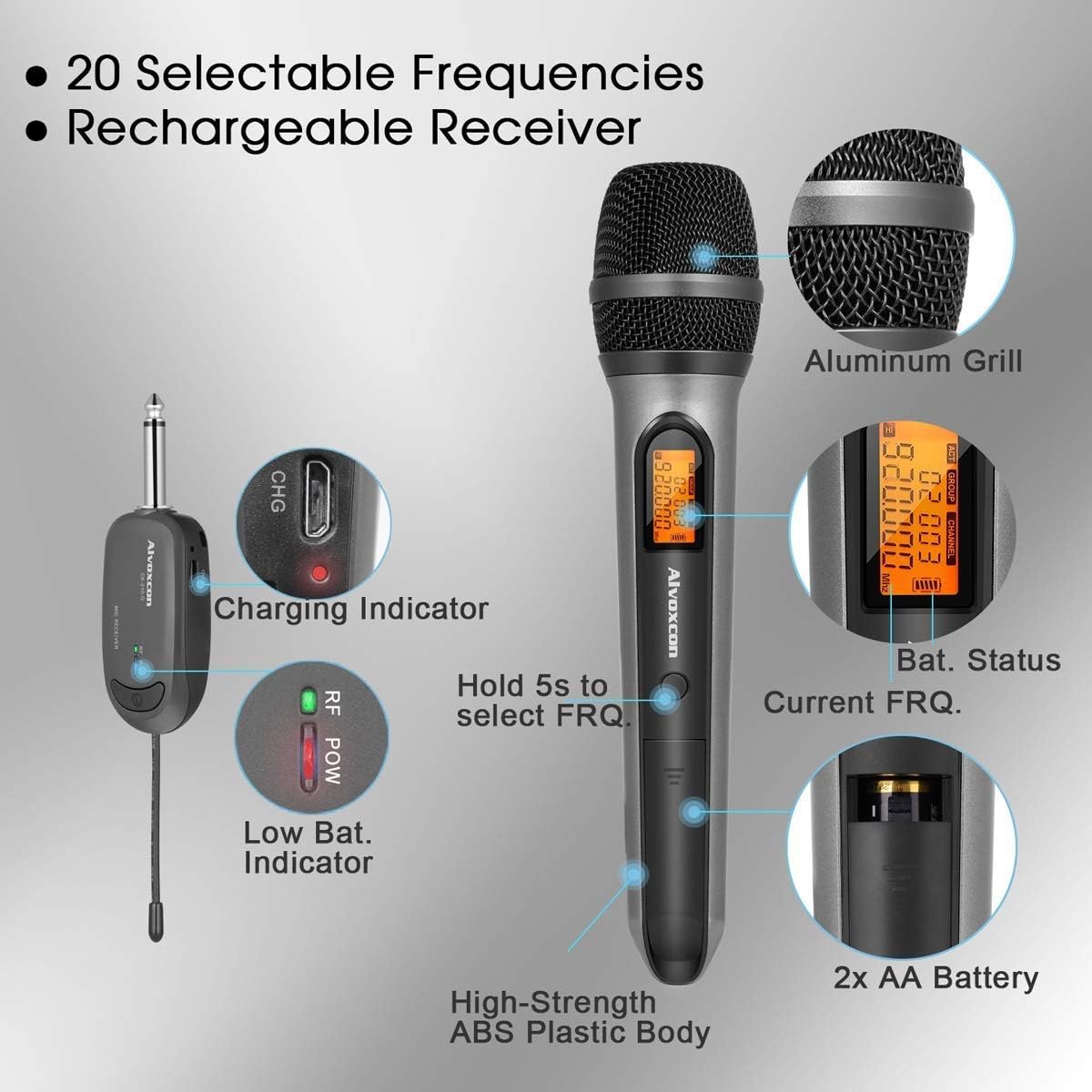
Image: All components of the Alvoxcon Wireless Microphone System, including the handheld microphone, mini receiver, AA batteries, USB charging cable, and various adapters, neatly arranged on a white surface.
Video: 'n Uitpak en meerview of the Alvoxcon single wireless handheld microphone system (CK210), demonstrating the contents of the package and initial setup steps.
Opstel instruksies
1. Installing Batteries in the Microphone
- Unscrew the bottom part of the microphone to open the battery compartment.
- Plaas twee AA-batterye in en maak seker dat die polariteit (+/-) korrek is.
- Skroef die onderste deel stewig terug.
2. Laai die ontvanger
- Koppel die USB-laaikabel aan die ontvanger se laaipoort.
- Steek die ander kant van die USB-kabel in 'n standaard USB-kragadapter (nie ingesluit nie) of 'n rekenaar se USB-poort.
- The charging indicator light on the receiver will illuminate during charging and turn off when fully charged.
3. Die Ontvanger aan 'n Oudiotoestel koppel
The receiver features a 1/4-inch (6.35mm) plug for direct connection to devices with a 'MIC IN' jack. Use the provided adapters for other connections.
- For PA Systems, Amplifiers, Mixers: Plug the 1/4-inch receiver directly into the 'MIC IN' jack.
- For DSLR Cameras: Use the 1/4-inch to 1/8-inch TRS adapter to connect the receiver to the camera's 1/8-inch microphone input.
- For Smartphones/Tablets/Laptops (for recording): Use the 1/4-inch to 1/8-inch TRS adapter, then connect it to the 1/8-inch TRRS splitter cable. Plug the microphone icon end of the splitter into your device's headphone/microphone combo jack. Note: This setup is primarily for recording; real-time sound projection to speakers from smartphones/computers is not supported.
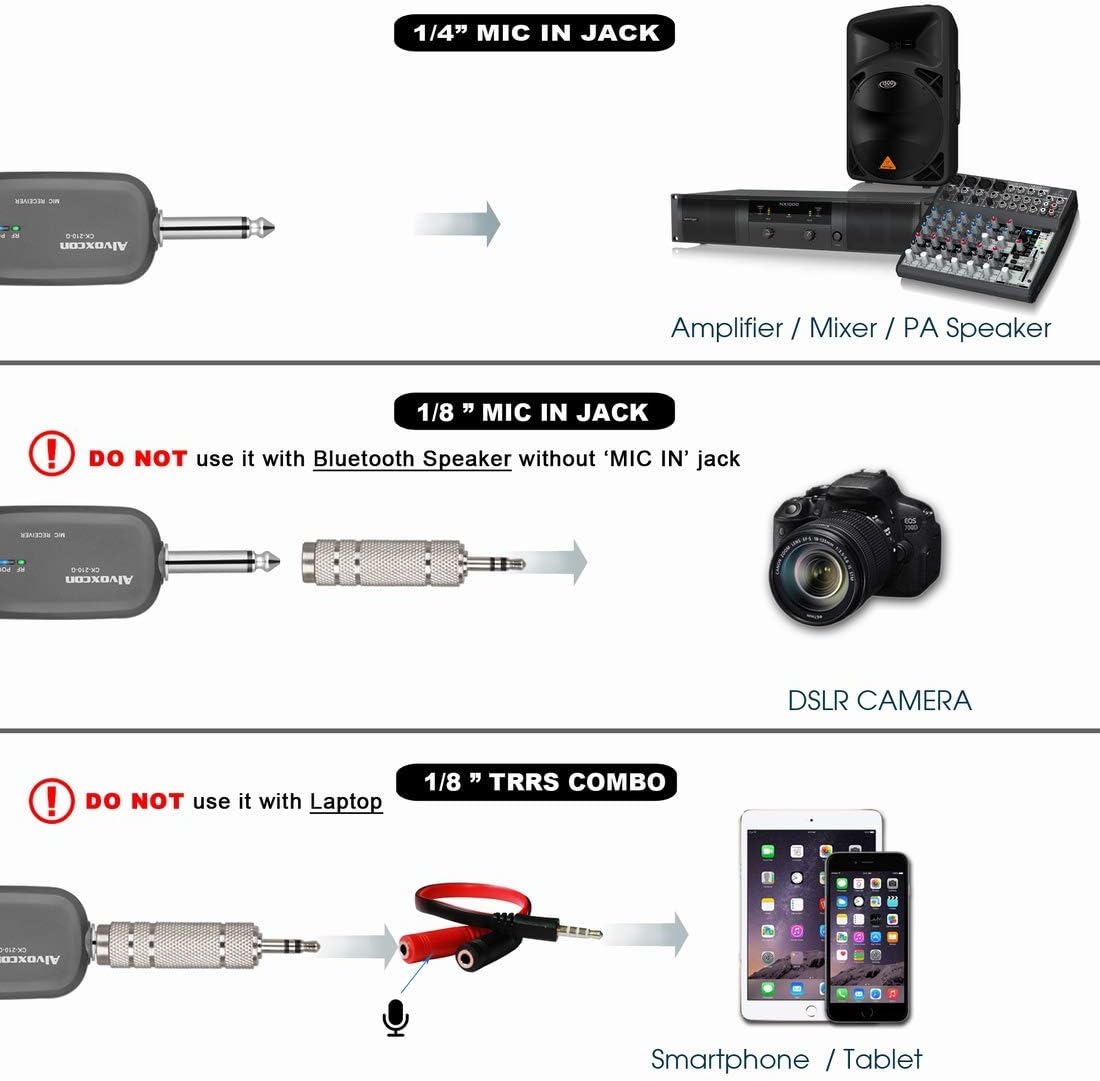
Image: Connection diagram illustrating how to connect the wireless receiver to an amplifier/mixer (1/4" jack), a DSLR camera (1/8" jack), and a smartphone/tablet (1/8" TRRS combo).
Belangrik: Do not use with Bluetooth speakers that only have 'LINE' or 'AUX' input jacks, as this may result in insufficient sound or no sound at all. Not compatible with MacBook for real-time sound projection.
Bedryfsinstruksies
1. Skakel aan/af
- Mikrofoon: Press and hold the power button on the microphone until the display illuminates.
- Ontvanger: Druk en hou die aan/uit-knoppie op die ontvanger in totdat die aanwyserliggie aanskakel.
- Om af te skakel, druk en hou die onderskeie aan/af-knoppies weer in.
2. Automatic Frequency Pairing
The system is designed for automatic frequency pairing. Once both the microphone and receiver are powered on, they should automatically connect. The RF POW indicator on the receiver will light up when a stable connection is established.
3. Selecting Frequencies (20 Selectable UHF Frequencies)
If you experience interference, you can change the operating frequency:
- On the microphone, press and hold the frequency selection button (often integrated with the power button or a separate 'SET' button) for approximately 5 seconds.
- The frequency displayed on the microphone will change. The receiver will automatically sync to the new frequency.
- Repeat this process until a clear channel is found.

Image: Close-up of the Alvoxcon wireless microphone and receiver, showing the charging indicator, low battery indicator, battery status, current frequency display, and the frequency selection button.
4. Optimale Gebruik
- Maintain a clear line of sight between the microphone and receiver for best performance.
- Keep the microphone within the recommended operating range of up to 30 meters (100 feet).
- Avoid placing the receiver near metal objects or other electronic devices that may cause interference.
Onderhoud
1. Skoonmaak
- Wipe the microphone and receiver with a soft, dry cloth.
- Moenie vloeibare skoonmaakmiddels of oplosmiddels gebruik nie, aangesien dit die afwerking of interne komponente kan beskadig.
2. Batteryversorging
- Remove batteries from the microphone if it will not be used for an extended period to prevent leakage.
- Ensure the receiver is fully charged before each use for optimal battery life.
3. Berging
- Bêre die stelsel op 'n koel, droë plek weg van direkte sonlig en uiterste temperature.
- Keep components in their original packaging or a protective case to prevent damage.
Probleemoplossing
| Probleem | Moontlike oorsaak | Oplossing |
|---|---|---|
| Geen klank vanaf mikrofoon nie |
|
|
| Static or intermittent sound |
|
|
| Receiver not charging |
|
|
Spesifikasies
- Mikrofoonvormfaktor: Mikrofoonstelsel
- Verbindingstegnologie: UHF
- Aantal kanale: 20 selectable frequencies
- Bedryfsreeks: Tot 30 meter (100 voet)
- Sein-tot-geraas-verhouding: 90 dB
- Microphone Power Source: 2x AA-batterye
- Receiver Power Source: Rechargeable Lithium Polymer battery
- Connector Tipe: 3.5 mm Jack (with adapters for 1/4 inch)
- Versoenbare toestelle: PA systems, Amplifiers, Mixers, DSLR Cameras, Smartphones, Laptops (for recording)
- Materiaal: Akrielnitril Butadieen Styreen, Aluminium
- Item gewig: 195 Grams (microphone)
- Produk afmetings: 11.8 x 5.11 x 2.55 duim
- Modelnommer: B07DZ44TF6

Image: Diagram detailing the extraordinary audio performance features of the microphone, such as 100 ft range, near-zero latency, UHF DQPSK processing, and a large diaphragm dynamic capsule.

Image: Close-up of the microphone displaying its polar pattern and highlighting features like good signal, extended distance, noise reduction, constant frequency, high fidelity, and overall quality.
Waarborg en Ondersteuning
For warranty information and technical support, please refer to the official Alvoxcon website or contact their customer service directly. Contact details are typically provided in the product packaging or on the manufacturer's webwebwerf.
Besoek die Alvoxcon Store on Amazon vir meer inligting en produkopdaterings.
Ask a question about this manual
Ask about setup, troubleshooting, compatibility, parts, safety, or missing instructions. Manuals+ will review the question and use this page’s manual context to help answer it.