
Inleiding
Thank you for choosing the Cygnett FreePlay Bluetooth Earbuds. These truly wireless earbuds are designed to provide a seamless audio experience with comfort and convenience. This manual will guide you through the setup, operation, and maintenance of your new earbuds.
The FreePlay earbuds feature a secure fit with ultra-comfortable silicone ear tips, a lightweight design, and a 10-meter wireless range. They come with an integrated microphone and a portable charging case for extended use.
Pakketinhoud
Maak asseblief seker dat alle items in u pakket teenwoordig is:
- Cygnett FreePlay Bluetooth Earbuds (Left and Right)
- Laaikas
- Mikro USB-laaikabel
- Silikoon-oorpunte (Klein, Medium, Groot)
Produk verbyview
Familiarize yourself with the components of your Cygnett FreePlay Bluetooth Earbuds and how they fit.

Prent: A man wearing a Cygnett FreePlay earbud, demonstrating its discreet and secure fit.

Prent: A woman wearing a Cygnett FreePlay earbud, illustrating its comfortable placement for active use.

Prent: Close-up of a single Cygnett FreePlay earbud, showing the speaker mesh and silicone ear tip.
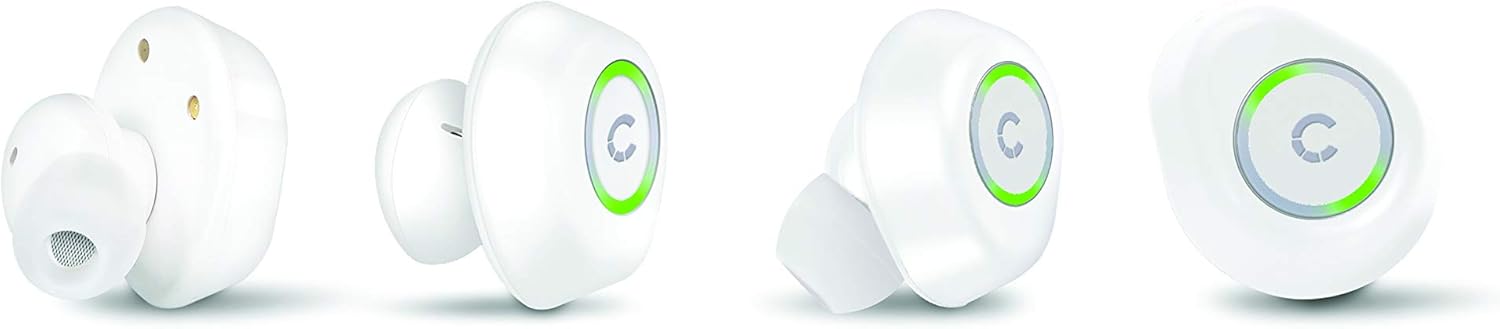
Prent: Various angles of the Cygnett FreePlay earbuds, highlighting their compact design and the illuminated 'C' logo.

Prent: The Cygnett FreePlay earbuds placed inside their open charging case, showing the charging contacts and the Cygnett branding.
Opstelling
1. Laai die oordopjes en houer
Laai die oordopjes en die laaikassie volledig voor die eerste gebruik.
- Plaas die oorfone in die laaikas. Maak seker dat hulle korrek in hul onderskeie gleuwe geplaas is (L vir links, R vir regs).
- Connect the Micro USB cable to the charging port on the case and the other end to a USB power source (e.g., computer, wall adapter).
- The indicator lights on the earbuds and/or case will show charging status.
- Once fully charged, disconnect the charging cable. The case provides approximately 6 hours of additional playback time for the earbuds.
2. Bluetooth-koppeling
To connect your Cygnett FreePlay earbuds to your device:
- Ensure the earbuds are charged and removed from the charging case. They should automatically enter pairing mode, indicated by a flashing LED light (color/pattern may vary).
- Gaan na die Bluetooth-instellings op jou slimfoon, tablet of ander Bluetooth-geaktiveerde toestel.
- Skakel Bluetooth aan.
- Soek vir available devices. You should see "Cygnett FreePlay" or a similar name appear in the list.
- Select "Cygnett FreePlay" to connect. Once connected, the earbud LED light will typically stop flashing or change to a solid color.
- Die oorfone sal outomaties weer aan die laaste gekoppelde toestel koppel wanneer dit uit die houer verwyder word en binne bereik is.
Let wel: Indien paring misluk, skakel die oorfone af, deaktiveer Bluetooth op jou toestel en herhaal die stappe.
Gebruik van die oordopjes
The Cygnett FreePlay earbuds feature a simple single-button control for managing calls and music playback.
Musiekbeheer
- Speel/pouse: Press the button once on either earbud.
- Volgende snit: Dubbeldruk die knoppie op die regteroorfone.
- Vorige snit: Dubbeldruk die knoppie op die linker oordopje.
- Volume op: Triple-press the button on the right earbud.
- Volume af: Triple-press the button on the left earbud.
Oproepbeheer
- Beantwoord/beëindig oproep: Press the button once on either earbud.
- Verwerp oproep: Press and hold the button for approximately 2 seconds on either earbud.
- Stemassistent: Press and hold the button for approximately 2 seconds (when not on a call) to activate your device's voice assistant (e.g., Siri, Google Assistant).
Krag aan/af
- Krag aan: Remove earbuds from the charging case. They will power on automatically. Alternatively, press and hold the button on each earbud for 3 seconds.
- Skakel af: Place earbuds back into the charging case. They will power off automatically. Alternatively, press and hold the button on each earbud for 5 seconds.
Onderhoud
Proper care will extend the life of your Cygnett FreePlay earbuds.
- Skoonmaak: Regularly clean the silicone ear tips with a soft, dry cloth. If necessary, use a slightly damp cloth with mild soap, then dry thoroughly. Do not use harsh chemicals or abrasive materials.
- Berging: Bêre die oordopjes altyd in hul laaikassie wanneer hulle nie gebruik word nie om hulle teen stof, vuiligheid en skade te beskerm.
- Vermy vog: Keep the earbuds and charging case away from water and excessive moisture. While designed for active lifestyles, they are not waterproof.
- Temperatuur: Avoid exposing the device to extreme temperatures (hot or cold) as this can shorten battery life and affect performance.
Probleemoplossing
As jy probleme met jou oorfone ondervind, probeer die volgende oplossings:
| Probleem | Oplossing |
|---|---|
| Oordopjes koppel nie met toestel nie. |
|
| Geen geluid uit oorfone nie. |
|
| Een oordoppie werk nie. |
|
| Laaikas laai nie. |
|
Spesifikasies
| Model Naam | Cy2496Frepl |
| Modelnommer | CY2496FREPL |
| Handelsmerk | Cygnett |
| Verbindingstegnologie | Draadloos |
| Draadlose kommunikasietegnologie | Bluetooth |
| Wireless Range | 10 XNUMX meter |
| Vormfaktor | In-Oor |
| Materiaal | Silikoon |
| Kleur | Wit |
| Battery Tipe | 1 Lithium metal (included) |
| Praat Tyd | 3 uur |
| Bystandtyd | 100 uur |
| Additional Playback from Case | 6 uur |
| Tipe beheer | Knoppie beheer |
| Versoenbare toestelle | Slimfoon, tablet |
| Ingesluit komponente | Mikro USB kabel |
| Laaipoort | USB |
Waarborg en Ondersteuning
For warranty information and customer support, please refer to the documentation provided with your purchase or visit the official Cygnett webwebwerf.
If you require further assistance or have questions not covered in this manual, please contact Cygnett customer service.