
1. Inleiding
This manual provides instructions for the setup, operation, and maintenance of the Avaya 1616 IP Telephone (Model 700450190). The Avaya 1616 is designed for users who require a robust and feature-rich communication device, supporting 16 line appearances and a high-quality speakerphone. This guide will help you maximize the functionality of your IP telephone.
2. Opstelling
Follow these steps to properly set up your Avaya 1616 IP Telephone.
2.1 Uitpak en Komponentidentifikasie
Carefully remove all components from the packaging. Ensure all parts are present before proceeding with the setup.
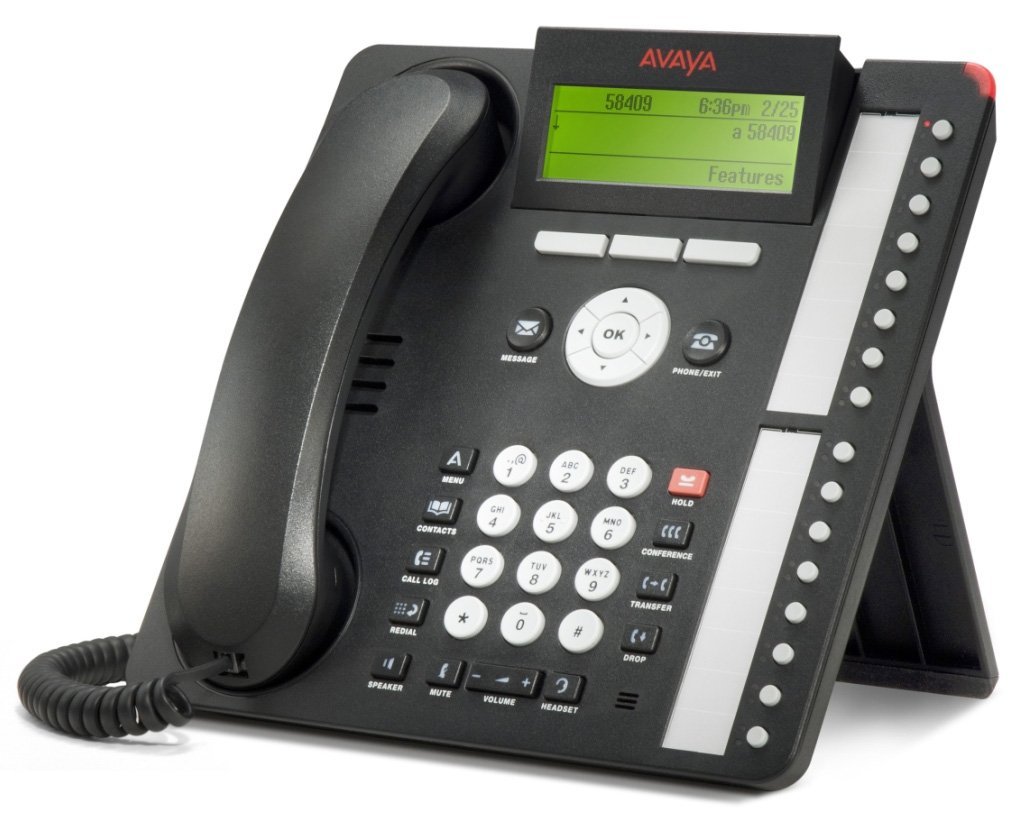
Figuur 1: Avaya 1616 IP Telephone components. This image displays the main telephone unit, the handset, the coiled handset cord, an Ethernet cable, and the desk stand. The main unit features a display screen, a numeric keypad, and various function buttons. The desk stand is designed to elevate the phone for easier viewing en werking.
- Telephone Base Unit: The main body of the phone with keypad, display, and function buttons.
- selfoon: The receiver for voice communication.
- Handsetkoord: Coiled cord connecting the handset to the base unit.
- Ethernet-kabel: Vir netwerkverbinding.
- lessenaar staander: For positioning the phone on a desk.
- Power Adapter (Sold Separately): A 5V local power supply may be required if Power over Ethernet (PoE) is not available.
2.2 Fisiese verbindings
- Heg die lessenaarstaander aan: Securely attach the desk stand to the bottom of the telephone base unit.
- Koppel die handset: Plug one end of the coiled handset cord into the handset and the other end into the designated handset port on the side or back of the telephone base unit.
- Koppel aan netwerk: Insert one end of the Ethernet cable into the "LAN" port on the back of the telephone and the other end into a network switch or router. The phone supports dual Ethernet ports for connection of the phone and a collocated PC with VLAN separation.
- Koppel krag:
- Krag oor Ethernet (PoE): If your network switch supports 802.3af PoE, the phone will receive power through the Ethernet cable. No separate power adapter is needed.
- Local Power Supply: If PoE is not available, connect a 5V local power supply (sold separately) to the power port on the back of the telephone and then to an electrical outlet.
Once connected, the phone will power on and begin its boot sequence. This may take a few moments.
3. Bedryfsinstruksies
This section covers the basic operation of your Avaya 1616 IP Telephone.
3.1 Sleutelkenmerke
- 16 Line Appearances/Feature Keys: Programmable buttons with dual LEDs for line status and feature access.
- High-Quality 2-Way Speakerphone: Vir handvrye kommunikasie.
- Beller-ID: Displays incoming caller information.
- Multilyn werking: Supports multiple active lines.
- Konferensie-oproepvermoë: Basic conferencing features.
3.2 Basiese oproepfunksies
- Maak 'n oproep:
- Lig die handset op of druk die Luidspreker-knoppie.
- Skakel die verlangde nommer met die sleutelbord.
- Press the "Call" or "Dial" softkey, or wait for automatic dialing.
- Beantwoord 'n oproep:
- Lift the handset, or press the Speaker button, or press the flashing line appearance button.
- Beëindig 'n oproep:
- Replace the handset, or press the Speaker button again if using speakerphone, or press the "End Call" softkey.
- Placing a Call on Hold:
- During an active call, press the "Hold" button. The line appearance LED will flash.
- To retrieve the call, press the flashing line appearance button.
- Dra 'n oproep oor:
- During an active call, press the "Transfer" button. The current call is put on hold.
- Dial the number of the party to whom you wish to transfer the call.
- Wait for the party to answer (consulted transfer) or press "Transfer" again to complete the transfer (blind transfer).
- 'n Konferensieoproep begin:
- During an active call, press the "Conference" button. The current call is put on hold.
- Skakel die nommer van die derde party.
- Once the third party answers, press the "Conference" button again to join all parties.
4. Onderhoud
Proper maintenance ensures the longevity and optimal performance of your Avaya 1616 IP Telephone.
4.1 Skoonmaak
- Gebruik 'n sagte, effens damp cloth to clean the exterior surfaces of the phone.
- Avoid using abrasive cleaners, solvents, or strong chemicals, as these can damage the finish and electronic components.
- Do not spray cleaning liquids directly onto the phone. Apply to the cloth first.
- Ensure the phone is disconnected from power before cleaning.
4.2 Algemene sorg
- Hou die foon weg van oormatige hitte, direkte sonlig en vog.
- Vermy om die foon te laat val of dit aan harde impakte bloot te stel.
- Maak seker dat kabels nie vasgeknyp of gespanne is nie.
5. Probleemoplossing
This section provides solutions to common issues you might encounter with your Avaya 1616 IP Telephone.
| Probleem | Moontlike oorsaak | Oplossing |
|---|---|---|
| Foon skakel nie aan nie. | Geen kragtoevoer of foutiewe verbinding nie. |
|
| Geen kiestoon nie. | Network connectivity issue or service problem. |
|
| Kan nie oproepe maak of ontvang nie. | Network configuration, service issue, or phone registration problem. |
|
| Swak klank kwaliteit. | Network congestion, faulty cable, or handset issue. |
|
If the problem persists after attempting these solutions, please contact your IT department or Avaya support for further assistance.
6. Spesifikasies
Key technical specifications for the Avaya 1616 IP Telephone (700450190).
| Kenmerk | Detail |
|---|---|
| Modelnommer | 700450190 |
| Line Appearances | 16 with dual LEDs |
| Luidspreker | High-quality 2-way |
| Monteer Opsies | Desk or wall mountable (with optional adapter) |
| Ethernet-poorte | Dual (for phone and collocated PC w/VLAN separation) |
| Kragbron | 802.3af Power over Ethernet (PoE) or optional 5V local power supply |
| Dialer Tipe | Enkel sleutelbord |
| Tipe antwoordstelsel | Digitaal |
| Versoenbare toestelle | Computers, Telephone Networks, VoIP Services |
| Konferensieoproepvermoë | Basies |
| Meerlynige bewerking | Multi-lyn-operasie |
| Beller-ID | Ja |
| Kleur | Swart |
| Produk afmetings | 9.8 x 7.9 x 2.8 duim (ongeveer) |
| Pakket afmetings | 16.8 x 10 x 3.3 duim |
| Gewig | 2.9 Pounds (Package Weight) |
7. Waarborginligting
This Avaya 1616 IP Telephone (700450190) is typically offered with a 90-dae beperkte waarborg. This warranty covers defects in materials and workmanship under normal use. For specific terms and conditions, please refer to the warranty documentation provided at the time of purchase or contact your vendor.
Note: As a renewed product, warranty terms may vary from new products. Always confirm warranty details with your supplier.
8. Ondersteuning
For technical assistance, further troubleshooting, or inquiries regarding your Avaya 1616 IP Telephone, please contact your system administrator or the vendor from whom you purchased the device. Avaya's official support channels can also provide resources and documentation for their products.
For general information about Avaya products, you may visit the official Avaya webwebwerf.