
1. Inleiding
Thank you for choosing the Pro Breeze 2500W Digital Oil-Filled Radiator. This manual provides essential information for the safe and efficient operation of your new heater. Please read all instructions carefully before use and retain this manual for future reference.

Image: Pro Breeze 2500W Digital Oil-Filled Radiator, showcasing its modern design and digital display.
2. Belangrike veiligheidsinstruksies
Wanneer elektriese toestelle gebruik word, moet basiese veiligheidsmaatreëls altyd gevolg word om die risiko van brand, elektriese skok en besering aan persone te verminder, insluitend die volgende:
- Lees alle instruksies voordat u hierdie verwarmer gebruik.
- Hierdie verwarmer is warm wanneer dit gebruik word. Om brandwonde te vermy, moenie toelaat dat kaal vel warm oppervlaktes raak nie.
- Uiterste versigtigheid is nodig wanneer enige verwarmer deur of naby kinders of invalides gebruik word en wanneer die verwarmer sonder toesig gelaat word.
- Ontkoppel altyd die verwarmer wanneer dit nie gebruik word nie.
- Gebruik geen verwarmer met 'n beskadigde koord of prop nie, of as die verwarmer nie funksioneer nie, laat val of beskadig is.
- Moenie buite gebruik nie.
- Om verwarmer te ontkoppel, draai kontroles af en trek dan die prop uit die uitlaat.
- Moenie enige ventilasie- of uitlaatopening inbring of toelaat dat vreemde voorwerpe binnedring nie, aangesien dit 'n elektriese skok of brand kan veroorsaak, of die verwarmer kan beskadig.
- Om 'n moontlike brand te voorkom, moenie luginlate of -uitlaat op enige manier blokkeer nie. Moet nie op sagte oppervlaktes, soos 'n bed, gebruik waar openinge geblokkeer kan word nie.
- ’n Verwarmer het warm en vlam- of vonkende dele binne. Moet dit nie gebruik in areas waar petrol, verf of vlambare dampe of vloeistowwe gebruik of gestoor word nie.
- Gebruik hierdie verwarmer slegs soos beskryf in hierdie handleiding. Enige ander gebruik wat nie deur die vervaardiger aanbeveel word nie, kan brand, elektriese skok of beserings aan persone veroorsaak.
- This heater includes an Beskerming oor oorverhitting feature and an Anti Tip-Over Switch for enhanced safety. The unit will automatically shut off if it overheats or tips over.

Image: The radiator features advanced safety functions including overheat protection and an anti-tip over switch, ensuring safe use around children and pets.
3. Produkkomponente
Familiarize yourself with the main parts of your Pro Breeze Digital Oil-Filled Radiator:
- Digitale beheerpaneel: For setting temperature, mode, and timer.
- LED skerm: Shows current temperature, timer settings, and mode.
- 10 Oil-Filled Elements: Efficiently heat the surrounding air.
- Drahandvatsels: Geïntegreerd vir maklike draagbaarheid.
- Caster wiele: Allow for smooth movement between rooms.
- Afstandbeheer: Wireless control of all functions.
- Aan/Af Kragskakelaar: Located on the side of the unit.

Image: The digital control panel and remote control offer convenient operation of the radiator.
4. Opstelling
Before first use, ensure the radiator is placed on a stable, level surface and is at least 1 meter away from any walls, furniture, or curtains. The caster wheels should be attached if not already installed. Simply push the wheel assemblies into the designated slots at the base of the radiator until they click securely into place.
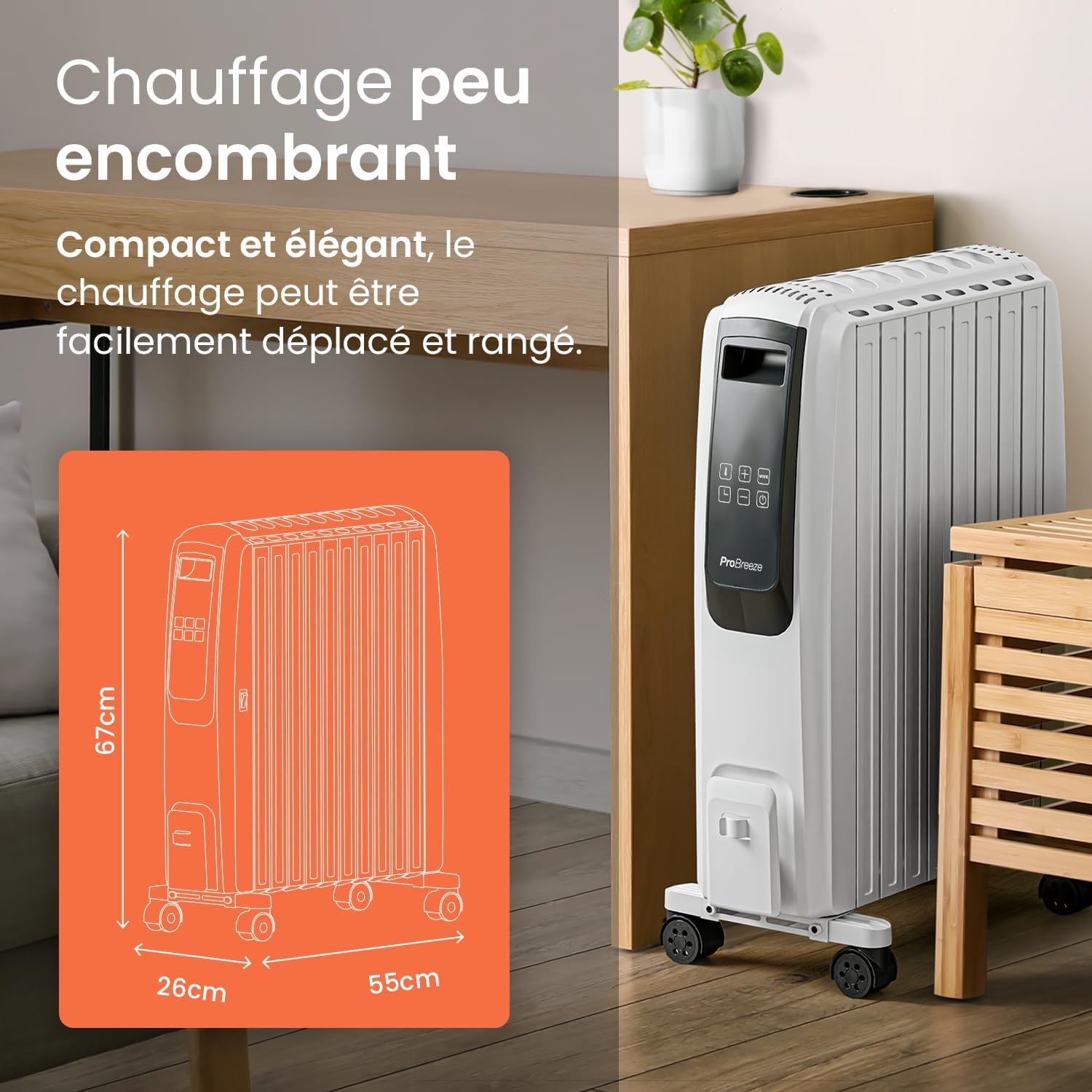
Image: The compact design, integrated carry handles, and caster wheels make the radiator easy to move and store.
5. Bedryfsinstruksies
5.1 Krag aan/af
- Plug the radiator into a suitable power outlet.
- Turn on the main power switch located on the side of the unit.
- Druk die Standby knoppie (
 ) on the control panel or remote control to activate the display and turn on the heater.
 - Druk op die om af te skakel Standby button again. For complete power off, switch off the main power switch and unplug the unit.
5.2 Stel temperatuur
The desired temperature can be set between 5°C and 35°C.
- With the heater on, press the Temperatuur knoppie () on the control panel. The temperature digits will blink.
- Gebruik die + en - knoppies om die verlangde temperatuur aan te pas.
- The display will stop blinking after a few seconds, and the new temperature setting will be saved.
5.3 kragmodusse
The radiator offers 4 power settings: Eco, Low, Medium, and High.
- Druk die Modus knoppie (
 ) repeatedly to cycle through the available power modes.
 - The selected mode will be indicated on the LED display.

Image: Choose from 4 power levels for a customized heating experience.
5.4 Timer Function (Auto-On / Auto-Off)
The integrated 24-hour timer allows you to program the radiator to turn on or off automatically.
Setting the Auto-On Timer:
- Ensure the radiator is plugged in and the main power switch is ON, but do not press the standby button.
- Druk die Afteller knoppie (). The time digits (H) will begin to blink.
- Gebruik die + en - buttons to set how much time you would like to elapse (1-24 hours) before the radiator automatically turns on. Time increments are 30 minutes for the first 5 hours, then 1 hour up to 24 hours.
- The time digits will stop blinking after a few seconds and show the remaining time until auto-on.
- Immediately after the time digits stop blinking, set the desired temperature and mode you would like the radiator to turn on in by pressing the Modus button. If no mode or temperature is set, the radiator will start on the 'low' power setting.
Video: Detailed instructions on how to set the auto-on timer for the Pro Breeze 2500W Oil-Filled Radiator.
Instelling van die outomatiese afskakeltimer:
- Ensure the radiator is switched on and operating in your desired mode and temperature.
- Druk die Afteller knoppie (). The time digits (H) will begin to blink.
- Gebruik die + en - buttons to set how much time you would like to elapse (1-24 hours) before the radiator automatically turns off. Time increments are 30 minutes for the first 5 hours, then 1 hour up to 24 hours.
- The time digits will stop blinking after a few seconds and show the remaining time until auto-off. The radiator will automatically shut off when the set time elapses.
Video: Detailed instructions on how to set the auto-off timer for the Pro Breeze 2500W Oil-Filled Radiator.

Image: Program the 24-hour timer to suit your schedule for convenient heating.
5.5 afstandbeheer
The included remote control allows you to operate all functions of the radiator from a distance. Ensure the remote control has a working battery (1 CR5 battery required, not included) and is pointed towards the radiator's control panel.
6. Onderhoud
6.1 Skoonmaak
Always unplug the heater from the wall outlet and allow it to cool down completely before cleaning. Use a soft, damp cloth to wipe the exterior surfaces of the heater. Do not use harsh detergents or abrasive cleaners. Do not immerse the heater in water or allow water to drip into the interior of the heater.
6.2 Berging
When storing the heater, ensure it is cool and dry. Wrap the power cord neatly and store the heater in a cool, dry place. It is recommended to store the heater in its original packaging to protect it from dust and damage.
7. Probleemoplossing
If your radiator is not functioning correctly, please refer to the following common issues and solutions:
| Probleem | Moontlike oorsaak | Oplossing |
|---|---|---|
| Verwarmer skakel nie aan nie. | Geen kragtoevoer. | Check if the power cord is securely plugged in and the main power switch is ON. Test the outlet with another device. |
| Die verwarmer hou onverwags op met werk. | Oorverhitbeskerming geaktiveer. | Unplug the heater, let it cool down for 30 minutes, and clear any obstructions from air vents. Plug it back in and restart. |
| Heater tips over. | Anti Tip-Over Switch activated. | Place the heater on a stable, level surface. The unit will resume operation once upright. |
| Afstandbeheer werk nie. | Battery low or incorrectly inserted. | Replace the CR5 battery. Ensure it is inserted with correct polarity. Point the remote directly at the control panel. |
| Temperatuuraanwysing is onakkuraat. | Sensor reading ambient temperature. | The internal sensor measures the temperature near the unit. For precise room temperature, use an external thermometer. Adjust the heater's set temperature accordingly. |
8. Spesifikasies
- Handelsmerk: Pro Breeze
- Modelnommer: PB-H06
- Krag: 2500 Watt
- Voltage: 240 Volt
- Number of Speeds/Power Levels: 4
- Produkafmetings (L x B x H): 50 x 24.5 x 66 cm (16 kg)
- Spesiale kenmerke: Rapid heating, Portable, Adjustable temperature, Electronic thermostat, Remote control
- Verhittingsmetode: konveksie
- Aanbevole gebruik: Indoor, Home
- Battery vir afstandbeheer: 1 CR5 (not included)
9. Waarborg en Ondersteuning
For warranty information or technical support, please refer to the contact details provided with your purchase or visit the official Pro Breeze webwebwerf. Bewaar u bewys van aankoop vir enige waarborgeise.