
Samyang 14mm F2.8
Samyang 14mm F2.8 AF Wide Angle Lens
Gebruikershandleiding
1. Inleiding
This manual provides detailed instructions for the proper use and care of your Samyang 14mm F2.8 AF Wide Angle, Full Frame Auto Focus Lens for Canon EF. Please read this manual thoroughly before using the lens to ensure optimal performance and longevity.
The Samyang 14mm F2.8 AF lens is designed for Canon EF-mount full-frame DSLR cameras, offering an ultra-wide 116.6° angle of view. It features a bright F2.8 aperture, auto-focus capabilities, and weather sealing for robust performance in various conditions. The optical design incorporates special elements and UMC anti-reflective coatings to deliver high image clarity, contrast, and color fidelity.

Figure 1.1: Samyang 14mm F2.8 AF Wide Angle Lens for Canon EF.
2. Pakketinhoud
Verifieer dat alle items in die pakket teenwoordig is:
- Samyang 14mm F2.8 AF Lens
- Voorste lensdop
- Lensdop agter
- Lens Sakkie
- Gebruikershandleiding (hierdie dokument)
- Waarborgkaart
3. Opstelling en installering
3.1 Die lens aan jou kamera bevestig
- Maak seker jou kamera is afgeskakel.
- Remove the rear lens cap from the lens and the body cap from your camera. Avoid touching the lens elements or the camera's sensor.
- Align the red index mark on the lens barrel with the corresponding red index mark on your camera's lens mount.
- Plaas die lens in die kameramontering en draai dit kloksgewys totdat dit in plek klik. Moenie die lens forseer nie.
- Once attached, you can remove the front lens cap.
3.2 Die lens van jou kamera losmaak
- Maak seker jou kamera is afgeskakel.
- Druk en hou die lensvrystellingsknoppie op jou kameraliggaam in.
- Terwyl jy die knoppie ingedruk hou, draai die lens antikloksgewys totdat dit van die kameraliggaam loskom.
- Immediately attach the front and rear lens caps to protect the lens elements.

Figuur 3.1: Kant view of the Samyang 14mm F2.8 AF lens, showing its compact design.
4. Bediening van die lens
4.1 Auto Focus (AF) / Manual Focus (MF) Switch
The lens features a switch on its barrel to toggle between Auto Focus (AF) and Manual Focus (MF) modes. This allows you to choose the focusing method best suited for your shooting situation.
- AF (Auto Focus): In this mode, the camera's autofocus system will automatically focus the lens. This is suitable for most general photography.
- MF (Handmatige Fokus): In this mode, you manually rotate the focusing ring on the lens to achieve focus. This is useful for precise focusing in specific scenarios like macro photography, astrophotography, or when the autofocus struggles in low light.

Figuur 4.1: Voorkant view of the Samyang 14mm F2.8 AF lens, highlighting the focus switch.
4.2 Diafragmabeheer
The aperture (F2.8) is controlled electronically through your camera body. Refer to your camera's instruction manual for details on how to adjust the aperture settings.
4.3 Built-in Lens Hood
The lens features a built-in petal-shaped lens hood. This hood helps to reduce flare and ghosting caused by stray light entering the lens, improving image contrast and color saturation. It also provides some physical protection to the front element.
5. Onderhoud en versorging
Proper maintenance ensures the longevity and optimal performance of your lens.
- Maak die lens skoon: Use a soft, lint-free microfiber cloth specifically designed for optical surfaces. For stubborn smudges, use a small amount of lens cleaning solution applied to the cloth, not directly to the lens.
- Stofverwydering: Use a blower brush to remove dust particles from the lens surface before wiping. Avoid using compressed air, which can damage coatings or force dust into the lens.
- Berging: When not in use, always attach both front and rear lens caps. Store the lens in its pouch or a dry, cool place away from direct sunlight and extreme temperatures. Avoid storing the lens in areas with high humidity to prevent mold growth.
- Weer verseëling: While the lens features weather sealing, it is not waterproof. Avoid exposing it to heavy rain or submerging it in water. Wipe off any moisture immediately.
- Hantering: Avoid dropping or subjecting the lens to strong impacts. This can damage internal optical elements or the autofocus mechanism.
6. Probleemoplossing
If you encounter issues with your Samyang 14mm F2.8 AF lens, refer to the following common problems and solutions:
| Probleem | Moontlike oorsaak | Oplossing |
|---|---|---|
| Lens not focusing (AF mode) |
|
|
| Images appear blurry or soft |
|
|
| Lens word nie deur kamera herken nie |
|
|
If the problem persists after trying these solutions, please contact Samyang customer support or an authorized service center.
7. Spesifikasies
| Kenmerk | Detail |
|---|---|
| Model Naam | 14 mm F2.8 AF |
| Versoenbare monterings | Canon EF |
| Brandpuntsafstand | 14 mm |
| Maksimum diafragma | F2.8 |
| Lens tipe | Wide Angle, Full Frame Auto Focus |
| Optiese konstruksie | 15 elements in 10 groups (1 ED, 2 Aspherical, 4 HR) |
| Bedekking | UMC (Ultra Multi-Coating) |
| Hoek van View (Vol raam) | 116.6° |
| Hoek van View (APS-C) | 92.8° |
| Diafragma lemme | 7 (afgerond) |
| Filter grootte | Not applicable (built-in hood) |
| Afmetings (deursnee x lengte) | Approx. 3.8 x 3.6 x 3.6 inches (Product Dimensions) |
| Gewig | Ongeveer. 1.52 pond |
| Weer verseëling | Ja |
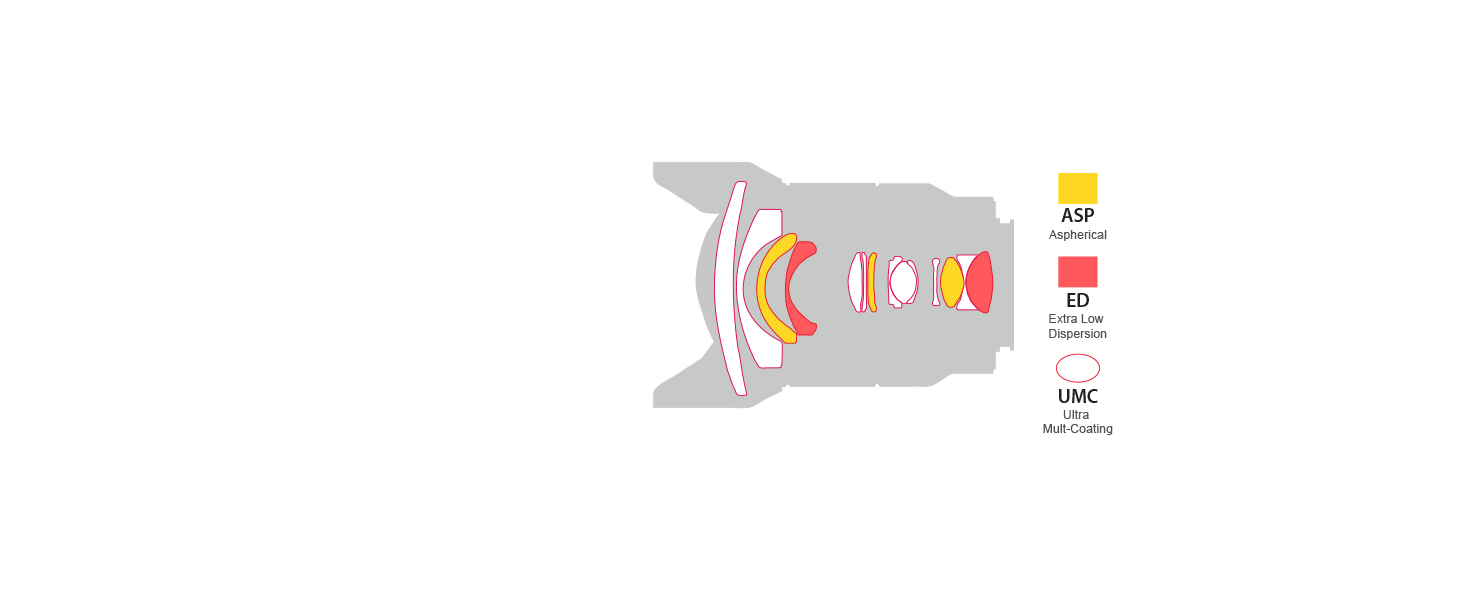
Figure 7.1: Optical construction diagram of the Samyang 14mm F2.8 AF lens, showing the arrangement of lens elements.
8. Waarborg en Ondersteuning
Your Samyang 14mm F2.8 AF lens comes with a manufacturer's warranty. Please refer to the included Warranty Card for specific terms, conditions, and duration of coverage.
For technical support, service, or warranty claims, please contact Samyang customer service through their official webwebwerf of die kontakinligting wat op u waarborgkaart verskaf word.
Aanlyn hulpbronne:
- Samyang Official Webwebwerf: www.samyanglens.com
- Samyang Store on Amazon: Amazon Samyang Store
Ask a question about this manual
Ask about setup, troubleshooting, compatibility, parts, safety, or missing instructions. Manuals+ will review the question and use this page’s manual context to help answer it.