
1. Inleiding
This user manual provides detailed instructions for the installation, operation, and maintenance of your LeeKooLuu RV Backup Camera Wireless HD 1080P LK5 system. Please read this manual thoroughly before using the product to ensure proper function and safety. This system is designed to enhance your driving and parking experience by providing a clear, wide-angle view of your vehicle's rear surroundings.
2. Pakketinhoud
Verifieer asseblief dat al die items wat hieronder gelys word, in u pakket ingesluit is:
- 1 x 7 duim monitor
- 1 x draadlose rugsteunkamera
- 2 x Kragdrade
- 1 x Sigaretaanstekeradapter
- 1 x sonskerm
- 1 x Voorruitmontering
- 1 x U Bracket
- 4 x antennas
- 1 x Gebruikershandleiding
- Other necessary installation parts
3. Veiligheidsinligting
Always prioritize safety when installing and operating the backup camera system. Adhere to all local traffic laws and regulations. This system is an aid and should not replace careful driving and direct observation.
- Maak seker dat alle verbindings stewig en behoorlik geïsoleer is om kortsluitings te voorkom.
- Moenie jou belemmer nie view of the road with the monitor.
- Regularly check the camera and monitor for damage or loose connections.
- Clean the camera lens periodically to maintain clear visibility.
- Professionele installasie word aanbeveel indien u onseker is oor enige stappe.
4. Produk verbyview
The LeeKooLuu LK5 system features a 7-inch HD 1080P monitor and a durable wireless camera, designed for reliable performance in various vehicle types.

Figuur 4.1: oorview of the LeeKooLuu LK5 wireless backup camera system, showing the 7-inch monitor and the camera unit with dual antennas.
4.1. Sleutel kenmerke
- HD 1080P Resolution: Provides clear and detailed images.
- Digitale draadlose sein: Dual antenna design for stable, uninterrupted signal up to 600ft in open areas.
- 7-Inch Touch Key Screen: Large display with responsive touch controls for easy operation.
- DVR Recording Function: Supports simultaneous recording of up to 4 cameras with loop recording.
- Verdeel skerm vermoë: Monitor can display dual or quad split views.
- IP69K Waterproof Camera: Full metal construction ensures durability in harsh weather conditions.
- Nagvisie: 18 infrared lights for enhanced visibility in low-light environments.
- DIY Guide Lines: Customizable parking guide lines for precise maneuvering.
- Furrion Pre-Wired Compatibility: Includes adapter for easy integration with Furrion pre-wired RVs.
5. Opstelling en installering
The LeeKooLuu LK5 system is designed for straightforward installation. Follow these steps for optimal performance.
5.1. Kamera-installasie
The camera can be wired to your vehicle's running lights, tail lights, or reverse lights, depending on whether you want it active continuously or only when reversing.
- Kies Monteerplek: Select a central location at the rear of your RV or vehicle that provides an unobstructed view.
- Draadkrag: Connect the camera's red wire to a 12V power source (e.g., running light, tail light, or reverse light positive wire) and the black wire to a ground point.
- Furrion Pre-Wired RVs: If your RV is Furrion pre-wired, use the provided adapter and pigtail wire for a plug-and-play installation.
- Veilige kamera: Mount the camera securely using the provided bracket and hardware. Ensure the antennas are positioned for optimal signal transmission.

Figure 5.1: Diagram illustrating the easy installation process, including wiring options for the camera and monitor, and compatibility with Furrion pre-installed mounting kits.

Figure 5.2: Information regarding the included bracket adapter and pigtail wire for compatibility with Furrion pre-wired RVs.
5.2. Monitor Installasie
Die 7-duim-monitor kan op jou paneelbord of voorruit gemonteer word.
- Heg Mount aan: Secure the U bracket or windshield mount to the monitor.
- Position Monitor: Place the monitor in a location that does not obstruct your driving view but is easily accessible.
- Power Monitor: Connect the monitor's power cord to the cigarette lighter adapter or directly to an ACC/Fuse/Radio power source.
- Verbind Antennas: Attach the two antennas to the monitor for stable signal reception.

Figure 5.3: Visual representation of the monitor mounted on a dashboard using the U-bracket and on a windshield using the suction cup mount.
6. Operasie
Once installed, the system will automatically pair. If pairing is needed, refer to the monitor's menu settings.
6.1. Basiese funksies
- Krag aan/af: Druk die kragknoppie op die monitor.
- Seinstabiliteit: The dual antenna design ensures a stable signal, reducing lag and interruptions.
- Touch Key Operation: Use the touch keys on the monitor for navigation and settings adjustments.
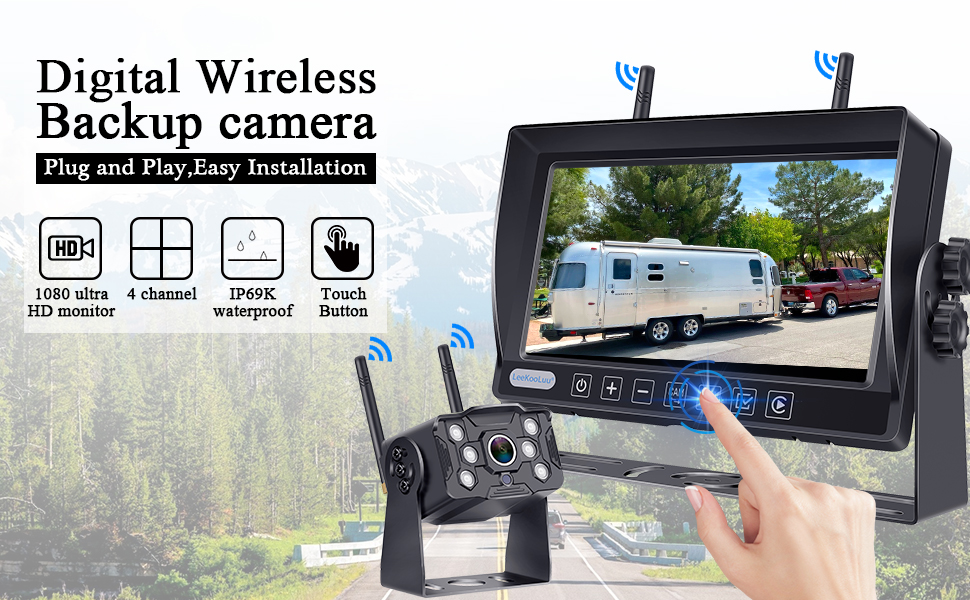
Figure 6.1: Illustration of the digital wireless backup camera system in operation, highlighting the touch button interface on the monitor.
6.2. Split Screen Monitoring
The monitor supports displaying multiple camera feeds simultaneously.
- Skakel oor Views: Use the "Split" or "Quad" button on the monitor to cycle through single, dual, or quad-screen views.
- Kameras byvoeg: The system supports up to 4 wireless cameras. Additional cameras can be purchased separately and paired.

Figure 6.2: The 7-inch monitor displaying various split-screen configurations, demonstrating its ability to support up to four wireless camera inputs simultaneously.
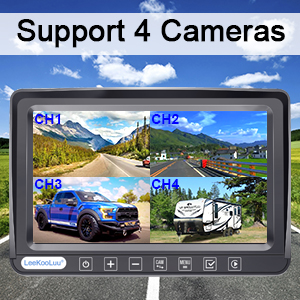
Figure 6.3: Visual confirmation that the system supports up to four cameras, showing a quad-view display on the monitor.
6.3. DIY Guide Lines
Customize the parking guide lines to match your vehicle and preferences.
- Aanpassing: Access the guide line settings through the monitor's menu to adjust width, vertical position, and horizontal position.
- Aktiveer/Deaktiveer: Guide lines can be turned on or off as needed.

Figuur 6.4: Examples of customizable guide lines on the monitor, demonstrating adjustments for width, vertical movement, and horizontal movement.
7. Kieslys-instellings
The monitor's menu allows for various adjustments and feature controls.

Figure 7.1: Icons representing various functions accessible through the monitor's menu, including Night Vision, Easy Install, Wireless, HD 1080P, 4 Channel, 7" Screen, Plug and Play, Touch Button, 170° Wide Angle, and Guide Lines DIY.
- Prentflip: Adjust the image orientation (Normal, Mirror, Vertical Normal, Vertical Mirror) to suit your mounting preference.
- Brightness/Saturation/Contrast: Fine-tune display quality.
- Saambinding: Re-pair cameras to the monitor if needed.
- Stelselinstellings: General system configurations.
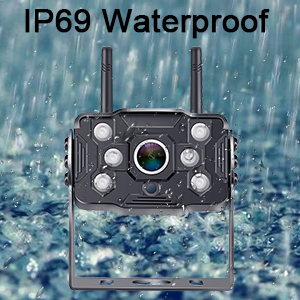
Figure 7.2: Display showing the four image flip modes: Normal, Mirror, Vertical Normal, and Vertical Mirror, allowing users to adjust the view based on camera orientation.
8. Recording Function (DVR)
The LK5 system includes a DVR function, allowing you to record video footage from the connected cameras.
- Loop opname: Videos are automatically saved and overwrite the oldest files wanneer die stoor vol is.
- Terugspeel: Review opgeneem footage directly on the monitor.
- Berging: An SD card (not included) is required for recording.

Figure 8.1: Illustration of the loop recording feature, showing video playback on the monitor and the ability to search recorded video by time and mode.
9. Onderhoud
Proper maintenance ensures the longevity and optimal performance of your LeeKooLuu backup camera system.
- Skoonmaak van die kameralens: Regularly wipe the camera lens with a soft, damp cloth to remove dirt, dust, or water spots that may obscure the viewVermy skuurmiddels.
- Skoonmaak van die monitorskerm: Use a microfiber cloth to gently clean the monitor screen. Do not spray cleaning solutions directly onto the screen.
- Kontroleer verbindings: Periodically inspect all power cables and antenna connections for any signs of wear, corrosion, or looseness. Ensure they are securely fastened.
- Weerbeskerming: While the camera is IP69K waterproof, extreme weather conditions (e.g., heavy snow, ice) may temporarily affect performance. Clear any obstructions from the camera lens.
- Berging: If storing the vehicle for an extended period, consider disconnecting the system from power to prevent battery drain.
10. Probleemoplossing
If you encounter issues with your LeeKooLuu RV Backup Camera system, refer to the following common problems and solutions:
| Probleem | Moontlike oorsaak | Oplossing |
|---|---|---|
| Geen beeld op monitor nie |
|
|
| Beeld flikker of onstabiel |
|
|
| Swak beeldkwaliteit (vaag, donker) |
|
|
| Opname werk nie |
|
|
11. Spesifikasies
| Kenmerk | Detail |
|---|---|
| Modelnommer | M1 |
| Monitor grootte | 7 duim |
| Video-opname-resolusie | 1080p |
| Wireless Range | Up to 600ft (open area), 270ft (in vehicles) |
| Waterdigte gradering | IP69K (Camera) |
| Voltage | 12 Volt |
| Vertoon tegnologie | LED |
| Spesiale kenmerke | 7 Inch Screen, Powerful Digital Wireless Signal, Real 1080P Resolution, Recording Ability, Split Screen (Support 2 wireless Cameras) |
| Verbindingstegnologieë | Draadloos |
| Optiese sensortegnologie | CMOS |
| Lens tipe | Wye hoek |
| Produk afmetings | 8 x 2 x 8 duim |
| Item gewig | 3.21 pond |
12. Waarborg en Ondersteuning
LeeKooLuu is committed to providing high-quality products and excellent customer service. While specific warranty terms are not detailed in this manual, the manufacturer offers dedicated support for their products.
- Kliëntediens: For any questions, technical assistance, or support needs, please contact LeeKooLuu customer service.
- Aanlyn hulpbronne: Check the official LeeKooLuu website or product page for FAQs, updated manuals, or video tutorials.

Figure 12.1: Image representing the availability of 24-hour customer service for support and inquiries.