
1. Inleiding
Dankie vir die aankoopasing the Homtime D2qi Bluetooth Speaker with Wireless Charging and Alarm Clock. This device is designed to provide a versatile audio experience with convenient features for your daily life. Please read this manual carefully before use to ensure proper operation and to maximize the product's lifespan.
2. Veiligheidsinligting
- Moenie die toestel aan uiterste temperature, humiditeit of direkte sonlig blootstel nie.
- Hou weg van water en ander vloeistowwe.
- Moenie die toestel self uitmekaar haal of probeer herstel nie. Verwys alle diens na gekwalifiseerde personeel.
- Gebruik slegs die meegeleverde of aanbevole kragadapter.
- Vermy om die toestel te laat val of aan sterk impakte te onderwerp.
3. Pakketinhoud
Kontroleer asseblief die pakket vir die volgende items:
- Homtime D2qi Bluetooth Speaker
- Kragadapter
- Gebruikershandleiding
4. Produk verbyview
The Homtime D2qi combines a high-quality Bluetooth speaker with a digital alarm clock and a convenient wireless charging pad. It features intuitive controls for easy operation.

Figuur 4.1: Voorkant view of the Homtime D2qi speaker with a smartphone placed on its top surface for wireless charging.

Figure 4.2: The Homtime D2qi speaker positioned on a book, showcasing its compact design and the digital clock display.

Figure 4.3: The Homtime D2qi speaker in a home setting, demonstrating wireless charging functionality.
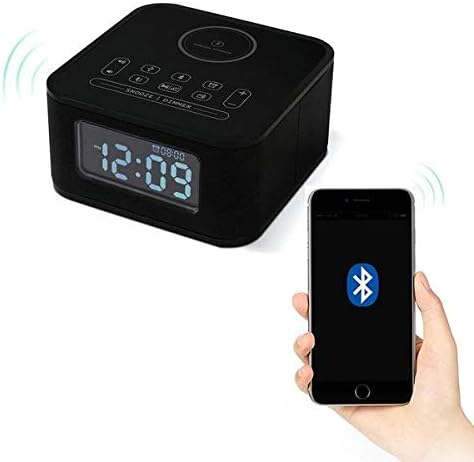
Figure 4.4: The Homtime D2qi speaker connected via Bluetooth to a smartphone.
5. Opstelling
5.1 Kragverbinding
- Connect the provided power adapter to the DC input port on the back of the Homtime D2qi.
- Steek die kragadapter in 'n standaardmuuraansluiting.
- Die skerm sal aanskakel, wat aandui dat die toestel aangeskakel is.
5.2 Aanvanklike Tydinstelling
Upon first power-on or after a power outage, you may need to set the time. Refer to the 'Operating Instructions' section for detailed steps on setting the clock.
6. Bedryfsinstruksies
6.1 Bluetooth-verbinding
- Druk die Bluetooth-knoppie on the top panel to enter Bluetooth pairing mode. The Bluetooth indicator will flash.
- Aktiveer Bluetooth op jou slimfoon of oudiotoestel en soek vir beskikbare toestelle.
- Select "Homtime D2qi" from the list.
- Sodra dit gekoppel is, sal die Bluetooth-aanwyser ophou flikker en konstant bly. Jy kan nou klank deur die luidspreker speel.
6.2 Draadlose laai
- Place your Qi-compatible smartphone centrally on the wireless charging pad located on the top surface of the speaker.
- Ensure the phone is properly aligned with the charging coil.
- The charging indicator on your phone will show that charging has begun.
6.3 Wekkerfunksie
- Druk die Alarm knoppie om alarminstellings af te skakel.
- Gebruik die +/- knoppies om die uur en minuut aan te pas.
- Druk die Alarm knoppie again to confirm each setting.
- Om die alarm te aktiveer/deaktiveer, druk die Alarm knoppie briefly when not in setting mode.
- Om te sluimer, druk die Sluimer/Dimmer-knoppie wanneer die alarm lui.
6.4 Radio Funksie
- Druk die Modusknoppie om oor te skakel na FM-radiomodus.
- Druk en hou die Speel/Pause-knoppie to auto-scan and save available stations.
- Gebruik die Vorige/Volgende knoppies to navigate through saved stations.
6.5 Call Answering
When connected via Bluetooth, the speaker can be used for hands-free calls.
- Druk op die om 'n inkomende oproep te beantwoord Speel/Pause-knoppie.
- Om 'n oproep te beëindig, druk die Speel/Pause-knoppie weer.
7. Onderhoud
- Maak die toestel skoon met 'n sagte, droë lap. Moenie skuurmiddels of oplosmiddels gebruik nie.
- Keep the charging pad free of dust and debris to ensure efficient wireless charging.
- Bêre die toestel op 'n koel, droë plek wanneer dit nie vir lang tye gebruik word nie.
8. Probleemoplossing
| Probleem | Moontlike oorsaak | Oplossing |
|---|---|---|
| Geen krag nie | Kragadapter nie gekoppel nie of foutiewe stopcontact. | Ensure power adapter is securely plugged into the device and a working wall outlet. |
| Geen klank van luidspreker nie | Bluetooth not connected; volume too low; incorrect mode. | Ensure Bluetooth is paired. Increase volume on both the speaker and your device. Check if the speaker is in the correct mode (Bluetooth/Radio). |
| Draadlose laai werk nie | Foon nie Qi-versoenbaar nie; foon nie in lyn gebring nie; foonomhulsel te dik. | Verify phone supports Qi wireless charging. Realign phone on the charging pad. Remove thick phone cases. |
| Buttons difficult to locate in the dark | Buttons are flush with the surface. | Familiarize yourself with button layout during daylight. Use the dimmer function to adjust display brightness. |
| Bluetooth disconnects automatically | Power saving feature; device out of range. | Reconnect Bluetooth manually. Keep devices within Bluetooth range (approx. 10 meters). |
9. Spesifikasies
| Kenmerk | Detail |
|---|---|
| Handelsmerk | Huistyd |
| Modelnommer | D2qi |
| Kleur | Swart |
| Tipe luidspreker | Bluetooth-luidsprekers |
| Konnektiwiteit | Draadloos |
| Versoenbare toestelle | Slimfone |
| Uitset krag | 5 - 10 Watt |
| Produk Gewig | 0.5 kg |
| Pakket afmetings | 19.6 x 18.8 x 14.8 cm |
| Hardeware-koppelvlak | Audio/Video Port |
10. Waarborg en Ondersteuning
Homtime products are manufactured to the highest quality standards. For warranty information and customer support, please refer to the warranty card included in your package or visit the official Homtime webwebwerf. Bewaar u aankoopbewys as bewys van aankoop.