
1. Inleiding
This manual provides detailed instructions for the safe and effective use of the SMART SENSOR AS8805 Digital Sulfur Dioxide Gas Monitor. This device is designed for high-sensitivity detection of sulfur dioxide (SO2) gas, featuring sound and light alarms, and a rechargeable Li-battery for portable operation. Please read this manual thoroughly before operating the device and retain it for future reference.
2. Veiligheidsinligting
Volg altyd die volgende veiligheidsmaatreëls om beserings of skade aan die toestel te voorkom:
- Moenie probeer om die toestel te verander of uitmekaar te haal nie.
- Maak seker dat die toestel binne die gespesifiseerde bedryfstemperatuur- en humiditeitsreekse gebruik word.
- Hou die toestel weg van sterk elektromagnetiese velde.
- Kontroleer die toestel gereeld vir enige tekens van skade of wanfunksionering.
- Perform zero calibration in a clean air environment, free from SO2 or other interfering gases.
- Recharge the battery promptly when the low power indicator is active to maintain optimal performance and safety.
- This device is designed for detecting SO2 gas. Do not use it for other gas types without proper calibration and verification.
3. Produk verbyview
The SMART SENSOR AS8805 is a compact and portable sulfur dioxide gas detector. Familiarize yourself with its components:

Figuur 3.1: Voorkant View of the AS8805 Detector. This image shows the front of the device, highlighting the digital LCD display, power on/off key, up key (addition), down key (subtraction), and enter key. The alarm light is visible at the top left, and the sulfur dioxide gas sensor is at the top right.
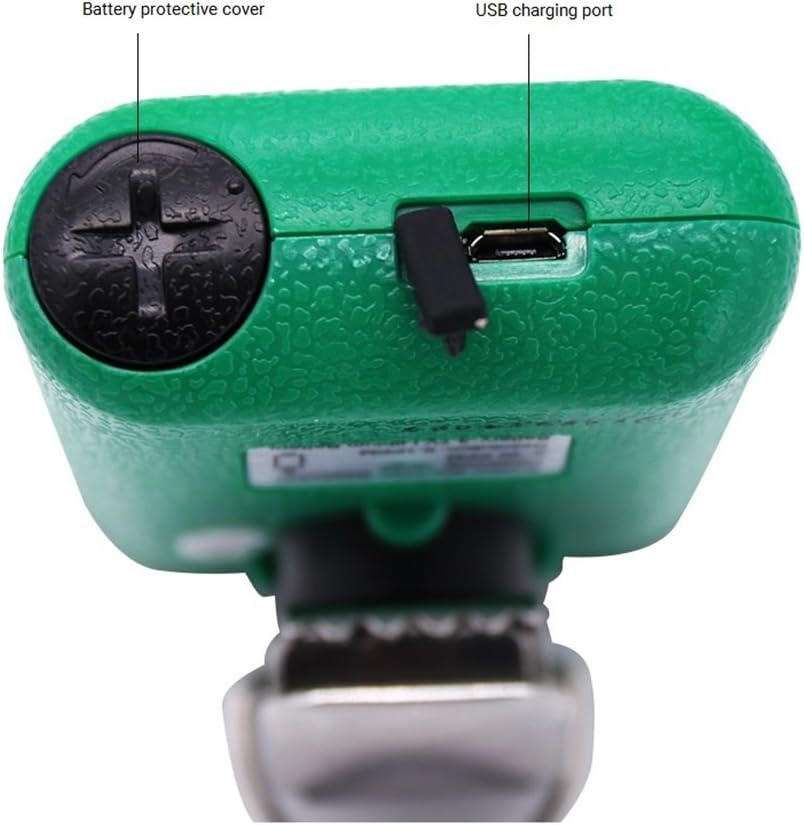
Figuur 3.2: Bo View of the AS8805 Detector. This image displays the top section of the device, indicating the battery protective cover and the USB charging port.

Figuur 3.3: Kant View of the AS8805 Detector. This image illustrates the side of the device, pointing out the gas sensor inside and the alarm light.
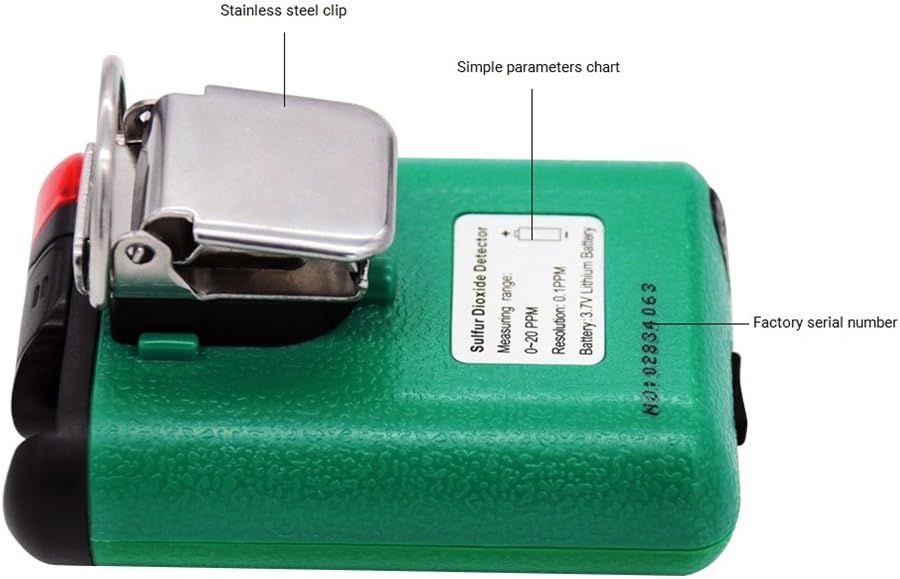
Figuur 3.4: Terug View of the AS8805 Detector. This image shows the back of the device, featuring the stainless steel clip, a simple parameters chart, and the factory serial number.
3.1 Sleutelkomponente
- Sulfur Dioxide Gas Sensor: Detects SO2 concentration in the air.
- Alarm lig: Provides visual indication during an alarm event.
- Digitale LCD-skerm: Shows real-time gas concentration, battery status, and other operational information.
- Krag aan/af sleutel: Word gebruik om die toestel aan of af te skakel.
- Up Key (Addition): Gebruik vir die navigasie van spyskaarte of om te verhoogasing-waardes.
- Down Key (Subtraction): Used for navigating menus or decreasing-waardes.
- Enter sleutel: Used to confirm selections or enter menus.
- Battery Protective Cover: Secures the internal battery.
- USB-laaipoort: For recharging the device's internal Li-battery.
- Stainless Steel Clip: Allows for convenient carrying and attachment.
4. Opstelling
4.1 Uitpak en Pakketinhoud
Carefully unpack the device and verify that all standard accessories are present:

Figure 4.1: Standard Package Contents. This image shows the items included in the standard package: the AS8805 gas monitor, power charger and cable, user manual, explosive-proof certificate, certificate of calibration, and warranty card.
- 1x Sulfur Dioxide Gas Monitor (AS8805)
- 1x Gebruikershandleiding
- 1x Explosive-proof Certificate
- 1x Waarborgkaart
- 1x Power Charger
- 1x kragkabel
4.2 Laai die battery
The device is powered by a 3.7V Li-battery. Before first use, or when the low power indicator appears, charge the device:
- Connect the provided power cable to the USB charging port on the top of the device (refer to Figure 3.2).
- Connect the other end of the cable to the power charger, and then plug the charger into a suitable power outlet.
- The battery icon on the LCD display will indicate charging status.
- A full charge typically allows for approximately 60 hours of continuous operation without alarms.
4.3 Aanvanklike aanskakeling
Om die toestel aan te skakel:
- Druk en hou die Krag aan/af sleutel totdat die skerm aanskakel.
- The device will perform a self-test and warm-up sequence. During this time, the display may show various readings before settling.
5. Operasie
5.1 Krag aan/af
- Krag aan: Druk en hou die Krag aan/af sleutel for a few seconds until the display turns on.
- Skakel af: Druk en hou die Krag aan/af sleutel vir 'n paar sekondes totdat die skerm afskakel.
5.2 Vertoon inligting
The digital LCD display shows the following information:
- Real-time SO2 Concentration: Displayed in parts per million (ppm).
- Batterystatus-aanwyser: Toon die huidige batterylaaivlak.
- Alarm aanwysers: Visual cues for high or low alarm conditions.
5.3 Alarm Functions and Settings
The device features adjustable high and low alarm values with three alarm methods: sound, light, and vibration. The alarm sound can reach up to 80dB.
- Default High Alarm: 10.0 dpm
- Default Low Alarm: 5.0 dpm
To adjust alarm values:
- Met die toestel aangeskakel, druk die Up-sleutel or Af-sleutel to enter the password interface.
- Enter the password (e.g., "123" as shown in the calibration video, though specific password should be confirmed in the full user manual). Use the Up en Down Keys to change digits and the Voer sleutel in to move to the next digit or confirm.
- After entering the correct password, navigate through the menu using the Up en Down Keys to find the alarm setting options.
- Adjust the high and low alarm thresholds as required using the Up en Down Keys, and confirm each setting with the Voer sleutel in.
5.4 Nulkalibrasie
Zero calibration ensures accurate readings by setting the baseline in a clean air environment. This procedure should be performed regularly or if you suspect inaccurate readings.
- Ensure the device is in a clean environment, free from any SO2 gas.
- Skakel die toestel aan.
- Access the calibration menu by pressing the Up-sleutel or Af-sleutel to enter the password interface.
- Enter the password (e.g., "123").
- After successful password entry, navigate to the calibration option (often labeled "CAL" or "ZERO CAL").
- Confirm the zero calibration selection with the Voer sleutel in. The device will then perform the zero calibration, displaying a changing number as it stabilizes.
- Wait for the device to stabilize and confirm the calibration. The display may show "F" or return to 0.0 ppm, indicating successful calibration.
5.5 Auto/Hand Power Off Function
The device includes an auto power-off feature to conserve battery life. This can be set manually.
- Outo-afskakeling: If enabled, the device will automatically turn off after 10 minutes of no operation.
- Refer to the full user manual for specific instructions on how to enable or disable the auto power-off function.
6. Onderhoud
6.1 Batterysorg
- Recharge the 3.7V Li-battery when the low power indicator is displayed.
- Vermy om die battery gereeld heeltemal te leeg te maak om sy lewensduur te verleng.
- Gebruik slegs die meegeleverde laaier en kabel.
6.2 Sensorlewensduur
The electrochemical sensor has an estimated life of 2 years. After this period, the sensor's accuracy may degrade, and replacement or professional calibration may be required.
6.3 Skoonmaak
- Vee die buitekant van die toestel af met 'n sagte, damp lap.
- Moenie skuur skoonmaakmiddels of oplosmiddels gebruik nie.
- Ensure no liquid enters the sensor opening or charging port.
7. Probleemoplossing
| Probleem | Moontlike oorsaak | Oplossing |
|---|---|---|
| Toestel skakel nie aan nie. | Lae of uitgeputte battery. | Laai die toestel met die meegeleverde laaier en kabel. |
| Onakkurate lesings. | Sensor requires zero calibration; sensor lifespan exceeded. | Perform zero calibration in clean air. If issues persist, consider sensor replacement or professional service. |
| Alarm klink voortdurend. | High SO2 concentration detected; alarm settings too low. | Evacuate the area and ventilate. Check and adjust alarm thresholds if necessary. |
| Die skerm is leeg of gevries. | Software error or battery issue. | Probeer om die toestel te herbegin. Kontak ondersteuning as die probleem voortduur. |
8. Spesifikasies
| Kenmerk | Detail |
|---|---|
| Produkmodelnommer | AS8805 |
| Gas Measurement Type | Swaeldioksied (SO2) |
| Meetreeks | 0 ~ 20 dpm |
| Testing Resolution | 0.1 dpm |
| Meetbeginsel | elektrochemiese |
| Sensor lewensduur | 2 jaar |
| Lae/hoë alarm | Supported, adjustable values |
| Alarm Metodes | Klank, Lig, Vibrasie |
| Alarmklankvlak | Tot 80 dB |
| Bedryfstemperatuur | -10 ~ 50 ℃ (14 ~ 122 ℉) |
| Bedryfshumiditeit | 15 ~ 95% RH (Standard) |
| Battery Tipe | 3.7V Li-battery (754060p) |
| Battery Werk Tyd | Approx. 60 hours (no alarm) |
| Outomatiese afskakeling | Yes (after 10 minutes of no operation, if enabled) |
| Produk Netto Gewig | 200 g (7.1 onse) |
| Produk Grootte | 120 * 65 * 38 mm |
| UPC | 785197913523 |
9. Waarborg en Ondersteuning
The SMART SENSOR AS8805 Digital Sulfur Dioxide Gas Monitor comes with a warranty as detailed in the included Warranty Card. Please refer to the card for specific terms and conditions.
For technical support, service, or inquiries regarding your device, please contact your retailer or the manufacturer directly. Keep your purchase receipt and warranty card handy when seeking support.