
1. Inleiding
Thank you for choosing the ASAKUKI Smart Wi-Fi Essential Oil Diffuser. This device combines aromatherapy with smart technology, allowing you to control it via a mobile application or voice commands. It is designed to humidify and purify the air, creating a relaxing atmosphere in your home or office.
This manual provides detailed instructions for the safe and efficient use of your diffuser. Please read it thoroughly before operation and retain it for future reference.

Image: The ASAKUKI Smart Wi-Fi Essential Oil Diffuser is versatile for various environments, including nurseries, family rooms, bedrooms, yoga studios, and workspaces.
2. Veiligheidsmaatreëls
Om veilige werking te verseker en skade te voorkom, let asseblief op die volgende:
- Always place the diffuser on a flat, stable surface.
- Do not exceed the maximum water fill line (500ml).
- Use only clean tap water or distilled water. Avoid using hot water.
- Add essential oils carefully to avoid spilling on the exterior of the unit.
- Hou die diffuser buite bereik van kinders en troeteldiere.
- Do not cover the mist outlet during operation.
- Unplug the device from the power outlet before cleaning or refilling.
- Moenie die eenheid in water of ander vloeistowwe dompel nie.
- If the unit is damaged, do not attempt to repair it yourself. Contact customer support.
- The diffuser features an automatic shut-off when water runs out, but it is recommended to monitor water levels.
3. Pakketinhoud
Verifieer dat alle items in jou pakket teenwoordig is:
- ASAKUKI Smart Wi-Fi Essential Oil Diffuser (Model DF010)
- Kragadapter
- Gebruikershandleiding
- Maatbeker (kan ingesluit word)
4. Produk verbyview
Familiarize yourself with the main components of your diffuser:

Image: The ASAKUKI Smart Wi-Fi Essential Oil Diffuser, showing its sleek design and the accompanying mobile app for control.
- Deksel: Top cover of the diffuser.
- Mis uitlaat: Where the mist is released.
- Watertenk: Holds up to 500ml of water.
- Max Water Line: Indicates the maximum fill level.
- Ultrasonic Plate: Located at the bottom of the water tank, responsible for mist generation.
- Luguitlaat: Located on the base.
- Drain Side: Indicated for proper water drainage.
- Ligte knoppie: Controls the LED light functions.
- Mist/Wi-Fi Button: Controls mist output and initiates Wi-Fi pairing.
- Kragaansluiting: Om die kragadapter aan te sluit.
5. Opstelinstruksies
Volg hierdie stappe vir aanvanklike opstelling:
- Plaas die verspreider: Position the diffuser on a flat, stable, and water-resistant surface.
- Verwyder die deksel: Gently lift the top lid off the diffuser.
- Voeg water by: Using a measuring cup, fill the water tank with clean tap water or distilled water up to the maximum water line (500ml). Do not overfill.
- Voeg essensiële olies by: Add 3-5 drops of your preferred essential oil directly into the water tank. Adjust the amount based on personal preference and room size.
- Vervang die deksel: Securely place the lid back onto the diffuser.
- Koppel krag: Plug the power adapter into the power jack at the base of the diffuser, then plug the adapter into a wall outlet.
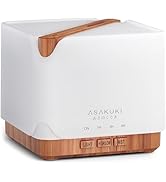
Image: Simple setup guide illustrating connecting power, app pairing, and wireless control.
6. Bedryfsinstruksies
6.1 Handmatige beheer
- Misbeheer: Druk die Mist/Wi-Fi button once for continuous mist. Press again for intermittent mist (30 seconds on, 30 seconds off). Press a third time to turn off the mist.
- Ligbeheer: Druk die Lig button once to turn on the LED light with automatic color cycling. Press again to fix the light to a specific color. Continue pressing to cycle through colors. Press and hold the Light button to turn off the light.
6.2 Smart Wi-Fi and App Control
The diffuser can be controlled remotely using the TuyaSmart app.
- Laai die toepassing af: Soek vir "TuyaSmart" in your smartphone's app store (iOS or Android) and download it.
- Registreer/Teken Aan: Maak die toepassing oop en registreer 'n nuwe rekening of meld aan as jy reeds een het.
- Voer paringsmodus in: With the diffuser plugged in, press and hold the Mist/Wi-Fi button for 5 seconds until the indicator light flashes rapidly. This indicates the diffuser is in pairing mode.
- Voeg toestel by: In the TuyaSmart app, tap "Add Device" or the "+" icon. Select "Small Home Appliance" > "Diffuser" (Wi-Fi).
- Koppel aan Wi-Fi: Follow the in-app instructions to connect the diffuser to your 2.4GHz Wi-Fi network. Ensure your phone is also connected to the same 2.4GHz network during setup.
- Beheer: Once successfully paired, you can control the mist, light, set timers, and create schedules directly from the TuyaSmart app.

Image: The mobile app allows for convenient control of the diffuser's functions.
6.3 Stembeheer met Alexa
The diffuser is compatible with Amazon Alexa for voice control.
- Aktiveer vaardigheid: In the Alexa app, search for and enable the "TuyaSmart" skill.
- Koppel rekening: Link your TuyaSmart account to your Alexa account.
- Ontdek toestelle: Ask Alexa to "Discover devices" or manually discover them in the Alexa app.
- Stembevele: Once discovered, you can use commands such as:
- "Alexa, turn on the diffuser."
- "Alexa, turn off the diffuser."
- "Alexa, set the diffuser to red."
- "Alexa, set diffuser brightness to 50%."

Image: Voice control with Alexa allows hands-free operation of the diffuser.
7. Onderhoud
Gereelde skoonmaak help om optimale prestasie te handhaaf en verleng die lewensduur van jou verspreider.
7.1 Skoonmaak
Clean the diffuser after every 5-6 uses or every 3-5 days, especially when changing essential oils.
- Ontkoppel: Disconnect the diffuser from the power outlet.
- Leë water: Remove the lid and carefully pour out any remaining water from the drain side of the water tank.
- Vee skoon: Use a soft cloth or cotton swab with a small amount of mild dish soap to gently wipe the inside of the water tank and the ultrasonic plate.
- Spoel: Rinse the water tank with clean water, being careful not to get water into the air outlet.
- Droog: Wipe all parts dry with a clean, soft cloth.
- Deep Clean (Optional): For stubborn residue, add a small amount of white vinegar to the water tank and let it sit for 10-15 minutes before wiping and rinsing.
7.2 Berging
When not in use for an extended period, ensure the diffuser is clean and completely dry. Store it in a cool, dry place away from direct sunlight.
8. Probleemoplossing
Indien u probleme ondervind, verwys na die volgende algemene probleme en oplossings:
| Probleem | Moontlike oorsaak | Oplossing |
|---|---|---|
| Geen mis of lae misuitset |
|
|
| Diffuser does not power on |
|
|
| Kan nie aan Wi-Fi/App koppel nie |
|
|
| Water lekkasie |
|
|
9. Spesifikasies
| Kenmerk | Detail |
|---|---|
| Handelsmerk | ASAKUKI |
| Modelnommer | DF010 |
| Kapasiteit | 500 milliliter |
| Afmetings | 6 cm L x 6 cm B x 7 cm H |
| Materiaal | Akrilonitrielbutadieenstireen (ABS), Polipropileen (PP) |
| Kragbron | Elektries met koord |
| Wattage | 10 watt |
| Dekkingsgebied | Tot 323 XNUMX vierkante voet |
| Spesiale kenmerke | App Control, Automatic Shut-Off, Multiple Light Settings, Multiple Mist Settings, Voice Control (Alexa) |
| Geraasvlak | Laer as 35 dB |
| Runtime (Full Capacity) | Up to 16 hours (on weak mist setting) |
10. Waarborg en Ondersteuning
The ASAKUKI Smart Wi-Fi Essential Oil Diffuser comes with a 1-year technical support warranty. This warranty covers manufacturing defects and issues arising from normal use.
For technical assistance, troubleshooting, or warranty claims, please contact ASAKUKI customer support through the retailer where you purchased the product or visit the official ASAKUKI webwebwerf vir kontakinligting.
Please have your model number (DF010) and proof of purchase ready when contacting support.