
Inleiding
Thank you for choosing the Awei B923BL Wireless Magnetic Sports Bluetooth Earphones. This manual provides essential information for setting up, operating, maintaining, and troubleshooting your new earphones. Please read it carefully before use to ensure optimal performance and longevity of your device.
Pakketinhoud
Kontroleer asseblief die pakket vir die volgende items:
- Awei B923BL Wireless Magnetic Sports Bluetooth Earphones
- USB-laaikabel
- Verskeie groottes van oorpunte
- Gebruikershandleiding
Produk verbyview
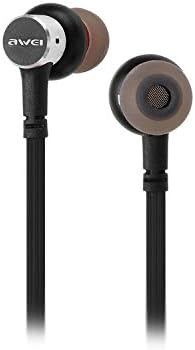
The Awei B923BL earphones are designed for active lifestyles, featuring a wireless Bluetooth connection and a magnetic design for convenient storage around your neck when not in use. They include an integrated microphone for hands-free calling.

Opstelling
1. Laai die oorfone
Before first use, fully charge your earphones. Connect the provided USB charging cable to the charging port on the earphones and the other end to a USB power source (e.g., computer USB port, wall adapter). The indicator light will show charging status and turn off or change color when fully charged.
2. Bluetooth-koppeling
- Maak seker dat die oorfone afgeskakel is.
- Press and hold the multi-function button (usually the power button) until the indicator light flashes red and blue alternately, indicating pairing mode.
- On your mobile phone or Bluetooth-enabled device, go to the Bluetooth settings and enable Bluetooth.
- Soek vir available devices. You should see "Awei B923BL" or a similar name in the list.
- Select "Awei B923BL" to connect. Once connected, the indicator light will usually flash blue slowly or turn off, and you may hear a confirmation tone.
- Indien gevra vir 'n wagwoord, voer "0000" in.
Once paired, the earphones will automatically connect to the last paired device when turned on, if the device's Bluetooth is active and within range.
Bedryfsinstruksies
Krag aan/af
- Krag aan: Press and hold the multi-function button for approximately 3 seconds until the blue indicator light flashes.
- Skakel af: Press and hold the multi-function button for approximately 5 seconds until the red indicator light flashes and then turns off.
Musiek afspeel
- Speel/pouse: Druk die multifunksionele knoppie een keer.
- Volgende snit: Druk en hou die Volume + knoppie in.
- Vorige snit: Druk en hou die Volume - knoppie.
Belbestuur
- Beantwoord/beëindig oproep: Druk die multifunksionele knoppie een keer.
- Verwerp oproep: Druk en hou die multifunksieknoppie vir ongeveer 2 sekondes in.
- Herbel laaste nommer: Dubbeldruk die multifunksieknoppie.
Volumebeheer
- Verhoog volume: Druk die knoppie Volume +.
- Verlaag volume: Druk die Volume - knoppie.
Onderhoud
- Clean the earphones regularly with a soft, dry cloth. Do not use harsh chemicals or abrasive materials.
- Verwyder die oordoppe en maak dit skoon met sagte seep en water indien nodig, en maak seker dat hulle heeltemal droog is voordat jy dit weer vasmaak.
- Bêre die oorfone op 'n koel, droë plek weg van direkte sonlig en uiterste temperature.
- Avoid exposing the earphones to water or excessive moisture.
- Do not attempt to disassemble or modify the earphones, as this will void the warranty.
Probleemoplossing
- Oorfone skakel nie aan nie: Maak seker dat die oorfone volledig gelaai is.
- Kan nie met toestel koppel nie:
- Make sure the earphones are in pairing mode (flashing red and blue).
- Maak seker dat Bluetooth op jou toestel geaktiveer is.
- Beweeg die oorfone nader aan jou toestel.
- Try restarting both the earphones and your device.
- Vee vorige Bluetooth-verbindings op jou toestel uit as jy te veel het.
- Geen geluid of lae volume:
- Check the volume levels on both the earphones and your connected device.
- Maak seker dat die oorfone behoorlik aan jou toestel gekoppel is.
- Probeer om verskillende klankbronne te speel.
- Probleme met oproepkwaliteit:
- Maak seker dat die mikrofoon nie geblokkeer word nie.
- Beweeg na 'n area met minder inmenging.
Spesifikasies
| Kenmerk | Detail |
|---|---|
| Handelsnaam | Awei |
| Modelnommer | B923BL |
| Kleur | Swart |
| Koptelefoonvormfaktor | In Oor |
| Verbindingstegnologie | Draadloos |
| Draadlose kommunikasietegnologie | Draadloos |
| Ouderdomsreeksbeskrywing | Volwasse |
| Materiaal | Rubber |
| Versoenbare toestelle | Selfone |
| Kabelkenmerk | Sonder kabel |
| Beheer metode | Raak |
| Aantal items | 1 |
| Vervaardiger | Awei |
| Spesiale kenmerke | Microphone Included (Note: This model does not feature active noise cancellation as per product description.) |
Waarborg en Ondersteuning
Waarborg inligting
This product comes with a 1-year manufacturer's warranty from the date of purchase. For warranty claims or service, please contact the manufacturer or their authorized service agent. For further details, you may also contact the retailer where the product was purchased.
Kliënte ondersteuning
If you encounter any issues not covered in this manual or require further assistance, please refer to the contact information provided with your product packaging or visit the official Awei webwebwerf vir ondersteuningsbronne.