
1. Inleiding
The PROZOR Bi-directional Digital Audio Converter is designed to convert digital audio signals between coaxial and optical (Toslink) formats. It allows for flexible audio routing, supporting conversion from coaxial to optical, or optical to coaxial, with simultaneous output to both formats. This device is ideal for integrating various audio components in your home theater system, ensuring high-quality, noise-free audio transmission.
2. Pakketinhoud
Verifieer asseblief dat alle items in u pakket ingesluit is:
- PROZOR Bi-directional Digital Audio Converter Unit
- 2m SPDIF Optical Toslink Cable
- USB-kragkabel
- Gebruikershandleiding

Figuur 2.1: Pakketinhoud
The image above displays the items typically included in the product package: the main converter unit, a 2-meter optical Toslink cable, a USB power cable for device operation, and the user manual.
3. Produk verbyview
The PROZOR Bi-directional Digital Audio Converter features clearly labeled input and output ports for ease of use. It includes a selector switch to choose between Coaxial and Toslink input sources.

Figure 3.1: Converter Ports and Indicators
This image illustrates the various ports and indicators on the converter. On one side, you will find the Coaxial Input, Optical Toslink Input, and an Input Selector Switch. The other side features the Optical Toslink Output, Coaxial Output, DC 5V/1A Power input, and a Power Indicator LED.
3.1 Conversion Modes
The converter supports four distinct conversion modes:
- Modus 1: Digital Coaxial Input to Digital Coaxial Output
- Modus 2: Digital Coaxial Input to Optical Toslink Output
- Modus 3: Optical Toslink Input to Digital Coaxial Output
- Modus 4: Optical Toslink Input to Optical Toslink Output

Figure 3.2: Conversion Mode Diagram
The diagram above visually represents the four possible audio signal conversion paths, highlighting the flexibility of the bi-directional functionality.
4. Opstelinstruksies
Follow these steps to connect your PROZOR Bi-directional Digital Audio Converter:
- Koppel invoerbron: Connect your audio source (e.g., TV, PS4, Blu-ray player) to the converter's input port (either Coaxial or Optical Toslink) using the appropriate cable.
- Kies invoer: Use the 'Select' switch on the converter to match your input source (Coaxial or Toslink).
- Koppel uitvoertoestel: Connect your audio receiving device (e.g., soundbar, amplifier, 5.1 surround system) to the converter's output port (either Coaxial or Optical Toslink). You can connect to both outputs simultaneously.
- Krag aan: Connect the USB power cable to the converter's DC 5V/1A port and plug the other end into a USB power source (e.g., TV USB port, USB wall adapter). The power indicator LED will illuminate.
- Configure TV Audio Output (Important): Access your TV's audio settings and ensure the digital audio output format is set to PCM/LPCM. This converter does not support Dolby AC3/DTS 5.1CH or other compressed audio formats. If your TV is set to a compressed format, you will not get sound.

Figuur 4.1: Tipiese verbindingsdiagram
This diagram illustrates a common setup where various digital audio sources are connected to the converter, which then outputs the audio to different sound systems.
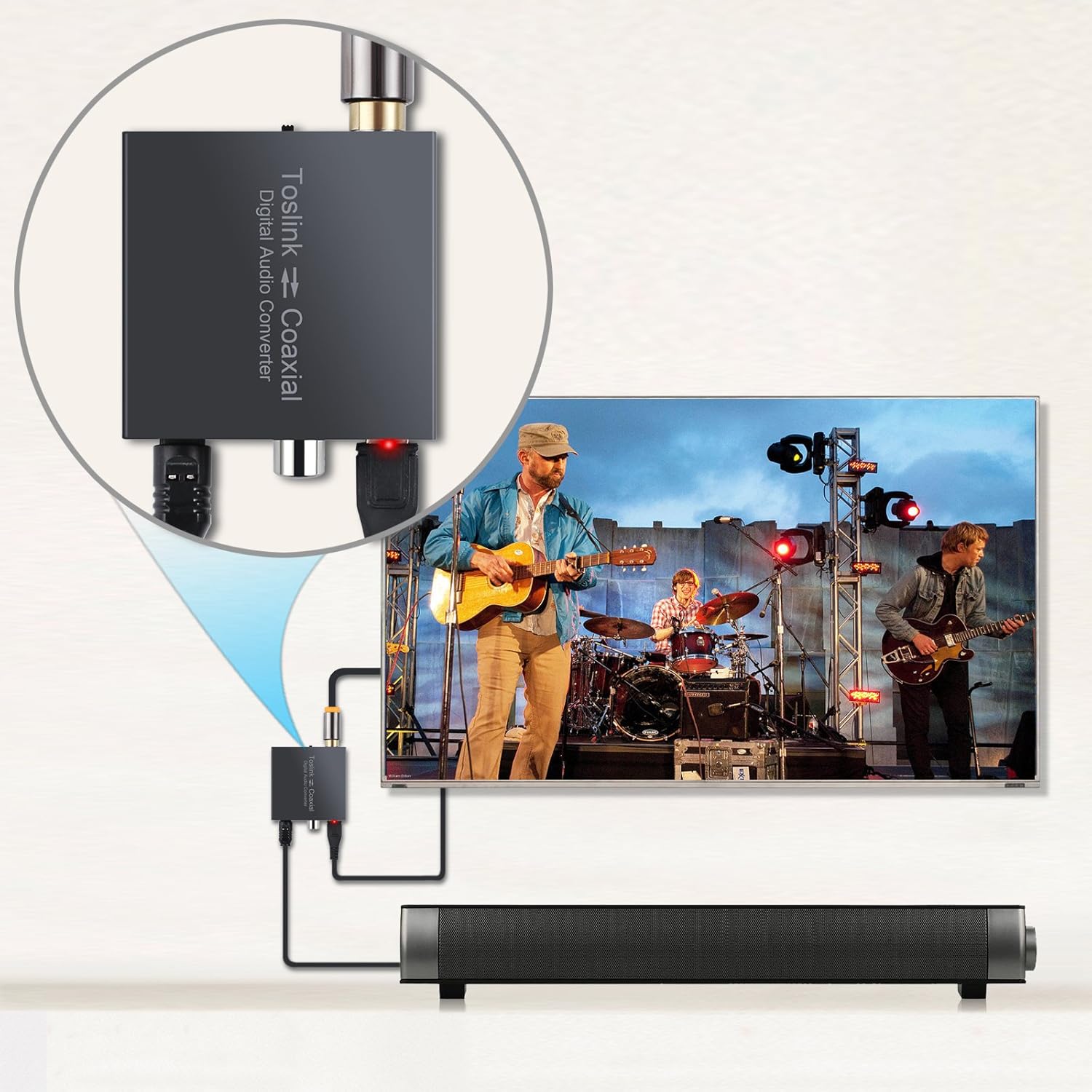
Figuur 4.2: Example Connection with TV and Soundbar
This image provides a visual example of the converter in a practical setup, connecting a TV to a soundbar for enhanced audio.
4.1 Opsteldemonstrasievideo
Video 4.1: PROZOR 192K Bi-directional Coaxial Optical Converter Setup Guide. This video demonstrates the physical connections and basic setup of the bi-directional converter.
Video 4.2: Optical to Coaxial or Coaxial to Optical Audio Converter Demonstration. This video provides a detailed look at the conversion process and how to switch between input types.
Video 4.3: LiNKFOR 192KHz DAC Digital to Analog Audio Converter Setup. This video demonstrates general setup steps for a digital audio converter, including important TV audio output settings (PCM/LPCM).
5. Bedryfsinstruksies
Once connected, the converter operates automatically based on the selected input. Ensure the 'Select' switch is set to the correct input type (Coaxial or Toslink) corresponding to your audio source. The red power indicator LED confirms the device is receiving power and functioning.
The device supports LPCM2.0/DTS/Dolby AC3/5.1CH audio formats, providing lossless digital audio conversion. It supports sampling rates up to 192 KHz 24bit for excellent audio output, as well as 32KHz, 44.1KHz, 48KHz, and 96KHz.
6. Probleemoplossing
- Geen klankuitset nie:
- Ensure the converter is powered on (red LED indicator).
- Verify that the 'Select' switch is set to the correct input source (Coaxial or Toslink).
- Kontroleer alle kabelverbindings vir 'n stewige pasvorm.
- Crucially, confirm your TV's digital audio output is set to PCM/LPCM. This converter does not support Dolby AC3/DTS 5.1CH or other compressed audio formats.
- Test with different audio sources and output devices if possible.
- Distorted or Poor Quality Sound:
- Ensure all cables are high quality and not damaged.
- Kyk vir enige los verbindings.
- Verify that the audio source is providing a clean signal.
- Intermitterende oudio:
- Check the power supply for stability.
- Maak seker dat kabels nie gebuig of beskadig is nie.
7. Spesifikasies
| Kenmerk | Beskrywing |
|---|---|
| Modelnommer | 8541740581 |
| Afmetings | 16 x 10.21 x 2.49 cm (6.3 x 4.02 x 0.98 duim) |
| Item gewig | 160 g |
| Materiaal | Metaal |
| insette Interface | Coaxial, Optical (Toslink) |
| Uitset-koppelvlak | Coaxial, Optical (Toslink) |
| Sampling Tarief Ondersteuning | Up to 192 KHz 24bit (also 32KHz, 44.1KHz, 48KHz, 96KHz) |
| Ondersteuning vir klankformaat | LPCM2.0/DTS/Dolby AC3/5.1CH |
| Kragtoevoer | DC 5V/1A (via USB cable) |
| Montage tipe | Kabelmontering |
| Boonste temperatuurgradering | 40 grade Celsius |

Figuur 7.1: Produkafmetings
The image above provides a visual representation of the compact dimensions of the converter, making it easy to integrate into any setup.
8. Waarborg en Ondersteuning
PROZOR-produkte is ontwerp vir betroubaarheid en werkverrigting. Vir waarborginligting of tegniese ondersteuning, verwys asseblief na die kontakbesonderhede wat saam met u aankoop verskaf is of besoek die amptelike PROZOR-webwerf. webwerf. Hou jou aankoopkwitansie vir waarborgeise.