
Inleiding
Thank you for choosing the Butterfly Eco Smart Plus 25-Litre Air Cooler. This manual provides essential information for the safe and efficient operation, maintenance, and troubleshooting of your new appliance. Please read these instructions carefully before use and retain them for future reference.
Belangrike veiligheidsinstruksies
To reduce the risk of fire, electric shock, or injury, always follow basic safety precautions when using electrical appliances. This includes:
- Verseker die kragtoevoer voltage matches the cooler's requirements (220-240 volts).
- Moenie die verkoeler, koord of prop in water of ander vloeistowwe dompel nie.
- Unplug the cooler from the outlet when not in use, before filling with water, or before cleaning.
- Moenie enige toestel gebruik met 'n beskadigde koord of prop, of nadat die toestel wanfunksioneer of op enige manier beskadig is nie.
- Keep the cooler on a stable, level surface to prevent tipping.
- Do not block air inlets or outlets. Maintain adequate clearance around the cooler for proper airflow.
- Hou kinders en troeteldiere weg van die koeler tydens werking.
- Do not use the cooler in areas where flammable liquids or gases are stored.
Produk verbyview
Familiarize yourself with the components of your Butterfly Eco Smart Plus Air Cooler.

Figuur 1: Voorkant view of the Butterfly Eco Smart Plus 25-Litre Air Cooler. This image shows the main body, front louvers, digital display control panel at the top, and castor wheels at the base.
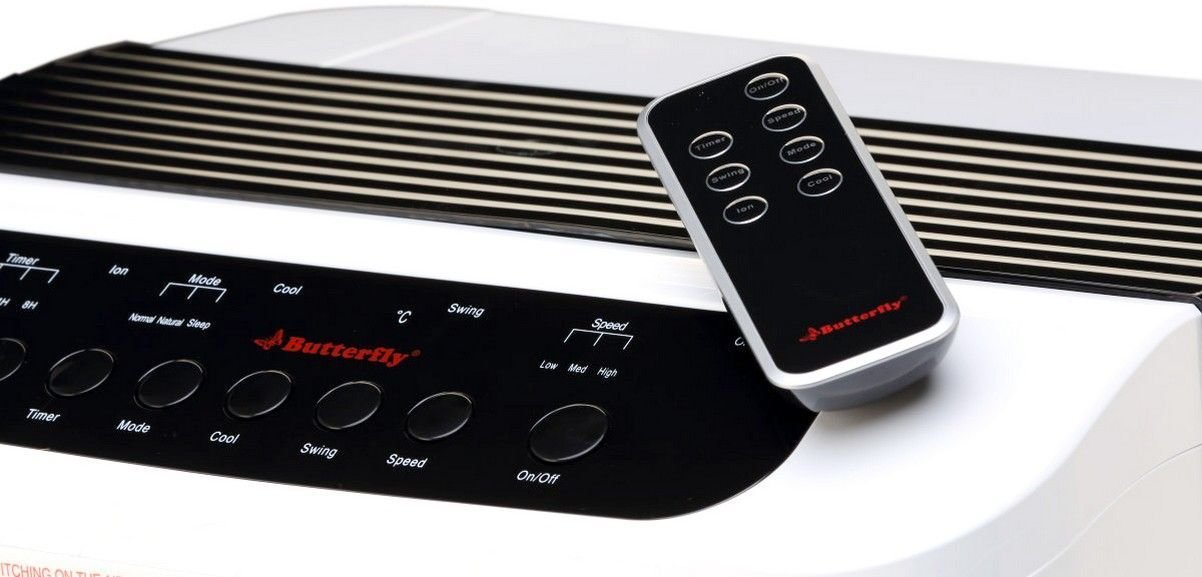
Figuur 2: Hoekig view of the air cooler, highlighting the top control panel and the included remote control placed on top. The side profile with vertical vents is also visible.

Figuur 3: Close-up of the remote control for the air cooler, showing buttons for On/Off, Speed, Mode, Timer, Swing, Ion, and Cool functions.

Figuur 4: Agter view of the air cooler with the back panel removed, revealing the honeycomb cooling media. This section is where air is drawn in and cooled by evaporating water.
Sleutelkomponente:
- Digital Display Control Panel: Located on the top, for manual operation.
- Front Louvers: Adjustable for directing airflow. Features both horizontal and vertical louvers for wide air distribution.
- Watertenk: 25-litre capacity, located at the bottom for water storage.
- Heuningkoek Verkoelingsmedia: Located at the rear, responsible for evaporative cooling.
- Castor wiele: Vir maklike mobiliteit van die eenheid.
- Afstandbeheer: Vir gerieflike werking vanaf 'n afstand.
Opstelling
- Uitpak: Carefully remove the air cooler from its packaging. Retain all packaging materials for future storage or transport.
- Plasing: Place the air cooler on a firm, level surface. For optimal cooling, position the cooler near an open window or door to allow fresh air intake and proper ventilation. Ensure there is at least 20 cm of space around the unit for unobstructed airflow.
- Watervulsel: Open the water inlet cap, typically located at the top or side. Fill the water tank with clean, fresh water up to the 'MAX' level indicator. Do not overfill. The cooler has a 25-litre capacity.
- Kragverbinding: Ensure the cooler is switched off before plugging it into a standard 220-240V AC power outlet.
Bedryfsinstruksies
Your air cooler can be operated using the control panel on the unit or the remote control.
Beheerpaneel/afstandbeheerfunksies:
- Aan/Af-knoppie: Press to turn the cooler on or off.
- Spoedknoppie: Siklusse deur 3 waaiersnelhede: Laag, Medium, Hoog.
- Koel knoppie: Activates the water pump to circulate water over the honeycomb pads for evaporative cooling.
- Swaai knoppie: Activates or deactivates the automatic oscillation of the vertical louvers to distribute air across a wider area. Horizontal louvers can be adjusted manually.
- Modusknoppie: Selects different operating modes (e.g., Normal, Natural, Sleep, if available).
- Timer-knoppie: Sets an operating duration after which the cooler will automatically turn off.
- Ion Button: Activates the ionizer function (if available) for air purification.
Aanvanklike werking:
- Steek die kragsnoer in 'n geskikte elektriese aansluiting.
- Druk die Aan/Af button on the control panel or remote. The unit will start in a default fan speed.
- Druk die Spoed button to select your desired fan speed (Low, Medium, High).
- For cooling, press the Koel button. You will hear the water pump activate.
- Druk die Swaai button to activate the automatic swing function for wider air distribution.
Onderhoud
Gereelde onderhoud verseker optimale werkverrigting en lang lewensduur van u lugverkoeler.
Daaglikse/Weeklikse Onderhoud:
- Watertenk: Regularly check the water level. For best performance and hygiene, drain and refill the water tank with fresh water every few days, especially if the cooler is used frequently.
- Buitenste skoonmaak: Vee die buite-oppervlaktes af met 'n sagte, damp lap. Moenie skuur skoonmaakmiddels of oplosmiddels gebruik nie.
Maandelikse/Seisoenale Onderhoud:
- Honeycomb Cooling Pads: The honeycomb pads can accumulate dust and mineral deposits. To clean, first unplug the cooler. Remove the back panel (refer to Figure 4 for location). Carefully slide out the honeycomb pads. Rinse them under running water to remove dust and deposits. For stubborn deposits, soak them in a mild descaling solution (e.g., vinegar and water) for 30 minutes, then rinse thoroughly. Ensure pads are completely dry before reinserting.
- Waterpomp: Inspect the water pump and its tubing for any blockages or damage. Clean any debris that may have accumulated.
- Dreineer: Completely drain the water tank before long periods of non-use or storage.
Berging:
Before storing the cooler for an extended period, ensure the water tank is empty and clean, and the honeycomb pads are dry. Store the unit in a dry, cool place, preferably in its original packaging.
Probleemoplossing
If you encounter issues with your air cooler, refer to the following common problems and solutions:
| Probleem | Moontlike oorsaak | Oplossing |
|---|---|---|
| Cooler does not turn on. | Geen kragtoevoer nie; Kragkabel nie ingeprop nie; Aan/uit-knoppie nie gedruk nie. | Check power outlet; Ensure cord is securely plugged in; Press the On/Off button. |
| No cool air / Only hot air. | Water tank empty; Cool function not activated; Honeycomb pads clogged; Water pump malfunction. | Fill water tank; Press the Cool button; Clean honeycomb pads; Check water pump for blockages or contact customer service if damaged. |
| Water is not pumping. | Water tank empty; Water pump or tubing blocked/damaged; Cool function not activated. | Ensure water tank is filled; Inspect pump and tubing for blockages; Press the Cool button. If pump is damaged, contact customer service. |
| Cool button blinking. | Low water level indicator. | Refill the water tank to the 'MAX' level. The blinking should stop once sufficient water is detected. |
| Ongewone geraas tydens operasie. | Low water level; Obstruction in fan or pump; Unit not on a level surface. | Check water level and refill if low; Inspect for foreign objects in fan or pump area (unplug first); Ensure cooler is on a stable, flat surface. |
| Afstandbeheer werk nie. | Batteries depleted; Obstruction between remote and cooler; Remote not pointed correctly. | Replace batteries; Remove any obstructions; Point remote directly at the cooler's receiver. |
Indien die probleem voortduur nadat u hierdie oplossings probeer het, kontak asseblief kliëntediens.
Spesifikasies
- Handelsmerk: Skoenlapper
- Model Naam: Eco Smart Plus
- Kapasiteit: 25 liter
- Kragverbruik: 200 Watt
- Bedryfsvoltage: 220 - 240 Volt
- Aantal snelhede: 3 (Laag, Medium, Hoog)
- Montage tipe: Vrye staande
- Spesiale kenmerke: Compact design, Remote Control, Horizontal and Vertical Louvers, Honeycomb Cooling Media, Digital Display Control Panel
- Kleur: Wit
Waarborg
This Butterfly Eco Smart Plus Air Cooler comes with a 1 jaar waarborg on the product from the date of purchase. Please retain your purchase receipt as proof of purchase for warranty claims. The warranty covers manufacturing defects under normal use. It does not cover damage caused by misuse, accidents, unauthorized repairs, or normal wear and tear.
Kliënte ondersteuning
For any queries, service requests, or technical assistance regarding your Butterfly Eco Smart Plus Air Cooler, please contact Butterfly customer support. Refer to the warranty card or the official Butterfly webwebwerf vir die mees onlangse kontakinligting.
Let wel: Always provide your product model number (Eco Smart Plus) and purchase details when contacting support.