
Inleiding
This manual provides comprehensive instructions for the setup, operation, maintenance, and troubleshooting of your Thomson Universal 2-in-1 Zapper Remote Control ROC Z107. Please read this manual carefully before using the device to ensure optimal performance and longevity.
Produk verbyview
The Thomson ROC Z107 is a universal remote control designed to operate two devices, typically a Television (TV) and a Set-Top Box (STB). It features large buttons for ease of use and includes a learning function for expanded compatibility.
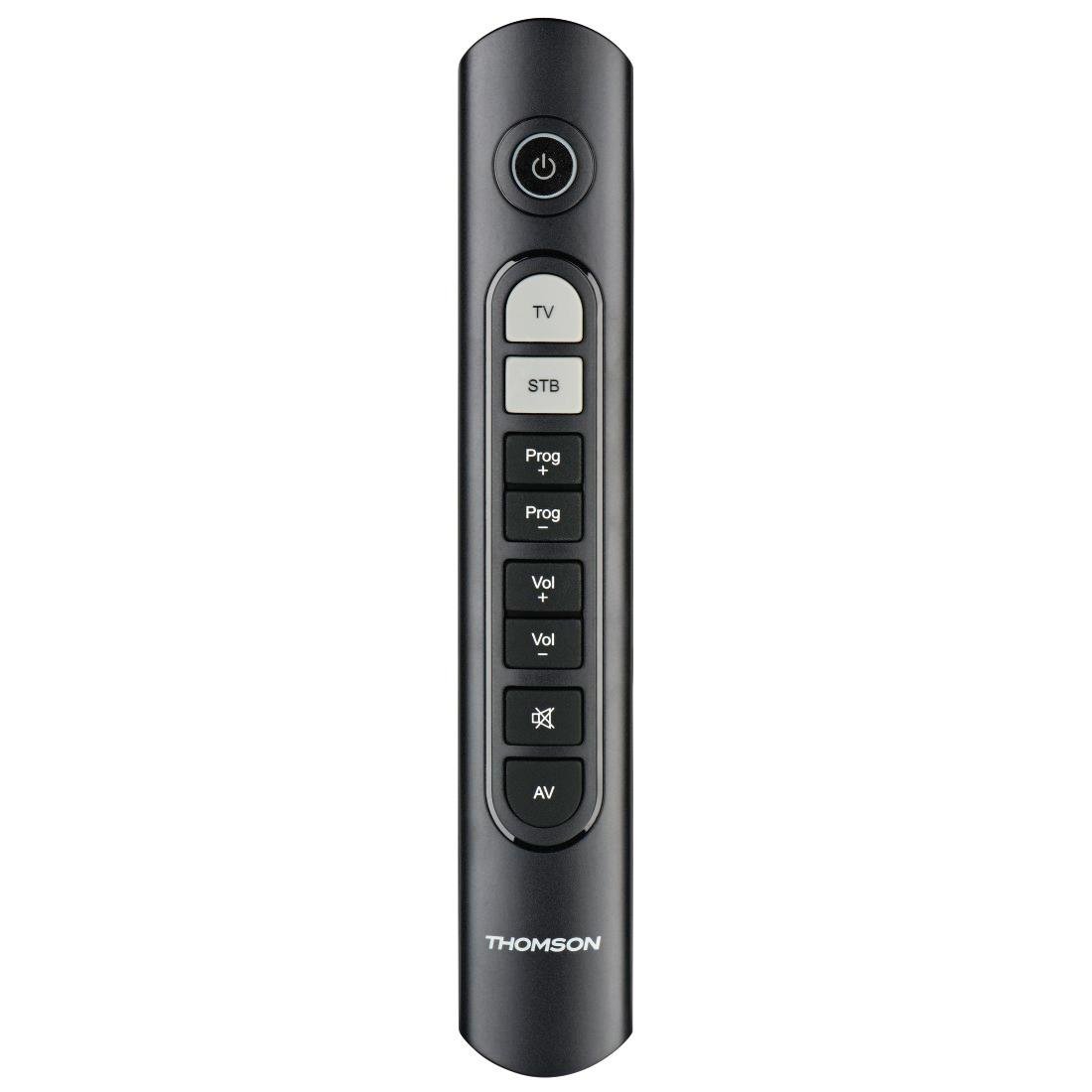
Image: Thomson Universal 2-in-1 Zapper Remote Control ROC Z107. This image displays the remote control from a slightly angled top-down perspective, highlighting its ergonomic design and the layout of its primary buttons.
Opstelling
1. Battery Installasie
- Maak die deksel van die batterykamer aan die agterkant van die afstandbeheerder oop.
- Insert two AAA batteries, ensuring correct polarity (+ and -). Two AAA batteries are included with your purchase.
- Maak die batterykompartement se deksel stewig toe.
2. Initial Programming (Pre-programmed Devices)
The remote control is pre-programmed for many popular brands such as LG, Sony, Samsung, Sharp, and Philips. For these brands, the remote may function immediately after battery installation without further setup. Test the remote with your TV and STB.
3. Learning Function (For Unlisted or Specific Functions)
If your device is not immediately compatible or if you wish to add specific functions from your original remote, use the learning function:
- Place the Thomson remote and your original remote control head-to-head, approximately 2-5 cm apart.
- Press and hold the desired device button (TV or STB) on the Thomson remote until the indicator light blinks.
- Press the button on the Thomson remote that you wish to program. The indicator light will blink slowly.
- Press the corresponding button on your original remote control. The indicator light on the Thomson remote will blink rapidly to confirm successful learning.
- Repeat for other buttons as needed.
- Press the device button (TV or STB) again to exit learning mode.
4. Master Volume and Program Selection
This feature allows you to designate which device (TV or STB) controls the volume and program channels, regardless of which device mode the remote is currently in. Refer to the full user manual for specific steps on setting up master control functions.
Bedryfsinstruksies
The Thomson ROC Z107 remote control features a simplified button layout for essential functions.

Image: Close-up of Thomson ROC Z107 remote control buttons. This image provides a detailed view of the remote's buttons, including Power, TV, STB, Program Up/Down, Volume Up/Down, Mute, and AV input selection.
- Kragknoppie (⏻): Turns the selected device (TV or STB) on or off.
- TV-knoppie: Selects the Television control mode.
- STB-knoppie: Selects the Set-Top Box control mode.
- Prog + / Prog - Buttons: Changes the program/channel up or down.
- Vol + / Vol - Buttons: Verhoog of verlaag die volume.
- Demp-knoppie (🔇): Demp of ontdemp die oudio.
- AV Button: Switches the input source on the TV (e.g., HDMI 1, HDMI 2, AV).
Onderhoud
Battery vervanging
When the remote control's performance degrades or the indicator light does not respond, it is time to replace the batteries. Follow the battery installation steps outlined in the Setup section.
Skoonmaak
Om die afstandbeheerder skoon te maak, gebruik 'n sagte, droë lap. Moenie vloeibare skoonmaakmiddels of skuurmiddels gebruik nie, aangesien dit die afstandbeheerder se oppervlak of interne komponente kan beskadig.
Probleemoplossing
- Afstandsbediening reageer nie:
- Kontroleer of die batterye korrek ingesit is en nie leeg is nie. Vervang indien nodig.
- Maak seker dat daar geen obstruksies tussen die afstandbeheerder en die toestel se IR-ontvanger is nie.
- Verify that the remote is in the correct device mode (TV or STB).
- Spesifieke funksies werk nie:
- If a specific button does not work, it may not be programmed for your device or the device may not support that function. Use the learning function to program the button from your original remote.
- Some older devices may have limited compatibility with universal remotes.
- Remote range is limited:
- Maak seker dat batterye vars is.
- The maximum operating range is 10 meters. Operating beyond this distance may result in unreliable performance.
Spesifikasies
| Handelsmerk | Thomson |
| Model Naam | ROC Z107 |
| Modelnommer | 00132672 |
| Materiaal | Plastiek |
| Kleur | Swart |
| Oordrag | Infrared (IR Wireless) |
| Aantal toestelle ondersteun | 2 (TV, STB) |
| Versoenbare randapparatuur | Television, DTH, Set-Top Box |
| Kragbron | 2 x AAA-batterye (ingesluit) |
| Maksimum reeks | 10 XNUMX meter |
| Produk afmetings | 31.5 x 15.5 x 4 cm |
| Item gewig | 170 gram |
| Aantal knoppies | 9 |
Waarborg
This product is covered by a manufacturer's warranty. Please refer to the warranty card included in the product packaging or contact Thomson customer support for detailed warranty information and terms.
Ondersteuning
For further assistance, technical support, or inquiries regarding your Thomson Universal 2-in-1 Zapper Remote Control ROC Z107, please visit the official Thomson webwebwerf of kontak hul kliëntediensafdeling. Kontakbesonderhede kan tipies op die produkverpakking of die handelsmerk se amptelike aanlyn teenwoordigheid gevind word.