
1. Inleiding
Thank you for choosing the Hanwha Techwin Wisenet QND-6020R 2 Megapixel Network Camera. This manual provides essential information for the safe and efficient installation, operation, and maintenance of your new surveillance camera. Please read this manual thoroughly before using the product and retain it for future reference.
2. Veiligheidsinligting
Neem die volgende veiligheidsmaatreëls in ag om beserings of skade aan die produk te voorkom:
- Kragbron: Use only the specified power adapter (AC/DC) for this device. Incorrect voltage kan brand of elektriese skok veroorsaak.
- Installasie: Ensure the camera is securely mounted to prevent it from falling. Wall mounting is recommended.
- Water en vog: This camera has an IP65 waterproof rating, meaning it is protected against dust and low-pressure water jets. However, avoid submerging the camera in water or exposing it to high-pressure water.
- Skoonmaak: Ontkoppel die krag voor skoonmaak. Gebruik 'n sagte, droë lap. Moenie vloeibare of aërosol skoonmaakmiddels gebruik nie.
- Bedryfstemperatuur: Do not operate the camera outside its specified temperature range.
- Diens: Moenie probeer om hierdie produk self te onderhou nie. Verwys alle diens na gekwalifiseerde dienspersoneel.
3. Pakketinhoud
Verifieer dat alle items in die pakket teenwoordig is:
- Hanwha Techwin Wisenet QND-6020R Network Camera
- Monteer skroewe en ankers
- Installasiegids
- Kragadapter (AC/DC)
4. Produk verbyview
The Hanwha Techwin Wisenet QND-6020R is a 2-megapixel network dome camera designed for reliable surveillance. It features advanced video compression (H.264, H.265, Motion JPEG), 1080p video capture, and a 3.60 mm lens. Key features include night vision up to 65.62 ft and motion detection capabilities.
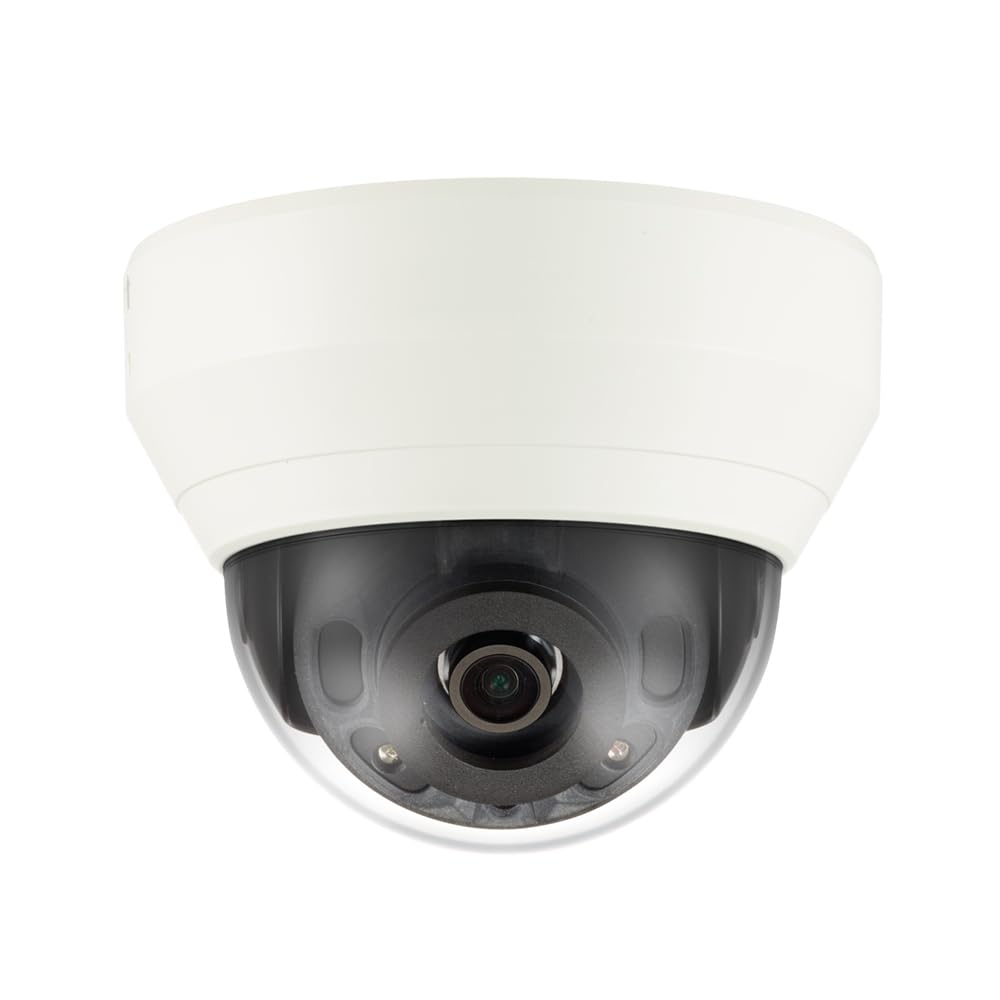
Figuur 4.1: Voorkant view of the Hanwha Techwin Wisenet QND-6020R 2 Megapixel Network Dome Camera. This image shows the compact dome design, suitable for discreet surveillance installations. The camera features a dark housing and a clear dome covering the lens, indicating its robust construction for various environments.
5. Opstelling
5.1 Montering van die kamera
- Kies 'n ligging: Choose a suitable wall location for optimal surveillance coverage. Ensure the surface is strong enough to support the camera.
- Boorgate: Use the provided mounting template (if applicable) to mark and drill pilot holes for the mounting screws.
- Bevestig die montering: Attach the camera's mounting base to the wall using the screws and anchors.
- Pas hoek aan: Once mounted, adjust the camera's viewhoek soos nodig.
5.2 Krag- en netwerkverbinding
- Kragverbinding: Connect the supplied AC/DC power adapter to the camera's power input port and then to a power outlet.
- Netwerkverbinding (bedraad): For a wired connection, connect an Ethernet cable from the camera's network port to your network router or switch.
- Netwerkverbinding (Wi-Fi): For Wi-Fi connectivity, refer to the camera's initial setup wizard or the dedicated network configuration section in the full digital manual for pairing instructions. The camera supports Wi-Fi connectivity.
5.3 Aanvanklike konfigurasie
After connecting power and network, the camera will boot up. Access the camera's web interface via a browser using its IP address (refer to your network's DHCP client list or use the manufacturer's discovery tool). Follow the on-screen prompts to set up administrator credentials, network settings, and initial video configurations.
6. Bedryfsinstruksies
6.1 Lewendig View en Opname
Kry toegang tot die kamera se regstreekse uitsendings view through its web interface or a compatible network video recorder (NVR) / surveillance software. Configure recording schedules, motion-triggered recording, and continuous recording settings as desired. Video is captured at 1080p resolution in MP4 format.
6.2 Bewegingsopsporing
The camera features a motion sensor. Configure motion detection zones and sensitivity settings within the camera's web interface. You can set up alerts (e.g., email notifications) to be triggered upon motion detection.
6.3 Nagvisie
The QND-6020R is equipped with night vision capabilities, providing clear images in low-light conditions up to 65.62 ft. The camera automatically switches between day and night modes based on ambient light levels. Night vision is in color.
7. Onderhoud
7.1 Skoonmaak
Regularly clean the camera's lens and housing with a soft, dry cloth to ensure optimal image quality. Avoid using harsh chemicals or abrasive materials.
7.2 Firmware-opdaterings
Periodically check the Hanwha Techwin website for firmware updates. Keeping your camera's firmware up-to-date ensures optimal performance, security, and access to new features.
8. Probleemoplossing
- Geen krag: Maak seker dat die kragadapter stewig aan beide die kamera en 'n werkende kragaansluiting gekoppel is. Verifieer dat die aansluiting krag het.
- Geen video/vanlyn: Check network cable connections (if wired) or Wi-Fi signal strength (if wireless). Verify the camera's IP address and network settings. Restart the camera and your network router.
- Swak beeldkwaliteit: Maak die kameralens skoon. Maak seker dat daar geen obstruksies in die kamera se oogveld is nie. view. Check lighting conditions.
- Bewegingsopsporing werk nie: Review motion detection zone settings and sensitivity in the camera's web interface. Ensure the feature is enabled.
- Kan nie toegang kry nie Web Interface: Verify the camera's IP address. Ensure your computer is on the same network segment as the camera. Try a different web blaaier.
9. Spesifikasies
| Kenmerk | Beskrywing |
|---|---|
| Modelnommer | QND-6020R |
| Handelsmerk | HANWHA |
| Aanbevole gebruike | Toesig |
| Spesiale kenmerke | Bewegingsensor, Nagvisie |
| Kragbron | AC/DC |
| Verbindingsprotokol | Wi-Fi |
| Tipe beheerder | H.264 |
| Mount Tipe | Muurmontering |
| Alerttipe | Slegs beweging |
| Waterdigte gradering | IP65 |
| Draadlose Tegnologie | Wi-Fi |
| Fotosensortegnologie | CMOS |
| Video-opname-resolusie | 1080p |
| Video-opname-formaat | MP4 |
| Nagvisie | Nag kleur |
| Vervaardiger | Hanwha Group |
10. Waarborg en Ondersteuning
This Hanwha Techwin product is covered by a manufacturer's warranty provided by Hanwha Group. For detailed warranty terms and conditions, please refer to the warranty card included with your product or visit the official Hanwha Techwin website. For technical support, troubleshooting assistance, or service inquiries, please contact Hanwha Techwin customer support through their official channels.