
Inleiding
This manual provides comprehensive instructions for the setup, operation, maintenance, and troubleshooting of your Summer Infant Panorama Digital Color Video Monitor. Please read this manual thoroughly before using the product to ensure safe and optimal performance.
Produk verbyview
The Summer Infant Panorama Digital Color Video Monitor offers advanced features for monitoring your baby, including a 5-inch high-resolution color LCD display, remote-controlled pan/tilt camera, two-way talk-back, digital zoom, and automatic night vision.
Sleutel kenmerke
- 5" full color digital flat screen display
- Remote control pan and tilt camera
- Two-way talk-back to baby
- Digital zoom functionality
- Built-in 2-color soft-glow nursery nightlight
- Automatic black & white night vision
- Klankgeaktiveerde LED-ligte
- Tot 800 voet reeks
- Power save button
- Low battery and out of range indicators
- Expandable system, up to 4 cameras
- Tabletop or wall mount camera option
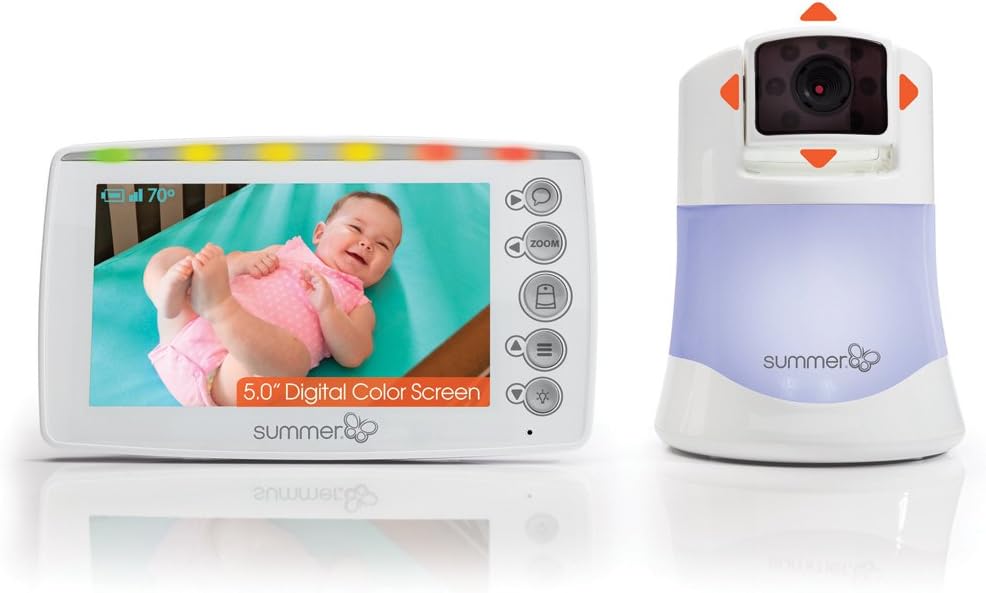
Figuur 1: Summer Infant Panorama Digital Color Video Monitor, showing the parent unit and camera.
Opstelling
Pakketinhoud
Maak seker dat alle komponente teenwoordig is:
- Ouereenheid (monitor)
- Baba-eenheid (kamera)
- AC Adapters (2)
- Wall mounting hardware (screws, anchors, cable clips)
Laai die ouereenheid
- Connect one AC adapter to the Parent Unit and plug it into a standard electrical outlet.
- Charge the Parent Unit for at least 8 hours before first use to ensure optimal battery performance.
- Die battery-aanwyser op die skerm sal die laaistatus wys.
Positioning the Baby Unit (Camera)
- Place the Baby Unit on a flat surface, such as a dresser or shelf, at least 3 feet (1 meter) away from the baby's crib.
- Ensure the camera has a clear line of sight to the baby.
- For wall mounting, use the provided hardware. Secure the camera to the wall at a height that provides a good view of the crib, ensuring the power cord is out of reach of children.
- Connect the second AC adapter to the Baby Unit and plug it into a standard electrical outlet.

Figuur 2: Proper placement of the camera and parent unit for optimal monitoring.
Aanvanklike paring
The Parent Unit and Baby Unit are pre-paired at the factory. If re-pairing is needed or additional cameras are added:
- Turn on both the Parent Unit and Baby Unit.
- On the Parent Unit, navigate to the menu and select the "Pairing" option.
- Follow the on-screen prompts to initiate pairing.
- Press the pairing button on the Baby Unit (refer to the camera diagram for location).
- The units will automatically connect.
Bedryfsinstruksies
Parent Unit Controls
The Parent Unit features a 5-inch display and various control buttons:
- Kragknoppie: Skakel die eenheid aan/uit.
- Volume knoppies: Verstel die luistervolume.
- Helderheidbeheer: Pas die skermhelderheid aan.
- Zoem knoppie: Activates digital zoom.
- Talk-Back Button: Druk en hou in om met jou baba deur die kamera te praat.
- Kieslys-knoppie: Kry toegang tot instellings en opsies.
- Navigasie-knoppies: Used to pan/tilt the camera and navigate menus.

Figuur 3: The 5.0" handheld parent unit in use.
Camera Control (Pan & Tilt)
Use the navigation buttons on the Parent Unit to remotely adjust the camera's view:
- Druk die Op/af arrows to tilt the camera vertically.
- Druk die Links/Regs arrows to pan the camera horizontally.

Figuur 4: The camera unit demonstrating pan and tilt capabilities.
Digitale zoom
Druk die Zoem button on the Parent Unit to digitally zoom in on the image. Press again to zoom out.
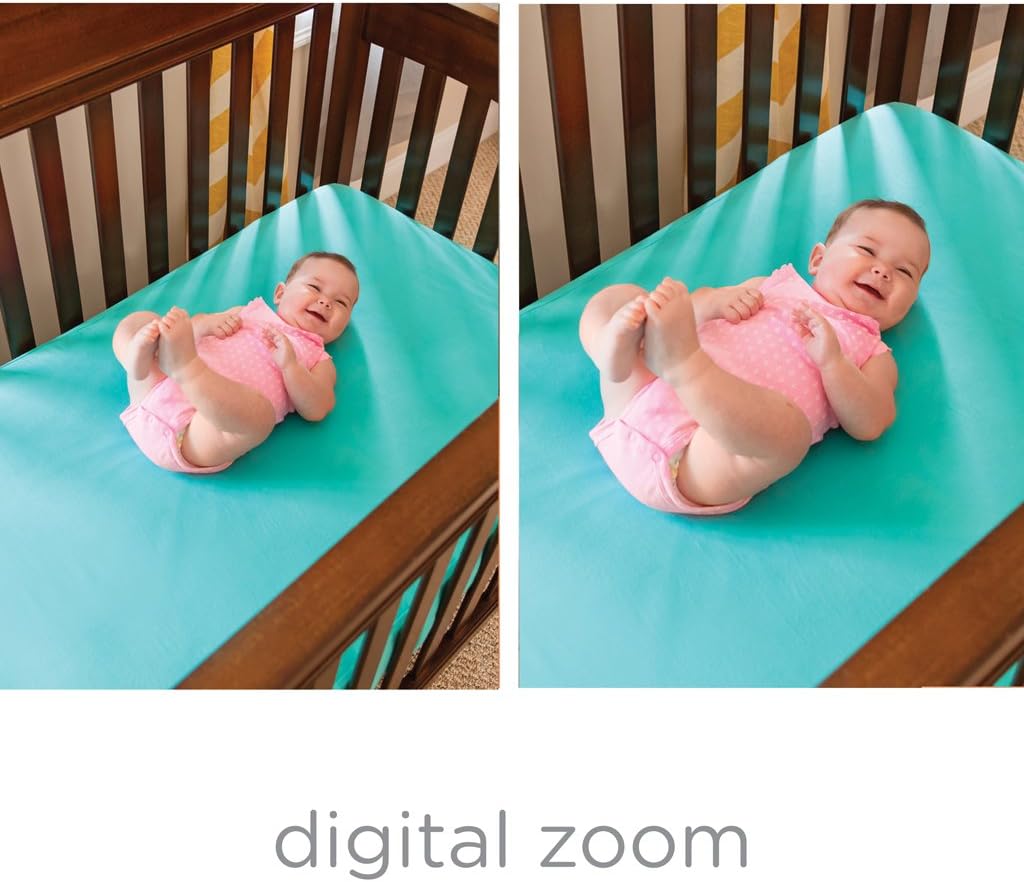
Figuur 5: Comparison of normal view en digitale zoom.
Nagvisie
The monitor automatically switches to black and white night vision in low light conditions, providing a clear view of your baby without disturbing them.

Figuur 6: Nagvisie view van 'n baba in 'n krip.
Two-Way Talk-Back
Press and hold the talk-back button on the Parent Unit to speak to your baby. Release the button to hear your baby.
Naglig
The Baby Unit includes a soft-glow nightlight. Access the menu on the Parent Unit to turn the nightlight on/off or change its color.
Onderhoud
Skoonmaak
- Wipe the Parent Unit and Baby Unit with a dry, soft cloth.
- Moenie skoonmaakmiddels of vloeibare skoonmaakmiddels gebruik nie.
Battery sorg
- To preserve battery life, fully charge the Parent Unit before each use.
- If the unit will not be used for an extended period, remove the battery.
Probleemoplossing
| Probleem | Oplossing |
|---|---|
| No picture/sound on Parent Unit | Ensure both units are plugged in and turned on. Check battery level of Parent Unit. Ensure units are within range. |
| "Out of Range" indicator | Move the Parent Unit closer to the Baby Unit. Reduce obstacles between units. |
| Swak beeldkwaliteit | Adjust the camera angle. Ensure adequate lighting for color vision or check night vision activation. |
| Staties of interferensie | Move units away from other electronic devices (cordless phones, Wi-Fi routers). |
| Parent Unit battery drains quickly | Ensure the unit is fully charged before use. Reduce screen brightness. Use power save mode if available. |
Spesifikasies
- Modelnommer: 29593
- Skermgrootte: 5 duim
- Draadlose kommunikasietegnologie: Wi-Fi
- Verbindingstegnologie: Draadloos
- Spesiale kenmerk: Nagvisie
- Kragbron: Battery Powered (AC adapter included)
- Batterylewe: Up to 10 Hours (Parent Unit)
- Reeks: Tot 800 voet
- Afmetings (L x B x H): 22.2 x 30.5 x 11.7 sentimeter
- Item gewig: 793 g
- Montage tipe: Muurmontering, tafelblad
Waarborg en Ondersteuning
For warranty information and customer support, please refer to the official Summer Infant webwebwerf of kontak hul kliëntediensafdeling. Bewaar u aankoopbewys as bewys van aankoop.
Vervaardiger: Somer Baba
Plek van Besigheid: Mississauga, ON L4Y 3Y4, CA
Eerste datum beskikbaar: 30 September 2018
Belangrike veiligheidsinligting
- Keep all cords out of reach of children (at least 3 feet / 1 meter away).
- Never place the camera or cords inside the crib or playpen.
- Hierdie produk is nie 'n plaasvervanger vir volwasse toesig nie.
- Moet nie naby water gebruik nie.
- Gebruik slegs die AC-adapters wat voorsien word.
Verwante video's
No official product videos from the seller are available for direct embedding in this manual based on the provided criteria.