

Inleiding
This manual provides comprehensive instructions for the setup, operation, and maintenance of your MASTER & DYNAMIC MH40 Over-Ear Headphones. Please read this guide thoroughly to ensure optimal performance and longevity of your device.
Pakketinhoud
Verifieer dat alle items in jou pakket teenwoordig is:
- MASTER & DYNAMIC MH40 Over-Ear Headphones
- Audio Cable with In-line Microphone
- USB-C Charging Cable (for Bluetooth functionality)
- Canvas Carrying Case
- Gebruikershandleiding (hierdie dokument)
Produk verbyview
The MH40 headphones are designed with premium materials for durability and comfort. Key components include:
- Forged Aluminum Body: Provides a robust and lightweight structure.
- Lambskin Ear Pads: Offer comfort for extended listening sessions.
- Custom Neodymium Drivers: Engineered for superior sound reproduction.
- Verstelbare kopband: Verseker 'n veilige en gemaklike pasvorm.
- Afneembare kabels: For both audio and charging.

Figure 1: MASTER & DYNAMIC MH40 Over-Ear Headphones, showcasing black metal and camo leather design.
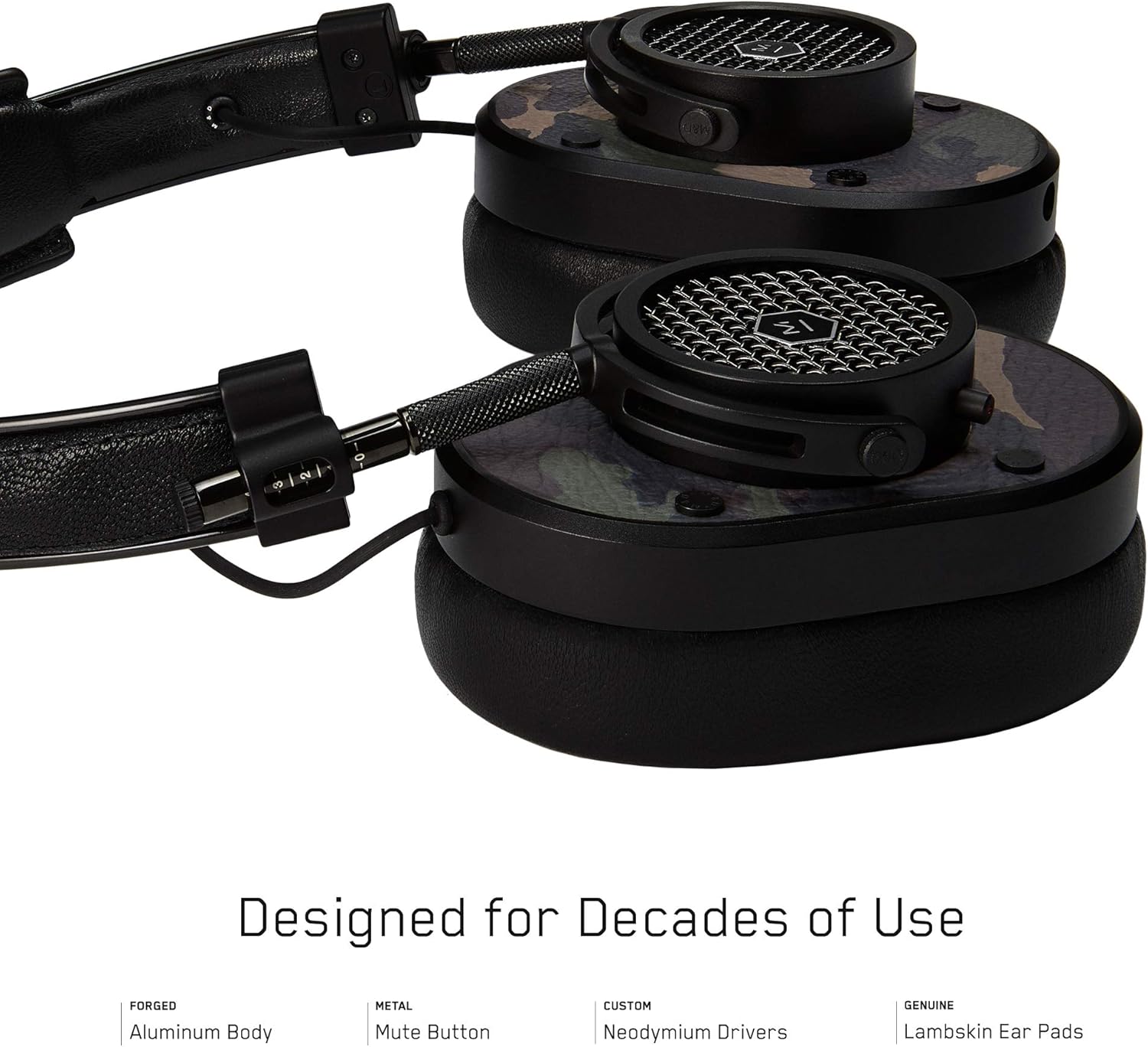
Figuur 2: Gedetailleerd view of the MH40 headphone earcups, highlighting the lambskin ear pads, metal grille, and adjustable hinge.
Opstelling
1. Pas die Fiksheid aan
- Gently extend or retract the metal arms on each side of the headband to adjust the height.
- Position the earcups so they fully cover your ears, ensuring a comfortable and secure fit.
- The lambskin ear pads are designed to conform to your head shape for optimal sound isolation and comfort.
2. Bedrade verbinding
- Locate the audio input port on the left earcup.
- Insert one end of the provided audio cable into the headphone's audio input.
- Connect the other end of the audio cable to your audio device's 3.5mm jack.
3. Bluetooth Pairing (Wireless Connection)
The MH40 headphones support Bluetooth connectivity for wireless audio. Ensure the headphones are charged before pairing.
- Krag aan: Press and hold the power button (usually located on one of the earcups) until the indicator light flashes.
- Paringsmodus: Continue holding the power button or press a dedicated Bluetooth pairing button (if available) until the indicator light flashes rapidly, indicating pairing mode.
- Toestelverbinding: On your audio device (smartphone, tablet, computer), navigate to Bluetooth settings and select "MH40" from the list of available devices.
- Bevestiging: The indicator light on the headphones will turn solid blue or green once successfully paired.
Note: The Bluetooth range is approximately 10 meters (33 feet).
Bedryfsinstruksies
Oudio-weergawe
- Speel/pouse: Press the multi-function button (often on the in-line microphone or earcup) once.
- Volgende snit: Press the multi-function button twice rapidly.
- Vorige snit: Press the multi-function button three times rapidly.
- Volumebeheer: Use the volume up/down buttons on the in-line microphone or dedicated earcup controls.
Belbestuur
- Beantwoord/beëindig oproep: Druk die multifunksionele knoppie een keer.
- Verwerp oproep: Druk en hou die multifunksieknoppie vir ongeveer 2 sekondes in.
- Demp mikrofoon: The MH40 features a dedicated mute button, typically located on the earcup or in-line control. Press to mute/unmute during a call.
Onderhoud
- Skoonmaak: Use a soft, dry cloth to wipe the headphones. For leather parts, use a specialized leather cleaner if necessary. Avoid harsh chemicals or abrasive materials.
- Berging: When not in use, store the headphones in the provided canvas carrying case to protect them from dust and scratches.
- Kabelversorging: Handle cables gently. Avoid sharp bends or excessive pulling to prevent damage. The retractable cable feature helps manage cable length.
- Oorkussings: The magnetic ear pads are removable for cleaning or replacement. Gently pull them off and reattach by aligning the magnets.
Probleemoplossing
Geen klank nie
- bedraad: Ensure the audio cable is securely connected to both the headphones and the audio source. Check the volume level on both the headphones and the source device.
- Bluetooth: Verify that the headphones are powered on and successfully paired with your device. Check the volume levels. Try re-pairing the headphones.
Kan nie via Bluetooth koppel nie
- Ensure the headphones are in pairing mode (rapidly flashing indicator light).
- Maak seker dat Bluetooth op jou brontoestel geaktiveer is.
- Beweeg die oorfone nader aan jou toestel (binne 10 meter).
- Skakel beide die oorfone en jou toestel af en aan, en probeer dan weer om te koppel.
- If previously paired, try "forgetting" the device on your source and re-pairing.
Mikrofoon werk nie
- Check if the microphone mute button is engaged.
- Ensure the audio cable with the in-line microphone is fully inserted.
- Verify microphone input settings on your connected device.
Spesifikasies
| Model Naam | MH40 |
| Verbindingstegnologie | Bedraad, Bluetooth |
| Draadlose kommunikasietegnologie | Bluetooth |
| Materiaal | Copper (components), Lambskin (ear pads), Canvas (carrying case) |
| Tipe beheer | Oproepbeheer, Aanraking |
| Kabelkenmerk | Intrekbaar |
| Item gewig | 0.36 kilogram (12.7 onse) |
| Tipe oudiobestuurder | Dinamiese bestuurder |
| Bluetooth-reeks | 10 meter |
| Oorstukvorm | Oor-oor |
| Spesiale kenmerke | Carrying case included, Lightweight, Microphone Included, Noise Isolation, Wireless |
| Produk afmetings | 7.48 x 6.3 x 2.76 duim |
| Vervaardiger | MASTER & DYNAMIC |
| Kleur | Black Metal / Camo Leather |
| Oorplasing | Oor Oor |
| Geraasbeheer | Klankisolasie |
| UPC | 858901007099 |
Waarborg en Ondersteuning
For detailed warranty information and customer support, please refer to the official MASTER & DYNAMIC webwebwerf of kontak hul kliëntediens direk. Bewaar u bewys van aankoop vir waarborgeise.
Aanlyn ondersteuning: www.masterdynamic.com/support (Example link, actual link may vary)


