
1. Inleiding
This manual provides detailed instructions for the installation, operation, maintenance, and troubleshooting of your FSP 400W Micro ATX Power Supply (Model FSP400-60GHS(85)-R1). This power supply unit is designed for compact small form factor PC systems, offering 400 watts of power output with 80 Plus Bronze certification for high efficiency. It is compatible with Intel and AMD CPU systems and standard PC configurations.
Please read this manual thoroughly before installation and operation to ensure proper usage and to prevent damage to the unit or other components.
2. Veiligheidsinligting
WAARSKUWING: Power supplies contain high voltage components. Do not open the power supply casing. There are no user-serviceable parts inside. Opening the casing will void the warranty and poses a risk of electric shock.
- Maak seker dat die kragtoevoer van die wisselstroomaansluiting afgeskakel is voor installasie of onderhoud.
- Install the power supply in a well-ventilated area.
- Do not operate the power supply in high humidity or extreme temperature environments.
- Use only the cables provided with the power supply.
- Maak seker dat alle kabels stewig gekoppel is voordat die stelsel aangeskakel word.
- This product is designed for use in personal computers. Do not use it for any other purpose.
3. Pakketinhoud
Verifieer dat al die items wat hieronder gelys word, in u pakket teenwoordig is:
- FSP 400W Micro ATX Power Supply (FSP400-60GHS(85)-R1)
- AC kragkabel
- SFX to PS2 Bracket
- Gebruikershandleiding
- Mounting Screws (typically included with PC cases, but sometimes with PSUs)

Figure 3.1: Package Contents. Shows the power supply unit, user manual, various power cables, an AC power cord, and an SFX to PS2 adapter bracket.
4. Produk verbyview
The FSP400-60GHS(85)-R1 is a compact power supply designed for small form factor systems. Key features include an 80mm cooling fan with thermal sensing technology and an energy-saving 1-watt standby mode.
4.1 Physical Layout

Figuur 4.1: Hoekig view of the FSP 400W Micro ATX Power Supply, highlighting the fan grille, power switch, and AC power input.

Figuur 4.2: Agter view of the power supply, detailing the main power switch and the AC power input socket.

Figuur 4.3: Bo view of the power supply, showing the protective grille over the 80mm cooling fan.
4.2 Uitsetverbindings
The power supply includes various connectors to power your system components:
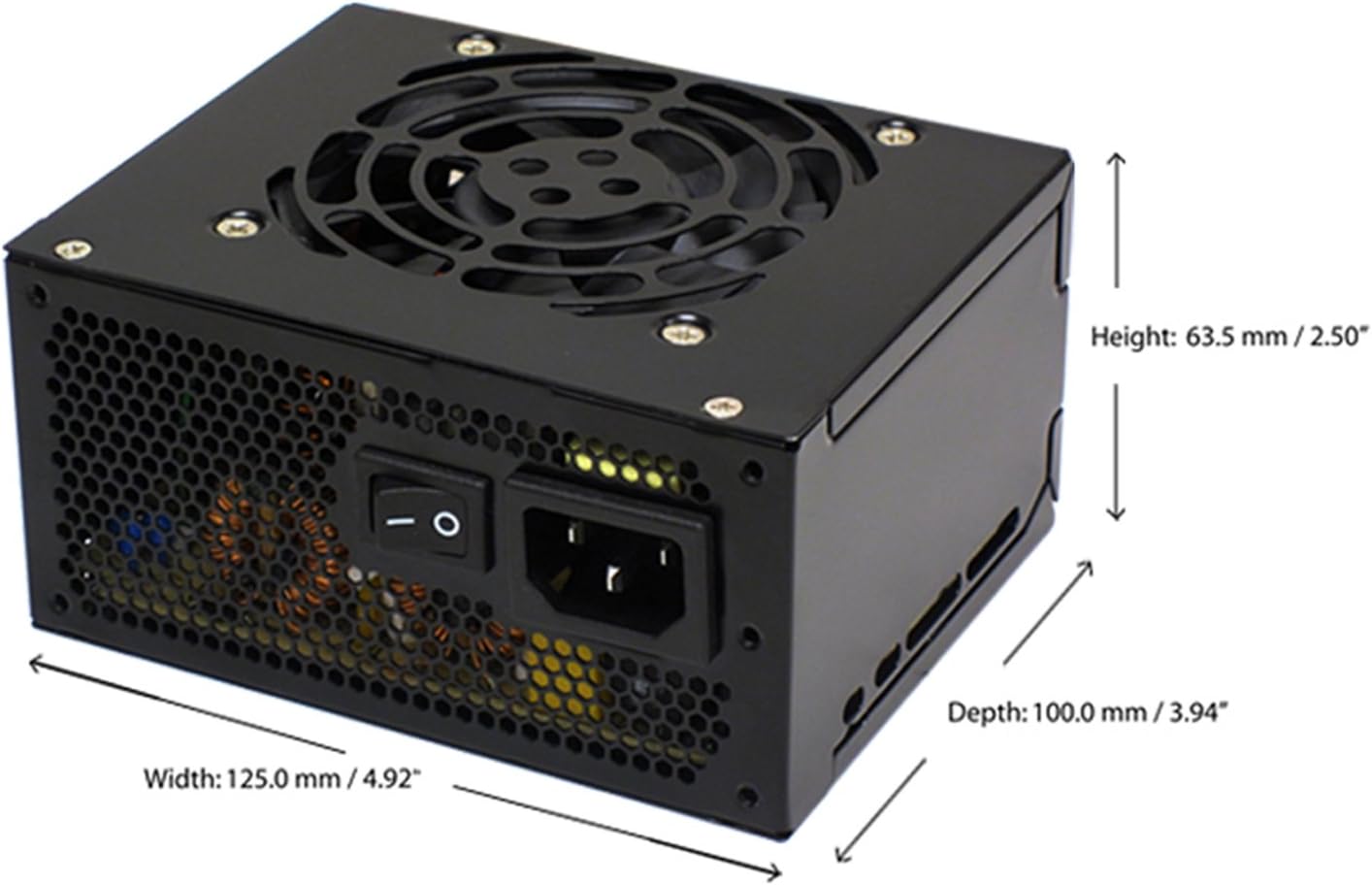
Figure 4.4: Diagram illustrating the types and quantities of output connectors available on the FSP400-60GHS(85)-R1 power supply.
- Main 24 Pin (1): For motherboard power.
- P4 | EPS 4+4 Pin (1): For CPU power.
- PCI-E 8 Pin (6+2) (1): Vir grafiese kaarte.
- Molex 4 Pin (3): For older peripherals and fans.
- Serial ATA 15 Pin (3): For SATA hard drives and SSDs.
- FDD 4 Pin (1): For floppy disk drives or other legacy devices.
5. Opstelling en installering
Before beginning installation, ensure your computer system is powered off and disconnected from the AC power outlet. It is recommended to wear an anti-static wrist strap to prevent electrostatic discharge (ESD) damage to components.
5.1 Installering van die kragtoevoer
- Berei die saak voor: Open your computer case. Identify the power supply mounting area.
- Montering van die PSU:
- For SFX cases: Insert the FSP400-60GHS(85)-R1 directly into the SFX power supply bay and secure it with screws.
- For standard ATX cases: Attach the included SFX to PS2 bracket to the power supply. Then, mount the power supply with the bracket into the ATX power supply bay and secure it with screws.

Figure 5.1: The FSP 400W Micro ATX Power Supply shown with the SFX to PS2 adapter bracket installed, ready for mounting in a standard ATX case.

Figure 5.2: Illustration demonstrating how the SFX power supply fits into a PS2 (ATX) case using the provided adapter bracket.
5.2 Aansluitkabels
Connect the appropriate cables to your motherboard and components. Refer to your motherboard and component manuals for specific connection points.
- Motherboard Power: Connect the 24-pin ATX connector to the corresponding socket on your motherboard.
- SVE Krag: Connect the 4+4-pin EPS/ATX 12V connector to the CPU power socket on your motherboard.
- Graphics Card Power: If your graphics card requires external power, connect the 6+2-pin PCI-E connector(s) to the graphics card.
- Bergingstoestelle: Connect SATA power connectors to your SATA hard drives, SSDs, and optical drives.
- Randapparatuur: Use Molex 4-pin connectors for case fans or other legacy peripherals as needed.
- Kabelbestuur: Route cables neatly to ensure proper airflow within the case.
Once all internal connections are made, close your computer case.
5.3 Eksterne verbinding
- Connect the AC power cord to the power supply's AC inlet.
- Plug the other end of the AC power cord into a grounded wall outlet or surge protector.
- Ensure the power switch on the back of the power supply is in the "OFF" (O) position before plugging it in.
6. Bedryfsinstruksies
6.1 Aanskakeling van u stelsel
- After all connections are secure, flip the power switch on the back of the power supply to the "ON" (I) position.
- Druk die aan/af-knoppie op jou rekenaarkas om die stelsel te begin.
6.2 Thermal Control System
The FSP400-60GHS(85)-R1 features an 80mm cooling fan with thermal sensing technology. This system automatically adjusts the fan speed based on the internal temperature of the power supply, optimizing cooling performance while minimizing noise.
6.3 Energy Saver Standby Mode
This power supply is designed with an energy-saving 1-watt standby mode, reducing power consumption when the system is in a low-power state or turned off but still connected to AC power.
7. Onderhoud
Behoorlike onderhoud verseker die lang lewensduur en optimale werkverrigting van u kragtoevoer.
- Skoonmaak: Periodically clean the exterior of the power supply and its fan grille to prevent dust buildup. Use a soft, dry cloth or compressed air. Ensure the power supply is disconnected from AC power before cleaning.
- Ventilasie: Ensure that the power supply's fan and ventilation openings are not obstructed. Good airflow is crucial for cooling.
- Kabelintegriteit: Regularly check all power cables for any signs of wear, fraying, or damage. Replace damaged cables immediately.
Do not attempt to open the power supply unit for internal cleaning or repair. This will void the warranty and can be dangerous.
8. Probleemoplossing
Indien u probleme met u kragtoevoer ondervind, raadpleeg die volgende algemene probleme en oplossings:
8.1 Geen kragtoevoer na die stelsel nie
- Kontroleer WS-krag: Ensure the AC power cord is securely plugged into both the power supply and a working wall outlet.
- Krag skakelaar: Verify that the power switch on the back of the power supply is in the "ON" (I) position.
- Interne verbindings: Confirm that the 24-pin ATX and 4+4-pin EPS/ATX 12V connectors are firmly seated in the motherboard.
- Kortsluiting: Disconnect all peripheral power cables (SATA, Molex, PCI-E) and attempt to power on. If the system powers on, a short circuit may exist in one of the connected components or cables. Reconnect them one by one to identify the faulty component.
8.2 System Instability or Random Shutdowns
- Oorlading: Maak seker dat jou stelsel se kragvereistes nie die 400W-kapasiteit van die kragtoevoer oorskry nie.
- Ventilasie: Check for proper airflow within the case and ensure the power supply's fan is not obstructed. Overheating can cause instability.
- Kabelverbindings: Re-check all power connections to ensure they are secure. Loose connections can lead to intermittent power delivery.
8.3 Excessive Fan Noise
- Stofopbou: Clean the fan grille and fan blades with compressed air.
- Obstruksie: Ensure no cables or foreign objects are interfering with the fan's rotation.
- Bedryfsomgewing: High ambient temperatures can cause the thermal control system to increase fan speed. Ensure adequate room ventilation.
If troubleshooting steps do not resolve the issue, contact FSP customer support or your retailer for assistance.
9. Spesifikasies
Detailed technical specifications for the FSP400-60GHS(85)-R1 power supply:
| Model Naam | FSP 400W Micro ATX Power Supply |
| Modelnommer | FSP400-60GHS(85)-R1 |
| Handelsmerk | FDV |
| Uitset Wattage | 400 Watt |
| 80 Plus Sertifisering | 80 Plus Brons |
| Vormfaktor | Micro ATX (SFX with PS2 bracket) |
| Verkoelingsmetode | Air (80mm fan with thermal control) |
| Kragtoevoer ontwerp | Nie-modulêr |
| Invoer Voltage | 100 - 265 Volts (AC) |
| Afmetings (L x B x H) | 4.9 x 3.9 x 2.5 duim (125.0 x 100.0 x 63.5 mm) |
| Item gewig | 2.31 pond |
| Versoenbare toestelle | Personal Computer (AMD/Intel CPU systems) |
| Koppelstukke | Main 24 Pin (1), P4 | EPS 4+4 Pin (1), PCI-E 8 Pin (6+2) (1), Molex 4 Pin (3), Serial ATA 15 Pin (3), FDD 4 Pin (1) |
| Omgewingsvoldoening | RoHS, Lead-Free, Green Product (G.P) |

Figure 9.1: Physical dimensions of the FSP 400W Micro ATX Power Supply.

Figure 9.2: Illustrative diagram showing typical cable lengths for the power supply connectors.
10. Waarborginligting
The FSP 400W Micro ATX Power Supply (FSP400-60GHS(85)-R1) is covered by a 3 jaar vervaardiger se waarborg. This warranty guarantees the quality and performance of the product for the specified period from the date of purchase.
The warranty covers defects in materials and workmanship under normal use. It does not cover damage resulting from improper installation, accidents, misuse, abuse, natural disasters, or unauthorized modifications or repairs. Opening the power supply casing sal die waarborg ongeldig maak.
For warranty claims or service, please retain your proof of purchase and contact FSP customer support.
11. Kliëntediens
If you require further assistance, have questions, or need to report an issue that cannot be resolved using the troubleshooting guide, please contact FSP customer support.
- FDV Webwebwerf: Visit the official FSP webwebwerf vir produkinligting, algemene vrae en ondersteuningsbronne.
- Kontakinligting: Refer to the FSP website or your product packaging for the most current customer service contact details (phone, email, or support portal).
When contacting support, please have your product model number (FSP400-60GHS(85)-R1) and proof of purchase readily available.