
Inleiding
Thank you for choosing the Capello Extra Large Display Digital Alarm Clock. This manual provides detailed instructions to help you set up, operate, and maintain your new alarm clock. Designed for clarity and ease of use, this clock features a large digital display and a stylish wood-grain finish, making it a perfect addition to any bedroom or living space.
Produk verbyview
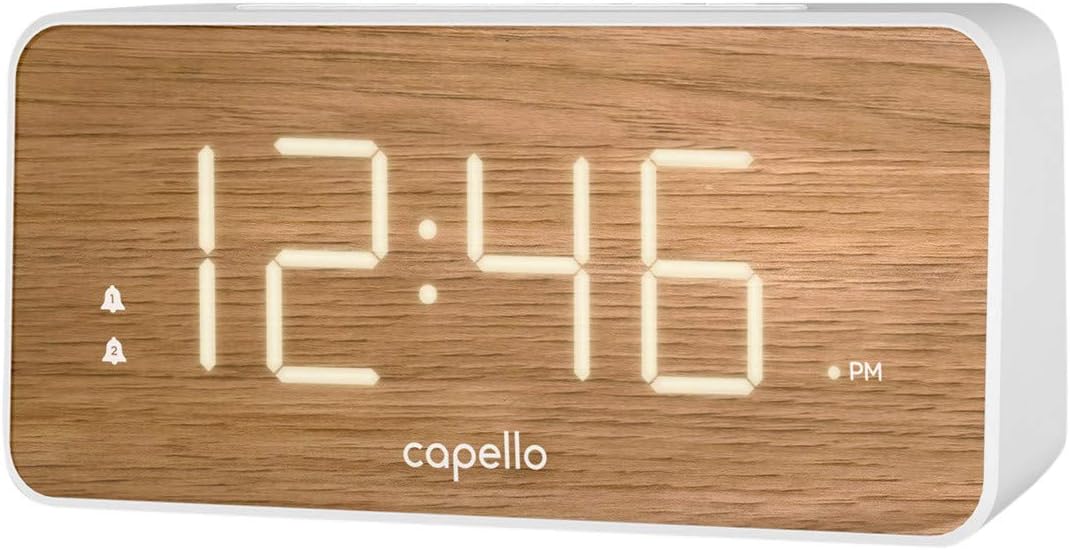
The Capello Digital Alarm Clock (Model: 43213-14795) features an extra-large digital display for easy readability from across the room. Its elegant white and pine D-frame design with a wood-grain finish complements various interior styles. The clock is equipped with intuitive controls for setting time and alarms, ensuring a user-friendly experience.
Opstelling
Kragverbinding
The alarm clock requires a continuous power supply via its included AC adapter for full functionality. Insert the adapter into a standard wall outlet and connect it to the clock's power input port. For backup during power outages, install 2 AAA batteries (not included) into the battery compartment located on the underside of the unit. These batteries will preserve time and alarm settings but will not power the display or alarm functions during an outage.
Stel die tyd in
- Druk en hou die TYD BEREIK button (or similar button, refer to specific button labels on your unit) until the hour digits begin to flash.
- Gebruik die UUR knoppie om die uur aan te pas. Gee aandag aan die AM/PM-aanwyser.
- Druk die TYD BEREIK knoppie weer om na die minuutsyfers te beweeg.
- Gebruik die MIN knoppie om die minute aan te pas.
- Druk TYD BEREIK weer om te bevestig en die tydinstellingsmodus te verlaat.
Stel die alarm
This clock supports dual alarms.
- Druk en hou die ALARM 1 knoppie totdat die alarmuursyfers flikker.
- Gebruik die UUR en MIN knoppies om die verlangde alarmtyd vir Alarm 1 in te stel.
- Druk ALARM 1 again to confirm. The alarm indicator for Alarm 1 will illuminate.
- Herhaal stappe 1-3 vir ALARM 2 if a second alarm is desired.
- To activate/deactivate an alarm, simply press the corresponding ALARM 1 or ALARM 2 button. The alarm indicator will show its status.
Bedryfsinstruksies
Sluimer funksie
Wanneer die alarm afgaan, druk die groot knoppie SLUIMER button located on the top of the clock. This will temporarily silence the alarm for approximately 9 minutes, allowing for extra rest. The alarm will sound again after the snooze period ends.
Stop die alarm
To turn off the alarm completely after it sounds, press the corresponding ALARM 1 or ALARM 2 button. The alarm indicator will turn off, signifying that the alarm is deactivated for the next day.
Vertoon helderheid
The display brightness can be adjusted to suit your preference. Locate the LIG or DOWWER button (often represented by a sun icon) on the top panel. Press this button repeatedly to cycle through different brightness levels (e.g., High, Medium, Low, Off).
Onderhoud
To ensure the longevity and optimal performance of your Capello Digital Alarm Clock, follow these simple maintenance guidelines:
- Skoonmaak: Wipe the clock's surface with a soft, dry cloth. Do not use abrasive cleaners, waxes, or solvents as they may damage the finish.
- Plasing: Plaas die horlosie op 'n stabiele, plat oppervlak weg van direkte sonlig, hittebronne en oormatige vog.
- Battery vervanging: Vervang rugsteunbatterye jaarliks of wanneer die skerm tekens van verdofing toon tydens 'n kragonderbrekingtage. Maak seker dat die polariteit korrek is wanneer nuwe batterye ingesit word.
Probleemoplossing
If you encounter any issues with your alarm clock, please refer to the following common problems and solutions:
| Probleem | Moontlike Oplossing |
|---|---|
| Die skerm is leeg of dof. | Ensure the AC adapter is securely plugged into both the clock and a working wall outlet. Check the display brightness setting using the LIGHT/DIMMER button. |
| Die alarm lui nie. | Verify that the alarm is activated (alarm indicator is lit). Ensure the alarm time is set correctly (AM/PM). Check if the volume is set to an audible level. |
| Tyd is verkeerd. | Reset the time following the 'Setting the Time' instructions. If using backup batteries, ensure they are fresh and correctly installed. |
| Knoppies reageer nie. | Unplug the AC adapter, remove backup batteries, wait for 1 minute, then reconnect power. This performs a soft reset. |
Spesifikasies
- Handelsmerk: Capello
- Modelnommer: 43213-14795
- Kleur: Wit
- Vertoon tipe: Digitaal
- Styl: Moderne
- Spesiale kenmerk: Large Display, Alarm
- Produk afmetings: 8.74"B x 5.83"H
- Kragbron: AC Powered (with battery backup for settings)
- Materiaal: Plastiek
- Item gewig: 1.01 pond
Amptelike Produkvideo's
Geen amptelike produkvideo's van die verkoper is tans vir hierdie item beskikbaar nie.
Waarborg en Ondersteuning
For warranty information and customer support, please refer to the manufacturer's official documentation included with your product or visit the Capello webwerf. Hou jou aankoopkwitansie vir waarborgeise.