
1. Inleiding
The SmartGen HAT560NB ATS Controller is an intelligent dual-supply module designed for Automatic Transfer Systems (ATS). It integrates digital, intelligent, and networked functionalities to provide precise voltage measurement and control for various power supply configurations. This controller is suitable for specialized ATS, Contactor ATS, and Air Break ATS applications, offering a compact structure, advanced circuitry, and high reliability.
It is engineered to reduce operational errors through automatic measurement and control, making it an ideal solution for managing power transfer between different sources like mains and generators.

Figuur 1: Voorkant view of the SmartGen HAT560NB ATS Controller, showing the LCD display and operational buttons.
2. Features and Characteristics
The HAT560NB controller incorporates a powerful microprocessor for accurate monitoring and control. Key features include:
- System type configuration: Mains (1#) & Generator (2#), Generator (1#) & Mains (2#), Mains (1#) & Mains (2#), Generator (1#) & Generator (2#).
- 132x64 LCD with backlight, offering optional Chinese and English display with push-button operation.
- Measurement and display of 2-way 3-phase voltage en frekwensie.
- Beskerming teen oor/onder voltage, loss of phase, reverse phase sequence, and over/under frequency.
- Automatic and Manual operating modes. Manual mode allows forced switch closure or opening.
- All parameters are configurable on-site, secured by two different passwords for authorized access.
- Genset commissioning can be set to On-load or Off-load mode.
- Automatic re-closing function for the ATS Controller.
- Configurable closing output signal as either on intervals or continuous output.
- Applicable for ATS with one neutral position, two neutral positions, and non-position types.
- Monitors 1-3 phase AC mains voltages.
- Manages changeover of both generator and mains contactors.
- Sends remote start commands to the generating set.
- Compatible with various contactors and changeover switch types.
3. Opstelling en installering
Proper installation is crucial for the safe and reliable operation of the HAT560NB controller. Ensure all power is disconnected before beginning installation. Refer to the wiring diagrams and terminal descriptions for correct connections.
3.1 Bedradingsdiagramme
The HAT560NB controller supports various wiring configurations depending on the ATS type. Below are typical wiring diagrams for different setups. Always consult a qualified electrician for installation.
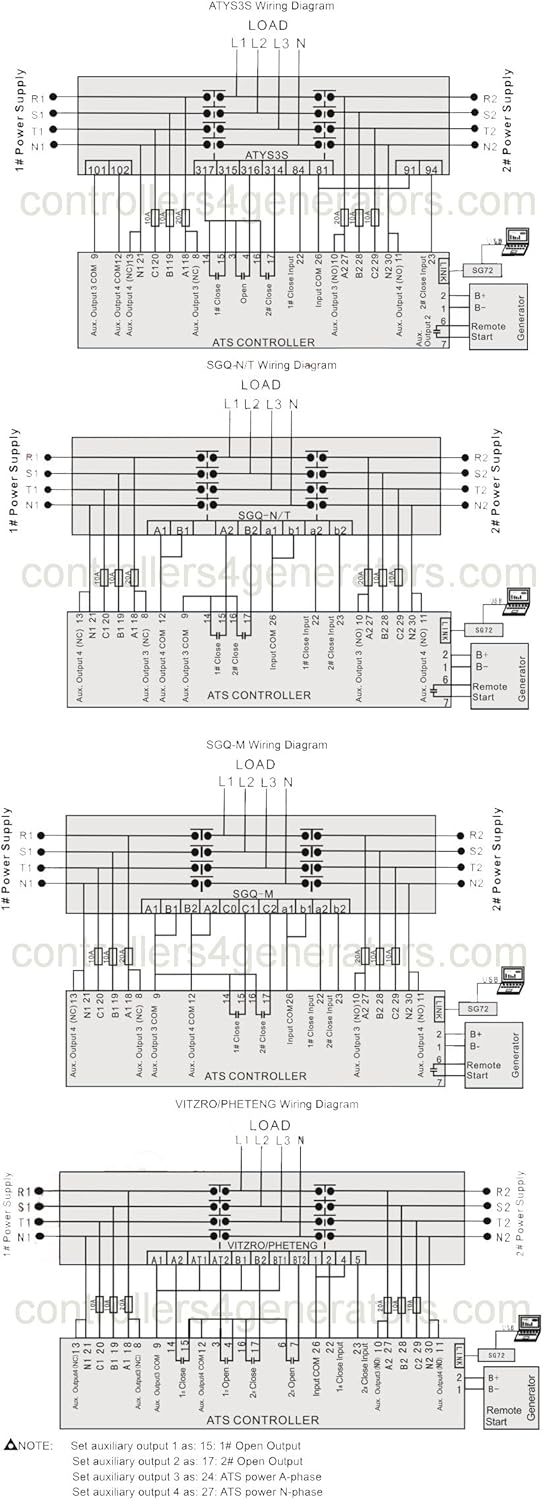
Figure 2: Comprehensive wiring diagrams illustrating connections for ATYS3S, SGQ-N/T, SGQ-M, and VITZRO/PHETENG ATS controller types. These diagrams show connections for 1# and 2# power supplies, load, and remote start signals.

Figure 3: Additional wiring diagrams focusing on SGQ-N/T, SGQ-M, and Contactor ATS configurations, detailing input and output connections for the controller.
3.2 Connecting Terminals
The controller features clearly labeled terminals for power input, auxiliary outputs, and control signals. Ensure each wire is securely connected to its designated terminal.

Figuur 4: Agter view of the HAT560NB controller, displaying the layout and labeling of all connecting terminals, including power inputs, auxiliary outputs, and communication ports.
4. Bedryfsinstruksies
The HAT560NB controller offers both automatic and manual operation modes, accessible via its front panel buttons and LCD display.
4.1 Power On and Initial Display
Upon powering on, the LCD will display system information, including voltage and frequency readings for both power sources. The backlight ensures visibility in various lighting conditions.
4.2 Moduskeuse
- Outomatiese modus: The controller automatically monitors the power sources and initiates transfer based on pre-set parameters and detected abnormalities (e.g., over/under voltage, frequency deviations, phase loss).
- Handmatige modus: Allows the user to manually control the opening or closing of the transfer switches. This mode is typically used for testing or specific operational requirements.
4.3 Parameterinstelling
All operational parameters can be configured directly on the unit using the push-buttons and LCD interface. Access to parameter settings is protected by a two-level password system to prevent unauthorized changes. Refer to the detailed programming guide (not included in this manual) for specific parameter definitions and adjustment procedures.
5. Onderhoud
Regular maintenance ensures the longevity and reliable performance of your HAT560NB ATS Controller.
- Skoonmaak: Keep the controller's exterior clean and free from dust and debris. Use a soft, dry cloth. Avoid abrasive cleaners or solvents.
- Verbindingskontroles: Periodically inspect all wiring connections to ensure they are secure and free from corrosion. Loose connections can lead to intermittent operation or system failures.
- Omgewingstoestande: Maak seker dat die bedryfsomgewing binne die gespesifiseerde temperatuur- en humiditeitsreekse bly om skade aan interne komponente te voorkom.
Vir enige interne onderhoud of herstelwerk, kontak gekwalifiseerde dienspersoneel.
6. Probleemoplossing
This section provides guidance on common issues you might encounter with the HAT560NB controller.
| Probleem | Moontlike oorsaak | Oplossing |
|---|---|---|
| Beheerder word nie aangeskakel nie | No DC power supply; Incorrect wiring | Check DC 8.0V-35.0V power supply connections; Verify wiring according to diagrams. |
| ATS not transferring automatically | Automatic mode not selected; Fault detected on active power source (e.g., over/under voltage, frequency); Incorrect parameters | Ensure controller is in Automatic mode; Check power source status; Verify parameter settings. |
| Display shows error for voltage/frekwensie | Actual power source issue; Sensor/input wiring problem | Gaan die werklike voltage and frequency of the power source; Inspect AC voltage insetbedrading. |
| Knoppies reageer nie | Tydelike sagtewarefout; Hardewareprobleem | Restart the controller by cycling power; If issue persists, contact support. |
7. Spesifikasies
The following table details the technical specifications for the SmartGen HAT560NB ATS Controller.
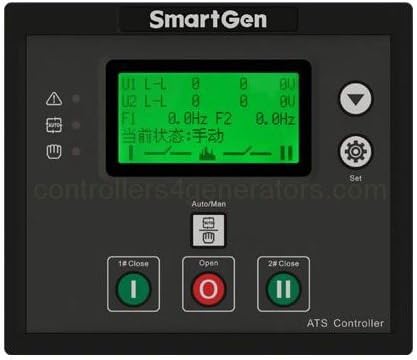
Figure 5: Detailed specifications table for the HAT560N series ATS Controller, including operating voltage, power consumption, AC voltage input ranges, rated frequency, relay outputs, communication, dimensions, and environmental conditions.
| Item | Spesifikasie |
|---|---|
| Bedryfsvoltage | DC 8.0V-35.0V (continuous power supply) |
| AC Voltage Invoer | AC170V-270V (during AC power L1N1/L2N2 supply) |
| Kragverbruik | <3W (bystandmodus: <2W) |
| Gegradeerde frekwensie | 50/60Hz |
| Maak aflosuitvoer toe | 16A AC250V (Volts free output) |
| Hulp-aflos-uitset 1 | 7A AC250V (Volts free output) |
| Hulp-aflos-uitset 2 | 7A AC250V (Volts free output) |
| Hulp-aflos-uitset 3 | 16A AC250V (Volts free output) |
| Hulp-aflos-uitset 4 | 16A AC250V (Volts free output) |
| Digitale invoer | GND connect is active |
| Kommunikasie | LINK-koppelvlak, MODBUS-protokol |
| Kas afmetings | 139 mm x 120 mm x 48 mm (5.47 x 4.72 x 1.89 duim) |
| Paneeluitsny | 130 mm x 111 mm |
| Werksomstandighede | Temperature: (-25~+70)°C, Humidity: (20~93)%RH |
| Bergingstoestand | Temperatuur: (-25~+70)°C |
| Beskermingsvlak | IP55 pakking |
| Isolasie sterkte | Pas AC2.2kV voltage tussen hoë voltage terminale en lae voltage terminaal; Die lekstroom is nie meer as 3mA binne 1min nie. |
| Gewig | 0.62 kg (1.63 pond) |